
1. Introduction
The DATOUBOSS DT-1218M is a 12V-1800W hybrid solar inverter designed to provide reliable power for various applications, including homes, RVs, and off-grid installations. This inverter efficiently converts solar and battery power into usable AC electricity, featuring advanced MPPT technology and a pure sine wave output. It includes an integrated MPPT charge controller for optimal solar charging and seamless energy transfer.
This manual provides essential information for the safe and efficient operation, installation, and maintenance of your DT-1218M hybrid solar inverter. Please read it thoroughly before installation and use.

Figure 1: The DATOUBOSS DT-1218M inverter is compatible with a wide range of household and office appliances, providing power for various applications.
2. Safety Instructions
Please read and follow all safety instructions carefully before installation and operation to prevent injury or damage to the inverter.
- Installation must be performed by qualified personnel.
- Ensure all wiring is correctly polarized and securely connected.
- Do not expose the inverter to rain, snow, spray, or any liquids.
- Do not disassemble the inverter. There are no user-serviceable parts inside.
- Ensure adequate ventilation around the inverter to prevent overheating.
- Keep flammable materials away from the inverter.
- Always disconnect all power sources (PV, battery, AC) before performing any maintenance or wiring.
- Wear appropriate personal protective equipment (PPE) during installation and maintenance.
3. Product Features
- 1800W Continuous Power Output: Provides stable 1800W continuous power, suitable for sensitive electronics.
- 2500W PV Input: Supports up to 2500W of photovoltaic input for efficient solar energy harvesting.
- Pure Sine Wave Output: Ensures compatibility with sensitive electronic devices like refrigerators, computers, and televisions.
- Integrated 100A MPPT Charge Controller: Advanced MPPT technology with ≥99.9% tracking efficiency and a maximum PV input voltage of 300V DC.
- Wide Battery Compatibility: Compatible with 12V Lithium, AGM, GEL, and Lead-acid batteries.
- RS485 BMS Interface: Supports common BMS protocols (GRO, VLO, PYL, PAC) for intelligent battery management.
- 4 Operating Modes: Grid-tied, Hybrid, Off-grid, and Battery-less modes for flexible energy management.
- 3 Energy Priorities: Grid priority (GRD), Photovoltaic priority (PV), and Battery priority (PBG).
- Fast Transfer Time: 10 ms transfer time ensures stable power during grid outages.
- Comprehensive Protection: Includes overload, short-circuit, over-voltage, under-voltage, and overheating protection.
- Intuitive LCD Display: Real-time display of voltage, current, power, battery status, temperature, and error codes.
- Intelligent Cooling Fans: Variable speed fans adjust based on ambient temperature and environmental conditions.
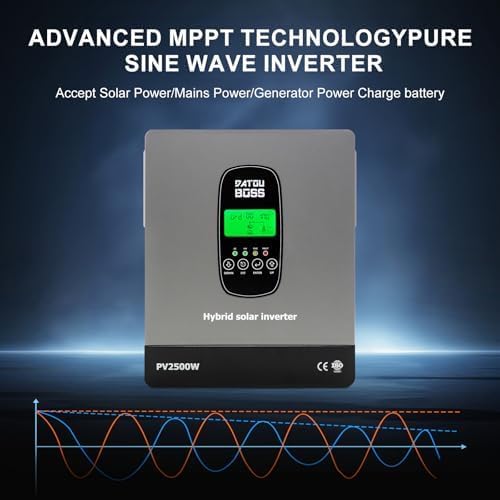
Figure 2: The inverter features advanced MPPT technology for optimal solar power utilization and pure sine wave output for sensitive electronics.

Figure 3: The inverter is equipped with comprehensive protection mechanisms including overvoltage, low voltage, short circuit, overload, overheating, and reverse polarity protection.
4. Product Diagram and Components
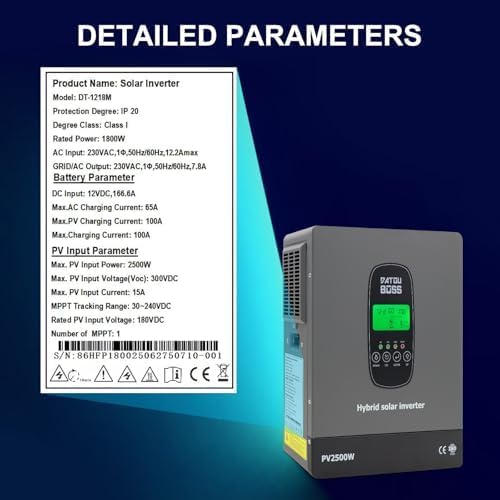
Figure 4: Front and side views of the inverter, highlighting the LCD display, LED indicators, and control buttons.

Figure 5: Rear view of the inverter, detailing the photovoltaic (PV) input connection socket, AC power outlet, AC power connection socket, AC input, and communication ports (RS485-1 for external communication/WiFi, RS485-2 for BMS).
Key Components:
- On/Off Button: Main power switch.
- COM Port RS485-1: For external communication or WiFi module.
- COM Port RS485-2: For communication with Battery Management System (BMS).
- Photovoltaic (PV) Input Connection Socket: Connects to solar panels.
- AC Power Outlet: Provides AC output for loads.
- AC Power Connection Socket: For grid or generator input (Standby Output/Continuous Output).
- AC Input: Main AC power input.
- Fans: Intelligent variable speed cooling fans.
- LCD Display: Shows real-time operational data and settings.
- Indicator LEDs: Provide quick status updates.
5. Installation and Setup
Proper installation is crucial for the safe and efficient operation of the inverter. It is highly recommended that installation be performed by a certified electrician or solar professional.
5.1 Site Selection
- Install the inverter in a cool, dry, and well-ventilated area.
- Avoid direct sunlight, high temperatures, and humidity.
- Ensure sufficient clearance around the inverter for proper airflow (refer to Figure 4 for fan locations).
- Mount the inverter vertically on a non-flammable surface.
5.2 Wiring Connections
Before making any connections, ensure all power sources are disconnected.
- Battery Connection: Connect the battery bank to the designated battery terminals on the inverter. Ensure correct polarity (+ to + and - to -).
- PV Array Connection: Connect the solar panel array to the PV input terminals. Observe correct polarity and ensure the PV voltage is within the inverter's specified range (30-240V DC operating, max 300V DC). Solar panels are recommended to be connected in series.
- AC Input Connection: Connect the AC grid or generator power to the AC input terminal.
- AC Output Connection: Connect your AC loads to the AC output terminals.
- Grounding: Ensure the inverter is properly grounded according to local electrical codes.
- Communication Connections (Optional): If using a BMS or external communication, connect the RS485 cables to the respective ports.

Figure 6: A typical system diagram illustrating the connections between solar panels, generator, mains power, battery, and the inverter to power various appliances.
5.3 Initial Power-Up
- After all connections are secure, switch on the battery breaker first.
- Then, switch on the PV array breaker.
- Finally, switch on the AC input breaker (if connected to grid/generator).
- Press the On/Off button on the inverter to power it on.
- Observe the LCD display and LED indicators for normal operation.
6. Operation
6.1 LCD Display and Control Buttons
The LCD display provides real-time information about the inverter's status, input/output parameters, and battery status. Use the control buttons (UP, DOWN, ESC, ENTER) to navigate through menus and adjust settings.
6.2 Operating Modes
The DT-1218M offers four distinct operating modes, configurable via the LCD display:
- Grid-tied Mode: The inverter synchronizes with the utility grid, potentially feeding excess solar power back to the grid.
- Hybrid Mode: Combines solar, battery, and grid power to optimize energy usage, often prioritizing solar and battery before drawing from the grid.
- Off-grid Mode: Operates independently from the utility grid, relying solely on solar and battery power.
- Battery-less Mode: The inverter can operate without a battery, directly powering loads from solar and/or grid.
6.3 Energy Priorities
You can set three energy priorities to determine the power source hierarchy:
- Grid Priority (GRD): Prioritizes power from the utility grid.
- Photovoltaic Priority (PV): Prioritizes power from solar panels.
- Battery Priority (PBG): Prioritizes power from the battery bank.
These settings can be configured directly from the LCD screen to match your energy consumption and generation preferences.
7. Battery Compatibility
The DATOUBOSS DT-1218M inverter is compatible with various 12V battery types:
- Lithium Batteries: Supports 12V lithium battery systems. The RS485 interface allows communication with common Battery Management Systems (BMS) such as GRO, VLO, PYL, and PAC for optimized charging and discharge.
- AGM Batteries: Compatible with Absorbent Glass Mat (AGM) sealed lead-acid batteries.
- GEL Batteries: Compatible with Gel cell sealed lead-acid batteries.
- Lead-Acid Batteries: Compatible with traditional flooded lead-acid batteries.
Battery parameters, SOC limits, and charge settings can be configured directly from the LCD screen to ensure proper charging and prolong battery life.
8. Maintenance
Regular maintenance ensures the longevity and optimal performance of your inverter.
- Cleaning: Periodically clean the inverter's exterior with a dry cloth. Ensure ventilation openings are free from dust and debris. Do not use liquid cleaners.
- Connection Checks: Annually inspect all electrical connections (PV, battery, AC) for tightness and corrosion. Tighten any loose connections.
- Ventilation: Ensure the area around the inverter remains clear for proper airflow. The intelligent fans adjust speed based on temperature (see Figure 7).
- Firmware Updates: Check the manufacturer's website for any available firmware updates.
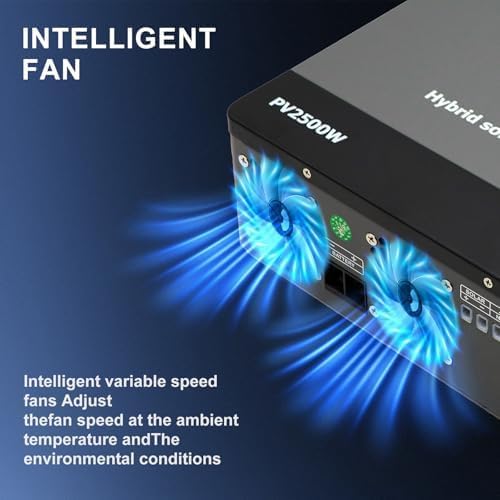
Figure 7: The inverter features intelligent variable speed fans that adjust based on ambient temperature and environmental conditions to maintain optimal operating temperature.
9. Troubleshooting
This section provides solutions to common issues. For more complex problems, contact technical support.
| Problem | Possible Cause | Solution |
|---|---|---|
| Inverter not powering on | No battery connection; Battery voltage too low; On/Off button not pressed. | Check battery connections and voltage; Ensure battery is charged; Press the On/Off button. |
| No AC output | Overload; Short circuit; Inverter in fault mode; AC output breaker tripped. | Reduce load; Check for short circuits; Check LCD for error codes; Reset AC output breaker. |
| Low PV charging current | Insufficient sunlight; Dirty solar panels; PV array misconfiguration; MPPT fault. | Check weather conditions; Clean solar panels; Verify PV array wiring; Consult technical support. |
| Error code displayed on LCD | Specific system fault (e.g., over-temperature, over-voltage). | Refer to the inverter's specific error code list (if available in separate documentation) or contact technical support with the error code. |
10. Specifications
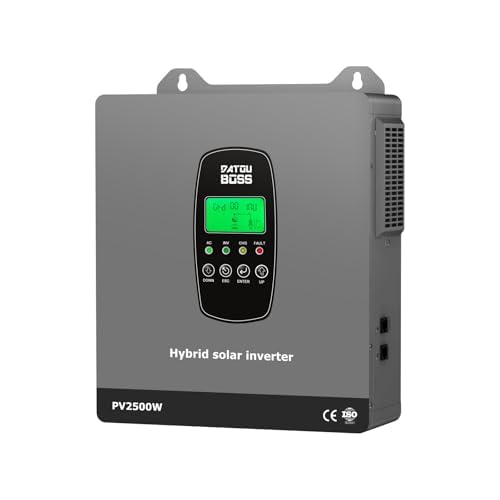
Figure 8: Detailed technical parameters for the DATOUBOSS DT-1218M Hybrid Solar Inverter.
| Parameter | Value |
|---|---|
| Product Name | Solar Inverter |
| Model | DT-1218M (DT-1218-A-EU) |
| Protection Degree | IP 20 |
| Degree Class | Class I |
| Rated Power | 1800W |
| AC Input | 230VAC, 1Φ, 50Hz/60Hz, 12.2Amax |
| GRID/AC Output | 230VAC, 1Φ, 50Hz/60Hz, 7.8A |
| DC Input (Battery) | 12VDC, 166.6A |
| Max. AC Charging Current | 65A |
| Max. PV Charging Current | 100A |
| Max. Charging Current (Total) | 100A |
| Max. PV Input Power | 2500W |
| Max. PV Input Voltage (Voc) | 300VDC |
| Max. PV Input Current | 15A |
| MPPT Tracking Range | 30-240VDC |
| Rated PV Input Voltage | 180VDC |
| Number of MPPT | 1 |
| Output Waveform | Pure Sine Wave |
| Dimensions (L x W x H) | 250mm x 91mm x 335mm (approx.) |
| Weight | 4kg (approx.) |
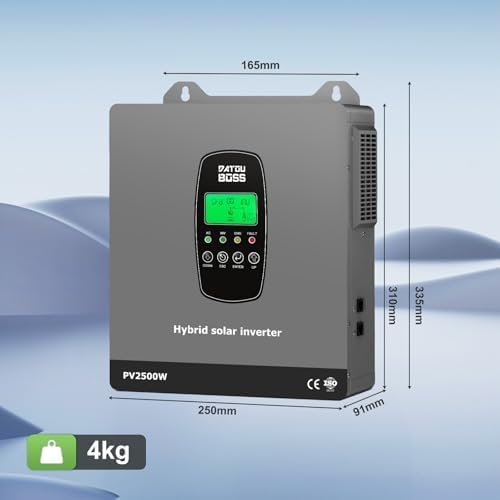
Figure 9: Physical dimensions and weight of the DATOUBOSS DT-1218M Hybrid Solar Inverter.
11. Warranty and Support
DATOUBOSS products are designed for reliability and performance. For warranty information, please refer to the warranty card included with your product or visit the official DATOUBOSS website. For technical support, troubleshooting assistance, or spare parts, please contact DATOUBOSS customer service through the contact information provided on the official website or your purchase platform.
Please have your model number (DT-1218M) and serial number (S/N) ready when contacting support.


