
1. Introduction
This manual provides essential information for the safe and efficient operation of your Electactic Nugget Ice Maker. Please read all instructions carefully before use and retain this manual for future reference.
2. Safety Instructions
Observe the following safety precautions to reduce the risk of fire, electric shock, or injury:
- Ensure the ice maker is connected to a grounded power outlet with the correct voltage (115 volts).
- Do not immerse the appliance, power cord, or plug in water or other liquids.
- Keep the ice maker away from heat sources and direct sunlight.
- Do not operate the appliance with a damaged cord or plug. Contact customer support for repairs.
- Supervise children when the appliance is in use.
- Use only potable water in the water reservoir.
- Ensure adequate ventilation around the unit. Maintain at least 5 inches of space from walls or other objects.
3. Package Contents
Verify that all items are present upon unpacking:
- Electactic Nugget Ice Maker
- Ice Basket
- Ice Scoop
- User Manual
4. Product Overview
Familiarize yourself with the components of your ice maker.
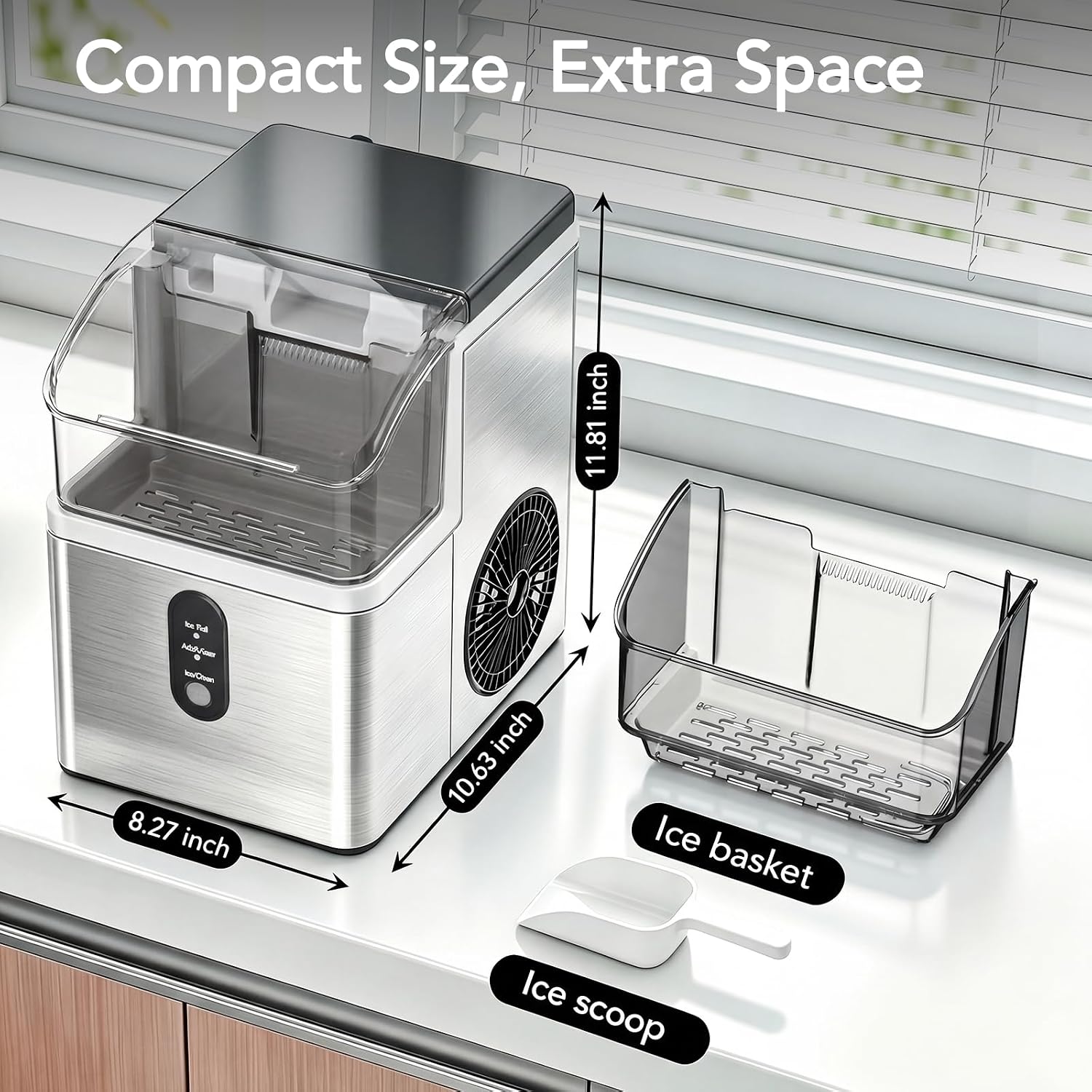
Image: The Electactic Nugget Ice Maker showing its compact dimensions (10.63"D x 8.27"W x 11.81"H), along with the removable ice basket and ice scoop.

Image: The control panel of the ice maker, highlighting the Water Shortage Indicator, Ice Making Indicator, and Self-Cleaning function button.
5. Setup
- Unpacking: Remove all packaging materials and inspect the ice maker for any damage.
- Placement: Place the ice maker on a flat, stable surface away from direct sunlight and heat sources. Ensure there is at least 5 inches of clearance around the unit for proper ventilation.
- Initial Cleaning: Before first use, clean the interior of the ice maker. Refer to the 'Maintenance and Cleaning' section for detailed instructions.
- Add Water: Open the lid and fill the water reservoir with potable water up to the MAX fill line. Do not overfill.
- Power Connection: Plug the power cord into a grounded electrical outlet.
6. Operating Instructions
6.1 Ice Production
- After setup, press the 'ICE/CLEAN' button once to start the ice making cycle. The 'Ice Making' indicator will illuminate.
- The first batch of nugget ice will be produced in approximately 7 minutes.
- The ice maker can produce up to 35 lbs of chewable pebble ice per day.
- When the ice basket is full, the 'Ice Full' indicator will light up, and the ice making process will pause. Once ice is removed, the unit will resume operation.
- If the water level in the reservoir is too low, the 'Add Water' indicator will light up. Add more water to resume ice production.

Image: The Electactic Nugget Ice Maker in operation, highlighting its daily output of 35 lbs and 7-minute fast ice production.
6.2 Detachable Ice Basket
The ice maker includes a removable ice basket that holds up to 2.2 lbs of ice. This allows for easy serving and transport of ice.

Image: A user demonstrating the removal of the detachable ice basket, filled with nugget ice, from the ice maker.
6.3 Nugget Ice Characteristics
The Electactic ice maker produces soft, chewable nugget ice, which cools drinks quickly and provides a satisfying texture. This type of ice is suitable for various beverages including iced coffee, smoothies, and sodas.

Image: A person enjoying a beverage with soft chewable nugget ice, illustrating the texture and cooling properties of the ice.
7. Maintenance and Cleaning
7.1 Self-Cleaning Function
The ice maker features an automatic self-cleaning function:
- Ensure the water reservoir is filled with clean water.
- Press and hold the 'ICE/CLEAN' button for 5 seconds to activate the 30-minute deep cleaning cycle. The 'Self-Cleaning' indicator will illuminate.
- Once the cycle is complete, drain the water from the unit.

Image: The Electactic Nugget Ice Maker with an overlay indicating the self-cleaning function, activated by a 5-second press of the ICE/CLEAN button for a 30-minute deep clean.
7.2 Manual Cleaning
For thorough cleaning or if the self-cleaning function is insufficient:
- Unplug the ice maker from the power outlet.
- Remove the ice basket.
- Drain all water from the reservoir using the drain plug located at the bottom or side of the unit.
- Clean the interior with a soft cloth and a mild detergent solution. Rinse thoroughly.
- Wipe the exterior with a damp cloth.
- Ensure all parts are dry before reassembling and operating.
8. Troubleshooting
Refer to this section for common issues and their solutions:
| Problem | Possible Cause | Solution |
|---|---|---|
| Ice maker not producing ice | No water in reservoir; 'Add Water' indicator on. | Fill the water reservoir with potable water. |
| Ice maker not producing ice | Ice basket is full; 'Ice Full' indicator on. | Remove ice from the basket. |
| Ice maker not producing ice | Unit is not powered on or plugged in. | Ensure the unit is plugged in and the power button is pressed. |
| Ice has an unusual taste or odor | First use; water quality; unit needs cleaning. | Perform a self-cleaning cycle. Use fresh, filtered water. Discard the first few batches of ice after initial setup or cleaning. |
| Unit is noisy | Normal operation sounds (compressor, water pump). | This is typically normal. Ensure the unit is on a stable, level surface. |
9. Specifications
| Feature | Specification |
|---|---|
| Brand | Electactic |
| Model Name | IM5815NH-STEEL |
| Product Dimensions (D x W x H) | 10.63" x 8.27" x 11.81" |
| Ice Production per Day | Up to 35 lbs |
| First Ice Batch Time | Approx. 7 minutes |
| Voltage | 115 volts |
| Refrigerant | R600a |
| Material Type | Stainless Steel |
| Noise Level | 40 dB (Ultra-Quiet) |
10. Official Product Video
Video: An official product video from Electactic demonstrating the features and operation of the Nugget Ice Maker. This video provides a visual guide to the product's capabilities.
11. Warranty and Support
For warranty information and customer support, please refer to the warranty card included with your product or visit the official Electactic website. Keep your purchase receipt as proof of purchase for any warranty claims.
For technical assistance or inquiries, please contact Electactic customer service.


