
1. Introduction
This manual provides essential information for the safe and effective operation, maintenance, and troubleshooting of your LAGTOM TwinPass 1000W Two-Seater Mobility Scooter. Please read this manual thoroughly before using the scooter to ensure proper understanding and to prevent injury or damage.
The LAGTOM TwinPass is a heavy-duty electric mobility device designed for two individuals, featuring a 1000W motor and a 500 lbs weight capacity. It is equipped with a 60V 20Ah battery, offering a top speed of 15.5 mph and a range of up to 36 miles.
2. Safety Information
Your safety is paramount. Adhere to all safety guidelines to prevent accidents and ensure the longevity of your scooter.
- Always perform a pre-ride inspection, checking brakes, tires, and battery level.
- Operate the scooter on stable, level surfaces. Avoid steep inclines beyond the scooter's climbing ability (20 degrees).
- Utilize the soft-start controller for smooth acceleration.
- Engage the four-wheel drum brakes for controlled stopping.
- The differential motor assists in balanced turns; however, exercise caution during sharp turns.
- Ensure the waterproof charging port cover is securely closed when not charging to prevent moisture ingress.
- Use front and rear lighting during low-light conditions for visibility.
- Do not exceed the maximum weight capacity of 500 lbs.
- Always use the parking lock when stopping or dismounting.
- Be aware of your surroundings and local traffic laws.
3. Product Overview and Features
The LAGTOM TwinPass mobility scooter is designed for comfort, convenience, and stability. Key features include:
- Dual Seating: Two comfortable, adjustable seats for shared travel.
- Powerful Motor: 1000W differential brushless motor for reliable performance.
- Extended Range: 60V 20Ah battery provides up to 36 miles on a single charge.
- Safety Features: Soft-start controller, four-wheel drum brakes, differential motor, waterproof charging port, front and rear lighting.
- Comfort & Stability: Four-wheel shock absorption system and puncture-proof tires for a smooth ride.
- Intuitive Controls: Multi-functional LED display, remote key with alarm.
- Ample Storage: Front basket, compartment storage, and a lockable rear trunk.
- Convenience: USB charging port for mobile devices.
3.1 Key Components

Image Description: A black LAGTOM TwinPass 1000W Two-Seater Mobility Scooter shown from the front-side, highlighting its powerful 1000W motor, 500 lbs weight capacity, 15 mph max speed, 31-36 miles driving range, and 20-degree climbing ability.
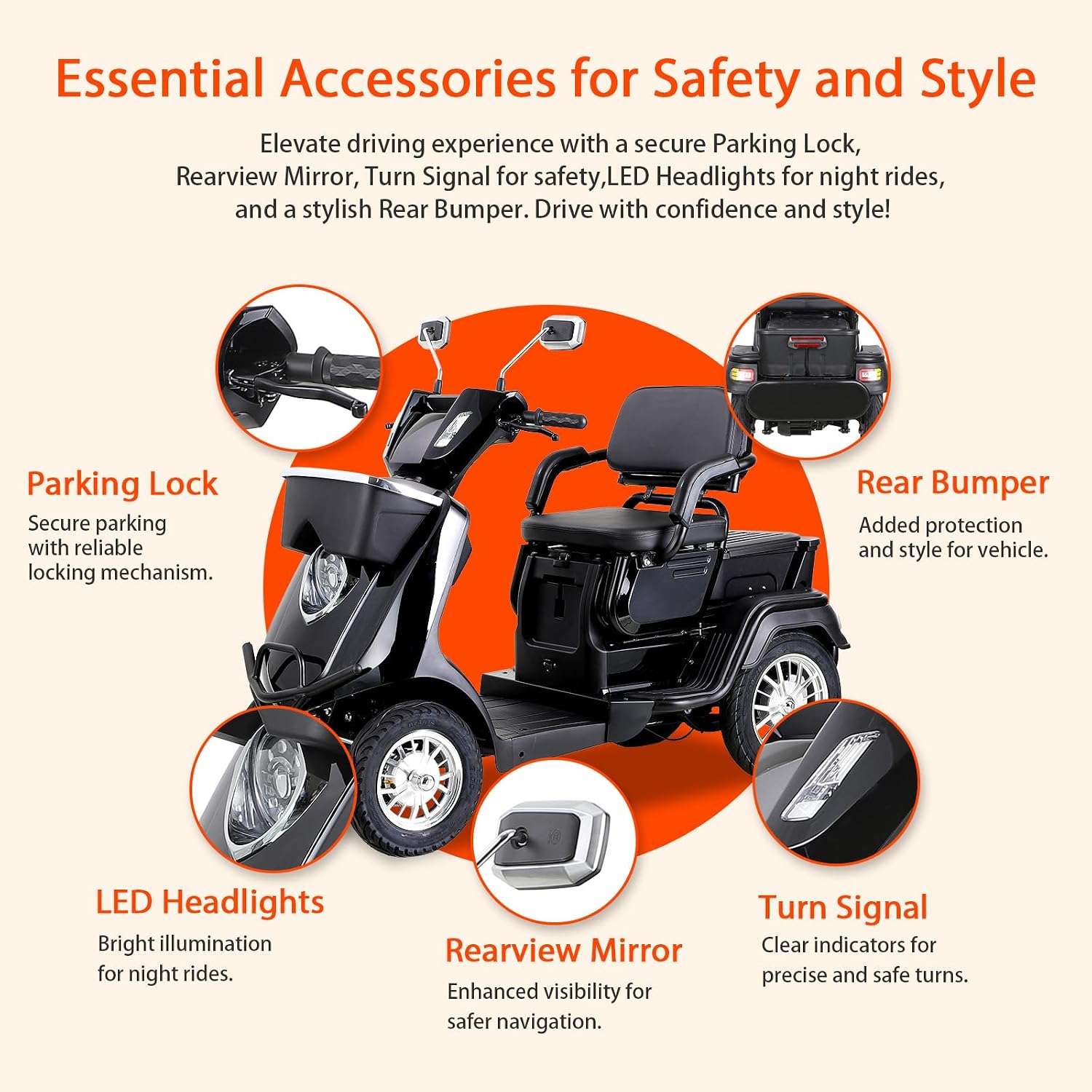
Image Description: Diagram illustrating essential accessories: Parking Lock, Rearview Mirror, Turn Signal, LED Headlights, and Rear Bumper, emphasizing safety and style features of the scooter.

Image Description: Illustration of the scooter's versatile seating, showing both single and double seat configurations with dimensions (Single Seat: 19.3"W x 14.2"D; Double Seat: 19.3"W x 24"D).

Image Description: Close-up views of the scooter's storage options, including a front basket, a central compartment, and a lockable rear trunk, detailing their utility for personal items and shopping.
4. Setup
The LAGTOM TwinPass mobility scooter is designed for easy assembly, with approximately 95% of the unit pre-assembled at the factory.
4.1 Initial Assembly
- Carefully unpackage the scooter and remove all packing materials.
- Locate the rear trunk.
- Follow the included quick-start guide for attaching the rear trunk to the designated area at the back of the scooter. Ensure all fasteners are securely tightened.
- Inspect all connections and components for any signs of damage or loose parts before first use.
4.2 Initial Battery Charge
Before the first use, fully charge the scooter's battery. Refer to the "Charging the Battery" section under Operating Instructions for detailed steps.
5. Operating Instructions
Familiarize yourself with the controls and functions before operating the scooter.

Image Description: Detailed diagram of the scooter's handlebar controls, labeling the Estimated Speed, Battery Display, Mileage, LED Light Switch, Horn, High-low Beam, Turn Signal, Three Speed Gear, Reverse Button, Seat Adjust Knob, USB Charging Port, and Parking Lock.
5.1 Starting and Stopping
- Power On: Insert the remote key into the ignition and turn it to the "ON" position. The LED display will illuminate.
- Power Off: Turn the key to the "OFF" position and remove it. Engage the parking lock.
5.2 Driving
- Acceleration: Gently press the throttle lever (typically on the right handlebar) to accelerate. The soft-start controller ensures smooth movement.
- Braking: Release the throttle and apply the brake levers (on both handlebars) to slow down or stop. The four-wheel drum brakes provide effective stopping power.
- Speed Control: Use the Three Speed Gear switch to select your desired speed mode (e.g., low, medium, high).
- Reverse: Press the Reverse Button to engage reverse gear. Exercise extreme caution when backing up.
- Lighting: Use the LED Light Switch to turn on the front and rear lights for improved visibility.
- Turn Signals: Activate the Turn Signal switch to indicate turns.
- Horn: Press the Horn button to alert others.
5.3 Charging the Battery
- Ensure the scooter is turned off.
- Locate the waterproof charging port. Open its cover.
- Connect the charger to the charging port, then plug the charger into a standard electrical outlet.
- The charger's indicator light will show charging status (e.g., red for charging, green for fully charged).
- Once fully charged, disconnect the charger from the outlet first, then from the scooter.
- Securely close the waterproof charging port cover.
5.4 Using the Remote Key and Alarm
The remote key allows for locking/unlocking and activating the alarm. When the scooter is locked, any attempt to move it will trigger the alarm.
5.5 USB Charging Port
A USB charging port is available on the handlebar console for convenient charging of mobile devices while the scooter is in operation or powered on.
5.6 Storage Compartments
- Front Basket: Ideal for small items like shopping bags or umbrellas.
- Compartment Storage: Suitable for personal items such as phones or snacks.
- Rear Trunk: Provides larger, lockable storage space for more substantial items and protection from weather.
6. Maintenance
Regular maintenance ensures optimal performance and extends the lifespan of your scooter.
- Cleaning: Wipe down the scooter with a damp cloth. Avoid using high-pressure water or harsh chemicals.
- Battery Care:
- Charge the battery fully after each use.
- If storing the scooter for an extended period, charge the battery at least once a month.
- Do not allow the battery to fully discharge for prolonged periods.
- Tires: Although puncture-proof, regularly inspect tires for wear and tear.
- Brakes: Periodically check the responsiveness of the drum brakes. If you notice reduced braking efficiency, contact support.
- Fasteners: Occasionally check all nuts, bolts, and screws for tightness.
7. Troubleshooting
This section addresses common issues you might encounter. For problems not listed here, contact customer support.
| Problem | Possible Cause | Solution |
|---|---|---|
| Scooter does not power on. | Battery is discharged; Key not in "ON" position; Loose battery connection. | Charge the battery; Ensure key is turned to "ON"; Check battery connections. |
| Scooter moves slowly or lacks power. | Low battery charge; Overload (exceeding 500 lbs capacity); Incorrect speed setting. | Recharge battery; Reduce load; Select a higher speed gear. |
| Battery not charging. | Charger not properly connected; Faulty charger or charging port; Battery issue. | Ensure secure connections; Test charger with another device if possible; Contact support if issue persists. |
| Brakes feel weak. | Brake adjustment needed; Worn brake pads. | Contact customer support for brake inspection and adjustment. |
8. Specifications
| Model Name | TwinPass |
| Motor Power | 1000W Differential Brushless Motor |
| Battery | 60V 20Ah |
| Maximum Speed | 15.5 mph |
| Driving Range | Up to 36 miles |
| Weight Capacity | 500 lbs |
| Climbing Ability | 20 degrees |
| Brake Style | Four-wheel Drum Brakes, Electromagnetic |
| Shock Absorption | Four-wheel system |
| Tires | Puncture-proof with tread patterns |
| Material | Steel and Aluminum Construction |
| Color | Black (as per current product) |
| Turning Radius | 75-degree |
9. Warranty and Support
Your LAGTOM TwinPass Mobility Scooter comes with a 1-year manufacturer's warranty, reflecting our commitment to quality and durability. This warranty covers manufacturing defects under normal use conditions.
For any questions, technical assistance, or warranty claims, please contact our US-based customer support team. Our distribution center provides quick and reliable after-sales support.
Contact Information: Refer to the product packaging or the official LAGTOM website for the most current contact details.
10. Product Video
Video Description: An official product video demonstrating the features and operation of the LAGTOM TwinPass Two-Seater Mobility Scooter, including its independent suspension, front bumper, USB phone charging, and cornering stability.