
Pebble PTWE04 Open Loop
Pebble Open Loop PTWE04 Earbuds User Manual
Model: PTWE04
Introduction
This manual provides essential instructions for the safe and efficient use of your Pebble Open Loop PTWE04 earbuds. Please read this guide thoroughly before operating the device and retain it for future reference.
Setup
1. Unboxing
Carefully remove all items from the packaging. The box contents include:
- 1N Earbuds
- 1N USB Cable
- 1N User Manual
- 1N Warranty Card
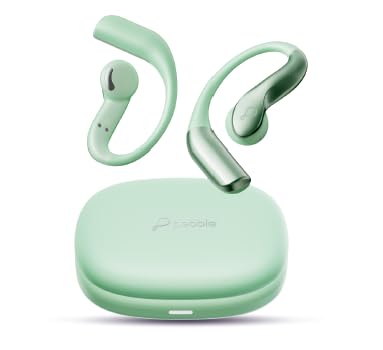
Image: The Pebble Open Loop PTWE04 earbuds in Sage Green, showcasing their open-ear design and charging case.
2. Charging the Earbuds
Before first use, fully charge the earbuds. Connect the provided USB cable to the charging port on the earbuds and to a compatible USB power source. A full charge takes approximately 120 minutes.
- Charging Indicator: Observe the LED indicator on the earbuds for charging status.
- Battery Life: Ensure optimal battery performance by not overcharging.
3. Pairing with a Device
The Pebble Open Loop PTWE04 earbuds feature Auto Pairing OWS Technology for instant connectivity.
- Ensure the earbuds are charged and powered on.
- Activate Bluetooth on your mobile device (e.g., cellphone).
- Open the charging case or remove the earbuds to initiate pairing mode.
- Select "Pebble Open Loop" from the list of available Bluetooth devices on your phone.
- Once connected, a confirmation sound will be heard.
For subsequent uses, the earbuds will automatically connect to the last paired device when powered on and within range.
Operating Instructions
1. Wearing the Earbuds
The earbuds feature an ear hook design for a secure and comfortable fit. Position the earbuds in your ear with the hook gently resting over your ear for stability, especially during activities like sport.
2. Basic Controls
The Pebble Open Loop PTWE04 earbuds utilize button control for various functions.
- Play/Pause: Press the multi-function button once.
- Next Track: Double-press the multi-function button on the right earbud.
- Previous Track: Double-press the multi-function button on the left earbud.
- Volume Up: Triple-press the multi-function button on the right earbud.
- Volume Down: Triple-press the multi-function button on the left earbud.
- Answer/End Call: Press the multi-function button once during an incoming call or active call.
- Reject Call: Press and hold the multi-function button for 2 seconds during an incoming call.
- Activate Voice Assistant: Press and hold the multi-function button for 2 seconds when not on a call.
3. Environmental Noise Cancellation (ENC)
The Environmental Noise Cancellation (ENC) feature helps reduce ambient noise during calls, ensuring clear communication even in noisy environments. This feature is automatically active during calls.
4. Gaming Mode
Activate Gaming Mode for low-latency audio, providing a more synchronized audio-visual experience during gameplay. Refer to the specific button combination in the quick start guide for activating/deactivating this mode.
Maintenance
1. Cleaning
Regularly clean your earbuds to maintain optimal performance and hygiene.
- Use a soft, dry, lint-free cloth to wipe the earbuds and charging case.
- Do not use abrasive cleaners, alcohol, or chemical solvents.
- Avoid getting moisture into any openings.
2. Storage
When not in use, store the earbuds in their charging case to protect them from dust and damage.
3. Splash Proof Build
The earbuds feature a splash-proof build, making them suitable for active lifestyles and protection against sweat and light rain. However, they are not designed for submersion in water. Avoid exposing them to excessive moisture.
Troubleshooting
Common Issues and Solutions:
- Earbuds not pairing:
- Ensure earbuds are charged.
- Turn off and on Bluetooth on your device.
- Forget the device from your phone's Bluetooth settings and re-pair.
- Ensure earbuds are within pairing range.
- No sound:
- Check device volume and earbud volume.
- Ensure earbuds are properly connected to your device.
- Try playing different audio sources.
- Charging issues:
- Verify the USB cable and power source are working correctly.
- Ensure the charging contacts on the earbuds and case are clean.
- Poor call quality:
- Ensure microphones are not obstructed.
- Move to an area with less environmental noise.
If issues persist, refer to the official Pebble support website or contact customer service.
Specifications
| Brand | Pebble |
| Model Name | Open Loop |
| Model Number | PTWE04 |
| Colour | Sage Green |
| Ear Placement | In Ear |
| Noise Control | Environmental Noise Cancellation |
| Battery Charge Time | 120 Minutes |
| Audio Driver Type | Dynamic Driver (12mm) |
| Compatible Devices | Cellphones |
| Product Features | Noise Cancellation, Gaming Mode, Splash Proof Build, Built-in Microphones, Auto Pairing OWS Technology |
| Network Connectivity | Wireless |
| Control Type | Button Control |
| Item Weight | 200 Grams |
| Country of Origin | China |
Warranty and Support
1. Warranty Information
Your Pebble Open Loop PTWE04 earbuds come with a 1 Year Warranty from the date of purchase. Please retain your purchase receipt and the warranty card for any warranty claims.
The warranty covers manufacturing defects. It does not cover damage caused by misuse, accidents, unauthorized modifications, or normal wear and tear.
2. Manufacturer and Importer
Manufacturer: SRK Powertech Pvt Ltd
Importer: SRK Powertech Pvt Ltd
For support, service, or warranty claims, please contact the manufacturer or your point of purchase.
Ask a question about this manual
Ask about setup, troubleshooting, compatibility, parts, safety, or missing instructions. Manuals+ will review the question and use this page’s manual context to help answer it.