
1. Introduction
The Tosima WA9C Pro is an advanced robot window cleaner designed to provide efficient and thorough cleaning for various smooth surfaces. Equipped with four automatic spray nozzles, intelligent cleaning modes, and robust safety features, this device simplifies window maintenance, offering a clear and streak-free finish.

The Tosima WA9C Pro robot window cleaner operating on a large glass surface, demonstrating its ability to clean without manual effort.
2. Safety Information
Your safety is paramount when operating the Tosima WA9C Pro. Please read and adhere to all safety instructions before use.
- Uninterrupted Power Supply (UPS): The integrated UPS system maintains the robot's suction for up to 25 minutes in case of a power outage. This allows sufficient time to retrieve the device safely.
- Safety Rope: Always attach the high-strength safety rope to a secure anchor point before operating the robot, especially when cleaning at heights. This provides maximum protection against accidental falls.
- Surface Suitability: Use the robot only on smooth, non-porous surfaces such as glass, tiles, and mirrors. Do not use on cracked, uneven, or damaged surfaces.
- Operating Environment: Ensure the operating area is clear of obstacles. Do not use in extreme weather conditions (e.g., strong winds, heavy rain).
- Children and Pets: Keep children and pets away from the operating robot.

Illustration of the safety lock mechanism and the UPS battery backup, emphasizing the dual safety features for secure operation.
3. Package Contents
Verify that all items are present in the package:
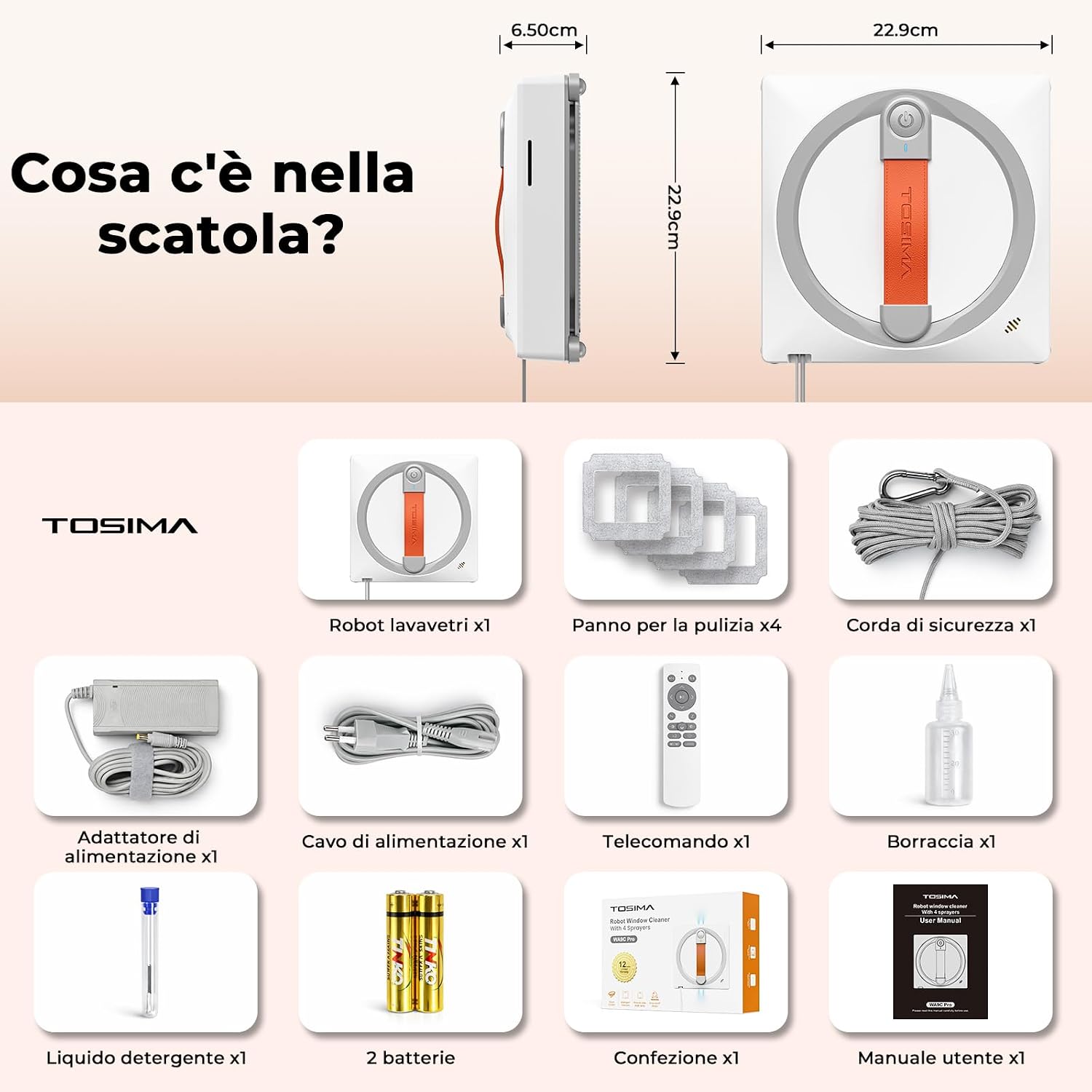
A visual representation of all components included in the Tosima WA9C Pro retail box.
- Robot Window Cleaner x1
- Cleaning Cloths x4
- Safety Rope x1
- Power Adapter x1
- Power Cable x1
- Remote Control x1
- Spray Bottle x1
- Cleaning Liquid x1
- Batteries (for remote) x2
- User Manual x1
4. Product Overview
The Tosima WA9C Pro features a square design for optimal corner cleaning and an advanced internal structure for powerful performance.

An X-ray view of the Tosima WA9C Pro, highlighting its key internal components such as the powerful suction fan, intelligent navigation system, emergency battery, and quad spray nozzles.
- Industrial-Grade Fan: Provides suction power exceeding 3200 Pa for secure attachment and effective cleaning.
- AI-Controlled Routing Algorithm: Ensures precise path planning and comprehensive coverage.
- 500mAh Emergency Battery: Powers the UPS system for up to 25 minutes during power interruptions.
- Quad Spray System: Four automatic nozzles distribute cleaning solution evenly for deep cleaning.

Detailed view of the four spray nozzles (two upper, two lower) on the Tosima WA9C Pro, designed for powerful and uniform cleaning solution distribution.
5. Setup
- Attach Cleaning Pads: Securely attach the provided cleaning cloths to the bottom of the robot. Ensure they are clean and properly aligned.
- Fill Water Tank: Open the water tank cap and fill it with the provided cleaning liquid or distilled water. Close the cap tightly.
- Connect Power: Plug the power adapter into an electrical outlet and connect it to the robot. Ensure the connection is secure.
- Attach Safety Rope: Fasten the safety rope's carabiner to a sturdy, immovable object (e.g., a balcony railing, heavy furniture). Attach the other end to the designated safety rope attachment point on the robot.
- Place Robot: Place the robot on the desired cleaning surface, ensuring it is flat against the glass. The robot will automatically activate its suction.
6. Operating Instructions
The Tosima WA9C Pro offers multiple cleaning modes and can be controlled via the included remote.
6.1 Power On/Off
- Power On: Once placed on the surface and connected to power, the robot will automatically power on and engage suction.
- Power Off: Press the power button on the remote control or on the robot itself. The robot will release suction after a few seconds. Carefully remove it from the surface.
6.2 Cleaning Modes
The robot features 6 intelligent cleaning modes to suit various window shapes and cleaning needs:

Visual representation of the six intelligent cleaning path modes available on the Tosima WA9C Pro, including N-shape, Z-shape, and spot cleaning.
- N-shape: Ideal for tall, narrow windows.
- Z-shape: Suitable for wide, short windows.
- Right N / Left N: Specific N-patterns for directional cleaning.
- Spot Cleaning: Focuses on a specific dirty area.
- Deep Cleaning (Z+N): Combines Z and N patterns for comprehensive cleaning.
6.3 Remote Control Operation
Use the remote control to select cleaning modes, start/pause cleaning, and manually direct the robot.

A user operating the Tosima WA9C Pro with its remote control, highlighting the convenience of managing cleaning tasks from a distance.
- Start/Pause Button: Initiates or pauses the cleaning cycle.
- Mode Selection Buttons: Choose between the 6 cleaning patterns.
- Directional Arrows: Manually steer the robot for precise cleaning.
- Spray Button: Manually activate the spray nozzles if needed.
7. Maintenance
Regular maintenance ensures optimal performance and longevity of your Tosima WA9C Pro.
- Cleaning Pads: After each use, remove the cleaning pads and wash them with mild detergent. Allow them to air dry completely before reattaching. Replace worn-out pads for best results.
- Nozzle Cleaning: If spray performance decreases, use the provided needle to clear any blockages in the spray nozzles.
- Robot Body: Wipe the robot's exterior with a soft, dry cloth. Do not use abrasive cleaners or immerse the robot in water.
- Storage: Store the robot in a cool, dry place away from direct sunlight when not in use.
8. Troubleshooting
If you encounter issues with your Tosima WA9C Pro, refer to the following common problems and solutions:
- Robot not sticking to surface:
- Ensure the surface is clean and dry.
- Check for sufficient power supply.
- Verify the suction fan is not obstructed.
- Streaks left on windows:
- Replace or clean the cleaning pads.
- Use the recommended cleaning solution.
- Ensure the spray nozzles are not clogged.
- Robot not moving or moving erratically:
- Check for obstacles on the window surface.
- Ensure the cleaning pads are not too wet or dry.
- Restart the robot and select a cleaning mode.
- Remote control not working:
- Replace the batteries in the remote control.
- Ensure there are no obstructions between the remote and the robot.
9. Specifications
| Brand | Tosima |
| Model Name | WA9C Pro |
| Recommended Surfaces | Glass, Glass Walls, Tiles, Mirrors |
| Special Features | Continuous Suction, Lightweight, Portable, Edge Cleaning, Wet & Dry Cleaning |
| Control Type | Remote Control |
| Battery Life | 25 Minutes (UPS) |
| Cleaning Path Width | 23 Centimeters |
| Battery Composition | Lithium Ion |
| Voltage | 24 Volts |
| Water Tank Capacity | 60 ml |
| Power Source | Corded Electric |
| Batteries Included | Yes |
| Item Dimensions (LxWxH) | 23L x 23W x 6.5H cm |
| Item Weight | 1.45 Kilograms |
| Noise Level | 60 Decibels |
10. Warranty
The Tosima WA9C Pro Robot Window Cleaner comes with a 2-year manufacturer's warranty. Please retain your proof of purchase for warranty claims. For detailed warranty terms and conditions, refer to the official Tosima website or contact customer support.
11. Support
For any questions, technical assistance, or support needs regarding your Tosima WA9C Pro, please contact our service team. We are committed to resolving your issues promptly.

Our dedicated service team is available to assist you with any product-related inquiries or issues.
You can typically find contact information on the official Tosima website or through your purchase platform.

