
1. Introduction
This manual provides essential instructions for the safe and effective use of your vivo ZEISS Telephoto Extender Gen 2 (200mm) and its accompanying accessories kit. This product is designed to enhance the photographic capabilities of your vivo X300 FE smartphone, offering extended focal length for capturing distant subjects with clarity.
Please read this manual thoroughly before using the product and retain it for future reference.
2. Safety Information
- Do not expose the telephoto extender to extreme temperatures, direct sunlight for prolonged periods, or high humidity.
- Avoid dropping or subjecting the product to strong impacts.
- Keep out of reach of children.
- Do not attempt to disassemble or modify the product. This will void the warranty and may cause damage.
- Clean the lens surfaces gently with a microfiber cloth specifically designed for optical lenses. Avoid abrasive materials or harsh chemicals.
- The telephoto extender has an IP54 rating, meaning it is protected against dust ingress and splashing water. It is not waterproof and should not be submerged in water.
3. Package Contents
Verify that all the following items are included in your package:
- vivo ZEISS Telephoto Extender Gen 2 (200mm)
- Dedicated Phone Case for vivo X300 FE
- Lens Adapter Ring
- Lens Cap (Front and Rear)
- User Manual (this document)

Image: The vivo ZEISS Telephoto Extender Gen 2 (200mm) unit.

Image: The lens cap for the telephoto extender, featuring vivo | ZEISS branding.
4. Setup and Installation
Follow these steps to properly attach the telephoto extender to your vivo X300 FE smartphone:
4.1. Attaching the Dedicated Phone Case
- Ensure your vivo X300 FE smartphone is clean and free of dust.
- Carefully insert your vivo X300 FE into the dedicated phone case. Ensure all buttons and ports align correctly with the case openings.

Image: The dedicated phone case for the vivo X300 FE, designed to accommodate the lens adapter ring.
4.2. Attaching the Lens Adapter Ring
- Locate the lens adapter ring. This ring features a mounting mechanism for the telephoto extender.
- Align the lens adapter ring with the camera module opening on the dedicated phone case.
- Gently press and twist (if applicable) the adapter ring until it securely locks into place on the phone case. Ensure it is firmly attached and does not wobble.

Image: The lens adapter ring, which connects the telephoto extender to the phone case.
4.3. Mounting the Telephoto Extender
- Remove the lens caps from both ends of the vivo ZEISS Telephoto Extender.
- Align the mounting end of the telephoto extender with the lens adapter ring on the phone case.
- Gently insert the extender into the adapter ring and twist clockwise until it clicks into a locked position. Do not overtighten.
- Verify that the telephoto extender is securely attached and stable.
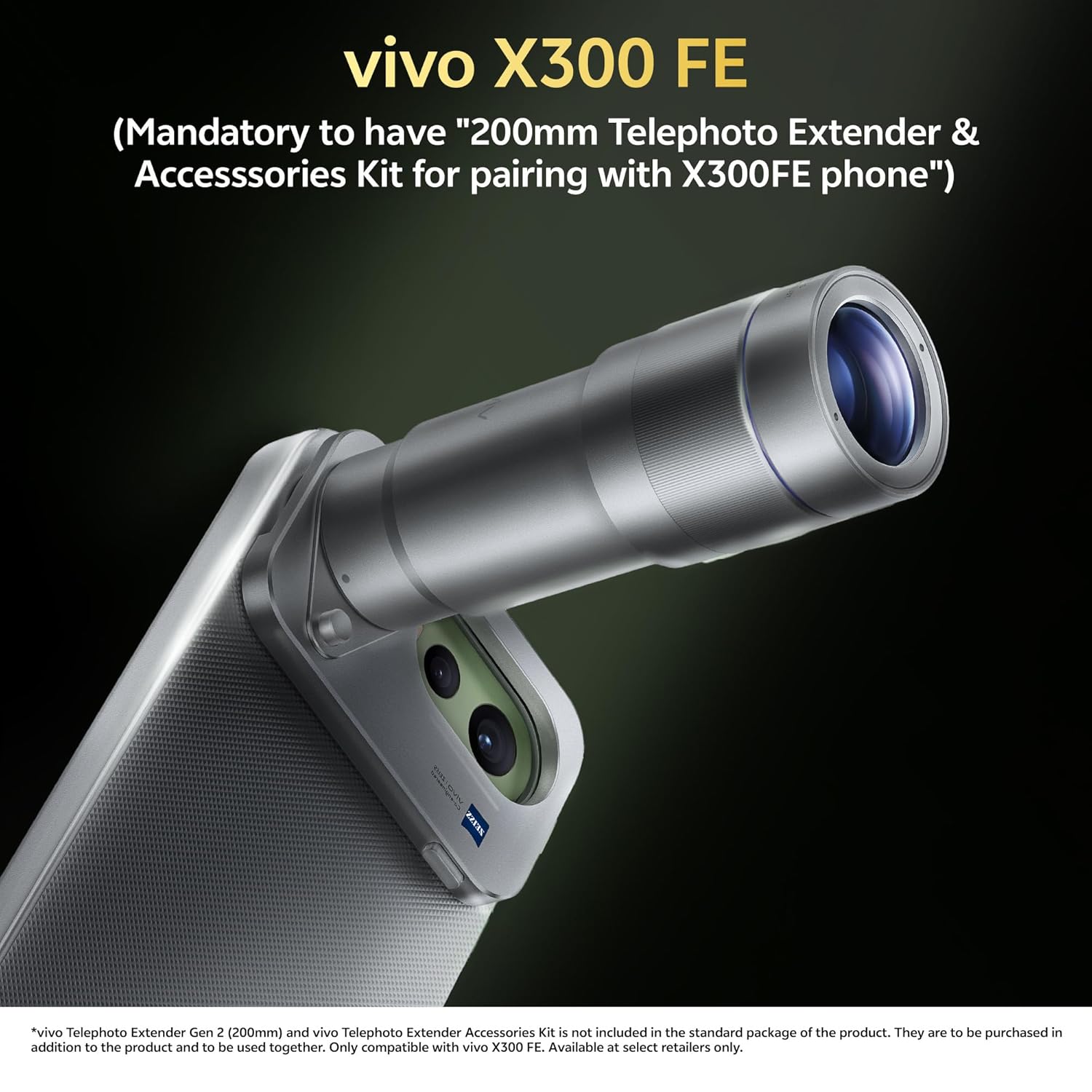
Image: The vivo ZEISS Telephoto Extender Gen 2 (200mm) fully assembled with the vivo X300 FE smartphone and dedicated case.
5. Operating Instructions
Once the telephoto extender is securely mounted, you can begin using it with your vivo X300 FE:
- Open the camera application on your vivo X300 FE smartphone.
- The smartphone camera system should automatically detect the attached telephoto extender or provide an option to switch to the external lens mode. Refer to your phone's camera app settings for specific instructions if automatic detection does not occur.
- Utilize the camera app's zoom controls to adjust the focal length. The extender provides a variable focal length range from 200mm up to 5400mm, allowing for significant magnification of distant subjects.
- For optimal image quality, ensure good lighting conditions and stabilize your phone, possibly using a tripod, especially at higher zoom levels.
- After use, carefully detach the telephoto extender by twisting it counter-clockwise from the adapter ring. Replace the lens caps to protect the optical elements.
6. Maintenance
6.1. Cleaning
- Lens Surfaces: Use a soft, clean microfiber cloth specifically designed for optical lenses. Gently wipe the lens surfaces to remove dust and smudges. For stubborn marks, a small amount of lens cleaning solution applied to the cloth (not directly to the lens) can be used.
- Body: Wipe the body of the telephoto extender and phone case with a soft, damp cloth. Avoid using harsh chemicals or abrasive cleaners.
6.2. Storage
- Always replace the front and rear lens caps when the telephoto extender is not in use to protect the optical elements from dust and scratches.
- Store the product in a cool, dry place, away from direct sunlight and extreme temperatures.
- If storing for an extended period, consider using a protective pouch or case.
7. Troubleshooting
| Problem | Possible Cause | Solution |
|---|---|---|
| Image is blurry or out of focus. |
|
|
| Telephoto extender not detected by phone. |
|
|
| Dust or debris visible in images. | Dust on lens surfaces or phone camera lens. | Clean both the telephoto extender lenses and your phone's camera lens thoroughly. |
8. Specifications
| Feature | Detail |
|---|---|
| Product Name | vivo ZEISS Telephoto Extender Gen 2 (200mm) |
| Compatibility | vivo X300 FE smartphone |
| Focal Length Range | Variable (200mm to 5400mm) |
| Lens Type | Telephoto (Zoom Design) |
| Water Resistance | IP54 (Telephoto Extender) |
| Phone Case Dimensions | 153.14 × 75.55 × 14.10 mm |
| Phone Case Weight | 28.50g |
| Lens Adapter Ring Dimensions | 70.50 × 45.90 × 8.67 mm |
| Lens Adapter Ring Weight | 15.25g |
| Color | Silver |

Image: An illustrative diagram showing the internal lens elements of the vivo ZEISS Telephoto Extender Gen 2.
9. Warranty and Support
For warranty information and customer support, please refer to the warranty card included with your product or visit the official vivo website. Keep your proof of purchase for warranty claims.
If you encounter any issues not covered in the troubleshooting section, please contact vivo customer service for assistance.