
Altrastorm D18-1
Altrastorm D18-1 Bluetooth Computer Speakers User Manual
Model: D18-1
Introduction
Thank you for choosing the Altrastorm D18-1 Bluetooth Computer Speakers. These speakers are designed to deliver high-fidelity audio with versatile connectivity options, including Bluetooth 5.0, USB DAC, 3.5mm AUX, and HDMI ARC. Featuring a durable MDF wooden enclosure, independent treble and bass controls, and immersive RGB lighting, the D18-1 speakers enhance your audio experience for music, gaming, and home theater.
Please read this manual thoroughly before use to ensure proper setup and operation. Keep this manual for future reference.

Image: Altrastorm D18-1 Bluetooth Computer Speakers in Basic Black.
Package Contents
Verify that all items listed below are included in your package:
- 2 x Altrastorm D18-1 Stereo Bookshelf Speakers
- 1 x 3.5mm AUX Audio Cable
- 1 x USB Data Cable (for DAC functionality)
- 1 x Power Adapter
- 1 x User Manual

Image: A visual representation of the Altrastorm D18-1 speaker package contents, including speakers, cables, power adapter, and user manual.
Product Overview
Speaker Components
The Altrastorm D18-1 speakers feature a robust design for optimal audio performance:
- 1-inch Silk Dome Tweeter: Delivers crisp, clear high frequencies.
- 3.5-inch Mid-Low Frequency Woofer: Provides rich mid-range and punchy bass.
- MDF Wooden Enclosure: High-density wood construction minimizes acoustic resonance for purer sound.
- Rear-Facing Bass Reflex Port: Enhances low-end depth.
- 15-degree Upward Tilt Design: Optimizes soundstage and high-frequency clarity by directing sound towards your ears.

Image: Diagram showing the internal components of the Altrastorm D18-1 speaker, highlighting the silk dome tweeter and 3.5-inch carbon fiber woofer.

Image: Cross-section view illustrating the MDF wooden cabinet construction and internal bracing for reduced resonance.
Rear Panel and Controls
The rear panel provides various input ports, while the front panel features intuitive controls:
- Power Input (DC 18V): Connects to the power adapter.
- USB Input (Type-C): For USB DAC connection to PC.
- AUX Input (3.5mm): For standard audio devices.
- HDMI ARC Input: For lossless audio from compatible TVs.
- Volume Control Knob: Adjusts master volume.
- Treble Adjustment Knob: Fine-tunes high frequencies.
- Bass Adjustment Knob: Adjusts low-frequency output.
- Light Mode Button: Controls RGB lighting effects.
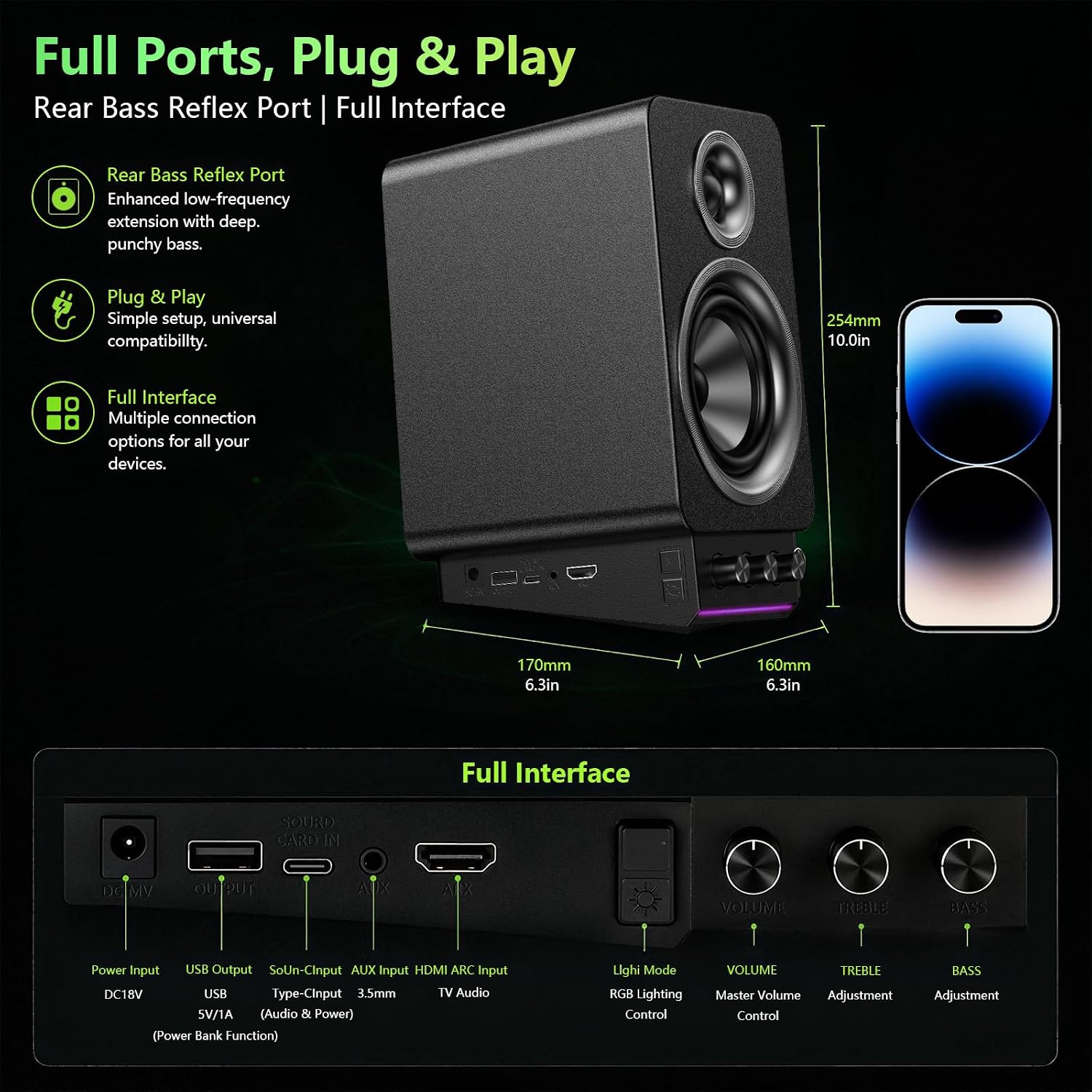
Image: Detailed view of the Altrastorm D18-1 speaker's rear panel, showing power input, USB, AUX, and HDMI ARC ports, along with front-facing volume, treble, bass, and RGB light controls.

Image: Close-up of the speaker's front controls, including volume, treble, and bass knobs, and the RGB lighting strip.
Setup Instructions
- Placement: Position the two speakers on a stable surface, such as a desk or shelf, ensuring they are equidistant from your listening position for optimal stereo imaging. The 15-degree upward tilt is designed for desktop use.
- Connect Speakers: Connect the left speaker to the right speaker using the provided speaker cable.
- Power Connection: Connect the power adapter to the DC 18V input on the rear of the main speaker, then plug the adapter into a power outlet.
- Audio Source Connection: Choose one of the following methods to connect your audio source:
- Bluetooth: Power on the speakers. The speakers will automatically enter Bluetooth pairing mode. On your device (smartphone, tablet), search for "Altrastorm D18-1" and pair.
- USB DAC (PC): Connect the provided USB data cable from the speaker's USB Type-C port to your computer's USB port. Your computer should automatically recognize the speakers as an audio output device.
- AUX (3.5mm): Connect the provided 3.5mm AUX cable from your audio device's headphone jack or line-out to the AUX input on the speaker's rear panel.
- HDMI ARC (TV): Connect an HDMI cable from your TV's HDMI ARC port to the HDMI ARC input on the speaker's rear panel. Ensure your TV's HDMI ARC function is enabled in its settings.
- Initial Volume Adjustment: Turn the volume knob to a low setting before playing audio to avoid sudden loud sounds.

Image: Visual guide demonstrating the four connection methods: Bluetooth, USB Sound Card, HDMI ARC, and AUX Input.

Image: Example setup showing the Altrastorm D18-1 speakers connected to a television via HDMI ARC for a home theater experience.

Image: Altrastorm D18-1 speakers positioned on a desktop next to a computer monitor, illustrating a typical setup.
Operating Instructions
Power On/Off
The speakers power on automatically when connected to power. To turn off, disconnect the power adapter.
Volume Control
Rotate the large Volume knob on the front panel clockwise to increase volume and counter-clockwise to decrease it.
Treble and Bass Adjustment
Use the Treble and Bass knobs on the front panel to fine-tune the audio output to your preference. Rotate clockwise to increase and counter-clockwise to decrease.
RGB Lighting Control
Press the Light Mode button on the front panel to cycle through various RGB lighting effects and colors. Hold the button to turn the lights off or on.

Image: The Altrastorm D18-1 speakers displaying various dynamic RGB lighting effects in red, blue, and green.
Switching Input Modes
The speakers automatically detect the active input. If multiple inputs are connected, you may need to select the desired source from your connected device or by cycling through inputs if a dedicated input selection button is present (refer to the product overview for specific controls).
Gaming Experience
The D18-1 speakers are designed to provide an immersive gaming experience with low latency audio and dynamic RGB accent lighting. Adjust treble and bass to optimize sound for game audio.

Image: Altrastorm D18-1 speakers integrated into a gaming setup, highlighting their RGB lighting and suitability for gaming audio.

Image: A gaming desk setup featuring the Altrastorm D18-1 speakers with vibrant RGB lighting, enhancing the immersive gaming atmosphere.
Official Product Videos
Altrastorm PC Speakers for Desktop with RGB Lighting
Video: This video provides an overview of the Altrastorm PC Speakers, showcasing their design and RGB lighting features in a desktop environment.
RGB Gaming PC Speakers
Video: This video demonstrates the RGB lighting and gaming capabilities of the Altrastorm PC Speakers, highlighting their visual appeal and audio performance for gamers.
Maintenance
- Cleaning: Use a soft, dry cloth to wipe the speaker surfaces. Avoid using abrasive cleaners, waxes, or solvents.
- Placement: Keep speakers away from direct sunlight, heat sources, and moisture. Ensure adequate ventilation around the speakers.
- Handling: Avoid dropping or subjecting the speakers to strong impacts. Do not attempt to disassemble the speakers, as this will void any potential warranty.
Troubleshooting
| Problem | Possible Solution |
|---|---|
| No sound from speakers. |
|
| Bluetooth pairing fails. |
|
| Sound distortion or poor quality. |
|
| RGB lights are not working. |
|
Specifications
| Feature | Detail |
|---|---|
| Brand | Altrastorm |
| Model Number | D18-1 |
| Speaker Maximum Output Power | 60 watts |
| Connectivity Technology | Bluetooth, HDMI, USB, 3.5mm AUX |
| Audio Output Mode | Stereo (2.0 Channel) |
| Input Voltage | 14V DC |
| Mounting Type | Shelf Mount |
| Speaker Type | Multimedia |
| Color | Basic Black |
| Control Method | Push Button, Knob |
| Woofer Diameter | 3.5 inches |
| Tweeter Size | 1 inch (Silk Dome) |
| Wireless Technology | Bluetooth 5.0 |
| Item Dimensions (D x W x H) | 5"D x 9.45"W x 5.59"H |
| Compatible Devices | Smartphone, Tablet, Laptop, Desktop, Television |
| Audio Driver Type | Dynamic Driver |
Warranty and Support
The product information indicates that there is no explicit warranty description provided. For specific warranty details or to inquire about product support, please refer to the documentation included with your purchase or contact Altrastorm customer service directly through their official website or the retailer where the product was purchased.
When contacting support, please have your product model number (D18-1) and purchase information readily available.
Ask a question about this manual
Ask about setup, troubleshooting, compatibility, parts, safety, or missing instructions. Manuals+ will review the question and use this page’s manual context to help answer it.