
uwant D500
uwant D500 Cordless Wet Dry Vacuum Mop Instruction Manual
Model: D500 | Brand: uwant
1. Introduction
Thank you for choosing the uwant D500 Cordless Wet Dry Vacuum Mop. This manual provides essential information for the safe and efficient operation, maintenance, and troubleshooting of your appliance. Please read it thoroughly before first use and keep it for future reference.
2. Important Safety Instructions
Always follow basic safety precautions when using electrical appliances to reduce the risk of fire, electric shock, or injury.
- Read all instructions before using the appliance.
- Do not immerse the appliance in water or other liquids.
- Keep hair, loose clothing, fingers, and all parts of the body away from openings and moving parts.
- Use only as described in this manual. Use only manufacturer's recommended attachments.
- Do not use with a damaged cord or plug. If appliance is not working as it should, has been dropped, damaged, left outdoors, or dropped into water, return it to a service center.
- Do not pull or carry by cord, use cord as a handle, close a door on cord, or pull cord around sharp edges or corners. Do not run appliance over cord. Keep cord away from heated surfaces.
- Do not unplug by pulling on cord. To unplug, grasp the plug, not the cord.
- Do not handle plug or appliance with wet hands.
- Turn off all controls before unplugging.
- Use extra care when cleaning on stairs.
- Do not use to pick up flammable or combustible liquids, such as gasoline, or use in areas where they may be present.
- Do not pick up anything that is burning or smoking, such as cigarettes, matches, or hot ashes.
- Do not use without filters in place.
- This appliance is for household use only.
- Store the appliance indoors. After use, store the appliance in a dry place.
3. Package Contents
Ensure all items are present and in good condition upon unpacking.
- uwant D500 Main Unit (Cordless Wet Dry Vacuum Mop)
- Charging Station
- HEPA Filter (1 installed, 1 additional)
- Roller Brush (1 installed, 1 additional)
- Cleaning Solution (500ml)
- Cleaning Brush
- Instruction Manual
- Odor Neutralizer Stick (1 installed, 2 additional in accessory kit)

Figure 3.1: Package Contents
4. Product Overview
The uwant D500 is a versatile 3-in-1 cordless wet dry vacuum mop designed for efficient floor cleaning. It vacuums, mops, and washes floors simultaneously.
Key Features:
- 3-in-1 Cleaning: Vacuums, mops, and washes floors.
- Powerful Suction: 17,000 Pa suction power for dry and wet debris.
- 180° Flat Reach: Allows cleaning under low furniture with a 13.5 cm clearance.
- Triple Edge Cleaning: Designed to clean close to edges and corners.
- Odor Prevention System: Features an odor eliminator bar in the dirty water tank, AI-powered one-touch self-cleaning, 65°C hot air drying, and real-time electrolyzed water generation for long-lasting antibacterial and deodorizing effects.
- Anti-Tangle Brush Bar: Prevents hair from wrapping around the roller brush, reducing manual cleaning.
- IPX6 Waterproof Floor Brush: Can be rinsed directly under running water.
- Dual Water Tanks: Separate tanks for clean water (650 ml) and dirty water (700 ml).
- Multiple Cleaning Modes: Dry, Smart, and Max modes for various cleaning needs.
- Three Water Flow Settings: High for tough stains, Medium for tiles, Low for wood floors.
- LED Display & Voice Prompts: Provides real-time information on battery level, cleaning mode, electrolysis status, and tank alerts.

Figure 4.1: uwant D500 Main Unit

Figure 4.2: Odor Prevention System
5. Setup
5.1 Assembly
- Carefully remove all components from the packaging.
- Insert the handle into the main unit until it clicks into place.
- Ensure the clean water tank and dirty water tank are correctly installed.
- Verify that the roller brush and HEPA filter are securely in their compartments.
5.2 Charging
- Place the charging station on a flat, stable surface near a power outlet.
- Connect the power adapter to the charging station and plug it into the outlet.
- Place the uwant D500 main unit onto the charging station. The LED display will indicate charging status.
- Fully charge the appliance before first use. A full charge takes approximately 4 hours.
5.3 Filling the Clean Water Tank
- Remove the clean water tank from the main unit.
- Open the tank cap and fill with clean tap water. For enhanced cleaning, add the recommended amount of uwant cleaning solution (500ml bottle included). Do not exceed the MAX fill line.
- Close the cap securely and reinsert the tank into the main unit.
6. Operating Instructions
6.1 Power On/Off
Press the Power button on the handle to turn the appliance on or off.
6.2 Selecting Cleaning Modes
The uwant D500 offers three cleaning modes:
- Dry Mode: For vacuuming dry debris like hair and dust.
- Smart Mode: Automatic adjustment of suction and water flow for daily cleaning.
- Max Mode: Maximum suction and water flow for stubborn stains and heavy dirt.
Press the Mode button to cycle through the available cleaning modes. The selected mode will be displayed on the LED screen.

Figure 6.1: Cleaning Modes and Water Control
6.3 Adjusting Water Flow
The appliance features three water flow settings:
- High: For difficult stains.
- Medium: Ideal for ceramic tiles and hard surfaces.
- Low: Gentle cleaning for sensitive wood floors.
Use the dedicated water flow button to adjust the water output as needed.
6.4 Cleaning Operation
- Tilt the main unit back to activate the roller brush and suction.
- Move the appliance slowly forward and backward over the area to be cleaned.
- For cleaning under furniture, tilt the unit to its 180° flat position.
- The triple edge cleaning design allows for thorough cleaning along walls and in corners.

Figure 6.2: 180° Flat Reach Cleaning

Figure 6.3: Triple Edge Cleaning
6.5 LED Display and Voice Prompts
The LED display provides real-time status updates. Voice prompts will alert you to important information such as low battery or a full dirty water tank.
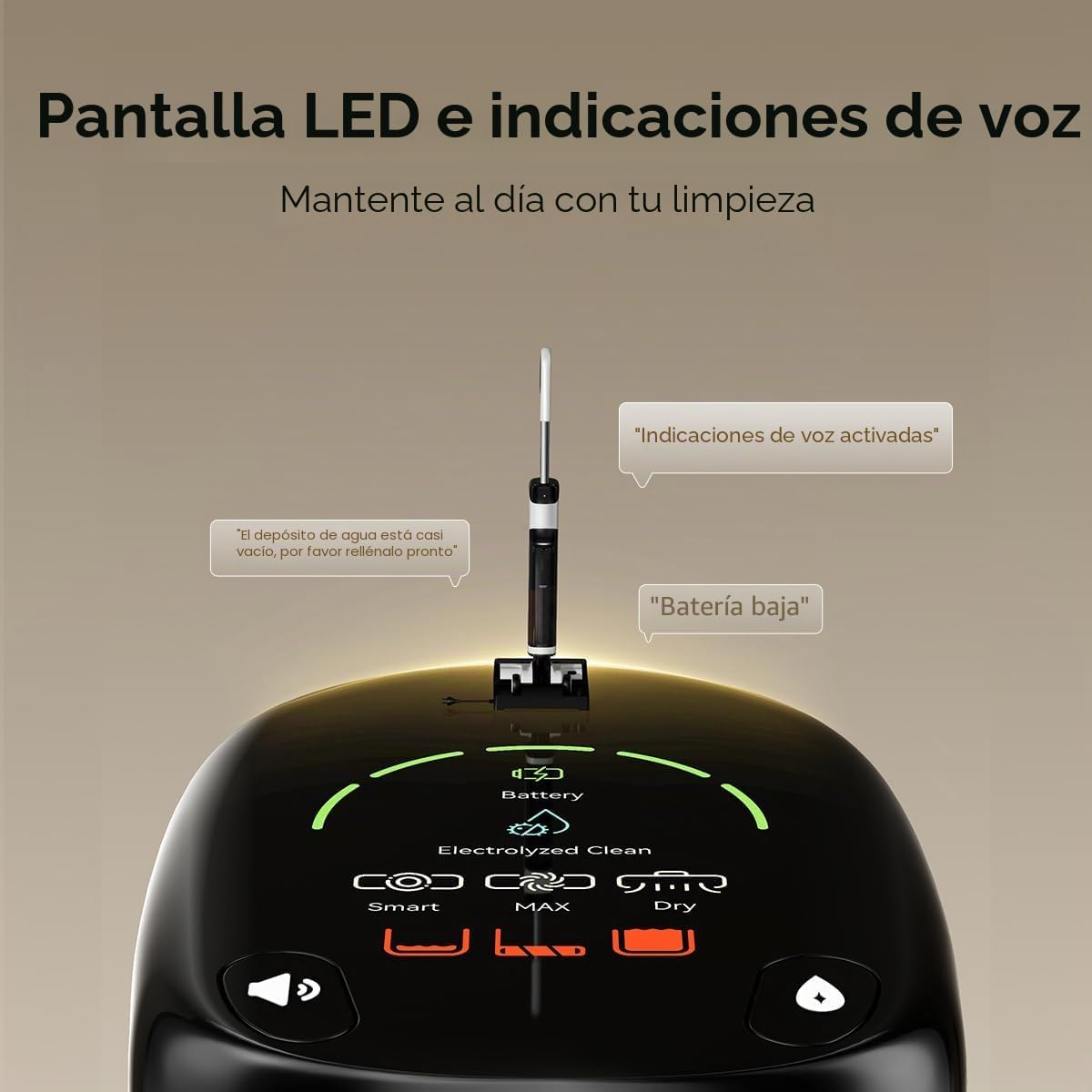
Figure 6.4: LED Display and Voice Prompts
7. Maintenance
Regular maintenance ensures optimal performance and extends the lifespan of your uwant D500.
7.1 Self-Cleaning Cycle
- After each use, place the main unit back on the charging station.
- Press the self-clean button once to activate the self-cleaning and drying mode.
- Press the self-clean button twice to activate only the self-cleaning mode.
- The AI-powered self-cleaning system will clean the roller brush and internal pathways. The 65°C hot air drying will then dry the brush to prevent odors.

Figure 7.1: One-Touch Self-Cleaning

Figure 7.2: AI Self-Cleaning with Bidirectional Brush Rotation

Figure 7.3: 65°C Hot Air Drying
7.2 Emptying and Cleaning the Dirty Water Tank
- After each use, remove the dirty water tank.
- Carefully empty the dirty water and debris.
- Rinse the tank thoroughly with clean water.
- Ensure the odor eliminator bar is clean and properly seated.
- Reinstall the dirty water tank.
7.3 Cleaning the Roller Brush
While the self-cleaning function is effective, occasional manual cleaning of the roller brush may be necessary, especially if there is excessive hair or debris.
- Turn off the appliance and remove the roller brush cover.
- Remove the roller brush.
- Use the provided cleaning brush to remove any tangled hair or debris.
- Rinse the roller brush under running water.
- Allow the brush to air dry completely before reinstalling.

Figure 7.4: Z-Comb Anti-Tangle Technology
7.4 Cleaning the HEPA Filter
The HEPA filter should be cleaned regularly to maintain suction performance.
- Remove the HEPA filter from its compartment.
- Tap the filter gently to remove loose dust.
- Rinse the filter under running water. Do not scrub.
- Allow the filter to air dry completely for at least 24 hours before reinstalling. Do not use the appliance with a wet filter.

Figure 7.5: HEPA Filter
8. Troubleshooting
If you encounter issues with your uwant D500, refer to the following table for common problems and solutions.
| Problem | Possible Cause | Solution |
|---|---|---|
| Appliance does not turn on. | Low battery; Not properly charged. | Charge the appliance fully. Ensure it is correctly placed on the charging station. |
| No suction or weak suction. | Dirty water tank full; Clean water tank empty; Clogged roller brush or air duct; Clogged HEPA filter. | Empty the dirty water tank. Refill the clean water tank. Clean the roller brush and check for blockages. Clean or replace the HEPA filter. |
| Water leakage. | Water tanks not properly installed; Tank caps not sealed; Damaged tank. | Ensure both clean and dirty water tanks are securely in place and their caps are tightly closed. Inspect tanks for damage. |
| Roller brush not rotating. | Hair or debris tangled in brush; Brush motor malfunction. | Clean the roller brush and remove any obstructions. If the problem persists, contact customer support. |
| Unpleasant odor. | Dirty water tank not cleaned; Roller brush not dried properly. | Empty and thoroughly clean the dirty water tank after each use. Ensure the roller brush is dried completely, preferably using the hot air drying function. Replace odor neutralizer stick if needed. |
| Voice prompts in wrong language. | Incorrect language setting. | To change the language, press and hold the volume button. |
9. Specifications
| Feature | Detail |
|---|---|
| Brand | uwant |
| Model Name | D500 |
| Model Number | D500-1 |
| Product Dimensions (L x W x H) | 31 x 28 x 73 cm |
| Color | White |
| Suction Power | 17,000 Pa |
| Clean Water Tank Capacity | 650 ml |
| Dirty Water Tank Capacity | 700 ml |
| Filter Type | HEPA Filter |
| Battery Type | Lithium |
| Drying Temperature | 65°C Hot Air |
| Waterproof Rating | IPX6 (Floor Brush) |
| Number of Cleaning Modes | 3 (Dry, Smart, Max) |
| Number of Water Flow Settings | 3 (High, Medium, Low) |
| Recommended Surface | All floors |
| Usage Environment | Indoor |
| UPC | 765452708934 |
| Manufacturing Year | 2025 |
10. Warranty and Support
10.1 Warranty Information
The uwant D500 Cordless Wet Dry Vacuum Mop comes with a two-year warranty from the date of purchase. This warranty covers manufacturing defects and malfunctions under normal use.
Please retain your proof of purchase for warranty claims.
10.2 Customer Support
For any questions, technical assistance, or to request replacement parts, please contact uwant customer support. Our team is available to assist you and aims to respond within 24 hours.
How to Contact Us:
- Through your purchase platform: Navigate to your order details and select "Contact Seller" or "Ask a question" for "Uwant Spain Home Care".
- Refer to the contact information provided in your purchase documentation.

Figure 10.1: UWANT Customer Support
Ask a question about this manual
Ask about setup, troubleshooting, compatibility, parts, safety, or missing instructions. Manuals+ will review the question and use this page’s manual context to help answer it.