
1. Important Safety Information
Please read this entire manual carefully before assembling and operating your FUNMILY Walking Pad Incline Treadmill. Retain this manual for future reference. Failure to follow these instructions could result in injury or damage to the product.
General Safety Precautions:
- Always place the treadmill on a flat, stable surface.
- Keep children and pets away from the treadmill during operation.
- Ensure adequate clear space around the treadmill (at least 2 feet on sides and front, 6 feet at the rear).
- Do not operate the treadmill if it has a damaged cord or plug, or if it is not working properly.
- Wear appropriate athletic footwear during use.
- The maximum user weight capacity for this treadmill is 350 lbs. Do not exceed this limit.
- Always use the safety key/clip. Attach the clip to your clothing before starting your workout. If you fall or move too far back on the treadmill, the safety key will detach, and the treadmill will stop.
- Consult a physician before starting any exercise program.
2. Product Overview
The FUNMILY 3.5HP Walking Pad Incline Treadmill is designed for home and office use, offering a compact and versatile solution for cardio training. It features a powerful yet quiet motor, adjustable incline, and a removable desk workstation.
Key Features:
- 3.5HP Brushless Motor: Provides smooth and quiet operation with a speed range of 0.6-4 MPH. Noise levels are kept below 45 dB.
- 12% Manual Incline: Adjust the incline to 12% to simulate uphill walking and increase calorie consumption.
- LED Display: Track speed, distance, time, and calories burned.
- 12 Preset Programs: Offers a variety of workout options for different fitness levels.
- Shock-Absorbing Running Belt: A 7-layer belt with silicone shock absorbers and cushioning pads reduces knee pressure by 40%.
- Removable Desk Workstation: Provides space for laptops, books, or water bottles, enhancing versatility.
- Portable Design: Equipped with built-in transport wheels for easy movement and storage.
Components Included:
- Treadmill Unit
- Phone Stand
- Remote Control
- Lubricating Oil
- Power Cord
- Tool Kit
- User Manual

Figure 2.1: Included Components
3. Setup and Assembly
Your FUNMILY treadmill comes 90% pre-assembled. Follow these simple steps to complete the setup.
Assembly Steps:
- Unpack the Treadmill: Carefully remove the treadmill and all components from the packaging.
- Position the Treadmill: Place the treadmill on a flat, stable surface in your desired workout area.
- 2-Second Setup: Unfold the treadmill by lifting the handle bar into the upright position. Ensure it locks securely.
- Screw Mounting: Use the provided tool kit to secure any necessary screws for the handle bar and frame.
- Mounting Bracket: Attach the mounting bracket for the desk workstation to the handle bar.
- Install Desktop: Place the removable desktop onto the mounting bracket.
- Connect Power: Plug the power cord into a grounded electrical outlet.
- Insert Remote Batteries: Install batteries (not included) into the remote control.

Figure 3.1: Treadmill Assembly Steps
4. Operating Instructions
Familiarize yourself with the treadmill's controls and functions before beginning your workout.
Starting a Workout:
- Power On: Ensure the treadmill is plugged in and the main power switch (if present) is turned on.
- Attach Safety Key: Secure the safety clip to your clothing. The treadmill will not operate without the safety key in place.
- Start: Press the 'Start' button on the remote control or the treadmill console. The belt will begin to move at a low speed.
- Adjust Speed: Use the '+' and '-' buttons on the remote or console to increase or decrease the speed. The speed range is 0.6-4 MPH.
- Select Program (Optional): Choose from 12 built-in exercise programs using the 'Mode' or 'Program' button on the console.
Adjusting Incline:
This treadmill features a 12% manual incline adjustment. To adjust the incline, locate the black foot pad at the rear of the treadmill. Manually lift or lower the rear of the treadmill to engage the desired incline level. Ensure the treadmill is stable before use after adjusting the incline.
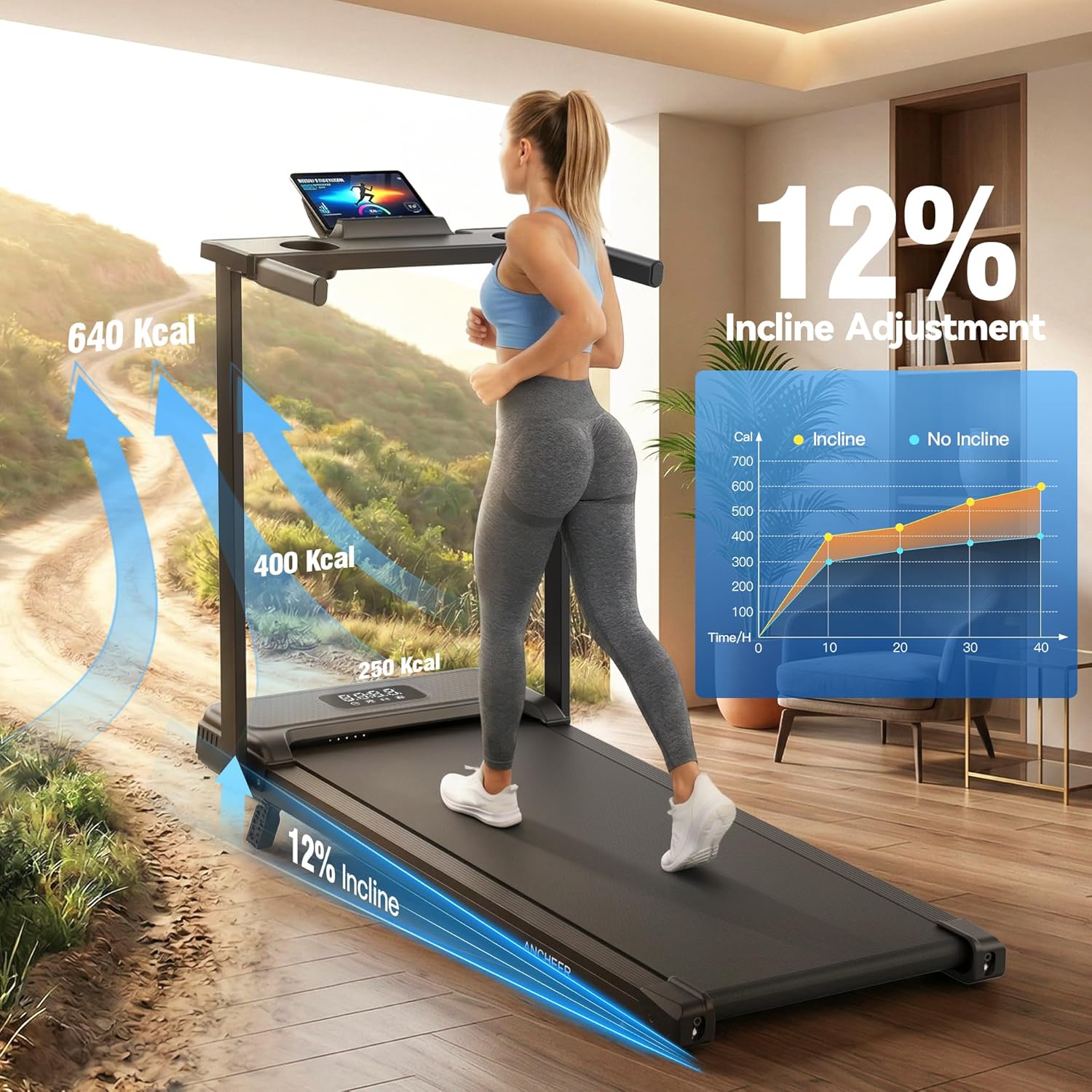
Figure 4.1: Manual Incline Adjustment
Using the LED Display:
The integrated LED display shows real-time workout data, including:
- Speed: Current walking/running speed.
- Distance: Total distance covered during the workout.
- Time: Duration of the workout.
- Calories Burned: Estimated calories expended.

Figure 4.2: LED Display Metrics
Stopping a Workout:
Press the 'Stop' button on the remote control or console. The treadmill belt will gradually slow down and stop. Alternatively, pulling the safety key will immediately stop the treadmill.
Remote Control Operation:
Video 4.1: Demonstrating the use of the remote control to operate the treadmill, including starting, stopping, and adjusting speed.
5. Maintenance
Regular maintenance ensures the longevity and optimal performance of your treadmill.
Cleaning:
- Wipe down the treadmill surfaces with a damp cloth after each use to remove sweat and dust.
- Do not use abrasive cleaners or solvents, as these can damage the finish.
- Keep the area around the treadmill clean and free of obstructions.
Lubrication:
The treadmill belt requires periodic lubrication to reduce friction and extend its lifespan. A bottle of lubricant is included with your purchase. Refer to the specific instructions provided with the lubricant for application frequency and method. Generally, apply lubricant under the running belt every few months, depending on usage.
Belt Adjustment:
If the running belt becomes misaligned or too loose/tight, it may require adjustment. Consult the detailed instructions in the included user manual for specific belt tensioning and centering procedures using the provided tool kit.
6. Troubleshooting
This section addresses common issues you might encounter with your treadmill.
| Problem | Possible Cause | Solution |
|---|---|---|
| Treadmill does not start | Power cord not plugged in; Safety key not in place; Main power switch off. | Ensure power cord is securely plugged in; Insert safety key; Turn on main power switch. |
| Belt slips or hesitates | Belt too loose; Belt needs lubrication. | Adjust belt tension (refer to manual); Apply lubricant under the belt. |
| Unusual noise during operation | Loose components; Belt misalignment; Motor issue. | Check and tighten all visible bolts and screws; Adjust belt alignment; If noise persists, contact customer support. |
| Remote control not working | Batteries dead or incorrectly inserted. | Replace batteries; Ensure batteries are inserted with correct polarity. |
If you encounter a problem not listed here or if the suggested solutions do not resolve the issue, please contact FUNMILY customer support.
7. Product Specifications
| Feature | Detail |
|---|---|
| Brand | FUNMILY |
| Model | 3.5HP Walking Pad Incline Treadmill with Desk & Handle Bar |
| Motor Horsepower | 3.5 HP (Peak) |
| Speed Range | 0.6 - 4 Miles per Hour |
| Maximum Incline | 12% (Manual Adjustment) |
| Weight Capacity | 350 Pounds |
| Product Dimensions (D x W x H) | 47"D x 22"W x 5"H |
| Deck Length | 35 Inches |
| Noise Level | Below 45 dB |
| Connectivity | Bluetooth |
| Metrics Measured | Calories Burned, Distance, Speed, Time |
| Assembly Required | No (90% pre-assembled) |
8. Warranty and Customer Support
Warranty Information:
The FUNMILY Electric Treadmill comes with a one-year manufacturer's warranty. This warranty covers free replacement of parts during the warranty period for manufacturing defects. Please retain your proof of purchase for warranty claims.
Customer Support:
For any questions, concerns, or assistance with your FUNMILY treadmill, please do not hesitate to contact our customer support team. We are committed to providing a satisfaction guarantee and will respond to your inquiries within 24 hours.
Contact information can typically be found on the product packaging or the official FUNMILY website.