
Introduction
The LIDER Soft Pop-Up Floor Box Kit provides a convenient and safe power access solution for various floor types. This kit features a 20 Amp GFCI duplex outlet with a tamper-resistant design, ensuring safety and code compliance. Its soft pop-up mechanism allows for discreet integration when not in use and easy access when needed. This manual provides essential information for proper installation, operation, and maintenance of your floor box kit.
Safety Information
WARNING: Risk of electric shock. Improper installation or use can lead to serious injury or death. Always follow these safety guidelines:
- Installation must be performed by a qualified electrician in accordance with all national and local electrical codes.
- Disconnect power at the circuit breaker or fuse box before installing or servicing the unit.
- Do not install in locations where the unit may be submerged in water.
- Ensure all wiring connections are secure and properly insulated.
- The GFCI (Ground Fault Circuit Interrupter) receptacle provides protection against electrical shock. Test the GFCI monthly as described in the Operating Instructions.
- This product is ETL Listed, ensuring it meets recognized safety standards.
Package Contents
Verify that all components are present before beginning installation:
- LIDER Soft Pop-Up Floor Box Assembly (Model LSFB-20GT-BB)
- Installation Hardware (screws, mounting brackets)
- Instruction Manual
Setup and Installation
This floor box is designed for installation in various floor types including hardwood, tile, carpet, marble, or granite. Always consult local electrical codes for specific requirements.
Required Tools (Not Included):
- Drill
- Hole Saw or Jigsaw
- Screwdrivers
- Wire Strippers
- Voltage Tester
Installation Steps:
- Disconnect Power: Turn off power to the installation area at the main circuit breaker. Verify power is off using a voltage tester.
- Prepare Opening: Create an opening in the floor according to the specified dimensions. The floor box dimensions are approximately 3-15/16” L × 3-15/16” W × 3” H. Ensure the opening is clean and free of debris.
- Route Wiring: Pull electrical wires through the prepared opening. Ensure sufficient wire length for connections.
- Connect Wiring: Follow standard wiring practices to connect the electrical wires to the GFCI receptacle terminals. Typically, black (hot) to brass screw, white (neutral) to silver screw, and green/bare (ground) to green screw. Refer to the wiring diagram provided with the unit if available.
- Mount Floor Box: Carefully place the floor box assembly into the opening. Secure it using the provided mounting hardware, ensuring it sits flush with the floor surface.
- Restore Power: Once installation is complete and all connections are secure, restore power at the circuit breaker.
- Test GFCI: Press the “TEST” button on the GFCI receptacle. The “RESET” button should pop out, and power to the outlets should be interrupted. Press “RESET” to restore power. If the GFCI does not trip or reset, consult the Troubleshooting section.

Image: Product dimensions for accurate installation.

Image: Internal view of the LIDER Soft Pop-Up Floor Box Kit during installation.
Video: Official LIDER demonstration of the Soft Pop-Up Floor Box. This video illustrates the product's features and operation.
Operating Instructions
Opening the Floor Box:
To access the outlets, gently press the release button located on the cover. The soft pop-up mechanism will smoothly raise the receptacle to the open position, locking securely for use.
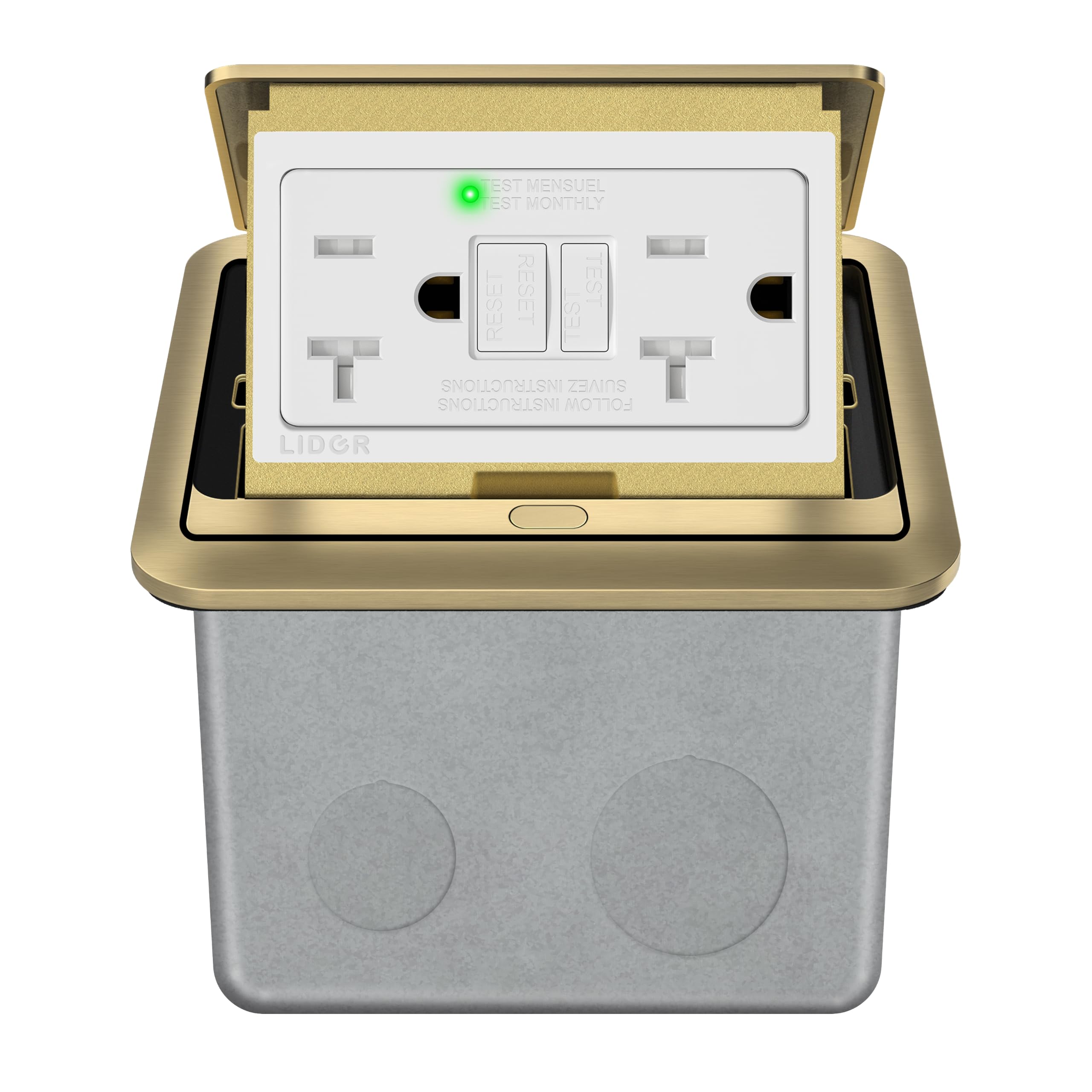
Image: The LIDER Soft Pop-Up Floor Box in its open, ready-to-use state.
Closing the Floor Box:
When not in use, press down firmly on the top of the receptacle unit until it retracts and the cover sits flush with the floor surface. The mechanism is designed for a secure, low-profile closure.

Image: The LIDER Soft Pop-Up Floor Box in its closed position, blending seamlessly with the floor.
GFCI Testing:
For continued safety, test the GFCI receptacle monthly:
- Plug a lamp or other device into the GFCI receptacle and turn it on.
- Press the “TEST” button on the GFCI. The device should turn off, and the “RESET” button should pop out.
- Press the “RESET” button. The device should turn back on.
- If the device does not turn off when the “TEST” button is pressed, or does not turn back on when the “RESET” button is pressed, the GFCI is not functioning correctly. Discontinue use and consult a qualified electrician.
Maintenance
The LIDER Soft Pop-Up Floor Box Kit requires minimal maintenance.
- Cleaning: Clean the surface of the floor box with a soft, damp cloth. Avoid abrasive cleaners or solvents that may damage the finish. Ensure the unit is closed and dry before cleaning.
- Regular Inspection: Periodically inspect the unit for any signs of damage, loose connections, or wear. If any issues are found, disconnect power and have the unit inspected by a qualified electrician.
- GFCI Testing: Perform the GFCI test monthly as described in the Operating Instructions to ensure proper function.
Troubleshooting
If you encounter issues with your LIDER Soft Pop-Up Floor Box Kit, refer to the following common problems and solutions:
| Problem | Possible Cause | Solution |
|---|---|---|
| GFCI trips frequently or won't reset. | Ground fault detected; overloaded circuit; faulty GFCI. | Unplug all devices and press RESET. If it holds, plug devices back in one by one to identify the faulty device. If it still trips, reduce load on the circuit. If the problem persists, the GFCI may be faulty and needs replacement by a qualified electrician. |
| No power from outlets. | Circuit breaker tripped; GFCI tripped; loose wiring connection. | Check and reset the circuit breaker. Press the RESET button on the GFCI. If neither resolves the issue, disconnect power and check wiring connections. Consult a qualified electrician if unsure. |
| Pop-up mechanism is stiff or not opening/closing smoothly. | Debris in mechanism; lack of lubrication; internal damage. | Ensure the area around the mechanism is clean and free of obstructions. Avoid forcing the mechanism. If the issue persists, contact customer support. |
Specifications
- Brand: LIDER
- Model: LSFB-20PD20AC
- Amperage: 20 A
- Voltage: 125V AC (Standard North American)
- Receptacle Type: GFCI Duplex, Tamper-Resistant
- Trip Level: 5mA
- Material: Galvanized Steel Enclosure, Stainless Steel / Brushed Brass Cover
- Product Dimensions (Box): 3-15/16” L × 3-15/16” W × 3” H
- Cover Dimensions: 3.94"W x 3.13"L
- Connector Type: Plug-in
- Total Power Outlets: 2
- Safety Certification: ETL Listed
- IP Rating: IP44 Splash-proof (when closed)

Image: The LIDER Soft Pop-Up Floor Box features an IP44 splash-proof design when closed.
Warranty and Support
Warranty:
This LIDER Soft Pop-Up Floor Box Kit is backed by a 3-year warranty from the date of purchase. This warranty covers defects in materials and workmanship under normal use. It does not cover damage resulting from improper installation, misuse, abuse, or unauthorized modifications.
Customer Support:
For technical assistance, warranty claims, or any questions regarding your LIDER product, please contact LIDER ELECTRIC INC customer service. Refer to your purchase documentation or the LIDER website for current contact information.