
1. Introduction
Thank you for choosing the DATOUBOSS 6300W Solar Hybrid Inverter. This all-in-one unit integrates a pure sine wave inverter, a dual MPPT solar charge controller, and a battery charger, designed to provide reliable power for homes, RVs, cabins, and off-grid applications. This manual provides essential information for the safe installation, operation, and maintenance of your inverter. Please read it thoroughly before installation and keep it for future reference.
The DATOUBOSS 6300W Hybrid Solar Inverter (Model 4863U) is compatible with 48V battery systems, including Lithium-ion, LiFePO4, AGM, Gel, and Flooded batteries, and supports high PV input voltage up to 500V DC for efficient energy management.
2. Important Safety Instructions
Please read all instructions and cautionary markings on the unit and in this manual before installation and operation. Failure to follow these instructions may result in electric shock, fire, or severe injury.
- Electrical Safety: All electrical installations must be performed by qualified personnel in accordance with local electrical codes.
- Battery Safety: Work with batteries can be hazardous. Wear appropriate personal protective equipment (PPE) including eye protection and gloves. Do not short-circuit battery terminals.
- Ventilation: Ensure adequate ventilation around the inverter to prevent overheating. Do not block ventilation openings.
- Environment: Install the inverter in a dry, well-ventilated area, away from direct sunlight, heat sources, and flammable materials. Avoid exposure to moisture or corrosive substances.
- Grounding: The inverter must be properly grounded.
- Disconnection: Before performing any maintenance or wiring, ensure all power sources (PV, utility, battery) are disconnected.
3. Product Overview
The DATOUBOSS 6300W Solar Hybrid Inverter is designed for efficient energy conversion and management. It combines multiple functions into a single compact unit.
Key Features:
- Integrated 6300W pure sine wave inverter, dual MPPT solar charge controller, and battery charger.
- High PV input voltage support up to 500V DC.
- Stable 110V/120V AC pure sine wave output for sensitive electronics.
- Advanced dual MPPT technology with up to 98% conversion efficiency.
- Compatible with 48V Lithium-ion, LiFePO4, AGM, Gel, and Flooded batteries.
- Supports operation with or without battery during daytime (PV start voltage ≥120V DC).
- Large LCD screen for real-time monitoring and easy configuration.
- Multiple charging and output modes (Solar First, Utility First, Hybrid Charging, SBU Priority, Utility Priority, Solar Priority).
- Comprehensive protection systems: overload, over-temperature, short circuit, over-voltage, low-voltage.
Product Diagram:
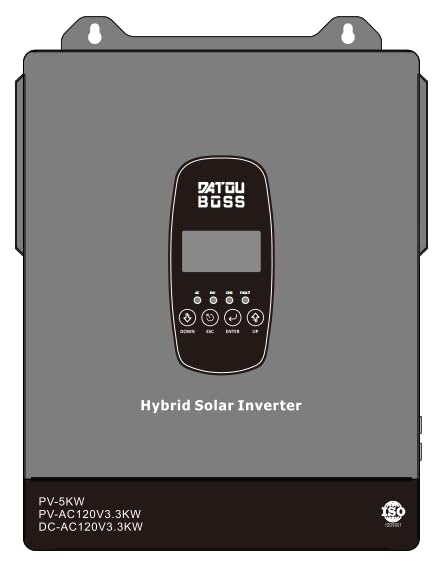
Figure 3.1: Front view of the DATOUBOSS 6300W Solar Hybrid Inverter, showing the LCD display and various connection ports. This image illustrates the compact design of the integrated unit.
4. Setup and Installation
Proper installation is crucial for the safe and efficient operation of your inverter. Ensure all safety precautions are followed.
4.1 Unpacking and Inspection
- Carefully unpack the inverter and check for any shipping damage.
- Verify that all accessories are included as per the packing list.
- If any damage or missing parts are found, contact your dealer immediately.
4.2 Mounting the Inverter
- Choose a suitable mounting location: vertical wall mount, indoors, well-ventilated, protected from direct sunlight and moisture.
- Ensure sufficient clearance (at least 20 cm) around the inverter for proper airflow.
- Use appropriate screws and anchors to securely mount the inverter to a sturdy surface.
4.3 Wiring Connections
WARNING: Before making any connections, ensure all power sources (PV array, utility grid, battery) are disconnected and secured against accidental reconnection.
- Battery Connection:
- Connect the 48V battery bank to the inverter's battery terminals. Ensure correct polarity (+ to + and - to -).
- Use appropriately sized cables and fuses/breakers for battery protection.
- PV Array Connection:
- Connect the solar panel array to the PV input terminals. Observe correct polarity.
- Ensure the PV input voltage (Voc) does not exceed the inverter's maximum PV input voltage (500V DC).
- AC Input (Utility/Generator) Connection:
- Connect the utility grid or generator AC input to the inverter's AC input terminals.
- Install an external AC breaker for protection.
- AC Output (Load) Connection:
- Connect your AC loads to the inverter's AC output terminals.
- Ensure the total load does not exceed the inverter's rated output power.
- Grounding:
- Connect the inverter's ground terminal to a reliable earth ground.
5. Operating Instructions
Once installed, the inverter can be powered on and configured for optimal performance.
5.1 Initial Startup
- Ensure all wiring connections are secure and correct.
- Turn on the battery breaker first.
- Turn on the AC input breaker (if connected to utility/generator).
- Turn on the PV array breaker (if connected to solar panels).
- Press and hold the ON/OFF button on the inverter for a few seconds to power it on.
- The LCD display will illuminate, showing system status.
5.2 LCD Display and Button Functions
The large LCD screen provides real-time monitoring of system parameters. Use the function buttons to navigate menus and configure settings.
- Display: Shows input/output voltage, power, battery status, charging current, operating mode, and error codes.
- Buttons: Typically include UP, DOWN, ENTER, and ESC/ON/OFF for navigation and selection. Refer to the on-screen menu for specific button functions in different modes.
5.3 Configuration Settings
The inverter allows customization of various parameters to optimize performance for your specific setup.
- Charging Current: Adjust the maximum charging current for your battery type (up to 100A/120A+).
- Output Priority: Set the priority for AC output source (e.g., Solar First, Utility First, SBU Priority).
- Charging Mode: Select how batteries are charged (e.g., Solar First, Utility First, Hybrid Charging).
- Battery Type: Configure settings for Lithium-ion, LiFePO4, AGM, Gel, or Flooded batteries.
Detailed instructions for navigating the menu and adjusting these settings are available on the inverter's LCD display. Consult the on-screen prompts for precise parameter adjustments.
5.4 Operating Modes
The inverter supports various operating modes to manage power flow efficiently:
- Solar First: Prioritizes solar power for loads and battery charging. Utility power is used only when solar is insufficient.
- Utility First: Prioritizes utility power for loads and battery charging. Solar power is used as a secondary source.
- SBU Priority (Solar-Battery-Utility): Loads are powered by solar, then battery, then utility.
- Hybrid Charging: Combines solar and utility charging for batteries.
6. Maintenance
Regular maintenance ensures the longevity and optimal performance of your DATOUBOSS inverter.
- Cleaning: Periodically clean the inverter's exterior with a dry cloth. Ensure ventilation openings are free from dust and debris.
- Connections: Annually inspect all wiring connections for tightness and corrosion. Re-tighten if necessary.
- Battery Inspection: For lead-acid batteries, check electrolyte levels and terminal condition regularly. Follow battery manufacturer's maintenance guidelines.
- Environment: Ensure the installation environment remains within specified temperature and humidity ranges.
7. Troubleshooting
This section provides solutions to common issues you might encounter. If the problem persists, contact customer support.
| Symptom | Possible Cause | Solution |
|---|---|---|
| Inverter does not power on. | Battery voltage too low; battery disconnected; power button not pressed correctly. | Check battery connections and voltage; ensure battery breaker is on; press and hold ON/OFF button. |
| No AC output. | Overload; short circuit; battery low; inverter in fault mode. | Reduce load; check for short circuits; charge battery; check LCD for error codes and clear fault. |
| PV charging not working. | PV panels disconnected; PV voltage too low/high; MPPT fault. | Check PV connections and voltage; ensure panels are receiving sunlight; check LCD for PV-related errors. |
| Overload warning. | Connected loads exceed inverter's capacity. | Disconnect some loads immediately. The inverter may automatically restart after a cool-down period. |
8. Technical Specifications
Below are the key technical specifications for the DATOUBOSS 6300W Solar Hybrid Inverter (Model 4863U).
| Parameter | Value |
|---|---|
| Brand | DATOUBOSS |
| Model Number | 4863U |
| Power Source | Solar and Battery Powered |
| Wattage | 6300 watts |
| Output Voltage | 110V/120V AC Pure Sine Wave |
| Battery Voltage | 48V DC |
| Max PV Input Voltage | 500V DC |
| MPPT Efficiency | Up to 98% |
| Max Charging Current | 80A (Dual MPPT) / 100A-120A+ (overall) |
9. Warranty Information
The DATOUBOSS 6300W Solar Hybrid Inverter (Model 4863U) comes with a 1-year warranty from the date of purchase. This warranty covers defects in materials and workmanship under normal use.
The warranty does not cover damage caused by improper installation, misuse, neglect, unauthorized modifications, or acts of nature. Please retain your proof of purchase for warranty claims.
10. Customer Support
For technical assistance, troubleshooting, or warranty inquiries, please contact DATOUBOSS customer support. You can find contact information on the official DATOUBOSS website or through your point of purchase.
For more information, you may also visit the DATOUBOSS Store on Amazon.


