
1. Important Safety Instructions
Please read all instructions carefully before using this dehumidifier. Failure to follow these instructions may result in electric shock, fire, or serious injury.
- Always place the dehumidifier on a stable, level surface.
- Do not operate the unit with a damaged cord or plug. If the cord or plug is damaged, contact customer support.
- Keep the unit away from water and other liquids. Do not immerse the unit in water.
- Ensure proper ventilation. Do not block air inlets or outlets.
- Unplug the unit before cleaning or performing any maintenance.
- This appliance is not intended for use by persons (including children) with reduced physical, sensory, or mental capabilities, or lack of experience and knowledge, unless they have been given supervision or instruction concerning use of the appliance by a person responsible for their safety.
- Do not use the dehumidifier in areas where flammable gases or liquids are stored.
2. Product Overview
The OWAAE Dehumidifier TZ-C4S is designed to effectively reduce excess moisture in your home, creating a more comfortable and healthier environment. It features quiet operation, an automatic shut-off function, and a 7-color LED ambient light.
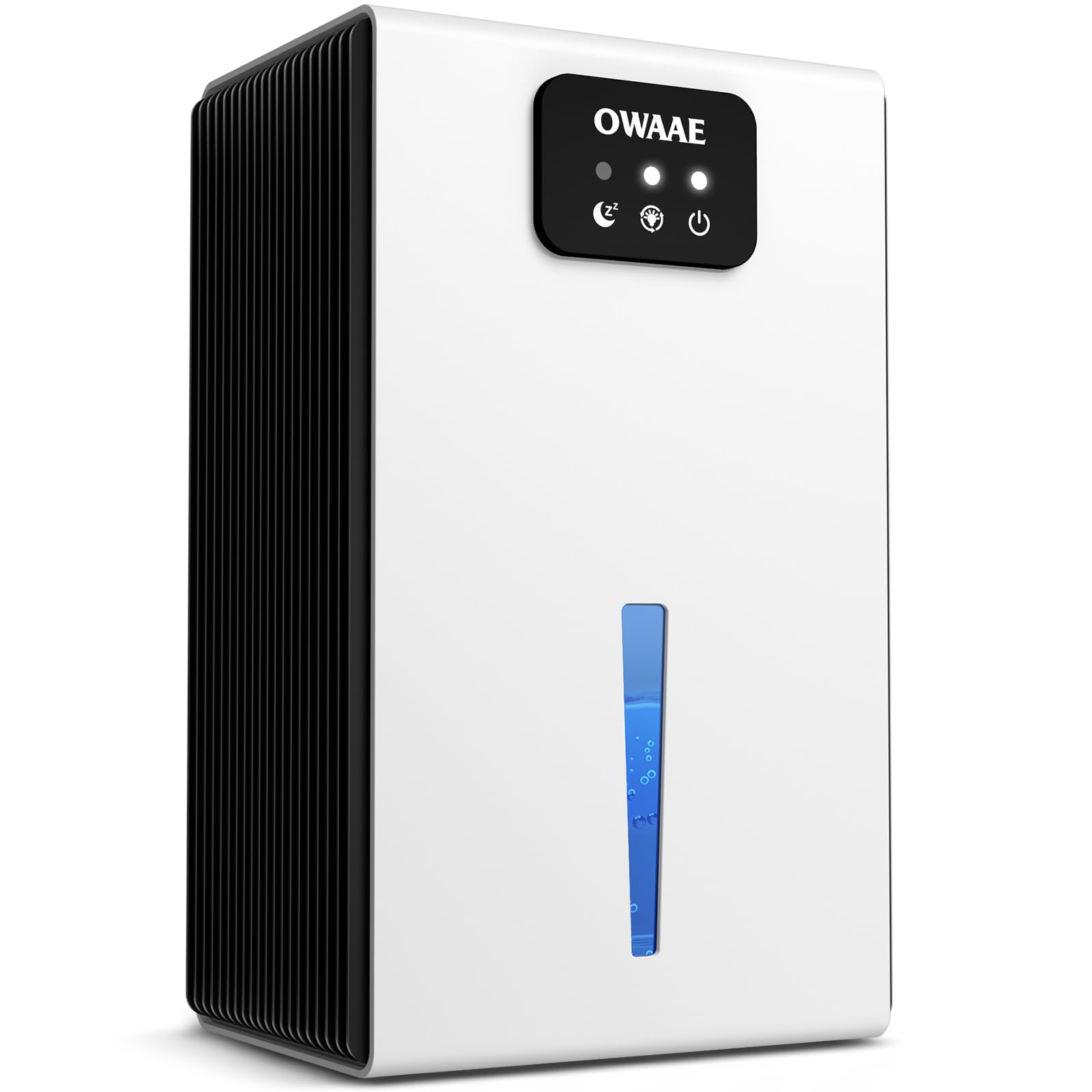
Image: OWAAE Dehumidifier TZ-C4S in a living room setting, demonstrating effective humidity reduction.

Image: Front view of the OWAAE Dehumidifier TZ-C4S.
3. Package Contents
Please check the package for the following items:
- OWAAE Dehumidifier Unit (Model TZ-C4S)
- User Manual
4. Controls and Display
The control panel is located on the top front of the unit. It features touch-sensitive buttons for easy operation.

Image: Control panel of the dehumidifier.
- Power Button (
 ): Turns the unit on or off.
 - Sleep Mode Button (
 ): Activates or deactivates sleep mode for quieter operation.
 - Light Button (
 ): Controls the 7-color LED ambient light.
5. Setup
- Unpack the Unit: Carefully remove the dehumidifier from its packaging. Retain the packaging for future storage or transport.
- Choose a Location: Place the dehumidifier on a firm, level surface in the desired area. Ensure there is at least 4 inches (10 cm) of space around the air inlets and outlets for proper airflow. Avoid placing it near heat sources or in direct sunlight.
- Connect Power: Plug the power cord into a suitable electrical outlet. The unit is now ready for operation.

Image: Side view of the dehumidifier, illustrating its compact design suitable for various placements.
6. Operating Instructions
6.1 Power On/Off
- To turn the unit ON, press the Power Button once. The indicator light will illuminate.
- To turn the unit OFF, press the Power Button again. The indicator light will turn off.
6.2 Normal Dehumidification
Once powered on, the dehumidifier will begin operating in normal mode, actively removing moisture from the air. The unit is designed for effective moisture control in areas up to 1000 sq ft.
6.3 Sleep Mode
For quiet operation during nighttime or in noise-sensitive environments:
- Press the Sleep Mode Button to activate. The unit will operate at a reduced noise level (under 30 dB), and indicator lights will dim or turn off to avoid disturbance.
- Press the Sleep Mode Button again to exit sleep mode.
Image: Dehumidifier operating in quiet sleep mode.
6.4 7-Color LED Ambient Light
The unit features an integrated 7-color LED light for ambient illumination:
- Press the Light Button once to cycle through the 7 colors.
- Press the Light Button a second time to lock the current color.
- Press the Light Button a third time to turn the LED light off.
Image: Dehumidifier showcasing its 7-color LED ambient light.
6.5 Automatic Shut-Off
For safety and convenience, the dehumidifier is equipped with an automatic shut-off feature:
- The unit will automatically stop operation when the water tank is full. The indicator light for the water tank will illuminate, and the unit will beep.
- The unit will also shut off if the water tank is improperly positioned or removed.
- Empty and correctly reinsert the water tank to resume operation.

Image: Dehumidifier indicating automatic shut-off when the water tank is full.
Video: An overview of the OWAAE Dehumidifier's features and operation, demonstrating its effectiveness in drying your home.
7. Maintenance
7.1 Emptying the Water Tank
When the water tank is full, the unit will automatically shut off. Follow these steps to empty it:
- Turn off the dehumidifier and unplug it from the power outlet.
- Carefully pull out the water tank from the back of the unit.
- Empty the collected water into a sink or drain.
- Rinse the water tank with clean water if necessary. Do not use harsh chemicals or abrasive cleaners.
- Carefully slide the empty water tank back into the unit until it clicks into place. Ensure it is properly seated to prevent leaks and allow the unit to resume operation.
- Plug the unit back in and turn it on.

Image: Back view of the dehumidifier, highlighting the water tank's location.

Image: Illustration of easy water tank removal.
7.2 Cleaning the Unit
Regular cleaning helps maintain the dehumidifier's efficiency:
- Exterior Cleaning: Wipe the exterior of the unit with a soft, damp cloth. Do not use abrasive cleaners or solvents.
- Air Inlets/Outlets: Use a soft brush or vacuum cleaner attachment to gently remove dust and debris from the air inlets and outlets.
8. Troubleshooting
If you encounter any issues with your dehumidifier, please refer to the following table before contacting customer support.
| Problem | Possible Cause | Solution |
|---|---|---|
| Dehumidifier does not turn on. | No power supply. | Ensure the power cord is securely plugged into a working outlet. Check the circuit breaker. |
| Dehumidifier not collecting water. | Humidity level is too low. | The unit will only collect water if the ambient humidity is above 45%. |
| Water tank is full or improperly installed. | Empty the water tank and ensure it is correctly reinserted. | |
| Unit is noisy. | Unit is not on a level surface. | Place the unit on a flat, stable surface. |
| Air inlets/outlets are blocked. | Clear any obstructions from the air inlets and outlets. | |
| LED light not working. | Light function is turned off. | Press the Light Button to cycle through colors or turn it on. |
9. Specifications
| Feature | Detail |
|---|---|
| Brand | OWAAE |
| Model Name | TZ-C4S |
| Product Dimensions (D x W x H) | 7.8"D x 4.9"W x 13.3"H |
| Capacity | 95 fluid ounces (water tank) |
| Floor Area Coverage | Up to 1000 sq ft |
| Special Features | Quiet Operation, Auto Shut-Off, 7-color LED light |
| Operation Mode | Automatic |
| Color | White |
10. Warranty and Support
OWAAE products are designed for reliability and performance. For warranty information or technical support, please refer to the contact details provided with your purchase documentation or visit the official OWAAE website. Please have your model number (TZ-C4S) and purchase date available when contacting support.