
Product Overview
The Jocoevol L Shaped Gaming Desk Model C-2022 is designed for both gaming and home office use, offering a spacious and versatile workspace. Key features include a reversible L-shaped design, an LED-lit tempered glass display cabinet, integrated power outlets, and fabric storage drawers. This manual provides detailed instructions for assembly, operation, and maintenance to ensure optimal use of your desk.
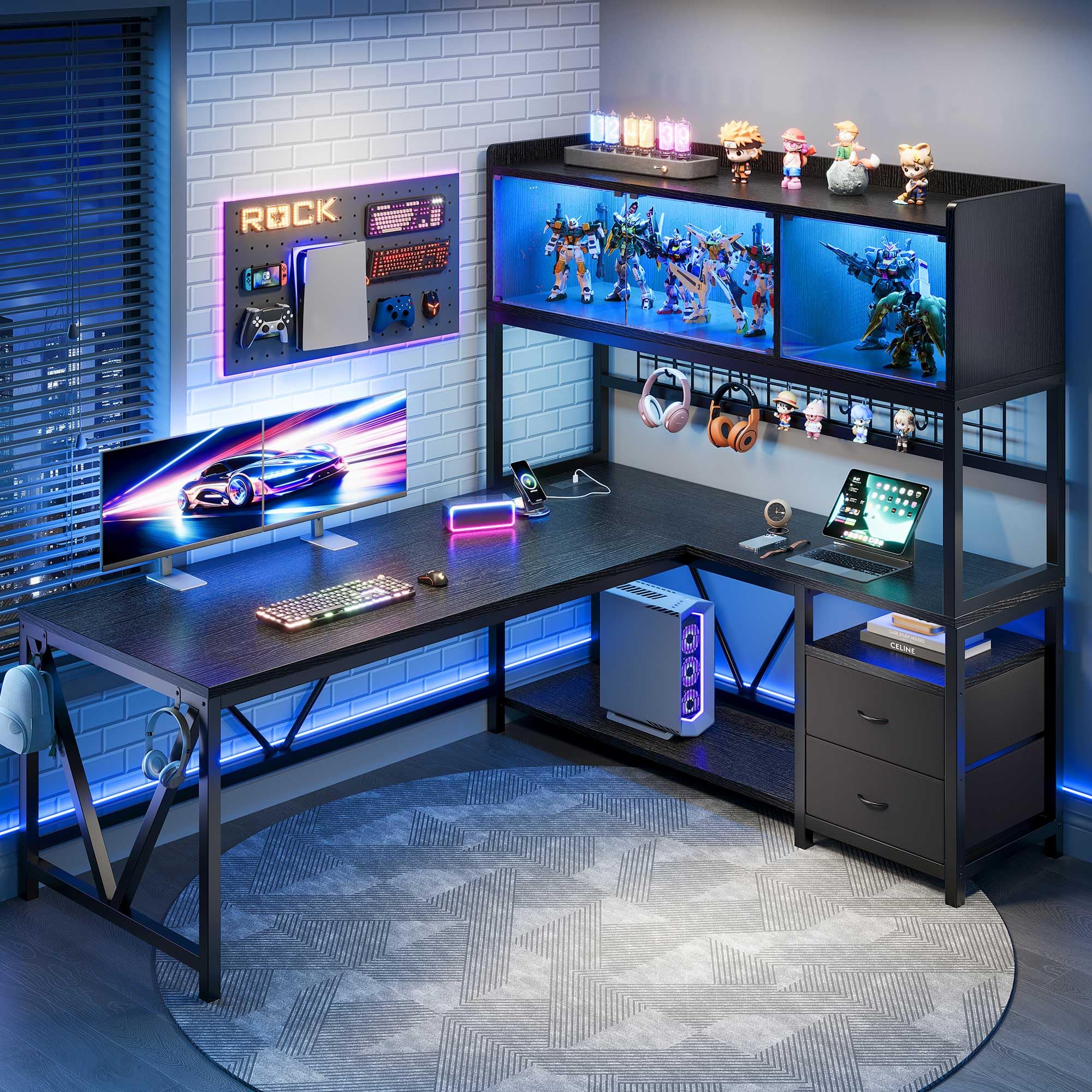
Figure 1: Overall view of the Jocoevol L Shaped Gaming Desk.
Safety Information
Please read all instructions carefully before assembly and use. Keep this manual for future reference. Ensure all components are securely fastened before placing items on the desk. Do not overload the desk or shelves. Keep liquids away from electrical components.
- Do not stand or sit on the desk.
- Use only the provided hardware for assembly.
- Keep small parts away from children during assembly.
- Ensure the desk is placed on a level surface.
Package Contents
Before beginning assembly, verify that all parts listed below are present and undamaged. If any parts are missing or damaged, please contact customer support.
- Desk panels (desktop, shelves, cabinet panels)
- Metal frame components (legs, supports)
- Fabric drawers
- LED light strip and controller
- Power outlet unit
- Assembly hardware (screws, bolts, tools)
- Instruction manual
Setup Instructions
Assembly of the Jocoevol L Shaped Gaming Desk requires two people and approximately 1-2 hours. Follow the step-by-step instructions provided with your product. All parts are labeled for easy identification.
1. Unpacking and Preparation
- Clear a spacious area for assembly.
- Carefully unpack all components and lay them out on a soft, clean surface to prevent scratches.
- Identify all parts using the provided parts list.
2. Frame Assembly
Begin by assembling the metal frame components. Ensure all screws are tightened securely but do not overtighten until the entire frame is assembled.

Figure 2: Illustration of the desk's high-density metal frame with rust-resistant coating.
3. Desktop and Shelf Installation
Attach the desktop panels and shelves to the assembled frame. Note that the L-shaped design is reversible, allowing the display cabinet section to be installed on either the left or right side to suit your room layout.

Figure 3: Product dimensions and reversible configuration options.
4. Display Cabinet and LED Light Installation
Install the tempered glass display cabinet. Carefully attach the LED light strip inside the cabinet according to the separate LED light manual. Ensure all wiring is neatly routed and secured.

Figure 4: Detail of the pop-up glass doors for the display cabinet.
5. Power Outlet and Drawer Installation
Integrate the built-in power outlet into its designated slot. Connect it to a wall outlet. Insert the fabric drawers into their respective compartments.
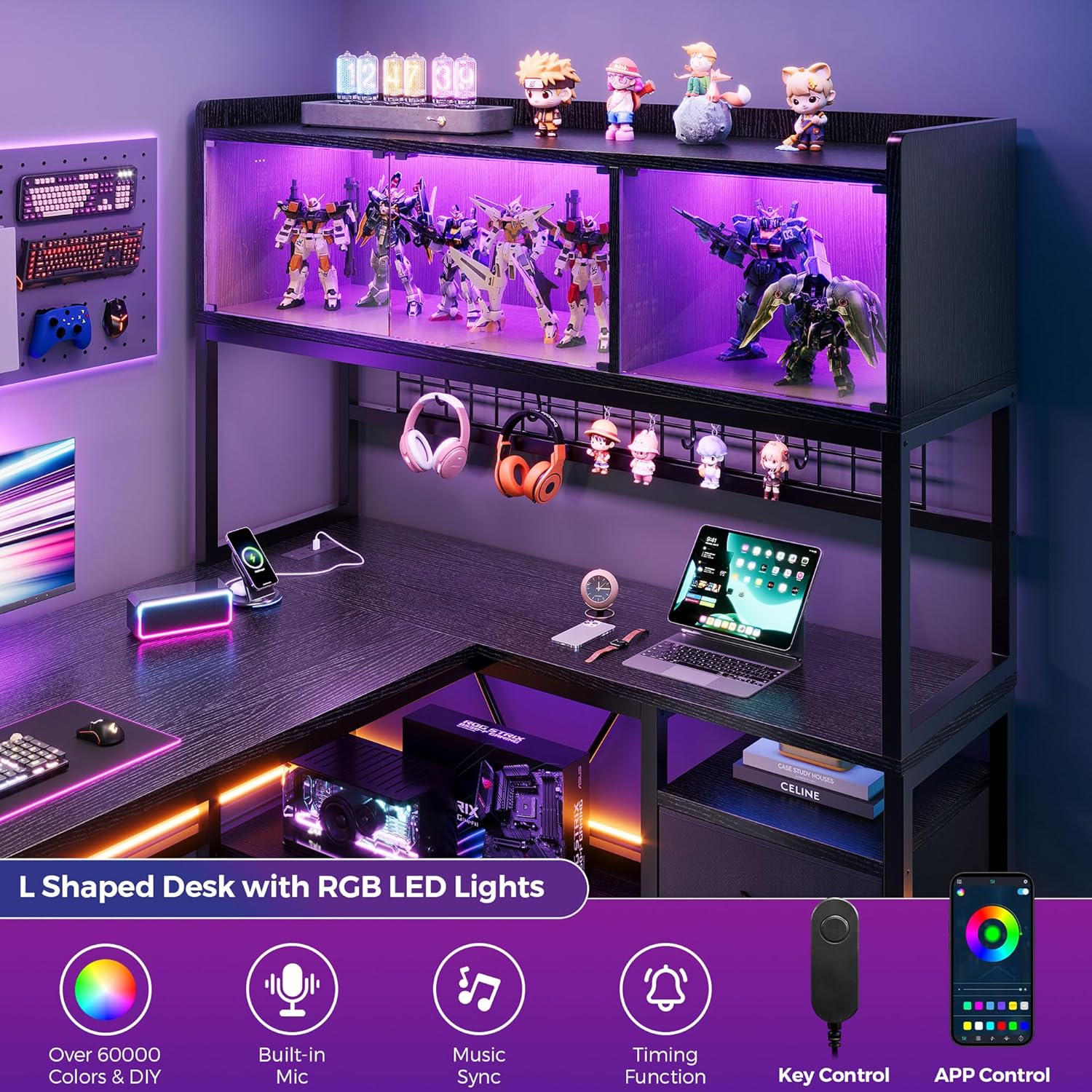
Figure 5: Integrated power strip with AC and USB/Type-C ports.

Figure 6: Fabric storage drawers for various document sizes.
Operating Instructions
LED Lighting System
The LED lights in the display cabinet can be controlled via a remote control or a dedicated smartphone application. Refer to the separate LED light manual for detailed instructions on pairing and operating the lights.
- Power On/Off: Use the power button on the remote or in the app.
- Color Selection: Choose from over 60,000 colors or create custom DIY colors.
- Music Sync: Activate music synchronization mode for lights to react to audio.
- Timing Function: Set schedules for the lights to turn on or off automatically.

Figure 7: LED lighting features and control options.
Integrated Power Outlet
The desk includes a built-in power strip with 2 AC outlets, 1 USB-A port, and 1 USB-C port. Plug your computer, monitor, and other devices directly into these outlets for convenient power access.
- Ensure the desk's main power cord is securely plugged into a wall outlet.
- Do not exceed the maximum power rating of the integrated power strip.
Storage Drawers
The two fabric drawers provide storage for documents and accessories. They are designed to accommodate Legal, A4, and Letter size files.
- Pull the handle to open the drawer.
- Push firmly to close.
- Avoid overloading drawers to ensure smooth operation.
Tempered Glass Display Cabinet
The display cabinet features pop-up glass doors. Gently press the door to open or close it. This design eliminates the need for external handles.

Figure 8: Display cabinet in use, showing items illuminated by LED lights.
Maintenance
Cleaning
The desk's wood grain desktop is waterproof and easy to clean. For general cleaning:
- Wipe surfaces with a soft, damp cloth.
- Avoid abrasive cleaners or harsh chemicals that may damage the finish.
- For glass surfaces, use a glass cleaner and a microfiber cloth.
Inspections
Periodically check all screws and connections to ensure they remain tight. Retighten if necessary to maintain stability.
Troubleshooting
LED Lights Not Working
- Check if the LED light strip is properly connected to its power source.
- Ensure the remote control has working batteries.
- Verify the LED controller is receiving power.
- If using the app, ensure Bluetooth connection is active and the app is correctly paired.
Power Outlets Not Functioning
- Confirm the desk's main power cord is securely plugged into a live wall outlet.
- Check if the wall outlet itself is working by plugging in another device.
- Ensure no circuit breaker has tripped.
Desk Instability
- Ensure all assembly screws and bolts are fully tightened.
- Verify the desk is placed on a flat, level surface.
- Adjust any leveling feet if present.
Specifications
| Feature | Detail |
|---|---|
| Brand | Jocoevol |
| Model Number | C-2022 |
| Shape | Rectangular (L-Shape configuration) |
| Product Dimensions (D x W x H) | 43.3"D x 54.3"W x 63"H |
| Color | Black |
| Style | Modern |
| Base Material | Metal |
| Top Material Type | Engineered Wood |
| Special Features | Open shelves, 2 display cabinets, 2 Storage Drawers, Built-in Outlet, Built-in USB Port |
| Number of Drawers | 2 (Fabric, File Drawer type) |
| Number of Shelves | 2 |
| Number of Cabinets | 1 (with tempered glass doors) |
| Item Weight | 82 Pounds |
| Required Assembly | Yes |
| Recommended Uses | Gaming, Home Office |
Warranty and Support
For any questions, missing parts, or assistance with assembly, please contact Jocoevol customer support. Information regarding returns and protection plans can be found on the product's purchase page.
- Returns: This product is eligible for 30-day easy returns through Amazon.com.
- Protection Plans: Optional 2-Year or 3-Year Protection Plans are available for purchase.
- Customer Support: Refer to your purchase platform for direct contact information for Jocoevol or Amazon customer service.