
1. Product Overview
This manual provides instructions for the FNTCASE protective case designed for the Samsung Galaxy Z Flip 8 (6.9 Inch, 2026 release). This case offers comprehensive protection including a built-in screen protector, hinge protection, a 360-degree rotatable belt clip, and an integrated kickstand.
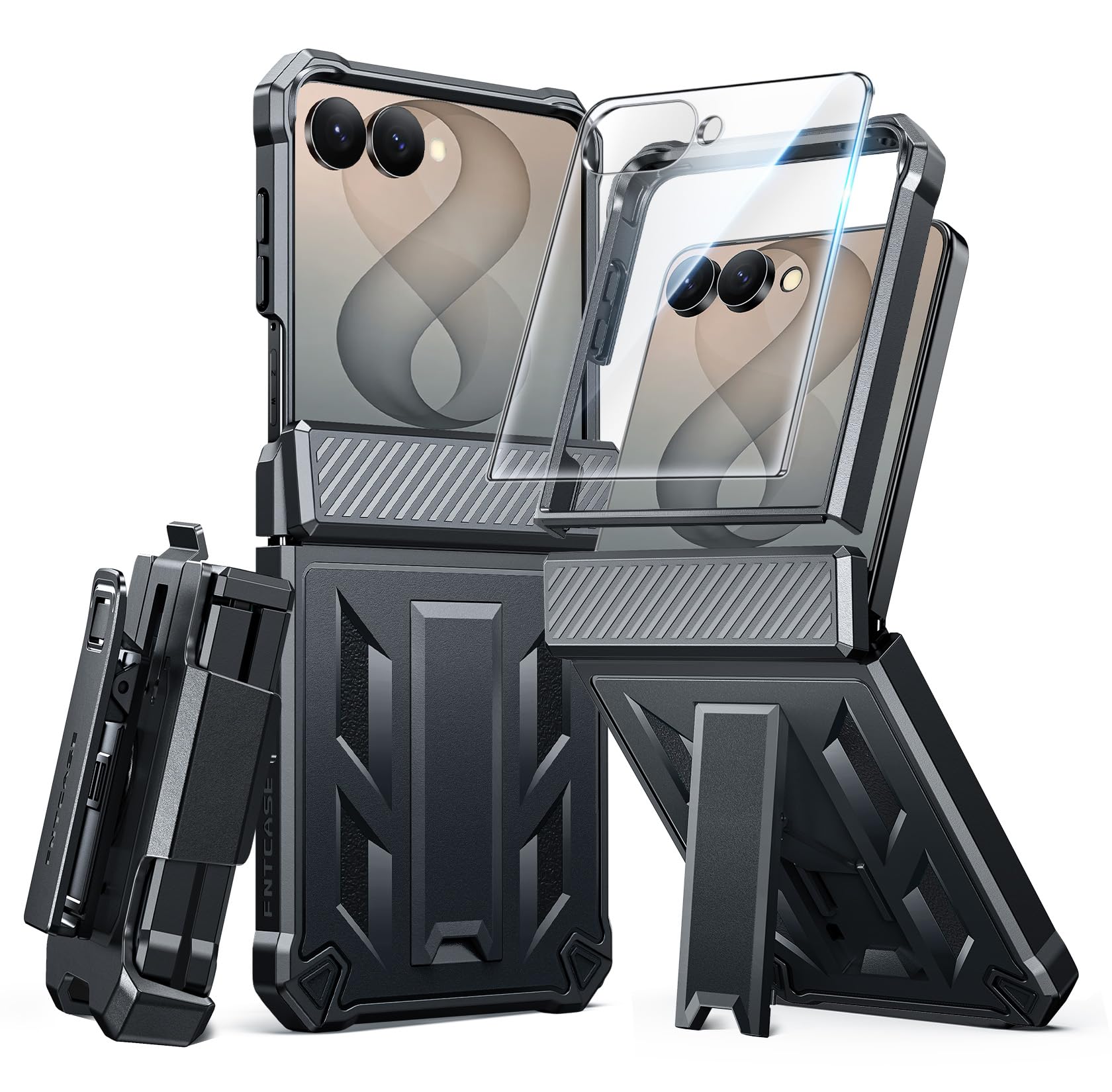
Image: The FNTCASE protective case for Samsung Galaxy Z Flip 8, showcasing its rugged design.
2. Package Contents
- FNTCASE Protective Case for Samsung Galaxy Z Flip 8
- Detachable Belt Clip Holster
- Built-in Screen Protector (integrated into the front frame)
3. Setup and Installation
Follow these steps to properly install your FNTCASE on your Samsung Galaxy Z Flip 8:
- Prepare Your Device: Ensure your Samsung Galaxy Z Flip 8 is clean and free of dust or debris. If you have an existing screen protector, it is recommended to remove it for optimal fit and touch sensitivity with the case's built-in screen protector.
- Separate Case Components: The case consists of a front frame with an integrated screen protector and a rugged back cover with hinge protection and a kickstand. Carefully separate these two parts.
- Install Front Frame: Place your Samsung Galaxy Z Flip 8 into the front frame component, ensuring all edges and corners are securely seated. The built-in screen protector should align perfectly with your phone's screen.
- Attach Back Cover: Align the front frame (with your phone inside) with the rugged back cover. Snap the two components together, starting from one side and working your way around, ensuring all clips engage securely.
- Verify Installation: Check that the case is fully closed around your phone, with no gaps. Test all buttons and port cutouts to ensure they are accessible and functional.

Image: Illustration of placing the phone into the front frame of the case.

Image: Diagram showing the separate components of the case and how they fit together.
4. Operating Features
4.1. Built-In Kickstand
The integrated kickstand allows for hands-free viewing in both portrait and landscape orientations.
- To Deploy: Gently pull out the kickstand from the back of the case until it locks into position.
- To Retract: Push the kickstand back into its recess until it sits flush with the case.

Image: The case with its kickstand deployed, demonstrating vertical and horizontal viewing angles.
4.2. 360° Rotatable Belt Clip Holster
The detachable belt clip holster provides convenient carrying options.
- Attaching the Holster: Slide the phone (in its case) into the holster until it clicks securely.
- Rotating the Clip: The belt clip can rotate 360 degrees. Adjust it to your preferred angle for carrying on a belt, backpack strap, or other secure points.
- Detaching the Holster: Press the release tab on the holster and slide the phone out.

Image: A person using the belt clip holster, showing its versatility for attachment to a belt or backpack.
4.3. Hinge Protection and Screen Protector
The case features a robust hinge protector and an integrated screen protector for comprehensive device safety.
- The hinge protector automatically covers the phone's hinge when folded, shielding it from impacts and scratches.
- The built-in screen protector offers sensitive touch performance while guarding against accidental scratches and impacts to the main display.

Image: Close-up view of the case highlighting the raised bezels for screen and lens protection, and the hinge protector.
5. Maintenance
To ensure the longevity and effectiveness of your FNTCASE, follow these maintenance guidelines:
- Cleaning: Regularly wipe the case with a soft, damp cloth to remove dust and grime. For stubborn dirt, a mild soap solution can be used. Avoid harsh chemicals or abrasive cleaners, as these can damage the case material or screen protector.
- Inspection: Periodically inspect the case for any signs of wear, cracks, or damage, especially after significant drops or impacts. A damaged case may not provide optimal protection.
- Screen Protector Care: Keep the built-in screen protector clean to maintain touch sensitivity and clarity. Avoid sharp objects that could scratch its surface.
6. Troubleshooting
If you encounter any issues with your FNTCASE, consider the following:
- Case Not Fitting Properly: Ensure your phone model is indeed the Samsung Galaxy Z Flip 8 (6.9 Inch). Double-check that all case components are correctly aligned and snapped together. Remove any existing screen protectors on your phone before installing the case.
- Reduced Touch Sensitivity: If the built-in screen protector affects touch sensitivity, ensure there is no dust or air bubbles between the phone screen and the protector. Re-installing the case carefully might resolve this.
- Belt Clip Issues: If the belt clip feels loose or does not rotate smoothly, check for any obstructions or damage. Ensure it is securely attached to the holster.
For further assistance, please contact FNTCASE customer support.
7. Specifications
| Feature | Detail |
|---|---|
| Brand | FNTCASE |
| Compatible Phone Models | Samsung Galaxy Z Flip 8, Samsung Galaxy Z Flip 8 (2026), Samsung Galaxy Z Flip 8 (6.9inch) |
| Material | Thermoplastic Polyurethane (TPU) |
| Color | Black |
| Fastener Type | Clip On |
| Built-In Media | Belt Clip, Kickstand |
| Drop Protection | 20FT Military Grade Drop Proof |
| Special Features | Hinge Protection, Screen Protector, 360 Rotatable Belt Clip, Built-In Kickstand |
8. Warranty and Support
Warranty: This FNTCASE product comes with a 12-month warranty from the date of purchase. This warranty covers manufacturing defects and material flaws under normal use. It does not cover damage caused by misuse, accidents, or unauthorized modifications.
Customer Support: For any questions, concerns, or warranty claims, please visit the official FNTCASE store on Amazon or contact their customer service directly.

