
EZVALO B0GYW2YVZM
Contents
EZVALO 13-inch Under Cabinet Lighting with Charging Station User Manual
Model: B0GYW2YVZM
1. Introduction
Thank you for choosing the EZVALO 13-inch Under Cabinet Lighting with Charging Station. This manual provides essential information for the safe and efficient operation of your new lighting system. Please read it thoroughly before use and retain it for future reference.
What's in the Box:
- 6 x 13 inch LED Closet Lights
- 12 x Adhesive Iron Sheets
- 1 x Multi-Device Charging Station
- 1 x Remote Control
- 1 x Instruction Manual (this document)
2. Important Safety Information
- Do not disassemble or modify the product.
- Keep the product away from water and high humidity. This product is not water-resistant.
- Do not expose the product to direct sunlight or high temperatures.
- Use only the provided charging station and compatible USB-C cables for charging.
- Keep out of reach of children.
- Ensure the installation surface is clean and dry before applying adhesive.
3. Product Overview
The EZVALO Under Cabinet Lighting system provides versatile illumination with motion sensing, adjustable color temperatures, dimming, and convenient remote control, all powered by a central charging station.
Key Features:
- Motion Sensor: Detects motion within 10 ft and a 120° field, with automatic on/off after 20 seconds of no movement.
- Three Lighting Modes: Night Motion, All-Day Motion, and Always-On.
- Adjustable Color Temperature: Choose from Warm White (3000K), Natural White (4500K), or Cool White (6500K).
- Stepless Dimming: Adjust brightness from 0% to 100%.
- Long Battery Life: 3200mAh rechargeable battery provides extended use.
- 3-Slot USB-C Charging Station: Powers up to 3 lights simultaneously and can charge other USB devices.
- Remote Control: Adjust settings from up to 16 ft away, including timers (15/30/60/90/120 minutes).
- Magnetic Installation: Built-in magnets for metal surfaces or use 3M adhesive for other surfaces.
Product Components:

Image 3.1: Overview of the EZVALO 13-inch Under Cabinet Light and Charging Station components.

Image 3.2: Detailed view of the light's onboard controls and the remote control functions.
Product Demonstration:
Video 3.1: A demonstration of the cabinet lights providing brilliant illumination in various settings.
Video 3.2: A demonstration showing how the cabinet lights brighten dark corners effectively.
4. Setup and Installation
The EZVALO lights offer tool-free installation with two primary methods:
Method 1: Direct Magnetic Attachment
If your desired installation surface is metal (e.g., refrigerators, gun safes), the lights can be directly attached using their built-in magnets.
Method 2: Adhesive Metal Plates
For non-metal surfaces such as finished wood, glass, ceramic tile, or smooth baseboards, use the included 3M adhesive metal plates.
- Clean the Surface: Ensure the installation surface is clean, dry, and free of dust or grease.
- Attach Plate & Peel: Peel off the protective film from one side of the adhesive metal plate and firmly press it onto the desired location.
- Press & Hold: Peel off the protective film from the other side of the metal plate and attach the light. Press and hold the light against the plate for at least 20 seconds to ensure a strong bond. Allow 24 hours for maximum adhesive strength before frequently removing the light.

Image 4.1: Visual guide for tool-free installation using magnetic attachment or adhesive metal plates.
Installation Tips:
- Maintain a distance of more than 20 inches between lights for optimal motion sensor performance.
- Avoid placing lights directly facing each other.
- Install lights at least 4 inches away from the edge of cabinets or shelves to prevent accidental activation or interference.

Image 4.2: Visual representation of recommended installation distances and placements.
5. Charging the Lights
The EZVALO lights are equipped with a 3200mAh rechargeable battery and come with a convenient multi-device charging station.
Charging Procedure:
- Connect the charging station to a power outlet using a 5V-2A or higher-output USB adapter for fast charging.
- Place up to three EZVALO lights into the designated slots on the charging station.
- The indicator light on the charging station will show the charging status (typically red for charging, green for fully charged).
- A full charge takes approximately 5.5 hours.
The charging station can also be used to charge other USB-C compatible devices like phones or earbuds.
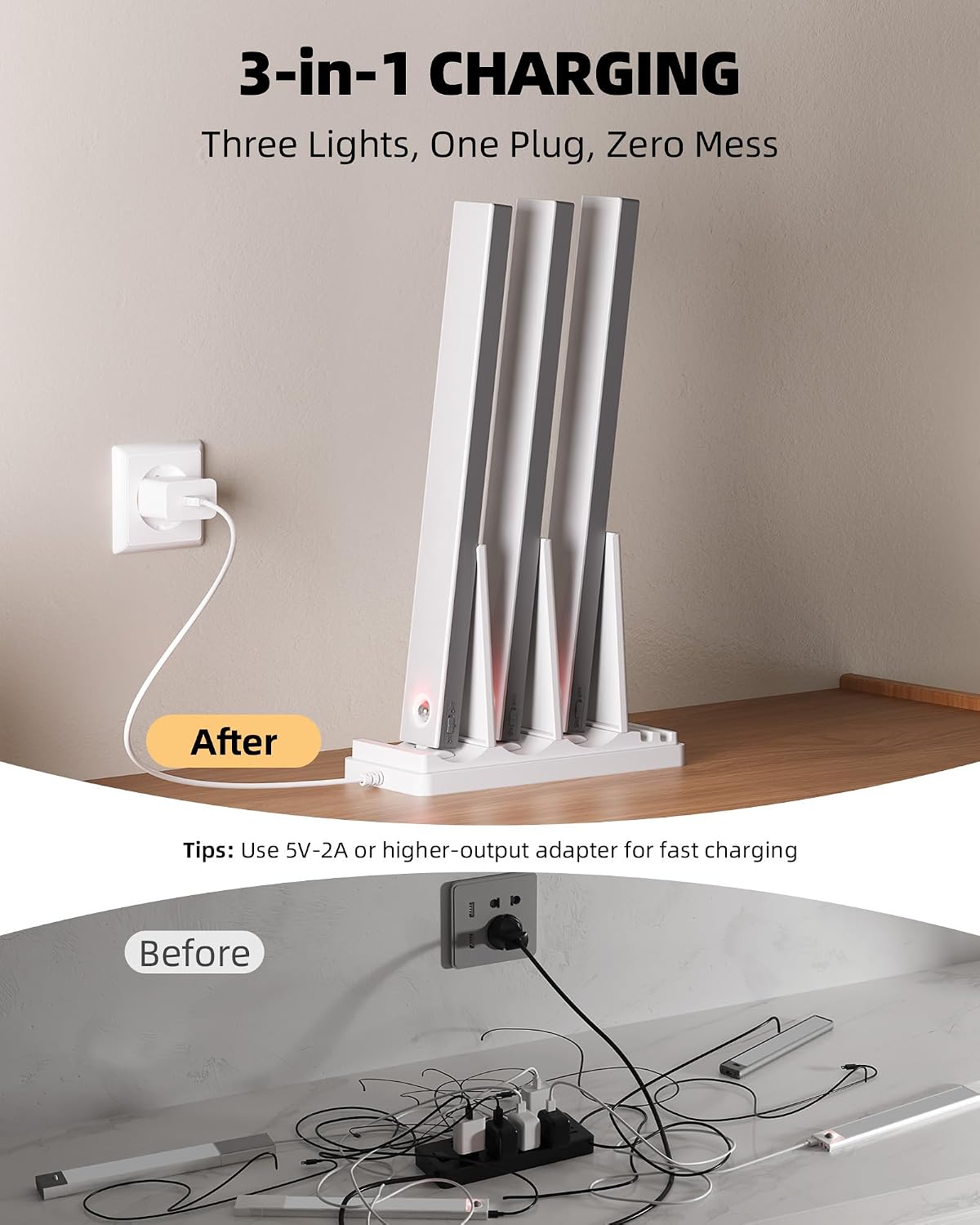
Image 5.1: The 3-in-1 charging station neatly charging multiple lights.

Image 5.2: Information on battery capacity, usage duration, and charging time.
6. Operating Instructions
Ensure the master switch on the side of each light is in the 'ON' position to enable all control features.
6.1 Lighting Modes
The lights feature three operational modes, selectable via the onboard 'MODE' button or the remote control:
- Night Motion Mode (Moon Icon): The light activates only in darkness or low-light conditions when motion is detected. It turns off automatically after 20 seconds of no motion. Ideal for nighttime use.
- All-Day Motion Mode (Sun Icon): The light activates whenever motion is detected, regardless of ambient light levels. It turns off automatically after 20 seconds of no motion. Suitable for dim areas that require light throughout the day.
- Always-On Mode (ON Icon): The light remains continuously on until manually turned off or switched to another mode. Useful for extended tasks or as a portable light source.

Image 6.1: Visual explanation of the three available lighting modes.
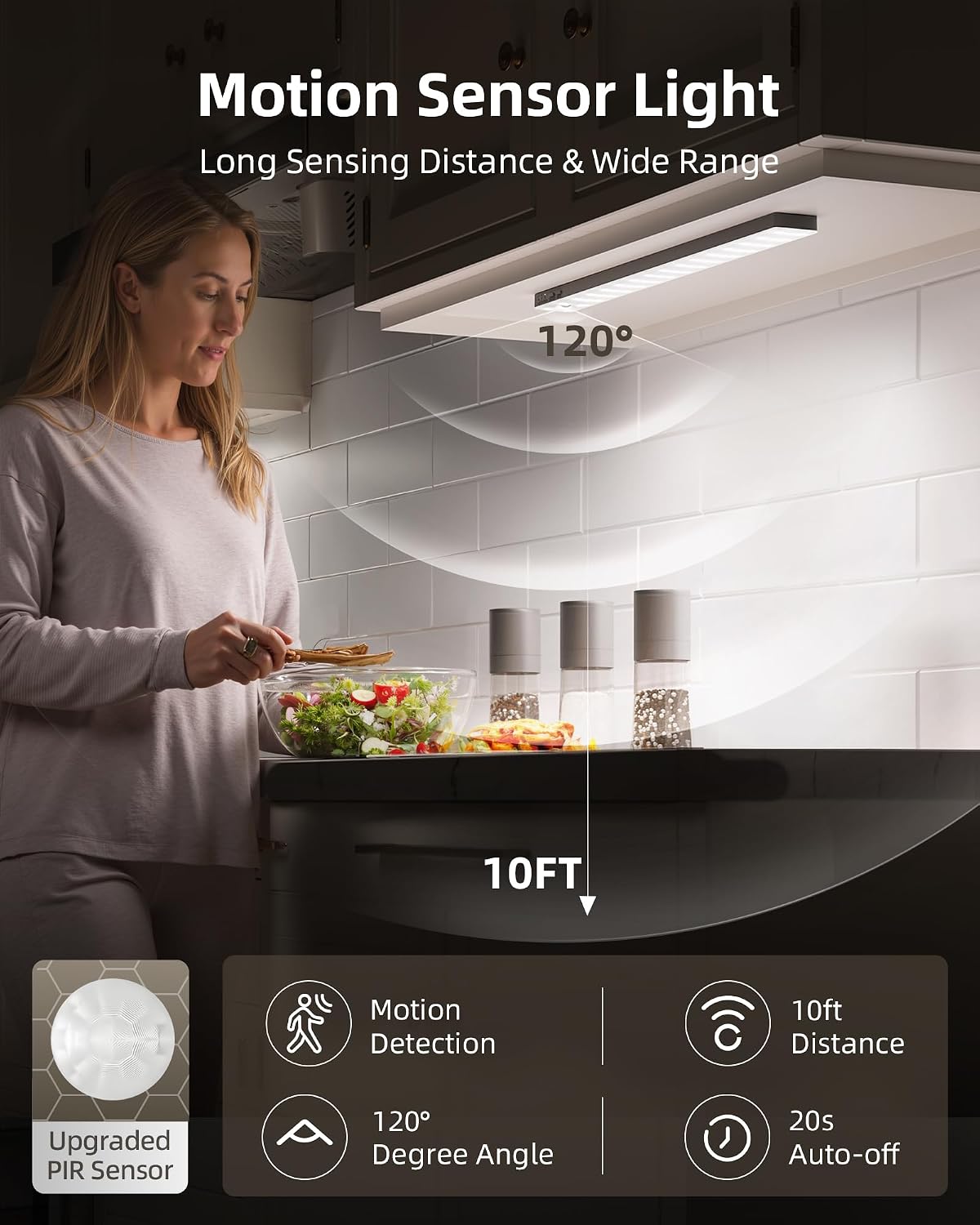
Image 6.2: Illustration of the motion sensor's 10ft detection distance and 120° angle.
6.2 Color Temperature Adjustment
You can adjust the light's color temperature to suit your preference or task:
- Warm White (3000K): Provides a cozy and inviting glow.
- Natural White (4500K): Offers a balanced light suitable for everyday tasks.
- Cool White (6500K): Delivers crisp, bright illumination for detailed work.
Adjust color temperature using the dedicated button on the light or the remote control.

Image 6.3: Examples of the three color temperature options in different environments.
6.3 Brightness Adjustment (Stepless Dimming)
The lights feature stepless dimming, allowing you to adjust the brightness from 0% to 100% to achieve the desired illumination level. Use the dimming buttons on the light or the remote control.
6.4 Remote Control Functions
The remote control provides convenient access to all light functions from up to 16 feet away:
- ON/OFF: Power the lights on or off.
- Day/Night: Switch between All-Day Motion Mode and Night Motion Mode.
- Dimming (+/-): Increase or decrease brightness.
- Color Temperature Buttons: Select Warm, Natural, or Cool White.
- Timer Functions (15/30/60/90/120 min): Set the lights to automatically turn off after a specified duration. Press 'Cancel' to deactivate the timer.

Image 6.4: The remote control in use, demonstrating its ability to control multiple lights.
7. Maintenance
Cleaning:
To clean the lights, gently wipe them with a soft, dry cloth. Do not use abrasive cleaners, solvents, or immerse the lights in water.
Battery Care:
- For optimal battery life, avoid fully discharging the lights frequently.
- Recharge the lights when the brightness noticeably diminishes.
- If storing the lights for an extended period, charge them to about 50% every 3-6 months to prevent deep discharge.
8. Troubleshooting
| Problem | Possible Cause | Solution |
|---|---|---|
| Light does not turn on. | Battery is depleted. Master switch is OFF. | Charge the light. Ensure the master switch on the side of the light is ON. |
| Motion sensor not working. | Incorrect mode selected. Obstruction in sensor path. Ambient light too high (in Night Motion Mode). | Switch to Night Motion Mode or All-Day Motion Mode. Clear any objects blocking the sensor. Ensure it's dark enough for Night Motion Mode to activate. |
| Remote control not responding. | Distance too far. Obstruction between remote and light. Light's master switch is OFF. | Move closer to the light (within 16 ft). Ensure a clear line of sight. Turn the light's master switch ON. |
| Light flickers or is dim. | Low battery. | Recharge the light fully. |
9. Specifications
| Feature | Detail |
|---|---|
| Brand | EZVALO |
| Model | B0GYW2YVZM |
| Light Source | LED (96 LEDs per light) |
| Brightness | 180 lumens (max) |
| Color Temperature | 3000K (Warm White), 4500K (Natural White), 6500K (Cool White) |
| Battery Capacity | 3200mAh (per light) |
| Charging Time | Approx. 5.5 hours |
| Input Voltage | 5V |
| Control Method | Remote Control, Onboard Buttons |
| Motion Sensor Range | 10 ft, 120° |
| Material | Acrylonitrile Butadiene Styrene (ABS) |
| Dimensions (L x W x H) | 13" x 1.5" x 0.6" (per light) |
| Indoor/Outdoor Usage | Indoor Only |
| Water Resistance Level | Not Water Resistant |

Image 9.1: Dimensions of the 13-inch EZVALO light.
10. Warranty and Support
Warranty:
This EZVALO product comes with a limited warranty. Please refer to the product packaging or contact customer support for specific warranty terms and conditions.
Customer Support:
If you have any questions, concerns, or require assistance with your EZVALO Under Cabinet Lighting, please contact our customer support team. Contact information can typically be found on the product packaging or the official EZVALO website.
Ask a question about this manual
Ask about setup, troubleshooting, compatibility, parts, safety, or missing instructions. Manuals+ will review the question and use this page’s manual context to help answer it.