
1. Introduction
Thank you for choosing the Ieejdn 47-inch Home Office Desk. This desk is designed to provide a functional and stylish workspace with integrated storage and a convenient charging station. This manual provides detailed instructions to ensure a smooth assembly process and proper use of your new desk. Please read all instructions carefully before beginning assembly and retain this manual for future reference.
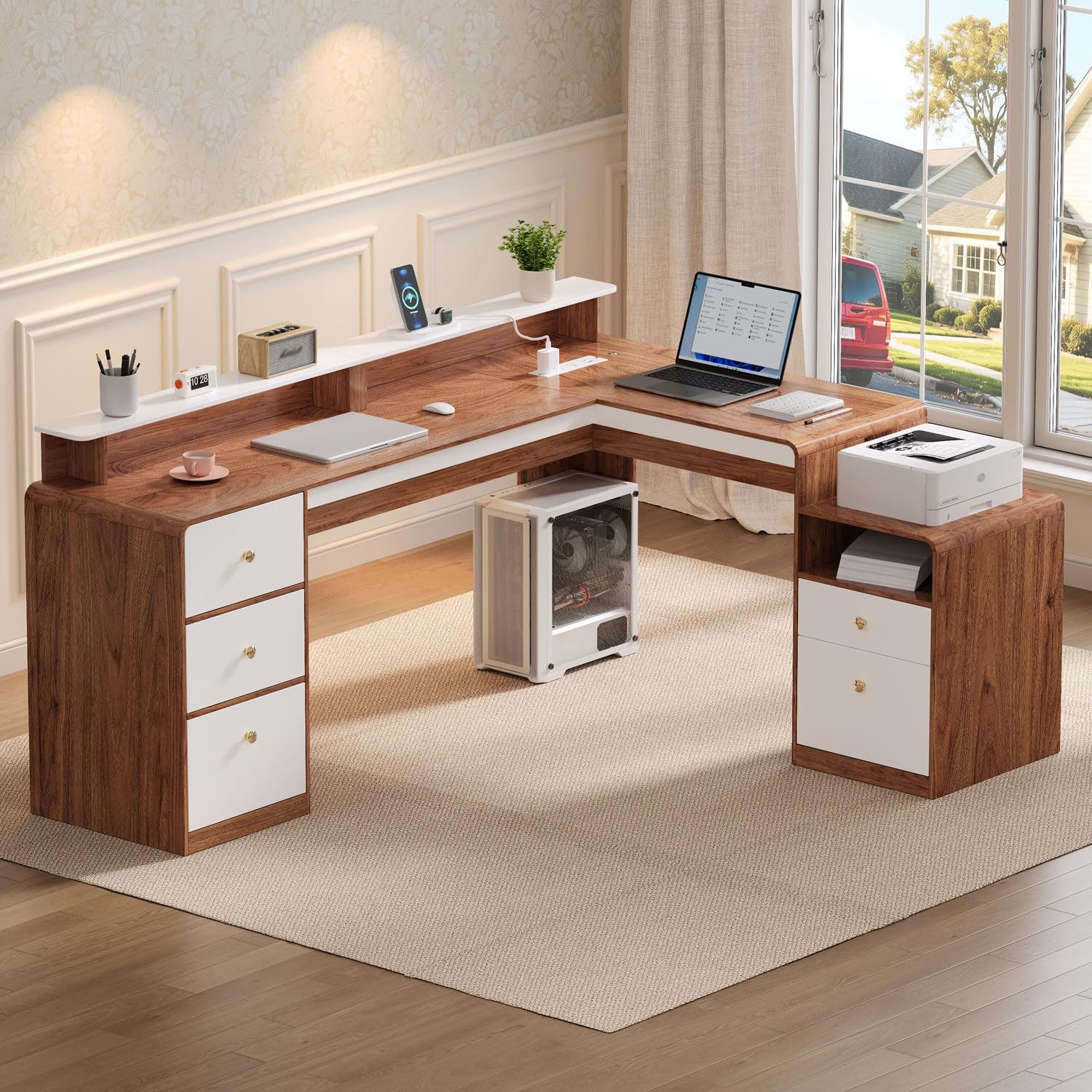
Image: Fully assembled Ieejdn 47-inch Home Office Desk, showcasing its L-shaped design, drawers, and integrated features.
2. Safety Guidelines
To ensure safe assembly and use of your Ieejdn Home Office Desk, please observe the following safety precautions:
- Two-Person Assembly: It is highly recommended that two adults assemble this desk to prevent injury and ensure proper alignment of parts.
- Use Correct Tools: Ensure you have the necessary tools as specified in the assembly instructions. Do not use power tools unless explicitly instructed, as they may overtighten fasteners and damage the desk.
- Clear Workspace: Assemble the desk in a clear, open area to avoid tripping hazards and to provide ample space for maneuvering components.
- Weight Limits: Do not exceed the recommended weight limits for the desktop, shelves, or drawers. Overloading can cause structural damage or collapse.
- Electrical Safety: When using the built-in charging station, ensure all connected devices are compatible with the power specifications. Do not overload the outlets. Keep liquids away from electrical components.
- Secure Placement: Place the desk on a level surface. If necessary, use shims to stabilize the desk and prevent wobbling.
- Children and Pets: Keep small parts and packaging materials away from children and pets during assembly.
3. Package Contents
Before beginning assembly, carefully unpack all components and verify that all parts listed below are present and undamaged. If any parts are missing or damaged, please contact customer support immediately.

Image: Dimensional diagram of the desk, illustrating various panels and drawer components.
Expected Components:
- Desktop Panels (L-shaped sections)
- Side Panels and Support Boards
- Drawer Fronts, Sides, and Bottoms
- Drawer Slides and Handles
- Built-in Power Strip with USB and Type-C ports
- LED Light Strip and Metal Touch Switch
- Assembly Hardware (screws, dowels, cam locks, etc.)
- Instruction Manual
4. Assembly Instructions
The Ieejdn Home Office Desk requires self-assembly. Follow these steps in sequence for a straightforward setup. Refer to the included detailed assembly diagram for visual guidance.
- Prepare Workspace: Clear a spacious area and lay out all components and hardware. Keep the instruction manual and assembly diagram handy.
- Assemble Main Frame: Begin by connecting the primary desktop panels and side supports according to the diagram. Ensure all cam locks and screws are tightened securely.
- Install Drawer Slides: Attach the drawer slides to the internal panels of the desk and to the drawer boxes as indicated. Ensure they are level and aligned for smooth operation.
- Assemble Drawers: Construct the drawer boxes by attaching the sides, front, and bottom panels. Install the drawer handles.
- Insert Drawers: Carefully slide the assembled drawers onto their respective slides. Test each drawer for smooth movement.
- Install Power Strip: Locate the designated area for the built-in power strip. Secure it in place and route the power cord as directed.
- Attach LED Light (if applicable): Adhere the LED light strip to the underside of the upper shelf. Install the metal touch switch in its designated position and connect it to the LED strip and power source.
- Final Checks: Once assembled, gently move the desk to its desired location. Check all connections and fasteners to ensure they are tight and secure.
5. Operating Your Desk
5.1. Drawers and Storage
The Ieejdn Home Office Desk features multiple storage options to help organize your workspace:
- Wood Drawers: Four standard wood drawers (labeled 1, 2, 4, 6 in the image) provide enclosed storage for office supplies, documents, and personal items.
- File Drawer: One dedicated file drawer (labeled 5) is designed to accommodate letter, legal, and A4 size hanging files, keeping your important documents organized. This drawer is interchangeable with other large drawers.
- Top Open Shelf: A convenient open shelf (labeled 3) is ideal for quick access items or decorative displays.

Image: Overview of the desk's storage capabilities, highlighting the various drawers and their potential interchangeability.

Image: Detailed view of the file drawer, demonstrating its capacity for letter, legal, and A4 sized documents.
5.2. Built-in Charging Station
The desk is equipped with an integrated power strip for convenient charging and power access:
- AC Outlets: 3 standard AC outlets (125V/12A) for computers, monitors, and other electronics.
- USB Port: 1 USB-A port (5V/2A) for charging smartphones, tablets, and other USB-powered devices.
- Type-C Port: 1 Type-C port (5V/10W) for compatible devices.
- Power Cord: The power strip includes a 4.9-foot power cord for connection to a wall outlet.

Image: Detailed view of the built-in power strip, showing its AC, USB, and Type-C outlets.
5.3. LED Lighting
The desk features an integrated LED light strip for enhanced illumination of your workspace. The LED light is controlled by a metal touch switch, allowing you to easily turn it on or off.

Image: The L-shaped desk with its LED lighting activated, highlighting the metal touch switch for control.
6. Care and Maintenance
Proper care will extend the life and appearance of your Ieejdn Home Office Desk:
- Cleaning: Wipe surfaces with a soft, damp cloth. Avoid using harsh chemicals, abrasive cleaners, or polishes that may damage the finish.
- Spills: Immediately wipe up any spills to prevent water damage or staining.
- Heat and Moisture: Avoid placing hot items directly on the desktop. Use coasters for beverages. Keep the desk away from excessive moisture or direct sunlight to prevent warping or fading.
- Fasteners: Periodically check all screws and fasteners to ensure they remain tight. Retighten as necessary to maintain stability.
- Drawer Slides: If drawers become stiff, a small amount of silicone lubricant can be applied to the slides.
7. Troubleshooting
Refer to this section for solutions to common issues:
| Problem | Possible Cause | Solution |
|---|---|---|
| Desk is wobbly. | Uneven floor; loose fasteners. | Ensure desk is on a level surface. Retighten all assembly screws and cam locks. Use shims if necessary. |
| Drawers do not slide smoothly. | Misaligned drawer slides; debris in slides; overtightened screws. | Check that drawer slides are correctly installed and aligned. Clear any debris. Loosen screws slightly if overtightened. Apply silicone lubricant. |
| Power strip is not working. | Not plugged into wall outlet; wall outlet not active; power strip switch off; overloaded circuit. | Ensure the power strip's cord is securely plugged into a functional wall outlet. Check if the wall outlet has power. Verify the power strip's internal switch (if any) is on. Reduce the number of connected devices if overloaded. |
| LED light is not turning on. | Loose connection; faulty switch; power strip not active. | Check all connections to the LED strip and touch switch. Ensure the power strip is receiving power. Contact support if the issue persists. |
8. Product Specifications
| Feature | Detail |
|---|---|
| Brand | Ieejdn |
| Model Number | 301 |
| Product Dimensions (D x W x H) | 21.65"D x 47.24"W x 29.92"H |
| Material Type | Engineered Wood |
| Color | Brown (Antique Brown / Saddlebrown) |
| Number of Drawers | 4 (including 1 file drawer) |
| File Drawer Compatibility | Letter, Legal, A4 sizes |
| Built-in Power Strip | 3 AC Outlets (125V/12A), 1 USB Port (5V/2A), 1 Type-C Port (5V/10W) |
| Power Cord Length | 4.9 feet |
| Special Feature | Adjustable (referring to file drawer configuration), LED Light |
| Item Weight | 52 pounds |
9. Warranty and Customer Support
Ieejdn is committed to providing quality products and excellent customer service. While specific warranty details are not provided in this manual, we offer comprehensive after-sales support for any product-related issues.
If you encounter any problems during assembly, operation, or if any parts are missing or damaged, please do not hesitate to contact our customer support team. We are here to assist you.
Contact Information: Please refer to your purchase documentation or the retailer's website for the most current customer support contact details.
We value your feedback and are dedicated to ensuring your satisfaction with your Ieejdn Home Office Desk.