
1. Introduction
The Ieejdn 47-inch Home Office Desk, Model 301, is designed to provide a functional and stylish workspace. This desk features a spacious desktop, integrated storage drawers, a file drawer, a side storage cabinet, and a built-in charging station. This manual provides essential information for assembly, operation, maintenance, and troubleshooting to ensure safe and efficient use of your desk.

Image 1.1: Overview of the Ieejdn 47-inch Home Office Desk, highlighting its dimensions, 220 lbs load capacity, thickened desktop design (0.98 inches), and large storage space.
2. Safety Information
- Read all instructions carefully before assembly and use.
- Keep all small parts and packaging materials away from children and pets to prevent choking hazards.
- Assemble the desk on a soft, clean surface (e.g., carpet or cardboard) to prevent scratches and damage.
- Do not overtighten screws during assembly, as this may damage the material. Tighten until snug.
- Ensure all connections are secure and stable before placing items on the desk or using the charging station.
- Do not exceed the maximum load capacity of 220 lbs (100 kg) for the desktop.
- Lift the desk when moving it; do not drag it, as this can cause structural damage or separation of components.
- Only use the provided power strip for electronic devices within its specified voltage and current limits.
3. Package Contents
Verify that all components are present before beginning assembly. If any parts are missing or damaged, please contact customer support.
- Desktop Panel
- Side Panels (Left and Right)
- Drawer Fronts, Sides, and Backs
- Drawer Bottoms
- Drawer Slides (Rails)
- Drawer Handles/Pulls
- File Drawer Mechanism
- Side Storage Shelves
- Built-in Power Strip with 4.9-foot power cord
- Assembly Hardware (screws, dowels, cam locks, etc.)
- Assembly Tools (e.g., Allen wrench)
- Instruction Manual
- 4 Stainless Steel Hooks (for side storage)
4. Setup (Assembly Instructions)
Assembly of this desk is designed to be straightforward. It is highly recommended that two people assemble the desk, especially when lifting the desktop, due to its weight and size. Follow the step-by-step instructions provided in the included assembly manual. All parts are clearly labeled with stickers for easy identification.
- Unpack and Identify Parts: Carefully unpack all components and lay them out on a clean, soft surface. Match each part to the corresponding number in the assembly manual.
- Assemble the Side Cabinet: Begin by assembling the main frame of the side cabinet, including the drawer compartments. Pay close attention to the orientation of panels and pre-drilled holes.
- Install Drawer Slides: Attach the drawer slides to the cabinet interior. Ensure the slides are installed in the correct direction for smooth drawer operation. Refer to the detailed diagrams in your assembly manual for proper alignment.
- Assemble Drawers: Construct the drawers according to the instructions. Insert the drawer bottoms and attach the drawer fronts. Install the drawer handles.
- Assemble Side Storage: Attach the side storage shelves and pegboard panel to the left desk leg. Install the provided stainless steel hooks as desired.
- Attach Desktop: With assistance, carefully place the desktop onto the assembled cabinet and leg structure. Secure it using the designated hardware.
- Install Power Strip: Integrate the built-in power strip into the designated cutout on the desktop. Connect the power cord.
- Final Checks: Verify that all screws are tightened, and the desk is stable.

Image 4.1: Illustration of the DIY storage solution integrated into the desk legs, showing shelves for books and a pegboard for accessories like keyboards and calculators. Includes 4 stainless steel hooks.

Image 4.2: Close-up view of the drawer slide mechanism, demonstrating the smooth operation of the drawers.
5. Operating Instructions
5.1 Using the Desktop
The 47.24-inch wide and 21.65-inch deep desktop provides ample space for your computer, monitor, printer, books, and other essentials. It is suitable for various tasks such as work, study, gaming, and writing. The desktop has a load capacity of up to 220 lbs.

Image 5.1: The spacious desktop, measuring 47.24 inches in width and 21.65 inches in depth, provides ample room for a laptop, lamp, and other accessories, enhancing work efficiency and organization.
5.2 Utilizing Storage Drawers
The desk includes multiple drawers for organized storage:
- Large Drawer: One large drawer (approximately 13.98in D x 25.59in W x 3.35in H) located under the desktop, ideal for stationery, documents, or a keyboard.
- Small Drawers: Two smaller drawers (approximately 13.98in D x 14.76in W x 3.35in H each) in the side cabinet, suitable for smaller office supplies.
- File Drawer: One file drawer (approximately 13.98in D x 14.76in W x 8.9in H) in the side cabinet, designed to hold standard letter-sized files.
Each drawer is designed to hold approximately 25 lbs. The drawers operate smoothly on their rails.

Image 5.2: The desk offers ample and versatile storage space with its four drawers, including a large central drawer, two smaller drawers, and a file drawer, all shown open to display their capacity for office supplies and documents.
5.3 Integrated Side Storage
The left desk leg features an integrated two-tier storage shelf and a pegboard. This area is perfect for organizing books, magazines, and other items. The included stainless steel hooks can be used to hang small accessories like keys or headphones.
5.4 Built-in Charging Station
The desk is equipped with a convenient built-in power strip. This charging station includes:
- 4 standard AC outlets (125V/12A)
- 1 USB-A port (5V/2A output)
- 1 USB-C port (PD10W output)
Use this station to power your computer, printer, and charge various electronic devices such as phones and tablets, eliminating the need for external power strips and reducing cable clutter.

Image 5.3: Detail of the built-in charging station, featuring three AC outlets, one USB-A port, and one USB-C port, providing convenient power access directly on the desktop.
6. Maintenance
- Cleaning: Wipe the desk surfaces with a soft, damp cloth. Avoid using abrasive cleaners, harsh chemicals, or solvents, as these can damage the finish.
- Spills: Immediately wipe up any spills to prevent staining or damage to the wood finish.
- Hardware: Periodically check all screws and fasteners to ensure they remain tight. Retighten if necessary to maintain stability.
- Sunlight Exposure: Avoid prolonged exposure to direct sunlight, which can cause fading or discoloration of the wood finish.
- Heat and Moisture: Use coasters under hot beverages and avoid placing hot items directly on the desktop. Protect the surface from excessive moisture.
7. Troubleshooting
| Problem | Possible Cause | Solution |
|---|---|---|
| Desk is wobbly or unstable. | Loose fasteners; uneven floor. | Check and tighten all screws. Ensure the desk is on a level surface; use shims if needed. |
| Drawers do not slide smoothly. | Drawer slides installed incorrectly; debris in tracks; overtightened screws. | Verify drawer slide orientation as per manual. Clean tracks. Loosen screws slightly if overtightened. |
| Parts do not align during assembly. | Incorrect part orientation; manufacturing defect. | Double-check the assembly manual for correct orientation. If parts are genuinely misaligned, contact customer support. |
| Power strip not working. | Not plugged into wall outlet; tripped circuit breaker; faulty device. | Ensure the desk's power cord is securely plugged into a functional wall outlet. Check your home's circuit breaker. Test with a different device. |
| Desk components separate when moved. | Desk was dragged instead of lifted. | Always lift the desk when moving it. Reassemble any separated components and tighten fasteners. |
8. Specifications
- Brand: Ieejdn
- Model Number: 301
- Model Name: Office Desk
- Product Dimensions (D x W x H): 21.65" x 47.24" x 29.92"
- Color: Natural
- Material: Engineered Wood
- Desktop Thickness: 0.98 inches
- Item Weight: 52 pounds
- Desktop Load Capacity: 220 lbs
- Drawer Load Capacity: Approximately 25 lbs per drawer
- Included Components: Desk, Power Strip, Assembly Hardware, 4 Stainless Steel Hooks
- Power Strip Output: 4 AC outlets (125V/12A), 1 USB-A (5V/2A), 1 USB-C (PD10W)
- Power Cord Length: 4.9 feet
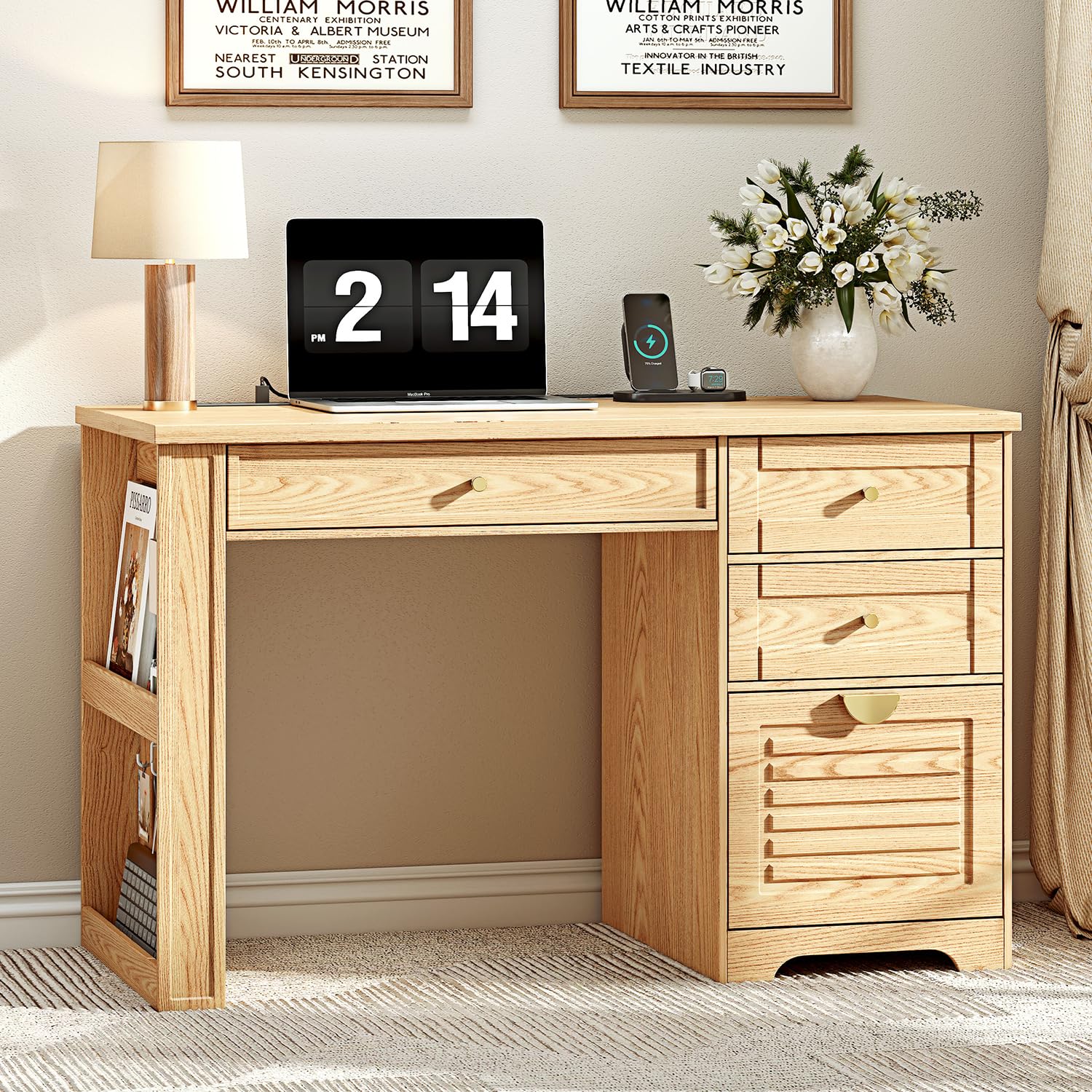
Image 8.1: Detailed dimensions of the Ieejdn 47-inch Home Office Desk, including overall height, width, depth, and individual drawer measurements.

Image 8.2: Close-up view illustrating the 0.98-inch thickness of the desktop, indicating a robust design.
9. Warranty Information
Specific warranty details for the Ieejdn 47-inch Home Office Desk are typically provided with your purchase documentation or can be obtained from the retailer. Please retain your proof of purchase for any warranty claims. For information regarding product defects or issues, refer to the customer support section.
10. Customer Support
If you encounter any problems with your Ieejdn Home Office Desk, require replacement parts, or have questions regarding assembly or functionality, please contact our customer service team. We are committed to providing excellent after-sales support.
Please have your model number (301) and purchase information ready when contacting support to expedite assistance.
For general inquiries or to visit the brand store, you may refer to the official Ieejdn store on Amazon: Ieejdn Store