
1. Product Overview
The ATOTOEXCEL V10 is a versatile 14.1-inch Android Car Stereo Navigation System designed for both 1DIN and 2DIN installations. It features the latest Android 14 operating system, 6GB RAM, and 128GB internal storage for high-speed performance and stable operation. This unit offers a wide range of functions including music playback, navigation, video streaming, and internet browsing without relying on a smartphone.
Key features include 4G LTE connectivity, dual-band Wi-Fi, USB tethering, wireless CarPlay and Android Auto, a professional-grade DSP for superior audio, and support for up to four simultaneous camera recordings. The 14.1-inch QLED display provides clear visuals with high brightness and anti-glare properties, ensuring readability even in direct sunlight.

Image: ATOTOEXCEL V10 Car Stereo highlighting 4G LTE, Wi-Fi, and USB Tethering capabilities.

Image: ATOTOEXCEL V10 Android System with 6GB RAM and 128GB Storage, demonstrating wireless CarPlay and Android Auto connectivity.
2. Setup and Installation
2.1 Package Contents
Before installation, verify that all components are present:
- V10 14.1-inch Display Audio Unit
- 16P Power Cable (16-pin wire harness)
- 4-in-1 Antenna
- HN9-RCA Cable
- 6-pin Dual USB Cable
- 4-pin DVR Storage USB Cable
- HN9-SIM Cable
- HN9-KTV Function Cable
- SIM Data Card
- DIN Sleeve 1
- DIN Sleeve 2
- Double DIN Bracket
- Universal Mounting Bracket
- DIN Pocket
- Mounting Screws
- Product Care & Online Support Guide
- Online Quick Guide

Image: Detailed view of the ATOTOEXCEL V10 package contents, showing the main unit, various cables, and mounting accessories.
2.2 Mounting Options
The V10 unit supports both 1DIN and 2DIN dashboard openings. The floating screen design allows for flexible positioning to optimize viewing angles and avoid obstructing vehicle controls.
- 9-Way Adjustable Mount: The included mount allows fine-tuning of depth, height, left/right position, tilt, and swivel. This ensures a natural and integrated fit, avoiding air vents, physical buttons, and other dashboard controls.

Image: Illustration of the ATOTOEXCEL FlexView Pro 9-Way adjustable floating screen mount, demonstrating various adjustment possibilities.

Image: Diagrams showing how to install the ATOTOEXCEL V10 into standard double DIN and single DIN dashboard openings.
Note: For detailed wiring and specific vehicle installation, professional assistance is recommended. Ensure all connections are secure before operating the unit.
3. Operating Instructions
3.1 Connectivity
- 4G LTE: Insert a compatible SIM card to enable constant online access without smartphone tethering.
- Dual-band Wi-Fi: Connect to Wi-Fi networks or use the unit as a hotspot for other devices.
- USB Tethering: Connect your smartphone via USB for internet access.
- Wireless CarPlay & Android Auto: Seamlessly integrate your smartphone for navigation, music, and hands-free communication.
- Bluetooth: For wireless audio streaming and hands-free calls with Qualcomm aptX HD support for high-quality sound.

Image: The ATOTOEXCEL V10 demonstrating its built-in 4G LTE, Wi-Fi hotspot, and USB tethering capabilities for continuous online access.

Image: The ATOTOEXCEL V10 displaying its seamless integration with wireless CarPlay and Android Auto for enhanced smartphone connectivity.
3.2 Audio Features
- Pro-Grade DSP Tuning: Customize your sound with a 32-band EQ, time alignment, and 3-way crossover.
- HD 24-bit DAC: Experience high-fidelity audio with enhanced detail and reduced noise.
- 4V RCA Pre-out: Provides strong, clean audio signals for external amplifiers.
- Optical Digital (SPDIF) & Coaxial Output: For connecting to external DACs and DSP units for a custom Hi-Fi audio environment.

Image: Screenshot of the ATOTOEXCEL V10's DSP audio tuning interface, showing equalizer and time alignment settings.
3.3 DriveKaraoke System
Transform your car into a karaoke room with the DriveKaraoke system. It features vocal removal algorithms and studio-grade DSP effects to enhance your voice. A separate wireless microphone kit (AC-MICW2, sold separately) is required for use.
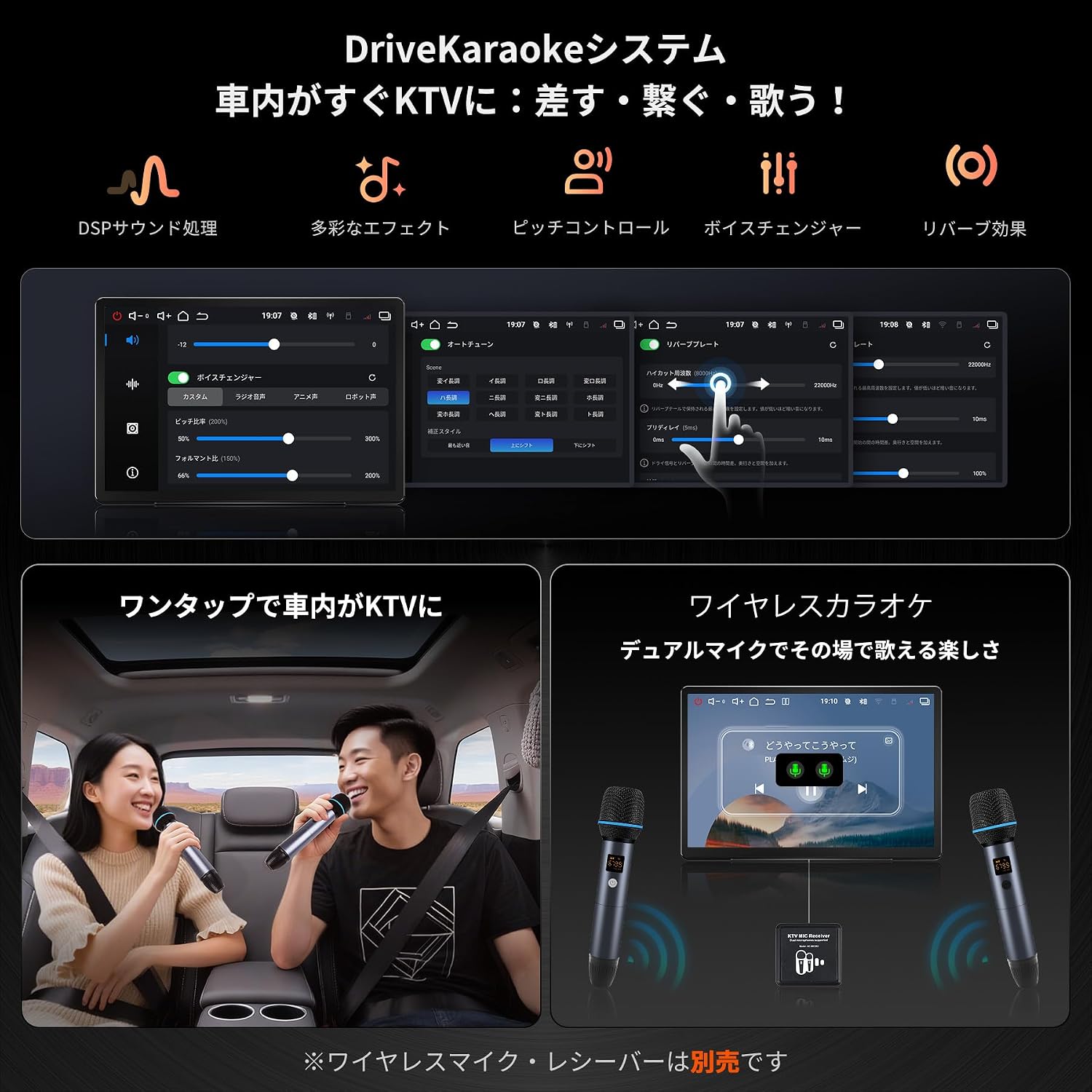
Image: The ATOTOEXCEL V10's DriveKaraoke system interface and a scene depicting in-car karaoke enjoyment.
3.4 QuadCam DVR (Driving Video Recorder)
Connect up to four 1080P cameras (sold separately) for simultaneous recording of front, rear, and interior views. Features include G-sensor emergency lock and future AI vision capabilities for road condition recognition, rear seat monitoring, and forgotten item alerts.
- Compatible Cameras (sold separately): AC-HN9FR (Front), AC-HN9CBV1 (Interior Front), AC-HN9CBV2 (Interior Rear), AC-HN9RRV3 (External Rear).

Image: The ATOTOEXCEL V10's QuadCam DVR system displaying simultaneous views from multiple cameras (front, rear, interior).
3.5 HDMI Output
Share video content to rear monitors via HDMI output, allowing passengers to enjoy movies or other media. This feature supports various multi-screen scenarios, including synchronized playback or independent content with shared audio.

Image: The ATOTOEXCEL V10 demonstrating HDMI output functionality, showing video content mirrored to rear-seat monitors.
3.6 AI Agent DriveChat
The V10 integrates an AI agent, DriveChat, powered by ChatGPT 5.5 and Gemini 3.0. This feature allows for checking vehicle status, searching for nearby points of interest (POIs) based on GPS, and other smart functionalities.

Image: The ATOTOEXCEL V10's AI Agent DriveChat interface, illustrating its capabilities for vehicle status checks and POI searches.
4. Maintenance
4.1 Software Updates
The ATOTOEXCEL V10 supports regular Over-The-Air (OTA) updates. These updates enhance functionality, improve system stability, and introduce new features. Ensure your device is connected to the internet to receive and install updates.

Image: Graphic illustrating the OTA (Over-The-Air) update feature for the ATOTOEXCEL V10, indicating continuous functional evolution.
5. Troubleshooting
- No Internet Connection with SIM Card: If the SIM card is recognized but you cannot connect to the internet, verify the APN settings. Refer to the detailed instructions in the online manual for specific APN configuration.
- Sudden Volume Drop during CarPlay: If you experience sudden volume drops while using CarPlay, check the 'Audio Mix' setting in the system's audio options and ensure it is enabled.
- Backup Camera Display Delay: If there is a delay in the backup camera image appearing, try disabling 'Picture in Picture' and 'Display from Top' settings in the camera display options.
- Unit Not Powering On: Ensure all power connections are correctly installed and secure. If the issue persists, contact customer support.
6. Specifications
| Feature | Description |
|---|---|
| Brand | ATOTOEXCEL |
| Model Number | V10G141OC |
| Screen Size | 14.1 inches |
| Display Type | QLED (Capacitive Touchscreen) |
| Operating System | Android 14 |
| RAM | 6GB |
| Internal Storage | 128GB |
| Connectivity | 4G LTE, Bluetooth, USB, Wi-Fi |
| Map Type | Worldwide |
| GPS Support | GLONASS, GPS, BeiDou |
| Audio Output Mode | Stereo |
| Amplifier Output | 4 x 29W RMS |
| Pre-out Voltage | 4V RCA |
| Compatible Devices | Amplifiers, Speakers, Smartphones |
| Control Method | App, Touch, Remote, Voice |
| Manufacturer | Shenzhen Yufengzhixing Electronics Tech Co Ltd |
7. Warranty and Support
7.1 Warranty Information
The ATOTOEXCEL V10 comes with a standard 12-month warranty. An additional 6-month extended warranty option is available upon registration within 30 days of purchase.

Image: Graphic illustrating the 12+6 month extended warranty program for the ATOTOEXCEL V10.
7.2 Customer Support
ATOTOEXCEL provides a prompt support system for all inquiries. For detailed information, online manuals, and quick guides, please scan the product code to access the Eproductcare platform. This platform offers multilingual online manuals and comprehensive support resources.

Image: Illustration showing how to access the ATOTOEXCEL V10 online manual and quick guide via a QR code and the Eproductcare platform.