
1. Introduction
Thank you for choosing the Mxmoonant CC-2 Multifunctional Electric Vegetable Slicer. This commercial-grade appliance is designed to streamline food preparation in professional kitchens, offering versatile cutting options with efficiency and durability. Constructed from high-quality 304 stainless steel, it ensures hygiene and longevity. Please read this manual thoroughly before operation to ensure safe and optimal performance.
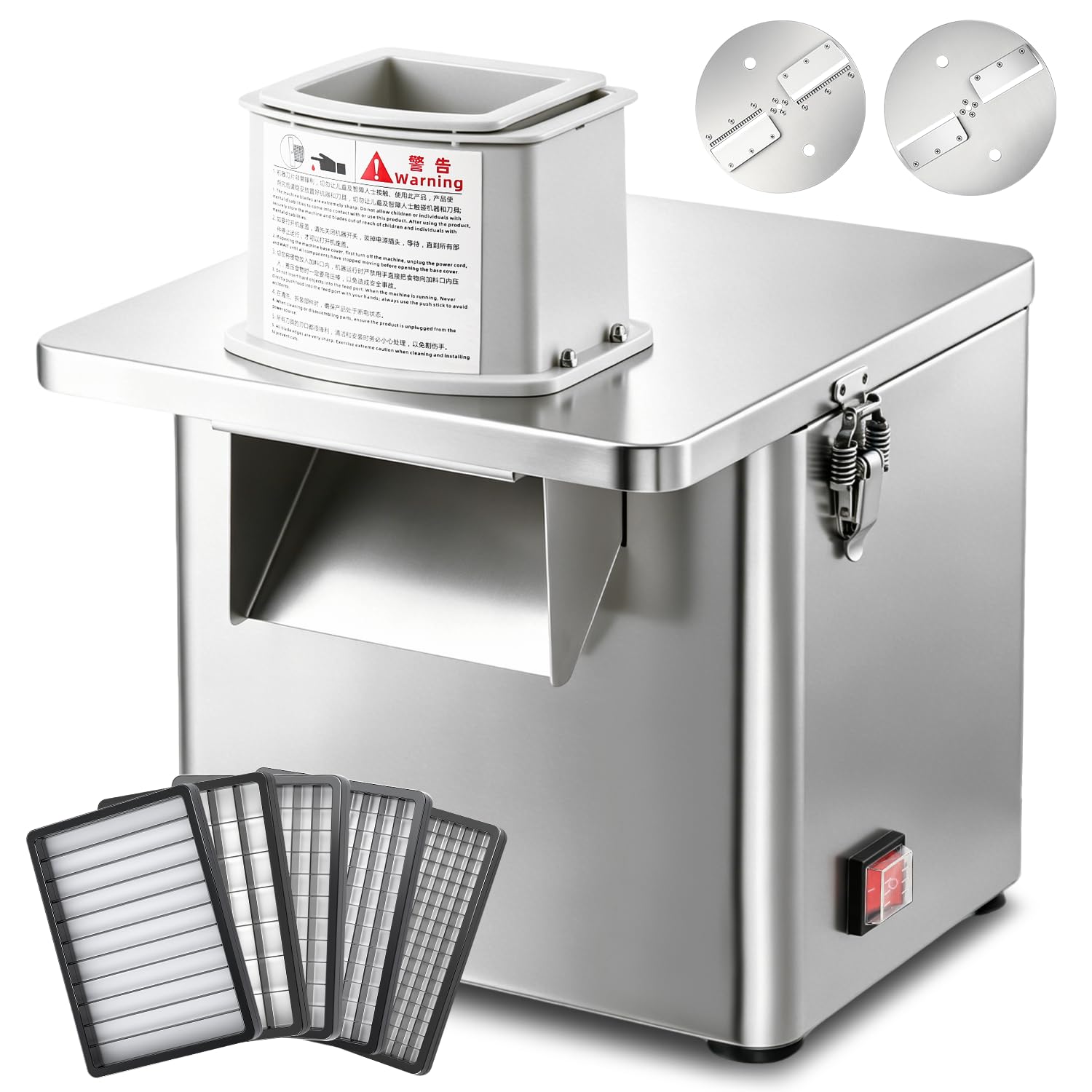
Figure 1: Mxmoonant CC-2 Electric Vegetable Slicer. This image displays the main unit of the slicer, highlighting its stainless steel construction and compact size suitable for various kitchen environments.
2. Safety Instructions
Always follow these safety precautions to prevent injury or damage to the appliance.
- Read all instructions: Familiarize yourself with the operation and safety features before use.
- Electrical Safety: Ensure the power supply matches the appliance's requirements (110V, with adapter for 100V Japan). Do not operate with a damaged cord or plug.
- Blade Safety: Blades are extremely sharp. Handle with extreme care during installation, removal, and cleaning. Always use the provided wrench for blade changes.
- Keep hands clear: Never insert hands or utensils into the feeding chute or discharge opening while the machine is operating. Use the pusher provided.
- Do not immerse: The main motor unit of the slicer must NOT be immersed in water or other liquids for cleaning. Wipe with a damp cloth.
- Supervision: Do not leave the appliance unattended during operation. Keep out of reach of children.
- Stable Surface: Operate the slicer on a stable, flat, and dry surface.
- Unplug when not in use: Always unplug the appliance from the power outlet before assembling, disassembling, cleaning, or when not in use.
3. Product Components
The Mxmoonant CC-2 slicer comes with the following components:
- Electric Slicer Main Unit
- 7 Blades (various types for slicing, dicing, julienne, stick cut)
- Pusher (2 sizes)
- Wrench for blade changes
- Instruction Manual
- 100V Conversion Adapter (for Japan use)

Figure 2: Overview of included components. This image shows the main unit, various blades (thin slice, julienne, dicing grids, stick cut), the pusher, and the wrench.
4. Setup
- Unpack: Carefully remove all components from the packaging. Retain packaging for future storage or transport.
- Clean: Before first use, wash all removable parts (blades, pusher) with warm soapy water. Wipe the main unit with a damp cloth. Ensure all parts are dry before assembly.
- Place the Unit: Position the slicer on a stable, level, and dry countertop. Ensure there is enough space around the unit for ventilation and operation.
- Install Blade: Select the desired blade type for your cutting task. Using the provided wrench, securely attach the chosen blade to the motor shaft. Ensure the blade is firmly locked in place with the side latches.
- Power Connection: Connect the power cord to the slicer. If using in Japan, attach the 100V conversion adapter to the plug before inserting it into a wall outlet.

Figure 3: Key components for setup and operation. This image highlights the powerful motor, secure side latches for blade exchange, the food pusher, and the simple one-touch power switch.
5. Operating Instructions
- Prepare Food: Wash and peel vegetables or fruits as needed. Cut larger items into pieces that fit comfortably into the feeding chute.
- Place Container: Position a suitable container or tray beneath the discharge opening to collect the processed food.
- Load Food: Place the prepared food into the feeding chute. Do not overfill.
- Start Slicer: Press the power switch to turn on the appliance.
- Use Pusher: Gently and firmly press the food down using the appropriate size pusher. Do not force the food. Allow the blades to do the work.
- Stop Slicer: Once all food is processed, turn off the slicer using the power switch. Unplug the unit from the power outlet.

Figure 4: Slicer in action. This image demonstrates the slicer processing cucumbers, producing uniform slices into a collection tray, alongside other prepared vegetables.
6. Blade Types and Functions
The Mxmoonant CC-2 offers four primary cutting functions using its interchangeable blades:
- Thin Slicing: Achieves 2-4mm adjustable slices. Ideal for cucumbers, potatoes, and other vegetables requiring thin, uniform cuts.
- Julienne (4mm): Produces fine, long strips. Perfect for carrots, potatoes, or burdock for salads and stir-fries.
- Dicing: Available in multiple sizes (6x6mm, 8x8mm, 10x10mm, 13x15mm) for precise cubing of vegetables like onions, carrots, or bell peppers.
- Stick Cut (80x10mm): Creates thicker, elongated sticks, suitable for French fries or vegetable sticks.

Figure 5: Four-in-one multi-function. This image illustrates the different blade types and the resulting cuts: thin slices (2-4mm adjustable), 4mm julienne, various dicing sizes (6x6mm, 8x8mm, 10x10mm, 13x15mm), and 80x10mm stick cuts.

Figure 6: Example of thin slicing. This image displays uniformly thin cucumber slices, achievable with the adjustable slicing blade.

Figure 7: Example of 4mm julienne cut. This image shows potatoes cut into fine, consistent julienne strips.

Figure 8: Example of dicing. This image illustrates red onions cut into small, uniform cubes using one of the dicing grid blades.

Figure 9: Example of stick cut. This image shows sweet potatoes processed into thick, even sticks using the 80x10mm stick cut blade.

Figure 10: Suitable and unsuitable foods. This graphic indicates that the slicer is designed for hard vegetables and fruits like potatoes, carrots, cucumbers, and eggplant, but not for meat, leafy greens, or soft tofu.
7. Maintenance and Cleaning
Regular cleaning and maintenance will ensure the longevity and hygienic operation of your slicer.
- Unplug: Always unplug the slicer from the power outlet before cleaning.
- Disassemble: Using the provided wrench, loosen the screws and carefully remove all blades (cutter disk, crossbar blade, etc.) and the pusher.
- Wash Removable Parts: Hand wash all blades and the pusher with warm, soapy water. Rinse thoroughly and dry immediately to prevent water spots or corrosion.
- Clean Main Unit: Wipe the exterior and interior of the main unit with a damp cloth. Use a mild detergent if necessary. DO NOT immerse the main unit in water.
- Dry Thoroughly: Ensure all parts are completely dry before reassembling or storing the slicer.
- Storage: Store the slicer and its components in a clean, dry place.

Figure 11: Easy cleaning process. This image demonstrates how to clean the slicer by rinsing removable parts and wiping the main unit. It emphasizes not immersing the main body in water.
8. Troubleshooting
If you encounter issues with your Mxmoonant CC-2 slicer, refer to the following common problems and solutions:
| Problem | Possible Cause | Solution |
|---|---|---|
| Slicer does not turn on | No power supply; Power switch off; Damaged cord/plug | Check power outlet and connection; Ensure switch is ON; Inspect cord/plug for damage (contact support if damaged). |
| Poor cutting performance | Dull or incorrect blade; Food too large/hard; Blade not securely installed | Ensure correct blade for food type; Sharpen or replace blade if dull; Cut food into smaller pieces; Verify blade is securely latched. |
| Unusual noise or vibration | Loose blade; Foreign object; Unit not on stable surface | Turn off and unplug. Check blade installation; Remove any foreign objects; Place unit on a stable, flat surface. |
| Food gets stuck in chute | Overfilling chute; Food too soft/sticky; Insufficient pressure on pusher | Do not overfill; Use firmer vegetables; Apply steady, firm pressure with the pusher. |
If the problem persists after attempting these solutions, please contact Mxmoonant customer support.
9. Specifications
Detailed technical specifications for the Mxmoonant CC-2 Electric Vegetable Slicer:
| Feature | Specification |
|---|---|
| Brand | Mxmoonant |
| Model Name | CC-2 |
| Dimensions (L x W x H) | 22 x 32 x 37.5 cm |
| Material | 304 Stainless Steel |
| Color | Silver |
| Power | 250W |
| Processing Capacity | Up to 120 kg/h |
| Weight | 11 kg |
| Voltage | 110V (US standard plug), includes conversion adapter for 100V Japan |
| Included Components | Electric slicer main unit, 7 blades, instruction manual, wrench, 100V adapter |
| Care Instructions | Hand wash only (main unit not submersible) |
10. Warranty and Support
For warranty information, technical support, or service inquiries, please contact Mxmoonant customer service through the retailer where you purchased the product or visit the official Mxmoonant website. Please have your model number (CC-2) and purchase date available when contacting support.