
1. Introduction
Thank you for purchasing the BAKAJI Floor Fan. This manual provides important information regarding the safe operation, installation, maintenance, and troubleshooting of your new fan. Please read this manual thoroughly before use and retain it for future reference.
This floor fan features a 20-inch (51 cm) blade diameter, a durable iron construction, and includes a remote control for convenient operation. It is designed for both indoor and outdoor use, providing powerful and adjustable airflow.
2. Safety Instructions
Always follow basic safety precautions when using electrical appliances to reduce the risk of fire, electric shock, and personal injury.
- Ensure the power supply voltage matches the rating label on the fan.
- Do not operate the fan with a damaged cord or plug. If the cord is damaged, it must be replaced by the manufacturer, its service agent, or similarly qualified persons to avoid a hazard.
- Keep fingers, pencils, or any other objects out of the fan grille when it is running.
- Unplug the fan from the outlet when not in use, when moving it from one location to another, and before cleaning.
- Do not use the fan in wet or damp locations such as bathrooms or laundry areas.
- Do not operate the fan near open flames, cooking appliances, or heating devices.
- Place the fan on a stable, level surface to prevent it from tipping over.
- This appliance is not intended for use by persons (including children) with reduced physical, sensory or mental capabilities, or lack of experience and knowledge, unless they have been given supervision or instruction concerning use of the appliance by a person responsible for their safety.
3. Package Contents
Verify that all items are present in the package:
- BAKAJI Floor Fan (Main Unit)
- Remote Control
- User Manual (this document)
4. Setup
The BAKAJI Floor Fan is designed for easy setup and is ready to use upon unboxing.
4.1 Placement
Place the fan on a firm, level surface. Ensure there is adequate space around the fan for optimal airflow and to prevent obstruction of the air intake or exhaust.

Image: The BAKAJI Floor Fan positioned on a patio, demonstrating its suitability for outdoor environments. The fan is black with blue blades, providing cooling for individuals seated nearby.

Image: The BAKAJI Floor Fan placed on a kitchen counter, illustrating its compact design and suitability for indoor use in various rooms.
4.2 Power Connection
Plug the fan's power cord into a standard electrical outlet. Ensure the outlet is easily accessible for quick disconnection if needed.
5. Operating Instructions
The fan can be operated using either the included remote control or the built-in control panel on the fan unit.

Image: The BAKAJI Floor Fan with its remote control being held by a hand, highlighting the remote operation feature. The fan is shown in an outdoor setting.
5.1 Power On/Off
- Using the Remote Control: Press the ON/OFF button.
- Using the Control Panel: Press the Power button on the fan's control panel.
5.2 Speed Adjustment
The fan offers multiple speed settings to control airflow intensity.
- Using the Remote Control: Press the SPEED button to cycle through available speed settings (e.g., Low, Medium, High).
- Using the Control Panel: Press the Speed button on the fan's control panel to adjust the fan speed.
5.3 Tilt Adjustment
The fan head can be manually tilted to direct airflow where needed.
- Grasp the fan head firmly with both hands.
- Gently tilt the fan head up or down to the desired angle. The fan will hold its position once adjusted.
6. Maintenance
Regular maintenance ensures optimal performance and extends the life of your fan.
6.1 Cleaning
- Always unplug the fan before cleaning.
- Use a soft, damp cloth to wipe the exterior surfaces of the fan. Do not use abrasive cleaners or solvents.
- To clean the fan blades, carefully remove the front grille (if detachable, refer to assembly instructions if applicable). Wipe the blades with a soft cloth. Ensure the grille is securely reattached before operating the fan.
- Do not immerse the fan in water or allow water to drip into the motor housing.
6.2 Storage
When not in use for extended periods, store the fan in a cool, dry place, preferably in its original packaging, to protect it from dust and damage.
7. Troubleshooting
If you encounter issues with your fan, refer to the following common problems and solutions:
| Problem | Possible Cause | Solution |
|---|---|---|
| Fan does not turn on | No power supply Power cord not securely plugged in Remote control batteries depleted | Check if the power outlet is working Ensure the power cord is fully inserted Replace remote control batteries |
| Weak airflow | Fan speed set too low Grille or blades are dirty | Increase the fan speed setting Clean the fan grille and blades (refer to Maintenance section) |
| Unusual noise | Fan not on a level surface Loose parts or foreign objects | Place the fan on a stable, level surface Unplug the fan and inspect for any loose components or obstructions. Do not attempt to repair internally. |
8. Specifications
Detailed technical specifications for the BAKAJI Floor Fan Model 8054143068061:
- Model Number: 8054143068061
- Type: Floor Fan
- Blade Diameter: 51 cm (approximately 20 inches)
- Power Source: Electric
- Control: Remote Control and Built-in Panel
- Placement: Ground Use
- Usage: Indoor/Outdoor
- Construction Material: Iron
- Product Dimensions (D x W x H): 7.87" x 20.08" x 20.08" (20 cm x 51 cm x 51 cm)
- Color: Black with blue blades
- Special Feature: Remote Controlled, Adjustable Tilt
- Installation Type: Ready to use
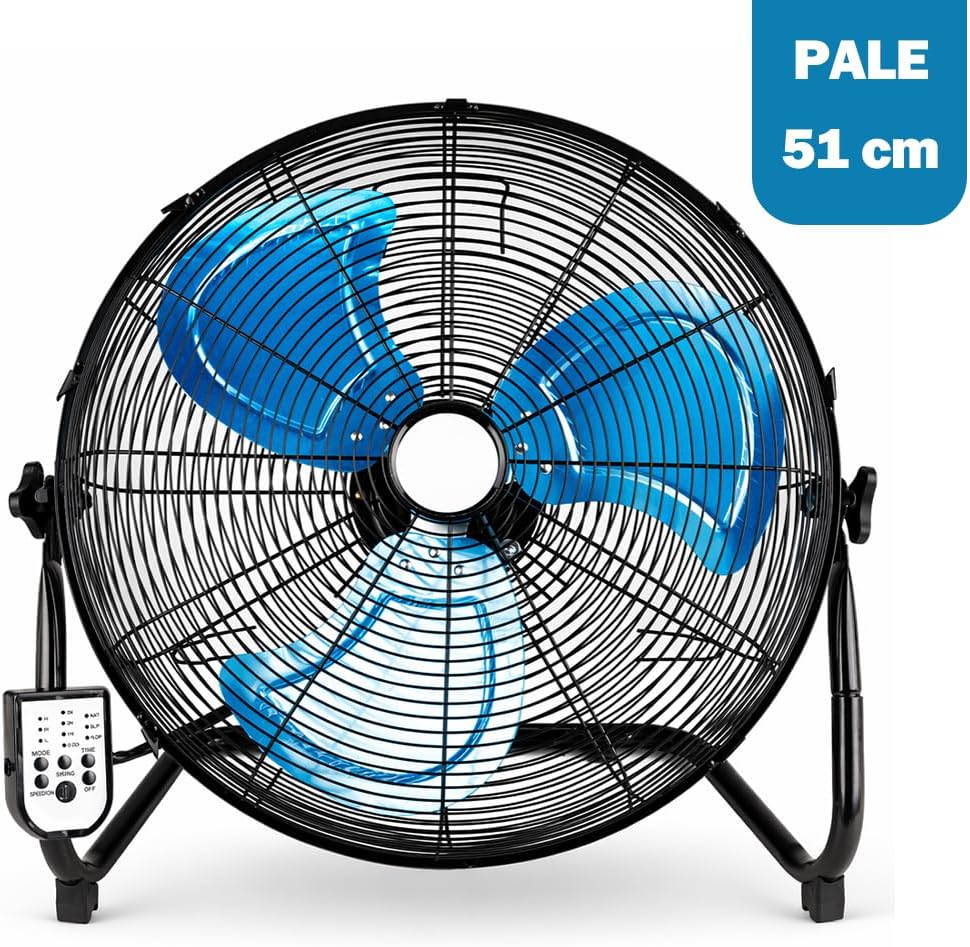
Image: A close-up view of the BAKAJI Floor Fan's blue blades and protective grille, indicating the 51 cm blade diameter.
9. Warranty
BAKAJI products are manufactured to high-quality standards. For information regarding warranty coverage, terms, and conditions, please refer to the warranty card included with your purchase or contact BAKAJI customer support.
10. Customer Support
If you have any questions, require assistance, or need to report an issue with your BAKAJI Floor Fan, please contact our customer support team. Contact information can typically be found on the product packaging or the official BAKAJI website.