
1. Introduction
The Douk Audio BSA600 V2.0 is a high-performance bass shaker amplifier designed to enhance your audio experience by providing powerful, tangible low-frequency vibrations. It is ideal for integration into home theater systems, gaming chairs, and sim racing rigs, transforming audio into physical sensations. This amplifier supports both stereo and mono bridged output configurations, offering versatility for various setups.

Image 1.1: The Douk Audio BSA600 V2.0 amplifier integrated into a home entertainment system.
2. Product Features
- Immersive Tactile Bass: Engineered for bass shakers and subwoofers, providing low-frequency output that can be felt, adding realism to movies and games.
- 230W Bridgeable Power: Features a TPA3255 chip, delivering up to 115W×2 in stereo or 230W×1 in bridged mono (2Ω).
- Wired Remote Control: Includes a 16.4 ft (5m) wired remote for convenient volume adjustment, mute, and power control.
- Auto Standby: Supports three power modes (manual, signal-sensing auto-on, and triggered control). Automatically enters standby after 10 minutes of no signal and reactivates upon signal detection.
- Customizable Crossover: Adjustable 50–200Hz low-pass filter to fine-tune bass response.
- Balance Control: Dedicated knob for adjusting output levels, useful for matching dual shakers or balancing a subwoofer.
- Flexible Installation: Compact design with included mounting brackets and adhesive pads for various placement options.
- Daisy-Chain Capability: Line-level RCA outputs allow linking multiple amplifiers for multi-seat or multi-room setups.
- USB Power Port: Integrated 5V/1A USB port for powering small accessories.
- Smart Protection: Includes overheat and overcurrent safeguards with auto-recovery for reliable operation.
3. Package Contents
Please check the package for the following items:
- 1 × Douk Audio BSA600 V2.0 Amplifier
- 1 × Wired Remote Control (5m / 16.4ft cable)
- 1 × Type-C Cable
- 1 × Power Cord
- 1 Set × Mounting Brackets
- 2 × Double-sided Adhesive Pads
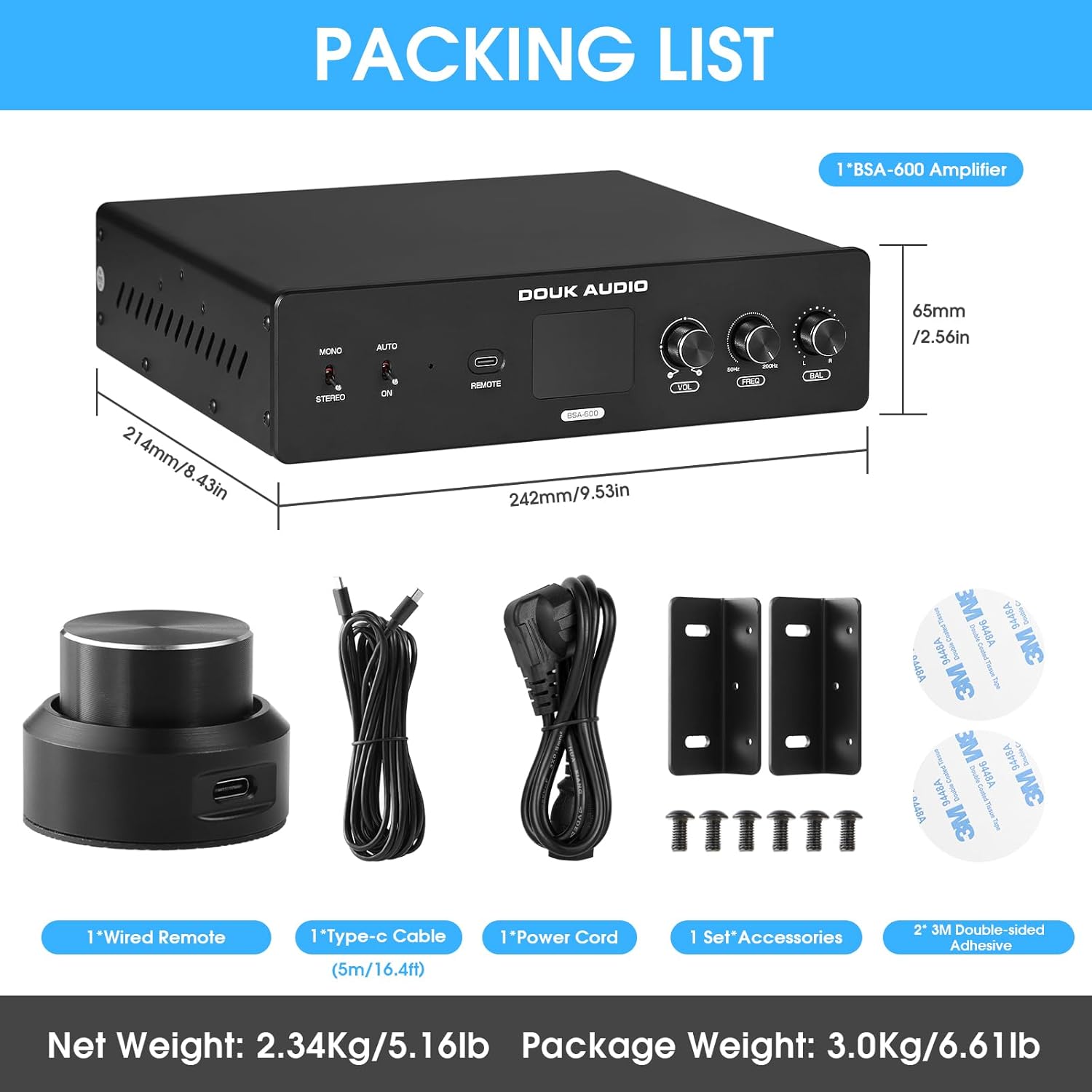
Image 3.1: Contents of the Douk Audio BSA600 V2.0 package.
4. Product Overview
4.1 Front Panel

Image 4.1: Front panel controls and indicators.
- Mono/Stereo Select Switch: Toggles between mono (bridged) and stereo output modes.
- Auto/On Switch: Selects between automatic signal-sensing power on/off and always-on modes.
- Power Indicator: Illuminates when the amplifier is powered on.
- Remote Port: Connects the wired remote control.
- Digital Display: Shows the current volume level.
- VOL (Volume) Knob: Adjusts the overall output volume.
- FREQ (Frequency) Knob: Adjusts the low-pass crossover frequency (50-200Hz).
- BAL (Balance) Knob: Adjusts the balance between left and right channels in stereo mode, or output level in mono mode.
4.2 Rear Panel
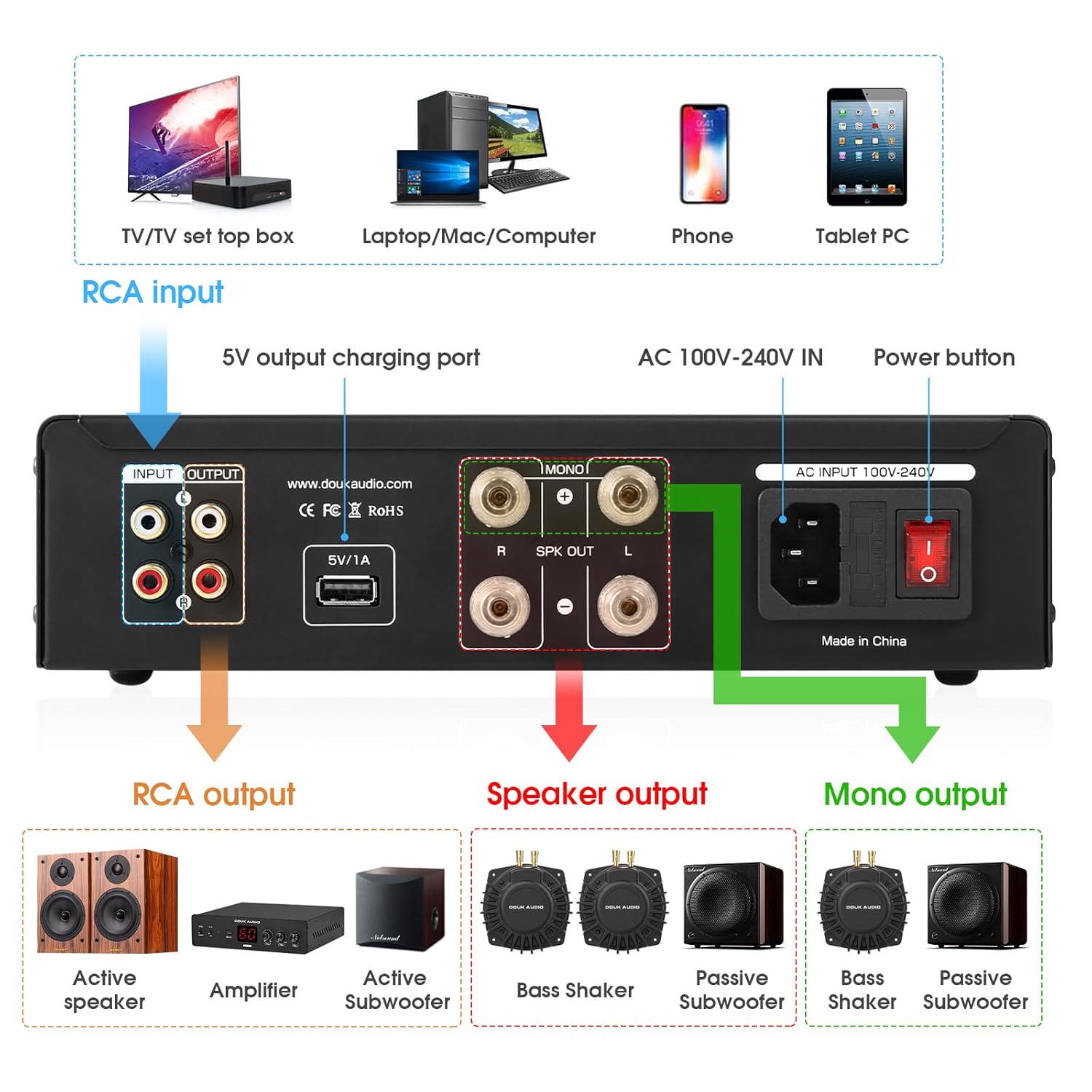
Image 4.2: Rear panel connections.
- RCA Input: Connects to your audio source (e.g., AV receiver, sound card).
- RCA Output: For daisy-chaining multiple amplifiers or connecting to other audio equipment.
- 5V/1A USB Output: Provides power for small external devices.
- Speaker Output (L/R): Connects to bass shakers or passive subwoofers in stereo mode.
- Mono Output: Connects to a single bass shaker or passive subwoofer in bridged mono mode.
- AC 100V-240V IN: Power input for the amplifier.
- Power Button: Main power switch for the unit.
4.3 Wired Remote Control

Image 4.3: Wired remote control.
- Short Press: Turns the amplifier on or mutes the audio.
- Long Press: Turns the amplifier off.
- Rotate: Adjusts the volume level.
5. Setup Instructions
Follow these steps to connect your Douk Audio BSA600 V2.0 amplifier to your audio system.
5.1 Basic Connection Diagram
Image 5.1: Comprehensive connection options for the amplifier.
5.2 Stereo Setup
- Connect your audio source (e.g., AV receiver's LFE output, sound card) to the RCA Input on the rear panel using an RCA cable.
- Set the Mono/Stereo Select Switch on the front panel to STEREO.
- Connect your two bass shakers or passive subwoofers to the Speaker Output (L/R) terminals. Ensure correct polarity (+ to + and - to -).
- Connect the power cord to the AC 100V-240V IN and plug it into a power outlet.
- Turn on the main Power Button on the rear panel.
5.3 Mono (Bridged) Setup
- Connect your audio source to the RCA Input on the rear panel.
- Set the Mono/Stereo Select Switch on the front panel to MONO.
- Connect your single bass shaker or passive subwoofer to the Mono Output terminals. Ensure correct polarity.
- Connect the power cord to the AC 100V-240V IN and plug it into a power outlet.
- Turn on the main Power Button on the rear panel.
5.4 Daisy-Chaining Multiple Amplifiers
To expand your tactile system, you can link multiple BSA600 V2.0 amplifiers:
- Connect the RCA Output of the first amplifier to the RCA Input of the second amplifier.
- Repeat this process for additional amplifiers as needed.
- Each amplifier can then power its own set of bass shakers or subwoofers.
5.5 Mounting Options
The amplifier's compact design and included mounting brackets allow for flexible installation. You can mount it under a couch, attach it to a gaming chair, or place it in an AV rack to save space and keep your setup tidy.

Image 5.2: Examples of amplifier mounting for discreet placement.
6. Operating Instructions
6.1 Power On/Off and Mute
- Use the main Power Button on the rear panel for initial power.
- Once the main power is on, use the wired remote control for daily operation:
- Short Press: Turns the amplifier on or mutes the audio.
- Long Press: Turns the amplifier off.
6.2 Power Modes (Auto Standby)
The amplifier offers flexible power management:
- ON Mode: Set the Auto/On Switch to ON. The amplifier will remain powered on continuously.
- AUTO Mode: Set the Auto/On Switch to AUTO. The amplifier will automatically turn on when an audio signal is detected and enter standby after 10 minutes of no signal.
- Triggered Control: This mode is typically used with external trigger signals from compatible AV equipment. Consult your AV equipment manual for details on connecting a trigger.

Image 6.1: Auto/On power mode switch.
6.3 Volume Adjustment
Rotate the VOL knob on the front panel or the rotary knob on the wired remote to adjust the output volume. The digital display will show the current volume level.
6.4 Crossover Frequency Adjustment
The FREQ knob adjusts the low-pass filter from 50Hz to 200Hz. This allows you to control which low frequencies are sent to your bass shakers or subwoofers. Adjust this to blend the tactile effects seamlessly with your main audio system.
6.5 Balance Adjustment
The BAL knob allows you to fine-tune the output balance. In stereo mode, it adjusts the relative output between the left and right channels. In mono mode, it can be used to adjust the overall output level of the single channel.

Image 6.2: Volume, Frequency, and Balance control knobs.
7. Maintenance
- Keep the amplifier in a dry, well-ventilated area.
- Avoid exposing the unit to direct sunlight, high temperatures, or humidity.
- Clean the exterior with a soft, dry cloth. Do not use harsh chemicals or abrasive cleaners.
- Ensure proper airflow around the unit to prevent overheating.
8. Troubleshooting
| Problem | Possible Cause | Solution |
|---|---|---|
| No power | Power cord not connected; Main power switch off; Power outlet issue. | Check power cord connection; Ensure rear power switch is ON; Try a different power outlet. |
| No sound/vibration | Input/output cables loose; Volume too low; Mute activated; Incorrect input selected; Auto standby active. | Check all cable connections; Increase volume; Deactivate mute on remote; Ensure correct input source; Check Auto/On switch. |
| Distorted sound/vibration | Volume too high; Incorrect impedance match; Faulty cables. | Reduce volume; Ensure bass shakers/subwoofers match amplifier impedance (2Ω or 4Ω); Replace cables. |
| Auto standby not working | Switch set to ON; Constant low-level signal. | Ensure Auto/On switch is set to AUTO; Check if the audio source is sending a continuous, even low-level, signal. |
9. Specifications
| Specification | Value |
|---|---|
| Model | SUC-BSA-600-US |
| Output Power (Stereo) | 115W × 2 (4Ω) |
| Output Power (Mono) | 230W × 1 (2Ω) |
| Number of Channels | 2 |
| Voltage | 110 Volts (AC) |
| Minimum Supply Voltage | 100 Volts (AC) |
| Maximum Supply Voltage | 240 Volts (AC) |
| Supply Current | 5 Amps |
| Item Dimensions (L x W x H) | 9.53 x 8.43 x 2.56 inches (242 x 214 x 65 mm) |
| Item Weight | 5.2 Pounds (2.34 kg) |
| Material Type | Aluminum |
| Manufacturer | Douk Audio |
| Specification Met | CE |
10. Official Product Video
Video 10.1: An official video demonstrating the Douk Audio Bass Shaker Amplifier for BS1 Tactile Transducer, showcasing its functionality and setup.
11. Warranty and Support
The Douk Audio BSA600 V2.0 amplifier comes with an 18-Month Limited Warranty from the date of purchase. This warranty covers manufacturing defects and malfunctions under normal use.
For technical support, warranty claims, or any questions regarding your product, please contact Douk Audio customer service through the retailer where you purchased the product or visit the official Douk Audio website for contact information.