
1. Product Overview
The DUMOS Makeup Vanity Desk is a versatile dressing table designed for daily beauty routines. It features an integrated mirror with adjustable lighting, a convenient charging station, and various storage options to keep your essentials organized.
Key features include:
- Smart Vanity Mirror: Offers 3 lighting modes (white, natural, warm) and stepless dimming for precise illumination.
- Integrated Power Hub: Equipped with 2 125V/12V outlets, 1 USB port, and 1 Type-C port, plus a dedicated hair dryer holder.
- Thoughtful Organization: Includes a storage drawer, dust-proof desktop space, and three open shelves for diversified placement.
- Enhanced Comfort and Stability: Designed to support up to 180 lbs, with an anti-tilt attachment and a comfortable sponge-stuffed bench.

Image 1.1: The DUMOS Makeup Vanity Desk with its accompanying bench, showcasing its design and functionality in a home environment.

Image 1.2: Detailed view of the vanity desk's storage capabilities, including the main drawer and the bench's hidden compartment.
2. Safety Information
Please read and understand all safety instructions before assembly and use. Failure to follow these instructions may result in injury or damage to the product.
- Assembly: Assemble the product on a soft, clean surface to prevent scratches. Ensure all parts are securely fastened before use.
- Stability: Always use the provided anti-tilt attachment to secure the vanity desk to a wall. This prevents accidental tipping, especially in households with children or pets.
- Electrical Safety: The integrated power hub contains electrical outlets and USB ports. Do not overload the outlets. Keep liquids away from electrical components. Disconnect power before cleaning or if any electrical issue occurs.
- Weight Capacity: Do not exceed the maximum weight capacity of 180 lbs for the vanity desk and 15 lbs for the storage drawer.
- Placement: Place the vanity desk on a level surface. Avoid placing it in direct sunlight or near heat sources to prevent material damage.
- Children: Keep small parts and packaging materials away from children during assembly. This product is not a toy.
3. Package Contents
Before beginning assembly, verify that all components listed in the instruction manual are present and undamaged. If any parts are missing or damaged, please contact customer service.
- Vanity Desk Components
- Vanity Mirror with LED Lights
- Storage Bench
- Hardware Pack (screws, dowels, anti-tilt kit)
- Instruction Manual
4. Assembly Instructions
Detailed assembly instructions and all necessary hardware are included with your DUMOS Makeup Vanity Desk. Please follow the step-by-step guide carefully.
Assembly Video Guide
Video 4.1: Official DUMOS assembly video for the Vanity Desk with Mirror and Lights. This video provides a visual guide to assist with the setup process.
General Assembly Steps:
- Unpack all components and verify against the parts list.
- Attach the side panels to the main desktop using the provided hardware.
- Install the drawer slides and assemble the drawer.
- Secure the mirror unit to the vanity desk.
- Assemble the storage bench.
- Install the anti-tilt attachment to secure the vanity desk to a wall.
- Connect the power cord for the mirror lights and charging station.
5. Operating Instructions
5.1 Smart Vanity Mirror with Adjustable Lighting
The integrated mirror features LED lighting with multiple modes and adjustable brightness.
- Power On/Off: Touch the power icon on the mirror to turn the lights on or off.
- Change Color Temperature: A short press on the power icon will cycle through the 3 lighting modes: Cold White, Warm White, and Warm Yellow (Natural).
- Adjust Brightness: A long press on the power icon will smoothly adjust the brightness (stepless dimming) within the selected color mode. Release when the desired brightness is achieved.

Image 5.1: Illustration of the smart vanity mirror's adjustable lighting, demonstrating the three color temperature options and dimming function.
5.2 Integrated Power Hub
The vanity desk includes a built-in power station for convenient charging of electronic devices and powering beauty tools.
- Outlets: Two 125V/12V power outlets are available for standard electrical devices.
- USB Ports: One USB port and one Type-C port are provided for charging smartphones, tablets, and other compatible devices.
- Hair Dryer Holder: A dedicated holder is located on the side for easy access and storage of your hair dryer.

Image 5.2: Close-up of the integrated power hub, highlighting the electrical outlets, USB ports, and the hair dryer holder for streamlined daily preparation.
6. Care and Maintenance
Proper care and maintenance will ensure the longevity and appearance of your DUMOS Makeup Vanity Desk.
- Cleaning: Wipe surfaces with a soft, damp cloth. Avoid harsh chemicals or abrasive cleaners, which can damage the finish.
- Spills: Immediately wipe up any spills to prevent staining or damage to the wood material.
- Mirror Care: Clean the mirror with a glass cleaner and a soft, lint-free cloth. Do not spray cleaner directly onto the mirror, especially near the edges or electrical components.
- Hardware: Periodically check all screws and fasteners to ensure they remain tight. Retighten as necessary.
- Avoid Overloading: Do not place excessively heavy items on the desk or in the drawer to prevent structural damage.
7. Troubleshooting
If you encounter any issues with your vanity desk, refer to the following common troubleshooting tips:
| Problem | Possible Cause | Solution |
|---|---|---|
| Mirror lights not turning on | Power cord not connected; Power outlet issue; Faulty wiring | Ensure power cord is securely plugged in. Test the outlet with another device. Contact customer support if issue persists. |
| Lights not changing modes/brightness | Incorrect touch operation; Sensor issue | Ensure you are using a short press for mode change and a long press for dimming. Clean the touch sensor area. |
| Charging ports not working | Power cord not connected; Device compatibility; Overload | Verify the main power cord is plugged in. Check if your device is compatible. Avoid connecting too many high-power devices simultaneously. |
| Desk feels wobbly | Loose fasteners; Uneven floor; Anti-tilt not installed | Tighten all assembly screws. Place on a level surface or use furniture pads. Install the anti-tilt attachment to a wall. |
8. Specifications
Detailed product specifications for the DUMOS Makeup Vanity Desk, Model DU-9DDD-WT.
| Feature | Detail |
|---|---|
| Brand | DUMOS |
| Model Number | DU-9DDD-WT |
| Color | Pink |
| Material | Wood, Metal (Frame) |
| Product Dimensions (D x W x H) | 15" x 24.1" x 59.1" |
| Item Weight | 65 Pounds |
| Number of Drawers | 1 |
| Drawer Capacity | 15 lbs |
| Desk Weight Capacity | 180 lbs |
| Power Outlets | 2 x 125V/12V |
| USB Ports | 1 x USB, 1 x Type-C |
| Required Assembly | Yes |
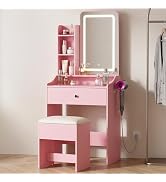
Image 8.1: Detailed product dimensions for the vanity desk and bench.
9. Warranty and Customer Support
DUMOS is committed to providing high-quality products and excellent customer service. For any inquiries, assistance with assembly, or to report missing/damaged parts, please contact our dedicated customer service team.
Please refer to your purchase documentation for specific warranty details. Keep your proof of purchase for warranty claims.
Contact Information:
- Refer to the contact details provided with your product packaging or on the DUMOS official website.
