
1. Important Safety Information
Please read and understand all instructions before assembling and using this product. Keep this manual for future reference.
- Weight Capacity: The top bunk has a maximum weight capacity of 450 pounds. Do not exceed this limit.
- Guardrails: The top bunk is equipped with 13.4-inch full-length guardrails. Ensure they are always securely in place to prevent falls.
- Anti-Tip Kit: Always use the provided anti-tip kit to securely anchor the bed to the wall. This prevents accidental tipping and ensures stability.
- Staircase Safety: The staircase features 15.8-inch extra-wide steps, a gentle slope, and a full-length handrail for secure and comfortable climbing. Always use the handrail when ascending or descending.
- Mattress Requirements: Use a twin-size mattress with a recommended thickness of 8-10 inches. Do not use a mattress that exceeds the height of the guardrails.
- Slats: The bed frame utilizes closely spaced metal slats, eliminating the need for a box spring. Ensure all slats are properly installed and secured.
- Assembly: Ensure all bolts, screws, and connectors are tightly secured before use. Periodically check and retighten as necessary.
- Children: This bed is designed for children, teens, and adults. Supervise young children to ensure safe use.

Image 1: Safety features of the DICTAC Twin Loft Bed. This image highlights the 13.4-inch full-length guardrail on the top bunk, the anti-tip kit designed to secure the bed to the wall, and the heavy-duty metal slats that provide strong mattress support without needing a box spring.

Image 2: Staircase safety comparison. This image compares the DICTAC loft bed's step-style staircase, featuring 15.8-inch extra-wide steps and side handrails for safe and comfortable access, against a traditional vertical ladder, emphasizing enhanced stability and reduced slipping risks.
2. Setup and Assembly
Your DICTAC Twin Loft Bed is designed for straightforward assembly. It comes with detailed instructions and all necessary accessories. Each part is clearly numbered to facilitate a quick and hassle-free setup.
2.1 Before You Begin
- Unpacking: Carefully unpack all components and hardware. Lay them out on a clean, soft surface (like a carpet) to prevent scratches.
- Check Contents: Refer to the parts list in your separate assembly manual to ensure all components are present. If any parts are missing or damaged, contact customer service immediately.
- Shipping Note: This product is shipped in two separate boxes. It is normal for these boxes to arrive on different days. Please wait for both boxes before beginning assembly.
- Tools: Basic installation tools are included. You may need a Phillips head screwdriver (not included) for some steps.
- Assistance: Assembly is easier with two people.
2.2 Assembly Steps (General Guidelines)
- Follow the step-by-step instructions provided in the separate assembly manual.
- Identify each part by its corresponding number.
- Attach the main frame components first, ensuring all connections are finger-tight before fully tightening.
- Install the desk, storage units, and staircase according to the manual.
- Securely attach the guardrails to the top bunk.
- Install the metal slats onto the bed frame.
- Install the LED strip light and connect the charging station as instructed.
- Once fully assembled, ensure all bolts and screws are tightened securely.
- Attach the anti-tip kit to the bed frame and secure it to a wall stud.
3. Operating Instructions
This loft bed integrates several features to enhance functionality and comfort.
3.1 Smart RGB LED Lighting
- Control: The LED lights can be controlled via a dedicated mobile application or physical buttons located on the light strip.
- Features: Enjoy over 60,000 colors, various modes (mic mode, music mode), timing functions, adjustable brightness, and custom style options.
- Power: Ensure the LED light strip is properly connected to a power source as per assembly instructions.

Image 3: Smart RGB LED lighting. This image illustrates the smart RGB LED lighting system installed under the loft bed, illuminating the desk area. The lighting can be controlled via an app or physical buttons, offering a wide range of colors and modes to customize the ambiance.
3.2 Built-in Charging Station
- Power: The charging station requires connection to a standard wall outlet using its 5.2-foot power cord.
- Outlets: Features 2 AC outlets (125V/12A) for laptops, monitors, or other electronics.
- USB Ports: Includes 2 USB ports (5V/2.4A) for charging smartphones, tablets, and other USB-powered devices.
- Usage: Plug your devices directly into the available ports. Ensure the charging station is powered on.

Image 4: L-shaped desk with charging station. This image displays the integrated L-shaped desk, suitable for monitors and other study or gaming equipment. It also shows the built-in charging station, equipped with two AC outlets and two USB ports, designed to keep electronic devices powered.
3.3 Integrated Storage Solutions
- Staircase Storage: The staircase features 4 fabric storage drawers and 2 open shelves, ideal for books, small items, or decorative displays.
- Side Storage Unit: The integrated side unit includes 4 deep fabric storage drawers and 3-tier open shelves, perfect for clothes, bedding, toys, or study materials.
- Desk: The L-shaped desk provides a spacious surface for studying, gaming, or working, accommodating monitors, laptops, and other gear.

Image 5: Side storage unit. This image showcases the vertical storage unit integrated into the loft bed structure, featuring four fabric storage drawers and three-tier open shelves, providing ample space for clothes, books, and decorative items.

Image 6: Staircase storage. This image details the storage capacity within the staircase, showing four oversized drawers and easy-access open shelves built into each step, offering convenient storage solutions for various items.
4. Maintenance
Proper care and maintenance will extend the life and appearance of your loft bed.
- Cleaning the Metal Frame: Wipe the metal surfaces with a soft, damp cloth. Avoid abrasive cleaners or harsh chemicals that could damage the finish.
- Cleaning Engineered Wood Surfaces: Use a soft, dry cloth to dust the desk and shelf surfaces. For spills, wipe immediately with a slightly damp cloth and dry thoroughly. Avoid excessive moisture.
- Fabric Drawers: Spot clean fabric drawers with a mild detergent and water solution. Allow to air dry completely. Do not machine wash.
- Hardware Check: Periodically (every 3-6 months) check all bolts, screws, and connections. Tighten any that have become loose to maintain structural integrity and safety.
- LED Lights: Keep the LED strip clean and free of dust. Do not attempt to repair the LED strip or charging station yourself; contact customer service if issues arise.
5. Troubleshooting
If you encounter any issues with your loft bed, refer to the following common solutions:
- LED Lights Not Working:
- Check if the LED strip is securely plugged into its power adapter and the adapter into a working wall outlet.
- Ensure the remote control (if applicable) has working batteries or that the app is correctly connected.
- Verify all connections to the LED strip are firm.
- Charging Station Not Functioning:
- Ensure the charging station's power cord is securely plugged into a functional wall outlet.
- Check your home's circuit breaker for any tripped switches.
- Test the outlet with another device to confirm it is receiving power.
- Bed Frame Squeaks:
- Tighten all assembly bolts and screws throughout the entire bed frame.
- Ensure the bed is placed on a level surface.
- Verify that the mattress is properly seated on the slats.
- Drawers Not Sliding Smoothly:
- Check for any obstructions (e.g., clothing, debris) in the drawer glides or tracks.
- Ensure the drawers are correctly assembled and aligned within their respective compartments.
- Verify that the drawer slides are properly installed and not bent.
If these steps do not resolve your issue, please contact DICTAC customer service for further assistance.
6. Specifications
| Feature | Detail |
|---|---|
| Model Number | LBWS-01 |
| Size | Twin |
| Material | Engineered Wood, Metal, Non-woven Fabric, Printed Oxford Fabric |
| Product Dimensions (L x W x H) | 94.3" x 40.83" x 72.1" |
| Weight Capacity | 450 pounds |
| Recommended Mattress Thickness | 8-10 inches |
| Number of Drawers | 8 (4 in staircase, 4 in side storage unit) |
| Charging Station | 2 AC Outlets (125V/12A), 2 USB Ports (5V/2.4A), 5.2-foot Power Cord |
| LED Lights | RGB, App/Button Control, Multiple Modes |
| Included Components | Desk, Guardrails, Installation Manual & Simple installation tool, LED Strip Light & charging station, Slats, Storage Boxes |
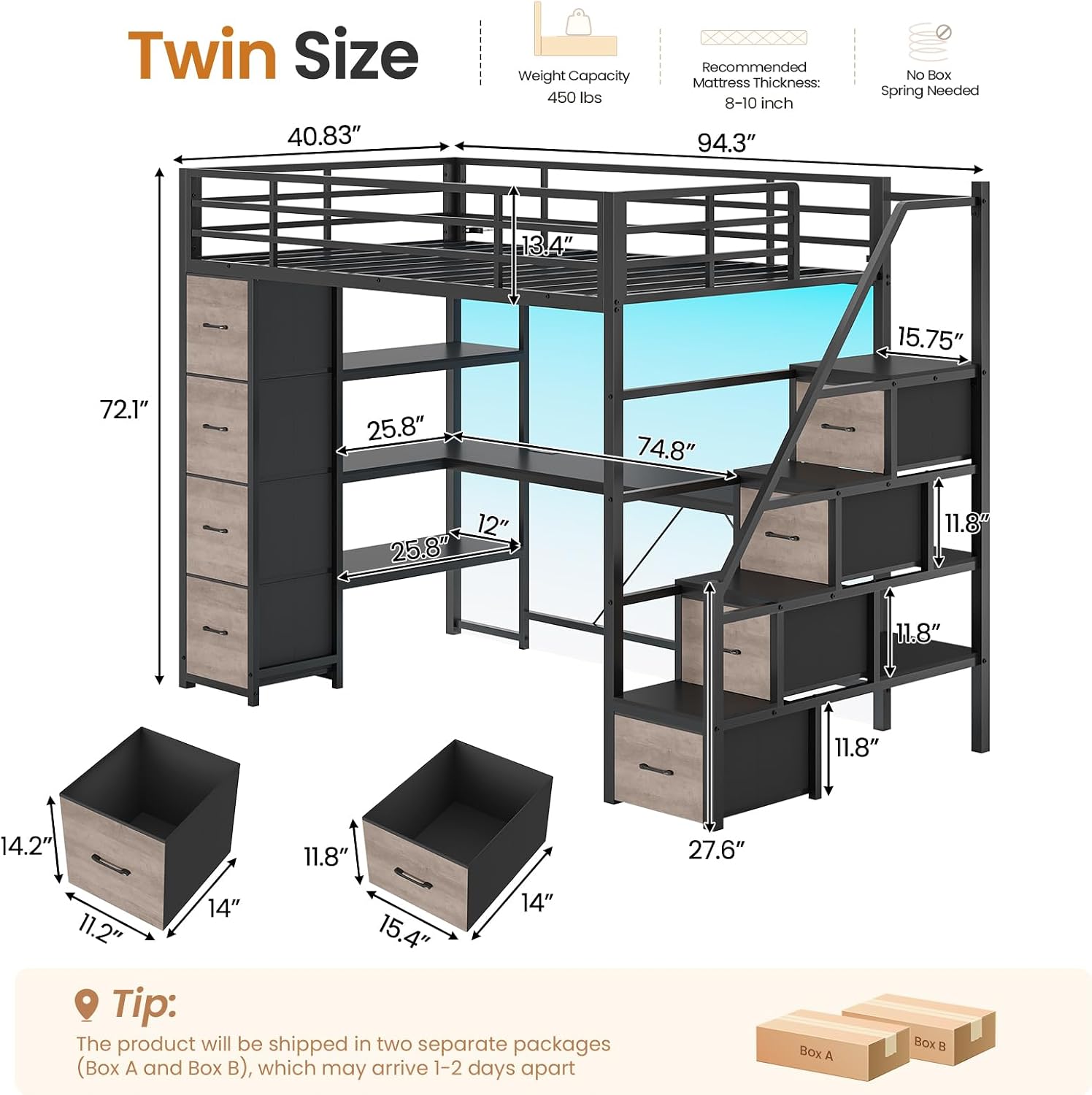
Image 7: Dimensions diagram. This diagram illustrates the overall dimensions of the DICTAC Twin Loft Bed, including height, length, width, and specific measurements for the desk, storage units, and guardrails. It also indicates a weight capacity of 450 lbs and a recommended mattress thickness of 8-10 inches.
7. Product Overview Video
Video 1: Official product video demonstrating features of the DICTAC Twin Loft Bed. This video provides a visual overview of the DICTAC Twin Loft Bed, showcasing its key features such as the integrated storage stairs, L-shaped desk, power strips, and LED lighting. It demonstrates the bed's functionality and space-saving design.

Image 8: All-in-one space-saving design. This image provides an overview of the loft bed's space-saving design, clearly delineating the three primary functional zones: the elevated sleeping area, the under-bed study or play area with a desk, and the integrated storage areas including drawers and shelves.
8. Warranty and Customer Support
DICTAC is committed to providing quality products and excellent customer service.
- Damage or Missing Parts: If you discover any damage, scratches, or missing parts upon delivery, please contact DICTAC customer service immediately. We aim to resolve your problem within 24 hours.
- Technical Support: For any questions regarding assembly, operation, or troubleshooting that are not covered in this manual, please reach out to our customer support team.
- Contact Information: Please refer to your purchase documentation or the DICTAC official website for the most current customer service contact details.