
HOMCOM 823-P008
HOMCOM 18000 BTU Mini Split AC/Heating System User Manual
Model: 823-P008
1. Introduction
Thank you for choosing the HOMCOM 18000 BTU Mini Split AC/Heating System. This manual provides essential information for the safe and efficient operation, installation, and maintenance of your unit. Please read this manual thoroughly before installation and use, and retain it for future reference.
This system offers 18000 BTU cooling and 18000 BTU heating capacity, suitable for areas up to 1250 sq. ft. It features a 22 SEER2 rating for energy efficiency, Wi-Fi connectivity, and compatibility with smart home systems like Alexa.
2. Safety Information
Important Safety Instructions: Always follow basic safety precautions when using electrical appliances to reduce the risk of fire, electric shock, injury, or property damage.
- Read all instructions before using this appliance.
- This appliance must be properly grounded.
- Do not operate the unit with a damaged power cord or plug.
- Do not insert fingers or foreign objects into air inlets or outlets.
- Do not attempt to repair or modify the unit yourself. Contact qualified service personnel.
- Ensure the power supply matches the unit's specifications (230V).
- Keep flammable materials away from the unit.
- Children should be supervised to ensure they do not play with the appliance.
- Ensure proper ventilation during installation and operation.
- Use only the specified refrigerant (R-32).
3. Package Contents
Verify that all components are present and undamaged upon unpacking. The system ships in two separate boxes.

Image: Detailed diagram of package contents, showing items in Box 1 and Box 2.
Box 1 Contents:
- Indoor Unit
- Wall Mounting Bracket (Pre-fitted to Indoor Unit)
- Indoor-Outdoor Unit Connection Cable
- User Manual
- 8 Screws
- 8 Expansion Bolts
- Remote Control
- Drain Pipe
Box 2 Contents:
- Outdoor Unit
- 2 Copper Connecting Pipes
- Power Connection Cable
- Adhesive Tape
- Sealing Putty
- Wall Sleeve
- 4 Anti-Vibration Pads
- Outdoor Unit Drain Connector (Heating Mode)
4. Product Features
- Smart Control: TUYA app and voice control (Alexa compatible) for remote operation.
- High Efficiency: 22 SEER2 rating with inverter heat pump technology for energy savings. AHRI and ETL/CETL verified.
- Multi-Mode Operation: Cool, Heat, Dehumidify, Fan, ECO, and Auto modes.
- Adjustable Settings: 4 fan speeds and a 0.5-24 hour timer.
- Quiet Operation: Operates as low as 28 dB in Sleep Mode.
- Easy Maintenance: Features self-cleaning and removable filters.
- Wide Temperature Range: Customizable 60-90°F comfort range.
- Advanced Base Heater: Prevents freezing for reliable outdoor operation in cold climates.

Image: Overview of the system's coverage and capacity.

Image: Energy efficiency details, showing 22 SEER2 rating.

Image: Smart control features via app and voice commands.

Image: Illustration of the ultra-quiet operation in sleep mode.

Image: Advanced base heater for extreme weather conditions.
5. Setup and Installation
Installation of a mini-split system requires specific tools and technical knowledge. It is highly recommended that installation be performed by a qualified HVAC technician to ensure proper function, safety, and warranty validity.
Key Installation Steps (Overview):
- Indoor Unit Placement: Select a location that allows for optimal airflow, drainage, and easy access for maintenance. Ensure sufficient clearance from walls and ceiling.
- Outdoor Unit Placement: Choose a stable, level surface with adequate clearance for airflow and away from obstructions. Minimize the distance between indoor and outdoor units.
- Drilling Wall Hole: Create a hole through the wall for refrigerant lines, drain hose, and electrical cables. Ensure a slight downward slope for proper drainage.
- Refrigerant Line Connection: Connect the copper pipes between the indoor and outdoor units. Ensure connections are tight and leak-free.
- Electrical Wiring: Connect the power and communication cables according to the wiring diagram provided in the full manual. Ensure all electrical work complies with local codes.
- Vacuuming and Refrigerant Charging: Evacuate the refrigerant lines to remove air and moisture. If necessary, add additional refrigerant. This step is critical and requires specialized equipment.
- Drainage Connection: Connect the drain hose from the indoor unit to ensure proper condensate removal.
- Sealing: Seal the wall hole around the pipes and cables to prevent air and moisture infiltration.
- Test Run: After installation, perform a test run to verify all functions are operating correctly.
Video: Detailed setup instructions for the HOMCOM Split Air Conditioner. This video provides a visual guide to the installation process, including connecting pipes and wires, and sealing the wall penetration.
Video: Instructions for connecting the HOMCOM Split Air Conditioner to the mobile application. This video guides users through the Wi-Fi setup process for smart control.
6. Operating Instructions
Your HOMCOM Mini Split AC/Heating System can be operated via the included remote control, a smartphone app (TUYA), or voice commands (Alexa).
Remote Control Operation:
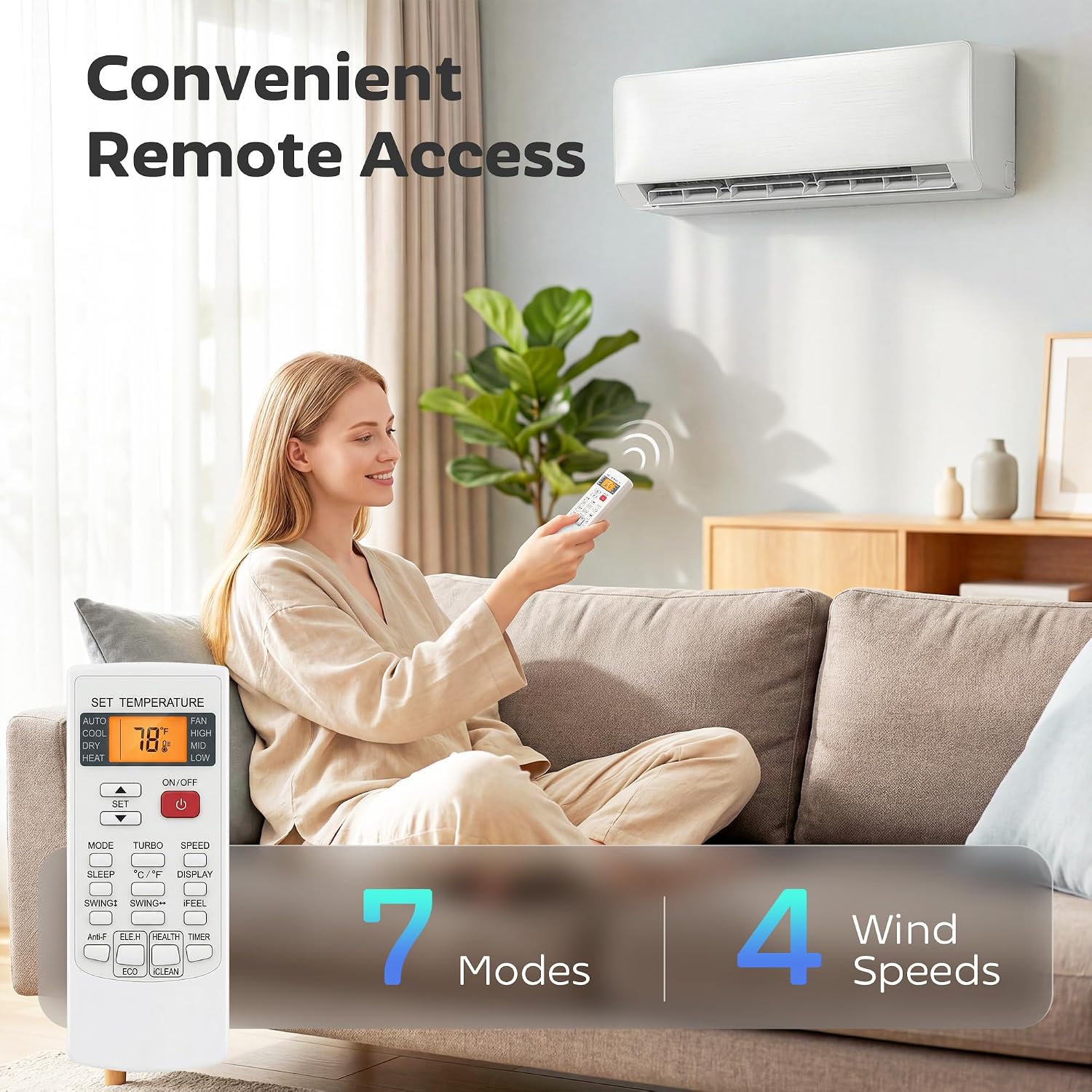
Image: Remote control for convenient access to various settings.
- Power Button: Turns the unit ON or OFF.
- Mode Button: Cycle through operating modes: Cool, Heat, Dehumidify, Fan, ECO, Auto.
- Temperature Adjustment: Use the Up/Down arrows to set the desired temperature (60-90°F).
- Fan Speed: Adjust fan speed (Low, Medium, High, Auto) to control airflow.
- Timer: Set a timer for automatic ON/OFF operation (0.5-24 hours).
- Sleep Mode: Activates quiet operation and adjusts temperature for comfortable sleep.
- Swing: Controls the louver direction for optimal air distribution.
Smart App & Voice Control:
After connecting your unit to Wi-Fi (refer to the setup video), you can control it using the TUYA app on your smartphone or through voice commands with Alexa-enabled devices.
- App Control: Access all functions and settings remotely, monitor status, and schedule operations.
- Voice Commands: Use phrases like "Alexa, set my AC to cool mode" or "Alexa, turn on sleep mode" to control the unit hands-free.
7. Maintenance
Regular maintenance ensures optimal performance and longevity of your unit.
- Air Filter Cleaning: The indoor unit features removable filters. Clean them every two weeks or more frequently if the unit is used heavily or in dusty environments.
- Open the front panel of the indoor unit.
- Remove the air filters.
- Wash filters with lukewarm water and mild detergent, or vacuum them.
- Allow filters to dry completely before reinstalling.
- Outdoor Unit Cleaning: Periodically clean the outdoor unit's coils and fins to remove dirt, leaves, and debris. Ensure power is disconnected before cleaning.
- Drainage Check: Ensure the drain hose is clear and free of obstructions to prevent water leakage.
- Self-Cleaning Function: Utilize the unit's self-cleaning feature as recommended in the full manual to maintain internal cleanliness.
- Professional Servicing: It is recommended to have a qualified technician inspect and service the unit annually.
8. Troubleshooting
Before contacting customer support, refer to the following common issues and solutions:
| Problem | Possible Cause | Solution |
|---|---|---|
| Unit does not turn on | No power, circuit breaker tripped, remote control batteries dead. | Check power supply, reset circuit breaker, replace remote batteries. |
| Insufficient cooling/heating | Dirty air filters, blocked outdoor unit, incorrect mode setting, low refrigerant. | Clean air filters, clear obstructions from outdoor unit, select correct mode, contact technician for refrigerant check. |
| Water leakage from indoor unit | Clogged drain hose, improper installation. | Clear drain hose, ensure proper slope. If issue persists, contact technician. |
| Unusual noise | Loose parts, foreign objects, compressor issue. | Check for loose parts or objects. If noise is from compressor, contact technician. |
| Wi-Fi connection issues | Incorrect Wi-Fi password, router issues, unit too far from router. | Verify password, restart router, move unit closer or use a Wi-Fi extender. Refer to app connection video. |
9. Specifications
| Feature | Detail |
|---|---|
| Brand | HOMCOM |
| Model Number | 823-P008 |
| Cooling Capacity | 18000 BTU |
| Heating Capacity | 18000 BTU |
| Coverage Area | Up to 1250 sq. ft. |
| SEER2 Rating | 22 |
| Voltage | 230V |
| Noise Level (Sleep Mode) | 28 dB |
| Refrigerant Type | R-32 |
| Indoor Unit Dimensions (D x W x H) | 9" x 44.9" x 13.1" |
| Outdoor Unit Dimensions (D x W x H) | 11" x 30.9" x 21.9" |
| Weight | 99 pounds (total system) |
| Control Methods | App, Remote, Voice (Alexa) |

Image: Detailed dimensions and key specifications of the unit.
10. Warranty and Support
The HOMCOM Mini Split AC/Heating System comes with the following warranty:
- 5-Year Compressor Warranty: Covers the core compressor component.
- 5-Year Parts Warranty: Covers general parts against manufacturer defects.
- 1-Year Warranty Against Manufacturer Defects: (As per product specifications, this might be a general warranty, while the 5-year applies to specific components). Please refer to your purchase documentation for exact terms.
- Lifetime Tech Support: Dedicated customer care and troubleshooting assistance.
For technical assistance, warranty claims, or further inquiries, please contact HOMCOM customer support. Refer to the contact information provided in your purchase documentation or on the official HOMCOM website.

Image: Summary of warranty coverage and support.
Ask a question about this manual
Ask about setup, troubleshooting, compatibility, parts, safety, or missing instructions. Manuals+ will review the question and use this page’s manual context to help answer it.