
1. Introduction
Thank you for choosing the Bettdow AC1095 DLP Projector. This portable projector is designed to deliver a superior home cinema experience with its native 1080p resolution, 600 ANSI Lumens brightness, and 4K decoding capabilities. Featuring a unique dual operating system (AOSP and Google TV), integrated battery, and smart functionalities like NFC screen mirroring and automatic adjustments, the AC1095 offers versatility and ease of use. Please read this manual thoroughly before operating the device to ensure proper usage and optimal performance.

Figure 1.1: Bettdow AC1095 DLP Projector and included accessories.
2. Setup
2.1 Unpacking and Initial Inspection
Carefully remove all components from the packaging. Ensure all items listed in the product accessories section are present and undamaged.

Figure 2.1: Projector dimensions and included accessories: remote control, USB-C cable, power adapter, and carrying case.
2.2 Powering On and Charging
- Connect the projector to a power outlet using the provided USB-C cable and power adapter.
- Press and hold the power button on the projector or remote control to turn it on.
- The integrated 20800mAh battery provides up to 200 minutes of playback. For extended use or charging, connect to a 65W or higher Power Delivery (PD) compatible power bank or the included adapter.

Figure 2.2: Integrated battery and USB-C charging port.
2.3 Placement and Projection
Place the projector on a stable surface. The integrated gimbal allows for flexible 360° projection, enabling you to project onto walls, ceilings, or floors.

Figure 2.3: Flexible projection using the integrated gimbal.
2.4 Automatic Adjustments
The AC1095 features laser TOF technology for instant autofocus and omnidirectional automatic keystone correction. This ensures a perfectly square image from almost any angle, even with side projection.
- Automatic Focus: The projector will automatically adjust the image clarity.
- Automatic Keystone Correction: The projector will automatically correct distorted images to a rectangular shape.
- Automatic Obstacle Avoidance: The projector can detect and avoid obstacles on the projection surface.
- Digital Zoom: Adjust the image size from 50% to 100% using the remote control.

Figure 2.4: Automatic screen adjustment features.
3. Operating Instructions
3.1 Dual System Operation (AOSP + Google TV)
The Bettdow AC1095 features a unique dual operating system. You can switch between AOSP (Android Open Source Project) and Google TV.
- Google TV: Provides access to the Google Play Store, integrated Chromecast, and curated streaming recommendations. Ideal for a refined and user-friendly experience.
- AOSP: Offers an open and customizable environment for installing applications outside the official store, advanced settings, and full control over your media.

Figure 3.1: Google TV interface.
3.2 Connectivity
- Wi-Fi: Supports dual-band 2.4G/5G Wi-Fi for seamless streaming. Navigate to the settings menu to connect to your wireless network.
- Bluetooth 5.0: Connect external speakers, gamepads, or other Bluetooth devices. Access Bluetooth settings to pair devices.
- NFC Screen Mirroring: For instant screen sharing from your NFC-enabled smartphone, simply tap your phone to the designated NFC area on the projector. This supports AirPlay and Miracast.
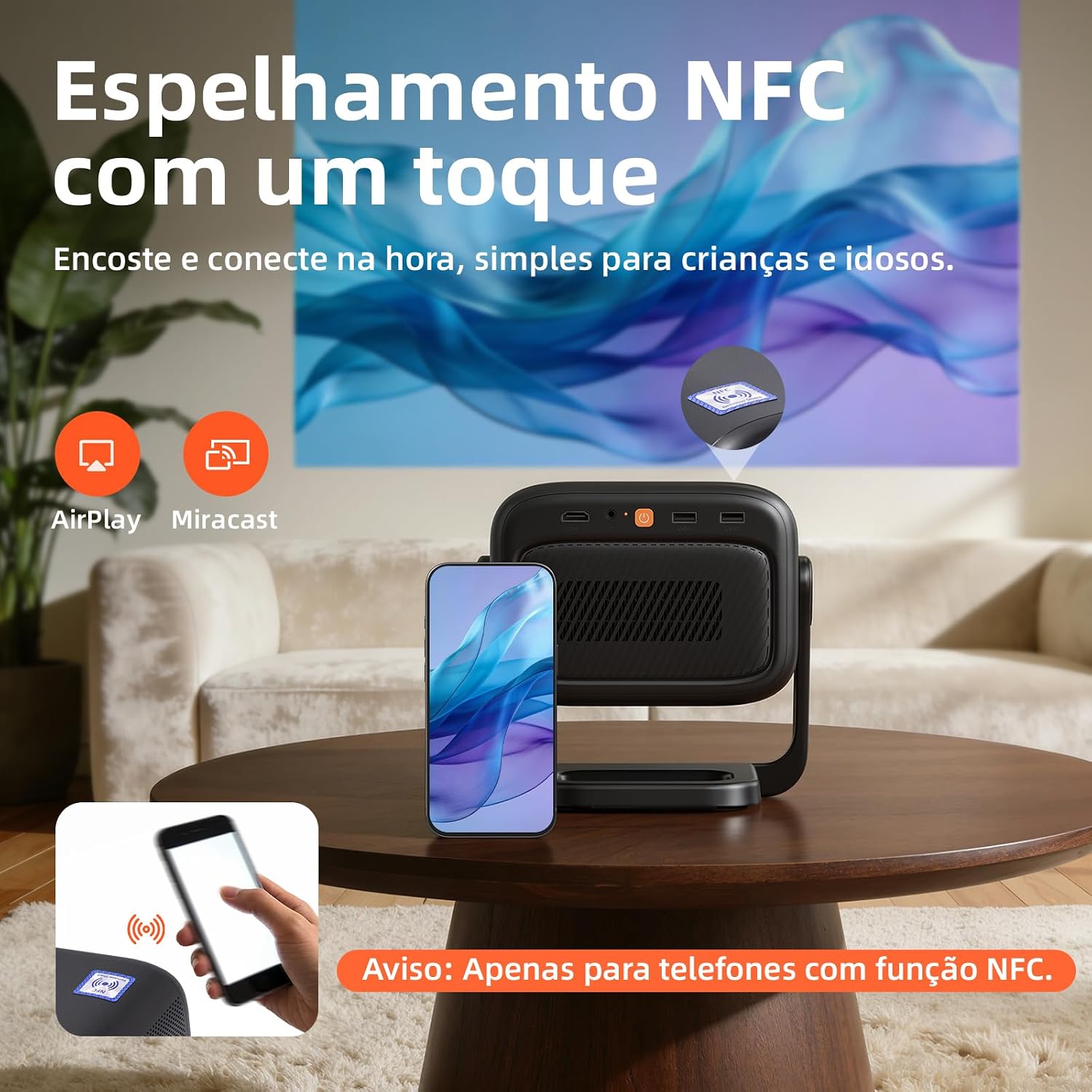
Figure 3.2: NFC one-touch screen mirroring. Note: Only compatible with NFC-enabled phones.
3.3 Audio Output
The projector features dual 10W speakers with Dolby Audio support, providing powerful bass and surround sound. For an enhanced audio experience, connect external speakers via Bluetooth.

Figure 3.3: Cinema-level surround sound.
4. Maintenance
4.1 Cleaning the Projector
- Use a soft, dry cloth to clean the exterior of the projector.
- For the lens, use a specialized lens cleaning cloth and solution. Avoid touching the lens directly with your fingers.
- Do not use abrasive cleaners, waxes, or solvents.
4.2 Battery Care
- To prolong battery life, avoid fully discharging the battery frequently.
- Charge the projector regularly, even if not in use, to maintain battery health.
- Store the projector in a cool, dry place when not in use for extended periods.
5. Troubleshooting
| Problem | Possible Cause | Solution |
|---|---|---|
| No image projected |
|
|
| Image is blurry |
|
|
| No sound |
|
|
| NFC mirroring not working |
|
|
6. Specifications
| Feature | Detail |
|---|---|
| Brand | Bettdow |
| Model Name | AC1095 |
| Display Technology | DLP |
| Native Resolution | 1920 x 1080 (1080p) |
| Max Screen Resolution | 1920 x 1080 (1080p) |
| Brightness | 600 ANSI Lumens |
| Contrast Ratio | 1000:1 |
| Connectivity Technology | WiFi6, Bluetooth 5.0, NFC |
| Special Features | Automatic Focusing, Automatic Keystone Correction, Integrated Gimbal, Dual OS (AOSP + Google TV) |
| Form Factor | Portable |
| Color | Black |
| Compatible Devices | Smartphone, Tablet |
| Max Projection Distance | 5 Meters |
| Min Projection Distance | 1.2 Meters |
| Battery | 20800mAh (up to 200 minutes playback) |
| Charging | USB-C, 65W Power Delivery compatible |
| Included Components | Remote control |
| Country of Origin | China |
7. Warranty and Support
The Bettdow AC1095 DLP Projector comes with a 6-month warranty from the date of purchase, covering manufacturing defects.
For technical support, warranty claims, or any questions regarding your product, please contact Bettdow customer service through the retailer where you purchased the product or visit the official Bettdow website for contact information. Please have your purchase receipt and product model number (AC1095) ready when contacting support.