
Introduction
Thank you for choosing the WILLED Under Cabinet Lights. This manual provides detailed instructions for the safe and efficient use of your new rechargeable motion sensor lights. Please read this manual thoroughly before installation and operation, and retain it for future reference.
Package Contents
Before proceeding with installation, please ensure all items are present and in good condition.
- WILLED Under Cabinet Light Bar (2 units)
- USB Charging Cable (2 units)
- Installation Accessories (e.g., magnetic strips with adhesive)
- User Manual
Setup and Installation
The WILLED Under Cabinet Lights are designed for easy installation using magnetic mounting. No tools are required for most surfaces.
- Prepare the Surface: Clean the desired installation surface thoroughly to ensure it is dry and free of dust or grease. This will ensure optimal adhesion of the magnetic strip.
- Attach Magnetic Strip: Peel off the protective film from one side of the adhesive magnetic strip. Firmly press the adhesive side onto the clean installation surface. Hold for a few seconds to ensure a strong bond.
- Mount the Light: The light bar has built-in magnets. Align the light bar with the installed magnetic strip on the surface. The light will magnetically attach to the strip.
- Initial Charge: Before first use, fully charge the light using the provided USB cable. Connect the cable to the light's charging port and a standard USB power adapter (not included). The LED battery display will indicate charging status and full charge.
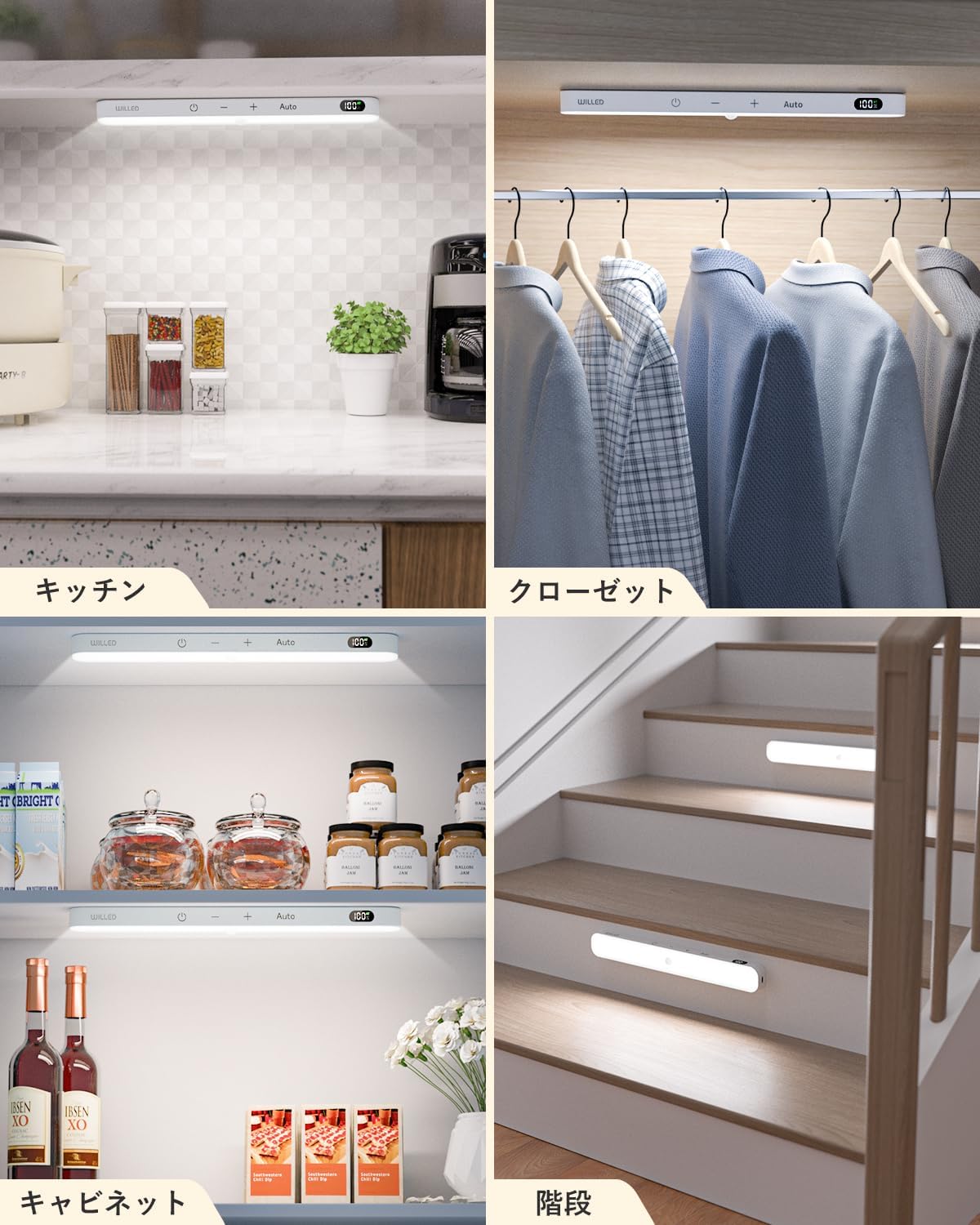
Image: The WILLED Under Cabinet Light bar, ready for installation.
Operating Instructions
The WILLED Under Cabinet Lights feature intuitive touch controls and multiple operating modes.
Controls Overview
The light bar features four touch keys for various functions:
- Power Button (⏻): Short press to turn the light ON/OFF.
- Minus Button (-): Short press to decrease brightness.
- Plus Button (+): Short press to increase brightness.
- Auto Button (Auto): Short press to cycle through motion sensor modes.

Image: Detailed view of the touch control panel on the light bar.
Brightness Adjustment
The light offers 5 brightness levels. Use the Minus (-) and Plus (+) buttons to adjust the light intensity to your preference. The light is dimmable from 10% to 100% output.
Operating Modes
Press the Auto button to cycle through the available operating modes:
- Motion Sensor Mode: In this mode, the light will automatically turn on when motion is detected within its 120° detection range (up to 10 feet) in a dark environment. It will automatically turn off after approximately 20 seconds of no motion. This mode is energy-efficient and ideal for closets, hallways, or stairs.
- Always-On Mode: The light remains continuously on until manually turned off or the battery is depleted. This mode is suitable for tasks requiring constant illumination, such as working under a cabinet.

Image: Illustration of motion sensor mode with detection range and always-on mode for continuous lighting.
Battery Level Display
The integrated LED display shows the current battery percentage, allowing you to monitor power levels and know when recharging is necessary or when the unit is fully charged.
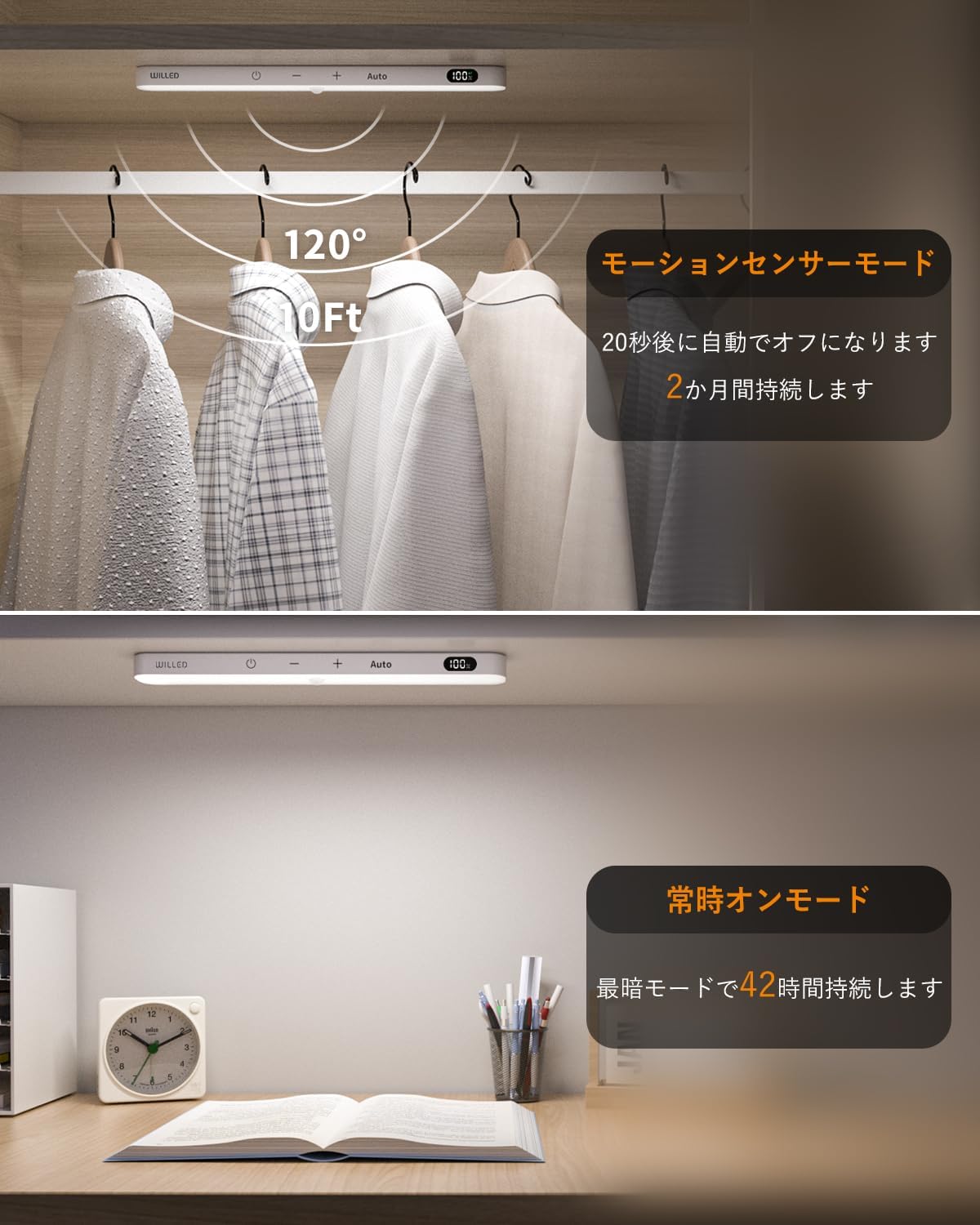
Image: The LED display showing battery percentage and auto mode status.
Typical Usage Scenarios
These lights are versatile and can be used in various locations:
- Under kitchen cabinets for task lighting.
- Inside closets for automatic illumination.
- In pantries or storage areas.
- Along staircases for safety and guidance.

Image: Examples of the light installed in a kitchen, closet, cabinet, and on stairs.
Maintenance
Proper maintenance ensures the longevity and optimal performance of your WILLED Under Cabinet Lights.
- Cleaning: Wipe the light bar with a soft, dry cloth. Do not use abrasive cleaners or solvents, as they may damage the finish or electronic components.
- Charging: Recharge the lights when the battery display indicates low power. Use only the provided USB cable or a compatible 5V USB charger. Avoid overcharging by disconnecting once fully charged.
- Battery Care: For optimal battery life, avoid completely draining the battery frequently. If storing the lights for an extended period, charge them to about 50% every few months.
- Environment: Do not expose the lights to extreme temperatures, high humidity, or direct water contact. These lights are designed for indoor use only.
Troubleshooting
If you encounter issues with your WILLED Under Cabinet Lights, refer to the following common problems and solutions:
| Problem | Possible Cause | Solution |
|---|---|---|
| Light does not turn on. | Low battery; Power button not pressed; Faulty unit. | Charge the light fully. Press the power button. If still not working, contact support. |
| Motion sensor not working. | Not in motion sensor mode; Ambient light too bright; Sensor obstructed; Low battery. | Ensure "Auto" mode is selected. Test in a dark environment. Clear any obstructions from the sensor. Charge the light. |
| Light is dim or flickers. | Low battery; Brightness setting too low. | Recharge the light. Increase brightness using the "+" button. |
| Light does not charge. | Faulty USB cable or adapter; Charging port issue. | Try a different USB cable and power adapter. Ensure the cable is fully inserted. |
Specifications
| Feature | Detail |
|---|---|
| Brand | WILLED |
| Model Number | B0GXYYH1CL |
| Color Temperature | Cool White 6000K |
| Material | Plastic |
| Light Source Type | LED |
| Power Source | Battery Powered (Rechargeable Lithium Ion) |
| Voltage | 5V DC |
| Light Source Wattage | 1 Watt |
| Special Features | Dimmable, Motion Sensor, Battery Level Display, Touch Control |
| Number of Light Sources | 2 (per pack) |
| Item Weight | 8 ounces |
| Item Dimensions (L x W x H) | 9.5" x 1.4" x 0.6" |
| Unit Count | 2 Count |
Warranty and Support
Your WILLED Under Cabinet Lights are covered by a 12-month warranty from the date of purchase. This warranty covers manufacturing defects and ensures the product functions as intended under normal use.
For warranty claims, technical support, or any questions regarding your product, please contact WILLED customer service through the retailer's platform or the official WILLED website. Please have your purchase receipt and model number (B0GXYYH1CL) ready when contacting support.