
1. Introduction
The LILYGO T3S3 V1.3 is a versatile development board featuring the ESP32-S3 microcontroller and an LR1121 LoRa module, operating at 920MHz. It integrates Wi-Fi, Bluetooth 5.0, and LoRa wireless communication capabilities, making it suitable for a wide range of IoT applications. The board also includes a 0.96-inch SSD1306 I2C OLED display for real-time data visualization and a TF card slot for data storage.
2. Features
- Wireless Connectivity: Wi-Fi and Bluetooth 5.0 for versatile network integration.
- LoRa Module: LR1121 for 920MHz long-range wireless communication.
- Microcontroller: ESP32-S3 for powerful processing.
- Display: Integrated 0.96-inch SSD1306 I2C OLED for data display.
- Storage: Support for TF (MicroSD) cards.
- User Interface: Reset and Boot buttons for easy control.
3. Package Contents
Verify that all items listed below are included in your package. If any items are missing or damaged, please contact your vendor.

Image: Contents of the LILYGO T3S3 V1.3 package. It includes the T3S3 board, a USB cable, two pin headers, a 920MHz LoRa antenna, and a 2.4G antenna.
- 1 x LILYGO T3S3 V1.3 Development Board
- 1 x USB Cable
- 2 x Pin Headers
- 1 x 920MHz LoRa Antenna
- 1 x 2.4G Antenna (for Wi-Fi/Bluetooth)
4. Setup
4.1 Hardware Connection
- Connect Antenna: Carefully screw the appropriate antenna (920MHz LoRa or 2.4G for Wi-Fi/Bluetooth) onto the IPEX connector on the board. Ensure a secure connection without overtightening.
- Power Supply: Connect the LILYGO T3S3 V1.3 board to your computer using the provided USB cable. The board can be powered via the USB-C port.
- Optional: TF Card Insertion: If using, insert a TF (MicroSD) card into the designated slot on the board.

Image: Rear view of the LILYGO T3S3 V1.3 board showing the LoRa module and an antenna connected to its IPEX connector.
4.2 Software Setup
To program and interact with the LILYGO T3S3 V1.3, you will need to set up your development environment.
- Install USB Drivers: Depending on your operating system, you may need to install USB-to-serial drivers for the ESP32-S3.
- Install Arduino IDE or PlatformIO: Download and install your preferred development environment.
- Add ESP32-S3 Board Support: Follow the instructions for your chosen IDE to add ESP32-S3 board support.
- Access Code Examples and Libraries: Refer to the official LILYGO GitHub repository for examples, libraries, and detailed documentation:
github.com/Xinyuan-LilyGO/LilyGo-LoRa-Series/tree/master
For additional information and getting started guides, visit the Wiki:
wiki.lilygo.cc/get_started/en/LoRa_GPS/T3S3/T3S3.html
5. Operating Instructions
5.1 Powering On and Basic Functionality
Once connected via USB, the board will power on. The integrated OLED display will typically show boot-up information or data as programmed.
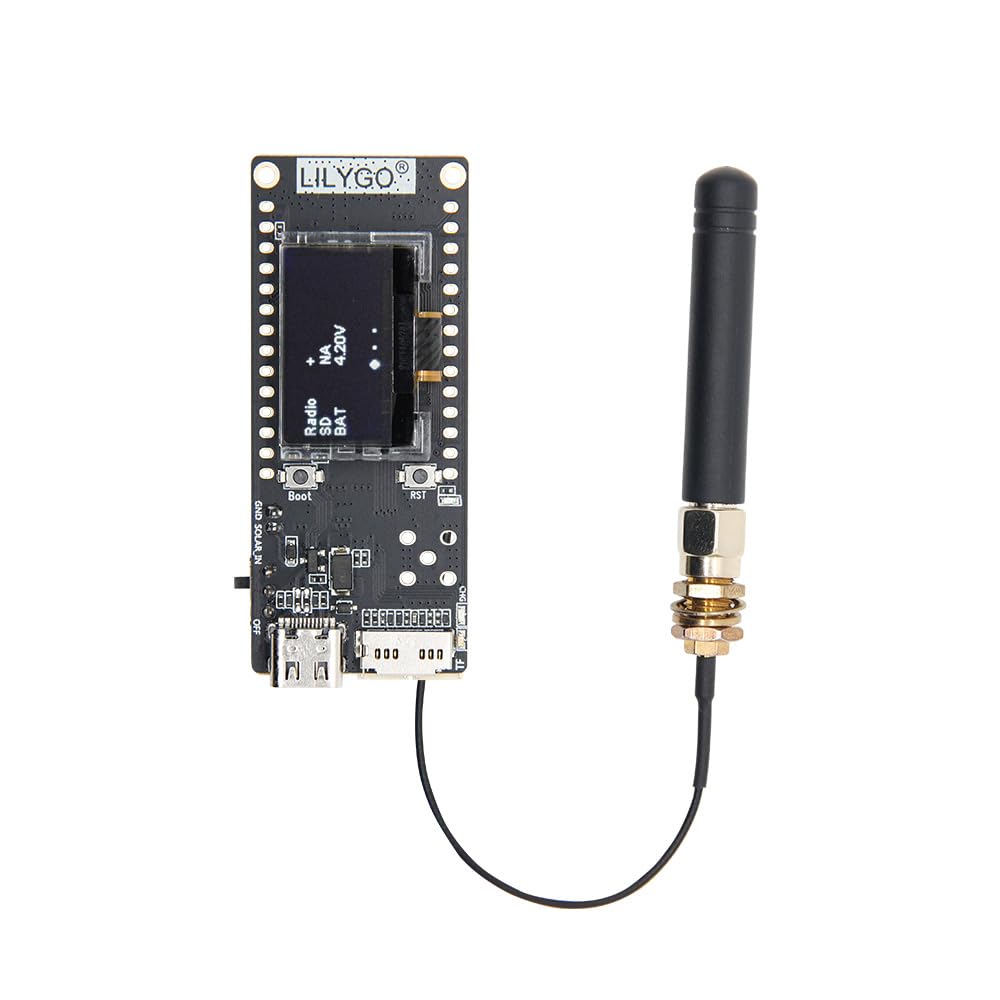
Image: Front view of the LILYGO T3S3 V1.3 board, highlighting the 0.96-inch OLED display, Reset button, and Boot button.
- Reset Button: Press the 'RST' button to restart the ESP32-S3 microcontroller.
- Boot Button: The 'Boot' button is used for entering the bootloader mode, typically for flashing new firmware. Hold 'Boot' while pressing and releasing 'RST', then release 'Boot'.
5.2 Wireless Communication
The T3S3 V1.3 supports multiple wireless protocols:
- Wi-Fi: Use the ESP32-S3's built-in Wi-Fi capabilities for standard internet connectivity. Ensure the 2.4G antenna is connected for optimal performance.
- Bluetooth 5.0: Utilize Bluetooth for short-range communication with other devices. The 2.4G antenna also serves Bluetooth.
- LoRa (920MHz): The LR1121 module enables long-range, low-power LoRa communication. Connect the 920MHz antenna for LoRa operations.
5.3 OLED Display Usage
The 0.96-inch SSD1306 OLED display can be programmed to show sensor data, status messages, network information, or other relevant output from your application. Refer to the provided code examples on the GitHub repository for display initialization and usage.
6. Maintenance
- Cleaning: Use a dry, soft cloth to clean the board. Avoid using liquids or solvents.
- Storage: Store the board in a dry, anti-static environment when not in use.
- Handling: Handle the board by its edges to avoid touching components, especially when powered. Static electricity can damage sensitive components.
- Firmware Updates: Regularly check the official LILYGO GitHub repository for firmware updates and improvements.
7. Troubleshooting
- Board Not Powering On:
• Ensure the USB cable is securely connected to both the board and a working USB port on your computer.
• Try a different USB cable or USB port. - OLED Display Not Working:
• Verify that the display is correctly initialized in your code.
• Check for any loose connections if the display is not factory-soldered.
• Ensure the I2C address for the SSD1306 is correct in your software. - Unable to Upload Code:
• Make sure the correct board (ESP32-S3 Dev Module) and COM port are selected in your IDE.
• Try holding the 'Boot' button while pressing and releasing 'RST', then release 'Boot' to enter bootloader mode before uploading.
• Ensure USB drivers are correctly installed. - Wireless Communication Issues:
• Confirm the correct antenna (2.4G for Wi-Fi/Bluetooth, 920MHz for LoRa) is securely connected.
• Check your code for correct initialization and configuration of the wireless modules.
• Ensure you are within range of your Wi-Fi access point or LoRa gateway.
8. Specifications

Image: Diagram showing the dimensions of the LILYGO T3S3 V1.3 development board: Length (L) 66mm, Width (W) 29mm, Height (H) 10mm.
| Feature | Detail |
|---|---|
| Microcontroller | ESP32-S3 |
| LoRa Module | LR1121 (920MHz) |
| Wireless Protocols | Wi-Fi, Bluetooth 5.0, LoRa |
| Display | 0.96 inch SSD1306 I2C OLED |
| Storage | TF Card Slot |
| Buttons | Reset, Boot |
| Dimensions (approx.) | 66mm (L) x 29mm (W) x 10mm (H) |
| Origin | China |
| UPC | 717974148170 |
9. Support and Resources
For further assistance, detailed technical documentation, code examples, and community support, please refer to the following official resources:
- GitHub Repository: github.com/Xinyuan-LilyGO/LilyGo-LoRa-Series/tree/master
- Official Wiki: wiki.lilygo.cc/get_started/en/LoRa_GPS/T3S3/T3S3.html
- Product Service: If you have any questions or suggestions about the product, please feel free to contact LILYGO directly.