
1. Introduction and Overview
The MOVA V70 Ultra Complete is an advanced robot vacuum cleaner designed to provide comprehensive and efficient floor cleaning. It features innovative technologies such as the MaxiReachX extendable mop and side brush, powerful 40,000 Pa suction, and the EcoCyclone bagless dust collection system. This manual will guide you through the setup, operation, and maintenance of your device.
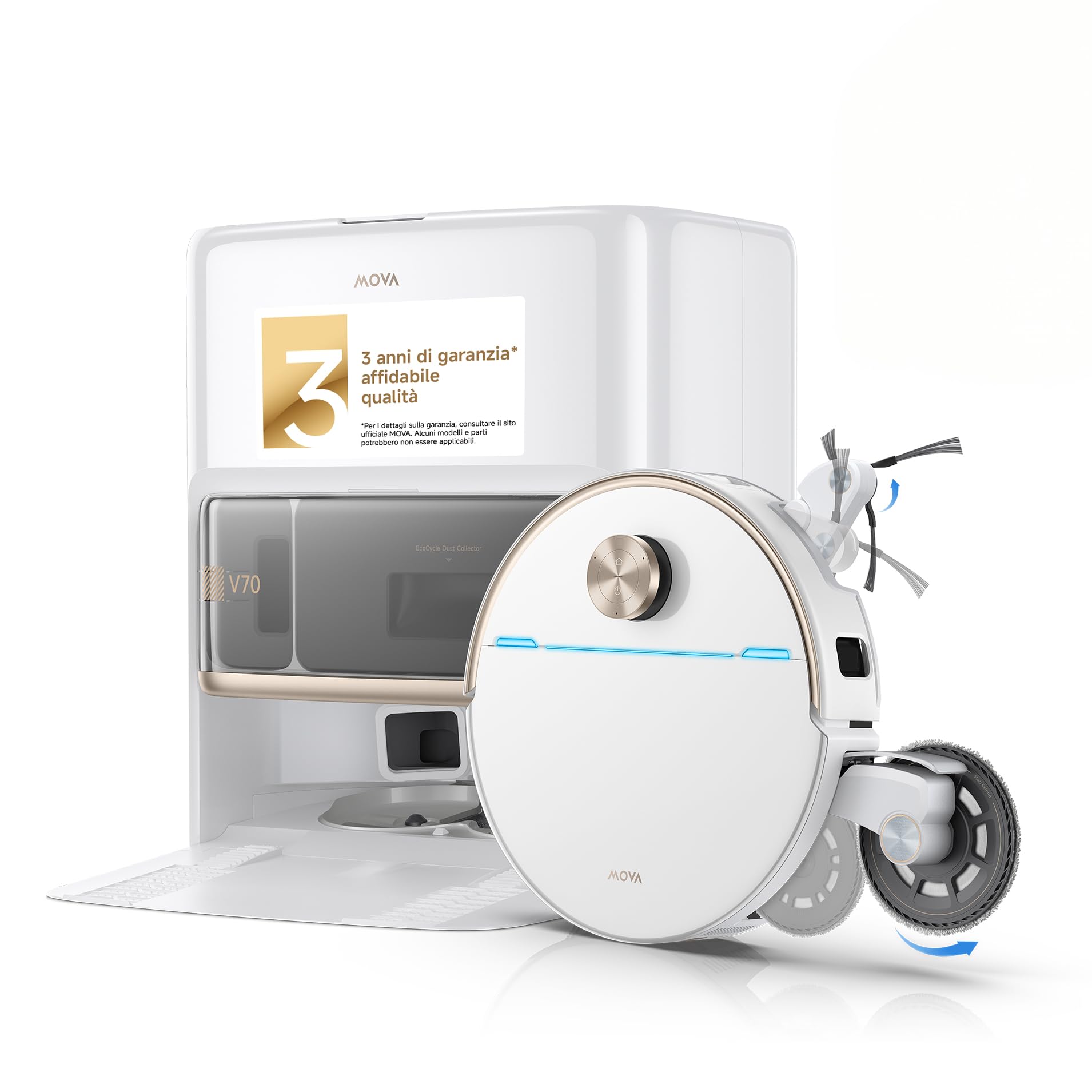
Image: MOVA V70 Ultra Complete Robot Vacuum Cleaner and Base Station. This image shows the robot vacuum cleaner docked at its white base station.
Key Features
- MaxiReachX Extendable Mop: Extends up to 16 cm for enhanced edge cleaning and reaching tight spaces.
- MaxiReachX Extendable Side Brush: Extends up to 12 cm to clean under low furniture and into corners.
- 40,000 Pa Suction Power: High-speed motor for powerful debris and hair removal.
- StepMaster System 2.0: Overcomes obstacles up to 9 cm, including steps and door thresholds.
- EcoCyclone Dustbin: Bagless, washable dustbin for up to 100 days of maintenance-free use.
- 6400 mAh Battery with Smart Resume: Ensures long cleaning sessions and resumes cleaning after recharging.
2. Setup Guide
2.1 Unboxing and Component Check
Carefully remove all components from the packaging. Verify that all items listed below are present.

Image: Contents of the MOVA V70 Ultra Complete Robot Vacuum Cleaner package. This image displays the robot vacuum, base station, main brush, side brush, mop pads, mop holders, dust filter, dustbin, detergent dispenser, base station ramp, user manual, quick guide, and accessory kit.
2.2 Base Station Placement
Place the base station on a hard, level surface against a wall. Ensure there is at least 0.5 meters of clear space on both sides and 1.5 meters in front of the base station for optimal robot navigation and docking. Connect the power cable to the base station and plug it into a power outlet.

Image: MOVA V70 Ultra Complete Robot Vacuum Cleaner returning to its charging station. The robot is shown approaching its white base station for charging.
2.3 Initial Charging
Place the robot onto the base station. Ensure the charging contacts align. The robot will begin charging automatically. For first-time use, fully charge the robot before operation. The battery indicator on the robot will show its charging status.
2.4 App Connection
Download the official MOVA app from your smartphone's app store. Follow the in-app instructions to connect your robot vacuum cleaner to your home Wi-Fi network. The app allows for advanced control, scheduling, map management, and firmware updates.
3. Operating Instructions
3.1 Starting and Stopping Cleaning
- To Start: Press the power button on the robot or use the 'Start Cleaning' option in the MOVA app. The robot will begin mapping and cleaning your home.
- To Pause: Press the power button once during cleaning.
- To Resume: Press the power button again.
- To Stop/Return to Base: Press and hold the power button for a few seconds, or use the 'Return to Base' option in the app.

Image: MOVA V70 Ultra Complete Robot Vacuum Cleaner in operation. The robot is actively cleaning a floor surface.
3.2 Cleaning Modes and Customization
The MOVA app offers various cleaning modes and customization options:
- Auto Cleaning: The robot intelligently cleans the entire mapped area.
- Zone Cleaning: Select specific areas on the map for the robot to clean.
- Spot Cleaning: Direct the robot to clean a small, concentrated area.
- No-Go Zones/Virtual Walls: Set virtual boundaries on the map to restrict the robot from entering certain areas.
- Suction Power & Water Flow: Adjust these settings via the app to suit different floor types and cleaning needs.
3.3 MaxiReachX Mop and Side Brush Extension
The robot automatically extends its mop and side brush when detecting edges or tight spaces, ensuring thorough cleaning along walls and under furniture.

Image: Diagram illustrating the MaxiReachX mop extension mechanism. This diagram shows how the mop extends to reach further into corners and edges.

Image: Diagram illustrating the MaxiReachX side brush extension mechanism. This diagram shows the side brush extending to clean closer to walls and under low furniture.
3.4 Obstacle Avoidance and Carpet Care
The robot uses advanced sensors to detect and avoid obstacles. Its StepMaster System 2.0 allows it to climb over thresholds and small steps up to 9 cm. For carpets, the robot can automatically boost suction power and lift its mop pads to prevent wetting the carpet.

Image: Diagram showing carpet detection and adaptive cleaning modes. This illustration demonstrates the robot's ability to detect carpets, boost suction, and lift mops.
4. Maintenance
Regular maintenance ensures optimal performance and extends the lifespan of your MOVA V70 Ultra Complete.
4.1 EcoCyclone Dustbin Cleaning
The EcoCyclone dustbin is designed for easy, bagless maintenance. Empty the dustbin regularly, especially after each cleaning cycle. The dustbin is washable; rinse it with water and allow it to air dry completely before reinserting.

Image: Internal view of the EcoCyclone dustbin with automatic drying. This diagram shows the internal components of the dustbin and its drying mechanism.
4.2 Mop Pads and Side Brush Maintenance
The base station automatically cleans and dries the mop pads. However, it is recommended to periodically remove and manually clean the mop pads and side brush to remove any tangled hair or debris. Replace worn-out mop pads and side brushes as needed.

Image: Diagram showing automatic functions of the base station. This illustration highlights the base station's capabilities including mop washing, drying, and dust emptying.
4.3 Filter and Sensor Cleaning
Clean the main filter inside the dustbin regularly. Tap out dust or rinse if washable, ensuring it's completely dry before reinstallation. Wipe the robot's sensors (cliff sensors, wall sensors, charging contacts) with a clean, dry cloth to ensure accurate navigation and charging.
5. Troubleshooting
If you encounter issues with your MOVA V70 Ultra Complete, refer to the following common problems and solutions:
| Problem | Possible Cause | Solution |
|---|---|---|
| Robot does not start or respond. | Low battery; power switch off; robot stuck. | Ensure robot is charged; check power switch; clear any obstructions. |
| Poor cleaning performance. | Full dustbin; clogged filter; worn brushes/mops. | Empty dustbin; clean/replace filter; clean/replace brushes/mops. |
| Robot cannot return to base station. | Base station obstructed; robot too far; Wi-Fi issue. | Ensure clear path to base; manually place robot near base; check Wi-Fi connection. |
| Mop not extending or retracting properly. | Debris in mechanism; sensor issue. | Clean around the mop extension mechanism; check for error messages in the app. |
| Navigation errors or getting stuck frequently. | Dirty sensors; complex environment; outdated firmware. | Clean all sensors; clear excessive clutter; update firmware via app. |
For more detailed troubleshooting or persistent issues, consult the MOVA app for specific error codes and solutions, or contact customer support.
6. Specifications
Below are the key technical specifications for the MOVA V70 Ultra Complete Robot Vacuum Cleaner:
| Feature | Specification |
|---|---|
| Model Number | RLV77CE-WH-X |
| Brand | Mova |
| Color | V70 Ultra Complete (White with transparent cover) |
| Product Dimensions (L x W x H) | 42L x 47W x 45.8H cm |
| Suction Power | 40,000 Pa |
| Battery Capacity | 6400 mAh (Lithium-ion) |
| Mop Rotation Speed | Up to 300 rpm |
| Mop Pressure | 15 N |
| Obstacle Climbing Capability | Up to 9 cm |
| Noise Level | 48 Decibels |
| Dustbin Type | EcoCyclone (Bagless, washable) |
| Recommended Use | Daily floor cleaning, suitable for homes with pets, large homes. |
7. Warranty and Support
7.1 Product Warranty
The MOVA V70 Ultra Complete Robot Vacuum Cleaner typically comes with a manufacturer's warranty. Please refer to the warranty card included in your product packaging or check the official MOVA website for specific warranty terms and conditions, including duration and coverage.
7.2 Customer Support
For technical assistance, service, or any questions regarding your product, please contact MOVA customer support. Contact details can usually be found on the official MOVA website or in the quick start guide provided with your product. When contacting support, please have your model number (RLV77CE-WH-X) and purchase information ready.


