
VOCOlinc VT2201TD-2P
VOCOlinc Smart Tag Tracker Instruction Manual
Model: VT2201TD-2P
Introduction
The VOCOlinc Smart Tag Tracker is a versatile Bluetooth tracking device designed to help you locate your valuable items. It offers dual compatibility with both Apple's "Find My" network and Google's "Find My Device" network, providing broad coverage for locating lost items. This manual provides detailed instructions for setup, operation, maintenance, and troubleshooting to ensure optimal use of your Smart Tag Tracker.

Figure 1: VOCOlinc Smart Tag Tracker attached to various items.
Setup
The VOCOlinc Smart Tag Tracker is designed for easy setup with either iOS or Android devices. Please note that due to system limitations, the tracker can only be connected to one system (iOS or Android) at a time. To switch between systems, you must first unpair the tracker from the current device and then re-pair it with the new device.
1. Initial Activation and Pairing (iOS)
- Ensure Bluetooth is enabled on your iOS device.
- Open the Apple "Find My" app.
- Press and hold the button on the VOCOlinc Smart Tag Tracker for 10 seconds to activate it. You should hear a sound.
- In the "Find My" app, navigate to the "Items" tab and tap "Add Item" or "Add Other Item."
- Follow the on-screen prompts to complete the pairing process.

Figure 2: Pairing instructions for iOS and Android.
2. Initial Activation and Pairing (Android)
- If not already installed, download and install the Google "Find My Device" app from the Google Play Store.
- Ensure Bluetooth is enabled on your Android device.
- Press and hold the button on the VOCOlinc Smart Tag Tracker for 10 seconds to activate it. You should hear a sound.
- Open the Google "Find My Device" app. The app should detect the tracker.
- Tap the link in the pop-up window within the app to complete the pairing process.
Note: Huawei HarmonyOS devices are not supported.
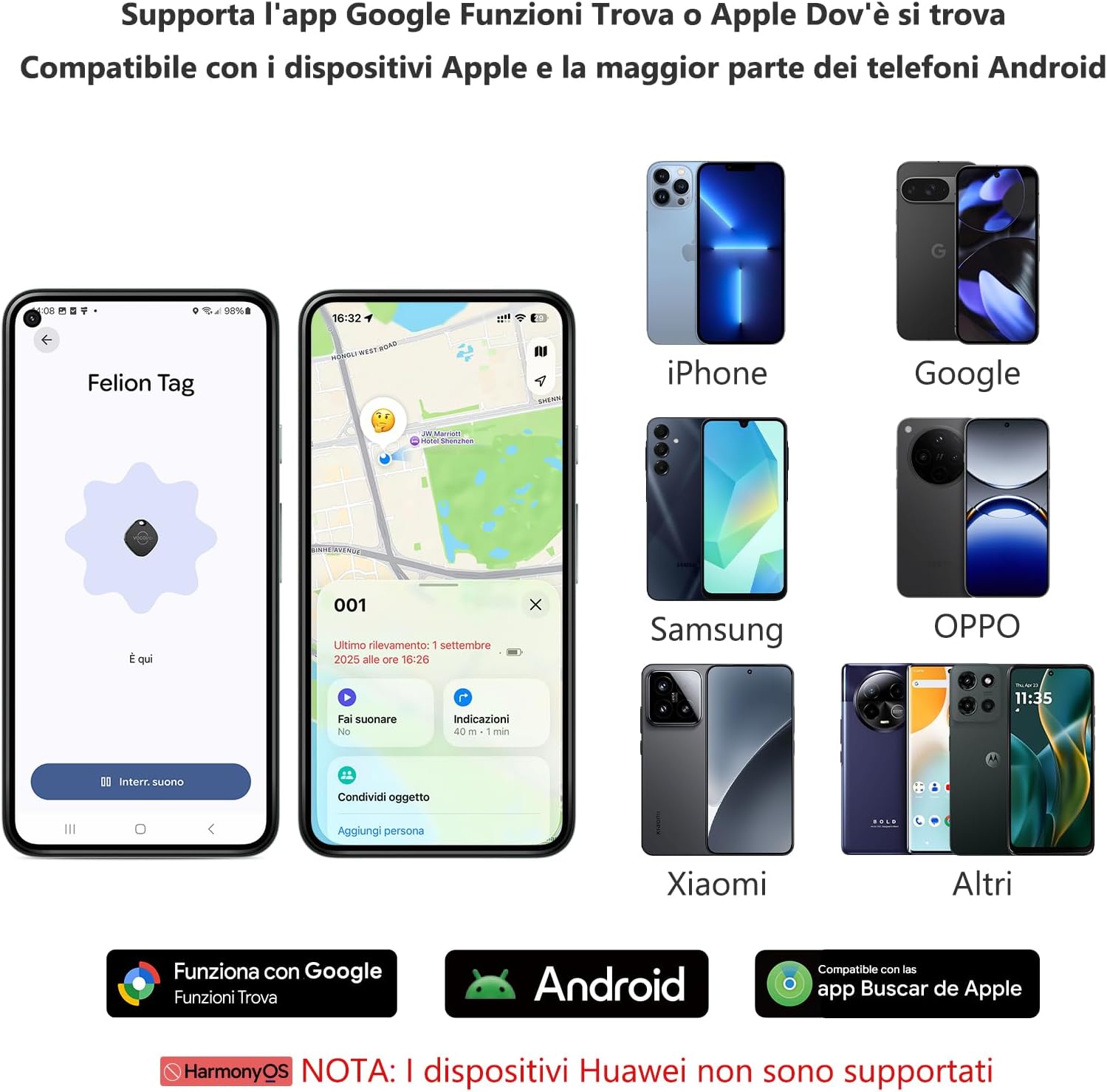
Figure 3: Device compatibility overview.
Operating Instructions
1. Finding Items Nearby
When your VOCOlinc Smart Tag Tracker is within Bluetooth range (up to 60 meters or 200 feet without obstacles), you can make it emit a loud sound to help you locate it. This is particularly useful for finding items misplaced around your home or office.
- Open the "Find My" app (iOS) or "Find My Device" app (Android).
- Select your VOCOlinc Smart Tag Tracker from the list of items.
- Tap the "Play Sound" option. The tracker will emit a sound between 80-100 decibels.
- Follow the sound to locate your item.

Figure 4: Using the "Play Sound" feature to locate items.
2. Finding Items at a Distance
If your item is outside of Bluetooth range, the VOCOlinc Smart Tag Tracker leverages the vast networks of Apple "Find My" and Google "Find My Device." Hundreds of millions of devices anonymously and securely relay the location of your tracker to your app.
- Open the "Find My" app (iOS) or "Find My Device" app (Android).
- The app will display the last known location of your tracker on a map.
- You can use the navigation feature within the app to get directions to your item's location.

Figure 5: Remote tracking via map.
3. Lost Mode and Separation Alerts
The VOCOlinc Smart Tag Tracker offers features to prevent loss and aid recovery:
- Separation Alerts (iOS only): Receive instant notifications on your Apple device if you leave your item behind. (This feature is not yet available for Google systems.)
- Lost Mode: If your tracker is lost, activate Lost Mode in the "Find My" (iOS) or "Find My Device" (Android) app. You will be automatically notified when your tracker is detected by another device in the network.
4. Sharing Your Tracker
For iOS 17 and Android devices, you can share your tracker's location with up to 5 participants in the respective apps. This allows trusted contacts to view the item's location on a map.

Figure 6: Sharing device location with family or friends.
Maintenance
1. Battery Replacement
The VOCOlinc Smart Tag Tracker uses a replaceable CR2032 coin cell battery, which typically lasts for over one year. The device will notify you when the battery is low and needs replacement.
- Gently pry open the tracker casing.
- Remove the old CR2032 battery.
- Insert a new CR2032 battery with the positive (+) side facing up.
- Close the casing securely.

Figure 7: Battery replacement steps.
2. Water Resistance
The VOCOlinc Smart Tag Tracker is rated IP68 for water and dust resistance. This means it can withstand immersion in water up to 1.5 meters for 30 minutes. While durable, it is recommended to avoid prolonged submersion or exposure to high-pressure water jets.

Figure 8: Water resistance demonstration.
Troubleshooting
If you encounter issues with your VOCOlinc Smart Tag Tracker, please refer to the following common solutions:
| Problem | Solution |
|---|---|
| Tracker not pairing. |
|
| No sound from tracker. |
|
| Inaccurate location on map. |
|
| Cannot switch between iOS and Android. |
|
Specifications
| Feature | Detail |
|---|---|
| Model Number | VT2201TD-2P |
| Dimensions | 35L x 35W x 10H mm |
| Weight | 20 Grams |
| Connectivity Technology | Bluetooth |
| Bluetooth Range | Up to 60 meters (200 feet) without obstacles |
| Sound Level | 80-100 dB |
| Battery Type | CR2032 Coin Cell (included) |
| Average Battery Life | Over 1 year |
| Water Resistance | IP68 (Dust and water resistant) |
| Compatible Devices | iPhone, iPad (iOS), Android, Google devices |
| Control Method | App (Apple Find My / Google Find My Device) |
| Material | Plastic |
| Country of Origin | China |

Figure 9: Physical dimensions and key features.
Warranty
The VOCOlinc Smart Tag Tracker comes with a 1-year product warranty from the date of purchase. This warranty covers manufacturing defects and malfunctions under normal use. Please retain your proof of purchase for warranty claims. The warranty does not cover damage caused by misuse, accidents, unauthorized modifications, or normal wear and tear.
Support
For any questions, technical assistance, or warranty claims regarding your VOCOlinc Smart Tag Tracker, please contact our customer service team. We offer 24-hour customer support to assist you with any issues.
Contact Information:
- Visit the official VOCOlinc website for FAQs and support resources.
- Refer to your purchase platform for seller contact details.
Related documentsVT2201TD-2P


Ask a question about this manual
Ask about setup, troubleshooting, compatibility, parts, safety, or missing instructions. Manuals+ will review the question and use this page’s manual context to help answer it.