
1. Introduction
This manual provides detailed instructions for the safe and effective use of your CAMWORLD AC18DC 4K 72MP Digital Camera. Please read this manual thoroughly before operating the camera and retain it for future reference. The CAMWORLD AC18DC is a compact digital camera featuring 4K video recording, 72-megapixel photo resolution, autofocus, and vlogging capabilities.
2. Setup
2.1 Package Contents
Verify that all items listed below are included in your package:
- CAMWORLD AC18DC Digital Camera
- 64 GB SD Card
- Rechargeable Lithium-ion Battery (1 included)
- Lens Cloth
- Lanyard
- Type-C USB Cable
- Carry Bag
- User Manual

Image: Overview of the items included in the CAMWORLD AC18DC camera package.
2.2 Battery Installation and Charging
The camera uses a 3.7V 900mAh Lithium-ion battery. Ensure the battery is fully charged before first use.
- Open the battery compartment cover on the bottom of the camera.
- Insert the battery according to the polarity indicators.
- Close the battery compartment cover securely.
- To charge, connect the camera to a power source using the provided Type-C USB cable. The charging indicator light will illuminate.

Image: The camera can be charged using the Type-C USB cable connected to a wall adapter or a power bank.
2.3 Memory Card Installation
The camera supports SD cards up to 64GB. A 64GB SD card is included.
- Locate the SD card slot, typically on the side or bottom of the camera.
- Insert the SD card with the metal contacts facing the correct direction until it clicks into place.
- To remove, gently press the card until it springs out.
3. Operating Instructions
3.1 Power On/Off
Press and hold the power button to turn the camera on or off. The 2.8-inch LED screen will display the startup sequence.
3.2 Taking Photos
The camera captures still images at an effective resolution of 72 megapixels.
- Autofocus: The camera features automatic focus. Point the camera at your subject, and it will automatically adjust focus.
- Digital Zoom: Utilize the 18x digital zoom for closer shots. Adjust zoom using the zoom controls.

Image: The camera offers 18x digital zoom and a selection of 9 creative filters.
- Self-Timer: The camera includes a self-timer function with options for 3, 5, or 10 seconds.

Image: The self-timer feature allows for delays of 3, 5, or 10 seconds before capturing a photo.
- Exposure Compensation: Adjust the exposure level to brighten or darken your images.
- Continuous Shooting: Capture a rapid sequence of photos.
- Time-lapse: Record a series of images over time to create a time-lapse video.

Image: Features include exposure compensation, time-lapse, and continuous shooting modes.
- LED Fill Light: Activate the built-in LED fill light for improved illumination in low-light conditions.
- Anti-Shake: The anti-shake function helps to reduce blur caused by camera movement.

Image: The camera includes an LED fill light and an anti-shake function for enhanced image quality.
3.3 Recording Videos
The camera records video at 2160p resolution, suitable for vlogging and general video capture.
- Press the dedicated video recording button to start and stop recording.
- The camera supports pause and restart functions during video recording.
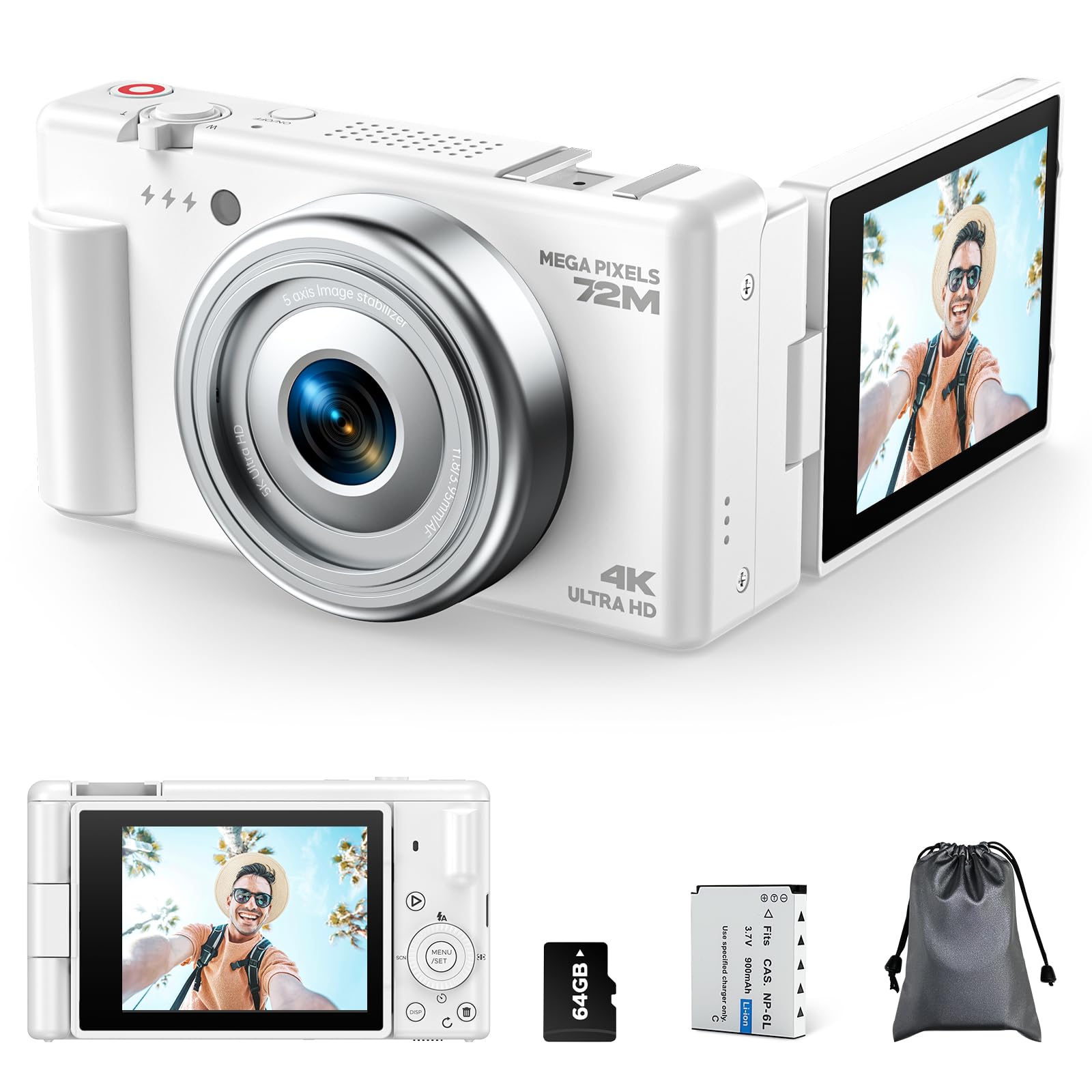
Image: The camera is designed for vlogging, featuring a date stamp and pause/restart video functions.
3.4 Webcam Functionality
The CAMWORLD AC18DC can be used as a webcam for live streaming or video calls.
- Connect the camera to your computer using the USB cable.
- Select 'Webcam Mode' on the camera's screen if prompted.
- Your computer should recognize the camera as a webcam.
- The camera also features a cold shoe mount for external accessories like microphones or flashlights (not included).

Image: The camera functions as a webcam and includes a cold shoe mount for external accessories.
3.5 Connecting to a Computer or TV
Transfer photos and videos or view content directly on a larger screen.
- USB Connection: Connect the camera to a computer using the Type-C USB cable to transfer files.
- HD Output: Use an appropriate cable (not included) to connect the camera to an HD-compatible display for direct viewing.
Image: The camera supports HD output to a TV and USB connectivity for file transfer to a computer.
4. Maintenance
4.1 Cleaning the Camera
- Use the provided lens cloth to gently clean the camera lens and screen.
- For the camera body, use a soft, dry cloth. Avoid using harsh chemicals or solvents.
4.2 Battery Care
- Store the battery in a cool, dry place when not in use.
- Avoid exposing the battery to extreme temperatures.
- If the camera will not be used for an extended period, remove the battery.
4.3 Storage
When not in use, store the camera in its carry bag to protect it from dust and scratches. Avoid storing in humid environments.
5. Troubleshooting
5.1 Camera Does Not Turn On
- Ensure the battery is correctly inserted and fully charged.
- Try charging the battery for at least 30 minutes.
5.2 Memory Card Error
- Ensure the SD card is inserted correctly.
- Check if the SD card is locked (write-protected). Unlock it if necessary.
- Try formatting the SD card (this will erase all data).
5.3 Poor Image/Video Quality
- Ensure the lens is clean.
- Check lighting conditions and use the LED fill light if needed.
- Verify that the anti-shake function is enabled for stable shots.
6. Specifications
| Brand | CAMWORLD |
| Model Name | AC18DC |
| Effective Still Resolution | 72 MP |
| Video Capture Resolution | 2160p (4K) |
| Optical Sensor Technology | CMOS |
| Optical Sensor Size | 1/3" |
| Digital Zoom | 18x |
| Screen Size | 2.8 Inches |
| Screen Type | LED (Color) |
| Autofocus | Yes |
| Connectivity Technology | USB |
| Battery Type | Lithium-ion |
| Special Features | Webcam, Self-timer, LED Fill Light, Anti-Shake |
| Included Memory Card | 64 GB SD Card |
7. Warranty and Support
For warranty information and customer support, please refer to the documentation provided with your purchase or contact CAMWORLD customer service. Keep your proof of purchase for any warranty claims.