
1. Introduction
The YOOPAI Sunlu S4 Pro is a dual-chamber filament dryer designed to remove moisture from 3D printer filaments. This device features independent temperature control for each chamber, fast heating up to 85°C, and smart humidity regulation to ensure optimal filament condition for high-quality 3D prints. Proper filament drying prevents common printing issues such as stringing, bubbling, and poor layer adhesion.
2. Safety Information
- Read all instructions before use.
- Do not operate the device with wet hands or in wet environments.
- Ensure the power supply matches the device's requirements.
- Keep out of reach of children.
- Do not block ventilation openings.
- Unplug the device before cleaning or maintenance.
- The device operates at high temperatures. Avoid touching internal components during operation.
- Only use the provided power cable.
The S4 Pro incorporates triple safety protection, including PTC thermostats, to ensure safe operation.

Image: Internal components of the Sunlu S4 Pro, highlighting the PTC Thermostats and circulation fan for enhanced safety.
3. Package Contents
Verify that all items are present in the package:
- Sunlu FilaDryer S4 Pro x 1
- User Guide x 1
- Teflon Tubing (100 cm) x 2
- Stainless Steel Shafts x 8
- Power Cable x 1
- Bearings x 16
- Vacuum Bag Set (Filament Storage Bags x 10, Hand Pump x 1, Sealing Clips x 5)

Image: An illustration detailing the Sunlu S4 Pro filament dryer and all its accompanying accessories, including the vacuum bag set.
Unboxing Guide
Video: This video provides a visual guide to unboxing the Sunlu S4 Pro Filament Dryer and identifying all included components.
4. Product Overview
The Sunlu S4 Pro is a high-performance filament dryer featuring a dual-chamber design for simultaneous drying of different filament types. It is equipped with dual 300W PTC heaters and two circulation fans for efficient and uniform heating up to 85°C. The intuitive control screen allows for easy management of each chamber's settings.

Image: Front view of the Sunlu S4 Pro Filament Dryer, showcasing its transparent cover and dual-chamber design.
Key Features:
- Dual-Chamber Independent Control: Two separate drying zones (220x210x211mm each) allow for simultaneous drying of different materials with customized settings.
- Upgraded 380W Fast Heating: Dual 300W PTC heaters and circulation fans provide rapid and uniform heating up to 85°C.
- Large 4 Spool Capacity: Accommodates up to four 1kg spools at once.
- Smart Humidity Control: Automatically adjusts to maintain optimal humidity levels, starting drying when humidity is above a set value and stopping at 25%.
- Universal Compatibility: Supports a wide range of 3D filaments including PLA, PETG, ABS, TPU, PA, and PC (1.75mm/2.85mm).
- High Safety: Features robust temperature protection and PTC thermostats.

Image: An infographic summarizing the main features of the Sunlu S4 Pro, including its annealing capability, dual control, humidity management, and safety mechanisms.
5. Setup
- Placement: Place the S4 Pro on a stable, flat, and heat-resistant surface. Ensure adequate ventilation around the device.
- Load Filament: Open the top cover. Place up to two 1kg filament spools in each chamber. Ensure the spools rotate freely on the stainless steel shafts.
- Close Cover: Securely close the top cover.
- Connect Power: Plug the power cable into the device and then into a suitable power outlet.

Image: The Sunlu S4 Pro with filament spools placed inside its dual chambers, ready for drying.
6. Operation
First-Time Operation Guide
Video: This video demonstrates the initial setup and basic operation of the Sunlu S4 Pro Filament Dryer.
Power On/Off
- Power On: Press and hold the power button on the control panel for a few seconds until the screen illuminates.
- Power Off: Press and hold the power button again until the screen turns off.
Dual Control Screen
The S4 Pro features a central control screen that allows independent management of each drying chamber (Zone A and Zone B).

Image: The control screen displaying independent temperature and humidity settings for Zone A and Zone B.
Setting Temperature and Time
- Select Chamber: Use the navigation buttons to select either Zone A or Zone B on the control screen.
- Adjust Temperature: Press the 'SET' button, then use the up/down arrows to adjust the desired drying temperature (SV - Set Value). The maximum temperature is 85°C.
- Set Drying Time: After setting the temperature, use the 'SET' button again to move to the time setting. Adjust the drying duration using the up/down arrows.
- Confirm Settings: Press 'SET' once more to confirm and start the drying process for the selected chamber.
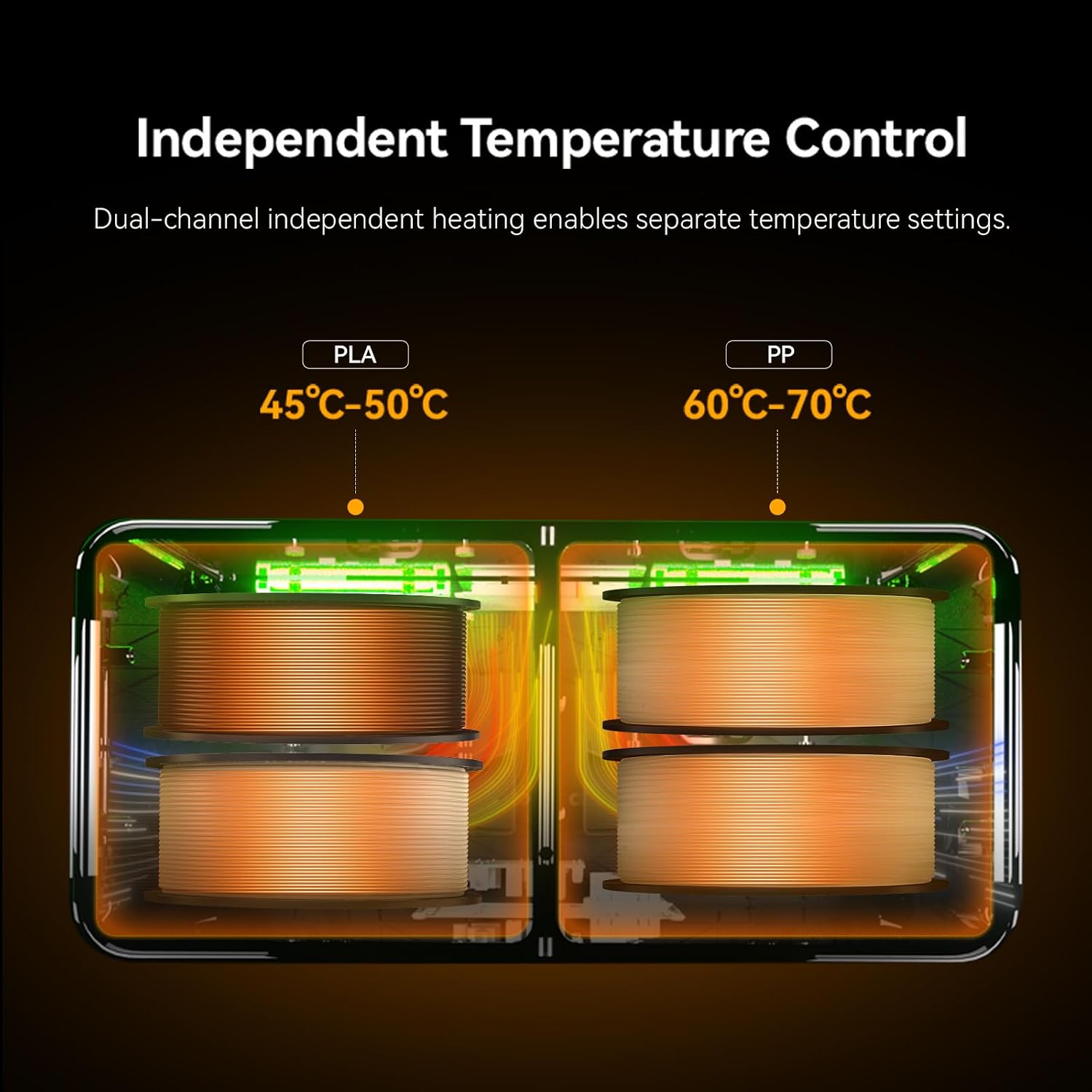
Image: An illustration demonstrating the independent temperature control feature, showing different temperature settings for PLA and PP filaments in each chamber.
Smart Humidity Control (MO3 Mode)
The S4 Pro's MO3 mode intelligently manages chamber humidity. It automatically initiates drying when the internal humidity exceeds a preset value and stops when it reaches 25%, ensuring filaments remain dry without constant manual intervention.

Image: A visual representation of the automatic humidity control feature, indicating that drying starts at 40% humidity and stops at 25%.
General Operation Overview
Video: A concise overview of the Sunlu S4 Pro Filament Dryer's features and general operation.
7. Filament Compatibility
The Sunlu S4 Pro is compatible with a wide range of 3D printing filaments and spool types. Always ensure your filament spool can withstand the drying temperature without deformation.
Supported Filament Types:
- Standard Filaments: PLA, PLA+, PETG, PVA, PCL, ABS, TPU, EASY-PA
- Engineering Filaments: ASA, PVB, PA, PC, PA6, PA12, PA-CF, PA-GF
The dryer supports filament diameters of Φ1.75mm and Φ2.85mm.

Image: An overview of the S4 Pro's compatibility with different filament diameters and types, including engineering and standard materials.
Spool Compatibility:
The S4 Pro is designed to be compatible with most 1kg spools on the market. Pay attention to the maximum temperature resistance of your specific spool to avoid deformation during drying.

Image: A visual comparison demonstrating the improved print quality of PLA filament after drying with the S4 Pro, compared to undried filament.
8. Maintenance
- Cleaning: Ensure the device is unplugged and cooled down before cleaning. Wipe the exterior with a soft, dry cloth. Do not use abrasive cleaners or solvents.
- Internal Cleaning: Periodically check the interior for any filament debris. Use a soft brush or compressed air to remove dust.
- Desiccant: The S4 Pro has a designated spot for desiccant pouches (not included). Regularly check and replace desiccant if used, to maintain optimal humidity absorption when the device is off.
9. Troubleshooting
- Device Not Powering On:
- Check if the power cable is securely connected to both the device and the power outlet.
- Ensure the power outlet is functional. - Filament Not Drying Effectively:
- Verify that the correct temperature and drying time are set for the specific filament type.
- Ensure the top cover is securely closed to maintain a sealed environment.
- Consider replacing desiccant pouches if used, as they may be saturated. - Temperature Not Reaching Set Value:
- Ensure the device is not placed in an excessively cold environment.
- Check for any obstructions to the ventilation fans. - Control Screen Unresponsive:
- Try restarting the device by unplugging and re-plugging the power cable.
- If the issue persists, contact customer support. - Difficulty with Operation:
- Refer to the 'Operation' section of this manual for detailed instructions.
- Watch the provided operation video for visual guidance.
10. Specifications
| Feature | Specification |
|---|---|
| Brand | YOOPAI |
| Model Number | S4 Pro |
| Item Weight | 3 kg |
| Special Feature | Dual-Chamber Independent Control |
| Manufacturer Part Number | S4 Pro |
| Maximum Heating Temperature | 85°C |
| Filament Diameter Compatibility | 1.75mm / 2.85mm |
| Drying Chamber Dimensions | 220x210x211mm (x2) |
| UPC | 810218380722 |
11. Warranty and Support
The YOOPAI Sunlu S4 Pro Filament Dryer comes with a 180-day warranty from the date of purchase. This warranty covers manufacturing defects and malfunctions under normal use.
For technical support, warranty claims, or any questions regarding your product, please contact YOOPAI customer service through the retailer's platform or the official brand website.
Please retain your proof of purchase for warranty validation.