
Introduction
Thank you for choosing the BOLOXA V90 Wireless Sports Earbuds. These earbuds are designed to provide a high-quality audio experience with features tailored for active lifestyles, including a secure fit, long battery life, and water resistance. This manual provides detailed instructions on how to set up, operate, maintain, and troubleshoot your earbuds to ensure optimal performance.
Package Contents
Please check the box for the following items:
- BOLOXA V90 Wireless Sports Earbuds (Left and Right)
- Charging Case
- USB-C Charging Cable
- Silicone Ear Tips (S, M, L sizes)
- User Manual
Product Overview
The BOLOXA V90 earbuds feature an ergonomic design with ear hooks for a secure fit during physical activity. They incorporate advanced audio technology for clear sound and communication.

Image: Exploded view of a BOLOXA V90 earbud, showing internal components such as the dynamic unit, 13mm graphene drivers, composite diaphragms, and Bluetooth 5.3 chip, contributing to its Hi-Fi stereo sound quality.
Key Features:
- Bluetooth 5.3 Technology: Ensures stable and fast wireless connection.
- Hi-Fi Sound Quality: Features 13mm drivers for deep bass and clear treble.
- CVC 8.0 Noise Cancellation: Enhances call clarity by reducing background noise.
- IPX6 Waterproof Rating: Provides protection against sweat, splashes, and light rain.
- 48 Hours Total Playtime: Extended battery life with the charging case.
- LED Battery Display: Digital display on the charging case shows battery levels.
- Touch Controls: Intuitive controls for music, calls, and voice assistant.
Setup
1. Charging the Earbuds and Case
Before first use, fully charge the earbuds and the charging case. The charging case has an LED display to indicate battery levels.
- Place the earbuds into the charging case.
- Connect the USB-C charging cable to the charging port on the case and to a power source.
- The LED display on the case will show the charging status. A full charge for the case and earbuds typically takes 1.5 to 2 hours.
- Each earbud provides approximately 8 hours of playtime on a single charge, with the charging case providing multiple additional charges for a total of up to 48 hours.

Image: BOLOXA V90 earbuds and charging case, highlighting 48 hours of total playtime, 8 hours of earbud playtime, and 1.5 hours for fast charging via USB-C.
2. Automatic Pairing
The earbuds are designed for one-step pairing after the initial setup.
- First-time Pairing:
- Open the charging case. The earbuds will automatically power on and enter pairing mode.
- On your device (smartphone, tablet, computer), enable Bluetooth.
- Search for available Bluetooth devices and select "V90" from the list.
- Once connected, you will hear a confirmation tone, and the earbuds will be ready for use.
- Subsequent Use:
- Simply open the charging case, and the earbuds will automatically connect to the last paired device.
- To disconnect, place the earbuds back into the charging case and close the lid. They will automatically power off.

Image: A visual guide demonstrating the auto-pairing feature of the BOLOXA V90 earbuds. Opening the case powers them on and connects them, while closing the case disconnects and powers them off. Compatible with iOS, Android, and Windows devices.
Operating Instructions
1. Wearing the Earbuds
For optimal sound quality and a secure fit, choose the correct ear tip size and adjust the ear hooks.
- Select the silicone ear tips (S, M, L) that best fit your ears.
- Insert the earbud into your ear canal.
- Gently place the ear hook over the back of your ear.
- Adjust the earbud and hook by twisting slightly until it feels comfortable and secure.

Image: Step-by-step guide on how to wear the BOLOXA V90 earbuds securely. It shows inserting the earbud, placing the ear hook over the ear, and adjusting for comfort, along with available ear tip sizes (S, M, L).
2. Touch Controls
The BOLOXA V90 earbuds feature sensitive touch controls on each earbud. The functions are as follows:
| Action | Left Earbud (L) | Right Earbud (R) |
|---|---|---|
| Play/Pause | Tap Twice | Tap Twice |
| Volume Down | Tap Once | - |
| Volume Up | - | Tap Once |
| Previous Song | Press and Hold 2s | - |
| Next Song | - | Press and Hold 2s |
| Answer Call | Tap Once | Tap Once |
| Hang Up Call | Press and Hold 2s | Press and Hold 2s |
| Activate Voice Assistant (Siri) | Tap 3 Times | Tap 3 Times |
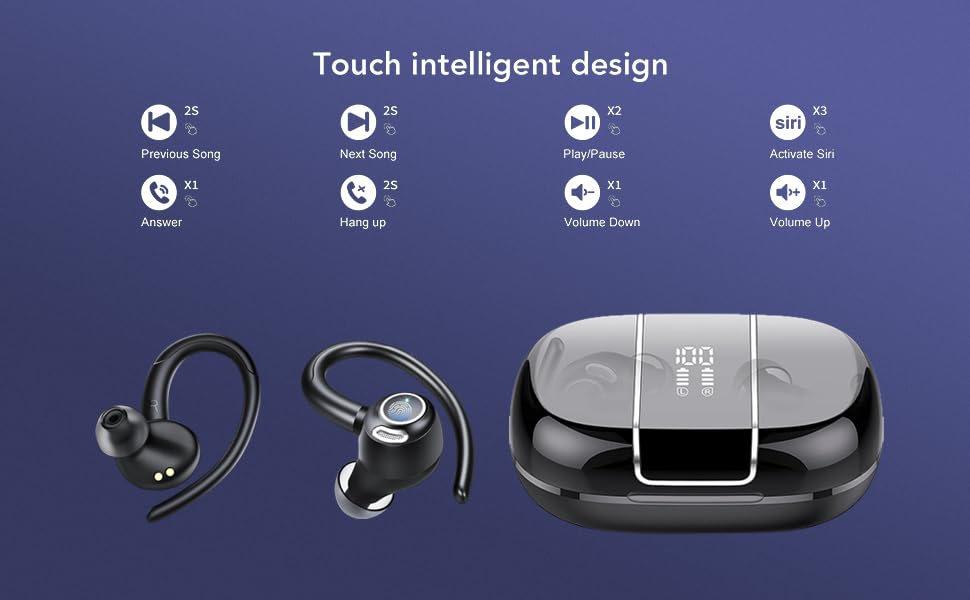
Image: Visual representation of the touch controls on the BOLOXA V90 earbuds, detailing actions for playing music, managing calls, and activating voice assistants like Siri.
3. Mono and Twin Mode
The earbuds can be used independently (mono mode) or together (twin mode).
- Mono Mode: Take either the left or right earbud out of the charging case. It will automatically connect to your device, allowing you to use a single earbud while the other remains in the case or is charging.
- Twin Mode: Take both earbuds out of the charging case. They will automatically connect to each other and then to your device for a stereo audio experience.
- You can switch between modes seamlessly by placing one earbud back in the case or taking the second one out.

Image: Illustration of the flexible usage modes for BOLOXA V90 earbuds, including single (mono), dual (twin), and switching capabilities, demonstrating how users can share audio.
Care and Maintenance
To ensure the longevity and optimal performance of your BOLOXA V90 earbuds, follow these care guidelines:
- Cleaning: Regularly clean the earbuds and charging case with a soft, dry, lint-free cloth. Do not use harsh chemicals or abrasive materials.
- Water Resistance: The earbuds are IPX6 waterproof, meaning they are resistant to strong jets of water. However, they are not designed for submersion. Avoid prolonged exposure to water and ensure they are dry before placing them back in the charging case.
- Storage: When not in use, store the earbuds in their charging case to protect them from dust and damage. Store in a cool, dry place away from extreme temperatures.
- Charging: Use only the provided USB-C cable or a certified equivalent for charging. Avoid overcharging.
- Avoid Impact: Do not drop or expose the earbuds to strong impacts, as this can damage internal components.
Troubleshooting
If you encounter issues with your BOLOXA V90 earbuds, refer to the following common solutions:
| Problem | Possible Solution |
|---|---|
| Earbuds not pairing/connecting |
|
| No sound or low volume |
|
| One earbud not working |
|
| Charging case not charging |
|
| Poor call quality |
|
Specifications
| Feature | Detail |
|---|---|
| Brand | BOLOXA |
| Model Number | V90 |
| Bluetooth Version | 5.3 |
| Ear Placement | In Ear |
| Form Factor | Wireless Earbuds with Earhooks |
| Noise Control | Sound Isolation, CVC 8.0 Mic (for calls) |
| Audio Driver Type | Dynamic Driver (13mm) |
| Control Type | Touch Control |
| Water Resistance Level | IPX6 Waterproof |
| Battery Life (Earbuds) | Up to 8 Hours (single charge) |
| Total Playtime (with Case) | Up to 48 Hours |
| Charging Port | USB-C |
| Compatible Devices | Cellphones, Tablets, Computers, TV |
| Item Weight | 100 Grams |
Warranty Information
The BOLOXA V90 Wireless Sports Earbuds come with a 2-year warranty from the date of purchase. This warranty covers manufacturing defects. Please retain your proof of purchase for warranty claims. The warranty does not cover damage caused by misuse, accidents, unauthorized modifications, or normal wear and tear.
Customer Support
For any questions, technical assistance, or warranty claims, please contact BOLOXA customer support:
- Manufacturer: BOLOXA
- Importer Contact: BOLOXA
- Please refer to the contact information provided on the product packaging or the official BOLOXA website for the most up-to-date support channels.


