
LG UltraWide 34U601B-B Monitor User Manual
Model: 34U601B-B
Introduction
This manual provides essential information for the safe and efficient use of your LG UltraWide 34U601B-B monitor. Please read this manual thoroughly before operating your device and retain it for future reference.
What's in the Box
Verify that all components are present in the package:
- Power supply
- Power cable
- HDMI cable
- DisplayPort cable
Setup
1. Assembling the Stand
Carefully attach the stand base to the stand neck, then secure the assembled stand to the monitor panel. Ensure all screws are tightened securely. Refer to the diagram below for proper assembly.

Image: The LG UltraWide 34U601B-B monitor with its stand, ready for connection.
2. Connecting Cables
Connect the power cable to the monitor and a power outlet. Use the provided HDMI or DisplayPort cable to connect your computer or other devices to the monitor. The monitor supports DisplayPort, HDMI, and USB Type-C connectivity.

Image: Rear view of the monitor showing available connection ports: 3-pole H/P out, HDMI 2.0 x 1, and DisplayPort 1.4 x 1.
3. Powering On
Press the power button located on the bottom center of the monitor to turn it on. Select the appropriate input source using the On-Screen Display (OSD) menu.
Operating the Monitor
On-Screen Display (OSD) Menu
The OSD menu allows you to adjust various monitor settings. Use the joystick button on the bottom center of the monitor to navigate the menu. Press the joystick to open the menu, move it up/down/left/right to select options, and press again to confirm.
Key Features and Settings
- UltraWide WQHD 21:9 Curved Display: The 34-inch 1800R curved screen with 3440x1440 resolution provides an expansive workspace for multitasking and immersive viewing.
- HDR10 and sRGB 99% Color Accuracy: Experience precise colors and high contrast with HDR10 compatibility and 99% sRGB coverage, ensuring realistic image reproduction.
- 120Hz Refresh Rate and AMD FreeSync Premium: Enjoy smooth visuals with a 120Hz refresh rate and AMD FreeSync Premium technology, which reduces screen tearing and stuttering for dynamic content and gaming.
- LG Switch (PBP/PIP): This feature allows you to divide the screen into up to 6 areas, customize layouts, and use multiple input sources simultaneously to enhance productivity.
- Reader Mode and Flicker Safe: These features adjust brightness and reduce flicker to minimize eye strain and improve visual comfort during extended use.

Image: The 34-inch UltraWide 21:9 display offers significantly more workspace compared to a standard 27-inch 16:9 monitor.

Image: The monitor's display showcasing accurate and vibrant colors, highlighting HDR10 and sRGB 99% capabilities.

Image: A visual representation of enhanced fluidity and reduced blur with a 120Hz refresh rate.

Image: A side-by-side comparison demonstrating the visual improvement with AMD FreeSync Premium activated, eliminating screen tearing.

Image: Examples of screen division and multi-window layouts using LG Switch for enhanced multitasking.

Image: Visual demonstration of Reader Mode and Flicker Safe features, showing their effect on screen appearance for eye comfort.
Maintenance
Cleaning the Monitor
To clean the screen, gently wipe it with a soft, lint-free cloth. For stubborn marks, lightly dampen the cloth with water or a mild, non-abrasive screen cleaner. Avoid using harsh chemicals, alcohol, or ammonia-based cleaners, as these can damage the screen surface. Always unplug the monitor before cleaning.
General Care
Avoid placing heavy objects on the monitor or its cables. Do not block ventilation openings. Keep the monitor away from direct sunlight, heat sources, and excessive moisture. When moving the monitor, handle it carefully to prevent damage.
Troubleshooting
If you encounter issues with your monitor, refer to the following common problems and solutions:
- No Power: Ensure the power cable is securely connected to both the monitor and a working power outlet. Check if the power adapter is functioning correctly.
- No Signal: Verify that the video cable (HDMI or DisplayPort) is properly connected to both the monitor and your computer. Ensure the correct input source is selected in the OSD menu. Try restarting your computer.
- Distorted Image or Incorrect Resolution: Check your computer's display settings to ensure the resolution is set to 3440x1440 and the refresh rate to 120Hz. Update your graphics card drivers.
- Flickering Screen: Enable Flicker Safe mode in the OSD menu. Ensure your graphics card drivers are up to date.
- Image Retention/Burn-in: While VA panels are less prone to this, avoid displaying static images for extended periods. Use screen savers or power-saving features.
For further assistance, please contact LG customer support.
Specifications
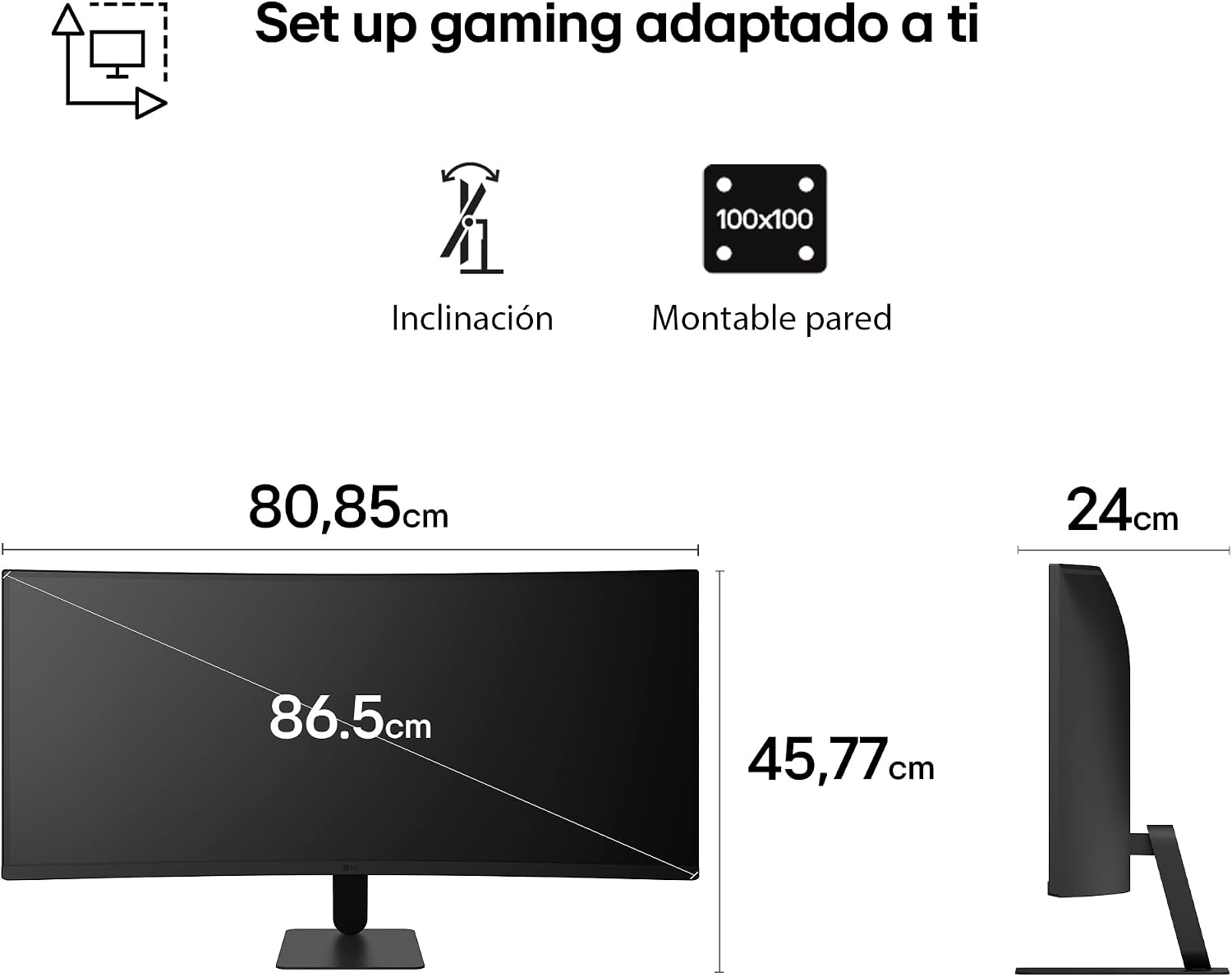
Image: Detailed dimensions of the LG UltraWide 34U601B-B monitor, including width, height, and depth.
| Feature | Specification |
|---|---|
| Model Number | 34U601B-B |
| Screen Size | 34 Inches |
| Resolution | 3440 x 1440 Pixels (WQHD Ultra Wide 1440p) |
| Aspect Ratio | 21:9 |
| Panel Type | VA |
| Curvature | 1800R |
| Refresh Rate | 120 Hz |
| Response Time | 5 Milliseconds |
| Contrast Ratio | 3000:1 |
| Brightness | 250 cd/m² |
| Color Gamut | sRGB 99% |
| HDR Support | HDR10 |
| Adaptive Sync | FreeSync Premium |
| Connectivity | DisplayPort 1.4, HDMI 2.0, USB Type-C |
| Power Consumption | 37 Watts |
| Dimensions (D x W x H) | 24 cm x 81 cm x 46 cm |
| Weight | 6.2 kg |
| VESA Mount | 100x100 mm |
Warranty Information
This LG monitor comes with a 2-year manufacturer's warranty. Please retain your proof of purchase for warranty claims. The warranty covers defects in materials and workmanship under normal use. For detailed terms and conditions, refer to the warranty card included with your product or visit the official LG website.
Support
For technical support, service inquiries, or additional product information, please visit the official LG website or contact LG customer service in your region. You can find contact details and support resources at www.lg.com/support.
You may also refer to the safety information PDF document available for download: Safety Information (PDF)


