
Important Safety Instructions
Please read all instructions carefully before using this appliance. Failure to follow these instructions may result in electric shock, fire, or serious personal injury.
- Always unplug the fan before cleaning or performing any maintenance.
- Do not operate the fan with a damaged cord or plug. If the cord or plug is damaged, contact customer support.
- Keep the fan away from water and moisture. Do not use in bathrooms or other wet environments.
- Ensure the fan is placed on a stable, level surface to prevent tipping.
- Do not insert fingers or other objects through the grille when the fan is operating.
- This appliance is for indoor use only.
- Supervise children when the fan is in use.
Product Overview
The hykolity 40-inch Tower Fan is designed to provide efficient and quiet air circulation for your home or office. It features multiple speed settings, operating modes, and a wide oscillation angle for comprehensive coverage.

Image: The hykolity 40-inch Tower Fan, showcasing its sleek design and digital display.
Key Features:
- Quiet Operation: Operates at a low noise level of 28dB.
- High-Velocity Airflow: Delivers powerful winds up to 26ft/s.
- Wide Oscillation: 90° oscillation for broad air distribution.
- Multiple Modes: Normal, Natural, Sleep, and Child modes.
- Adjustable Speeds: 3 fan speed settings.
- 12-Hour Timer: Programmable auto-off timer.
- Remote Control: Convenient operation from a distance.
- Space-Saving Design: Slim profile with a concealed handle for portability.
Setup Instructions
Follow these steps to assemble your hykolity Tower Fan.
- Unpack Components: Carefully remove all parts from the packaging. Ensure you have the fan body, base, and remote control.
- Attach the Base: Align the two halves of the fan base and snap them together. Then, align the assembled base with the bottom of the fan body. Secure the base to the fan body using the provided screws. Turn the screws clockwise until tightened.
- Position the Fan: Place the fan on a firm, level surface. Ensure there is adequate space around the fan for optimal airflow and oscillation.
- Plug In: Insert the power plug into a standard 120V AC electrical outlet.

Image: Visual guide for tool-free base setup and fan dimensions (12.4"D x 12.4"W x 40.55"H).
Video: An official hykolity video demonstrating the installation process of the tower fan.
Operating Instructions
Your hykolity Tower Fan can be operated using the control panel on top of the unit or the included remote control.
Control Panel and Remote Functions:
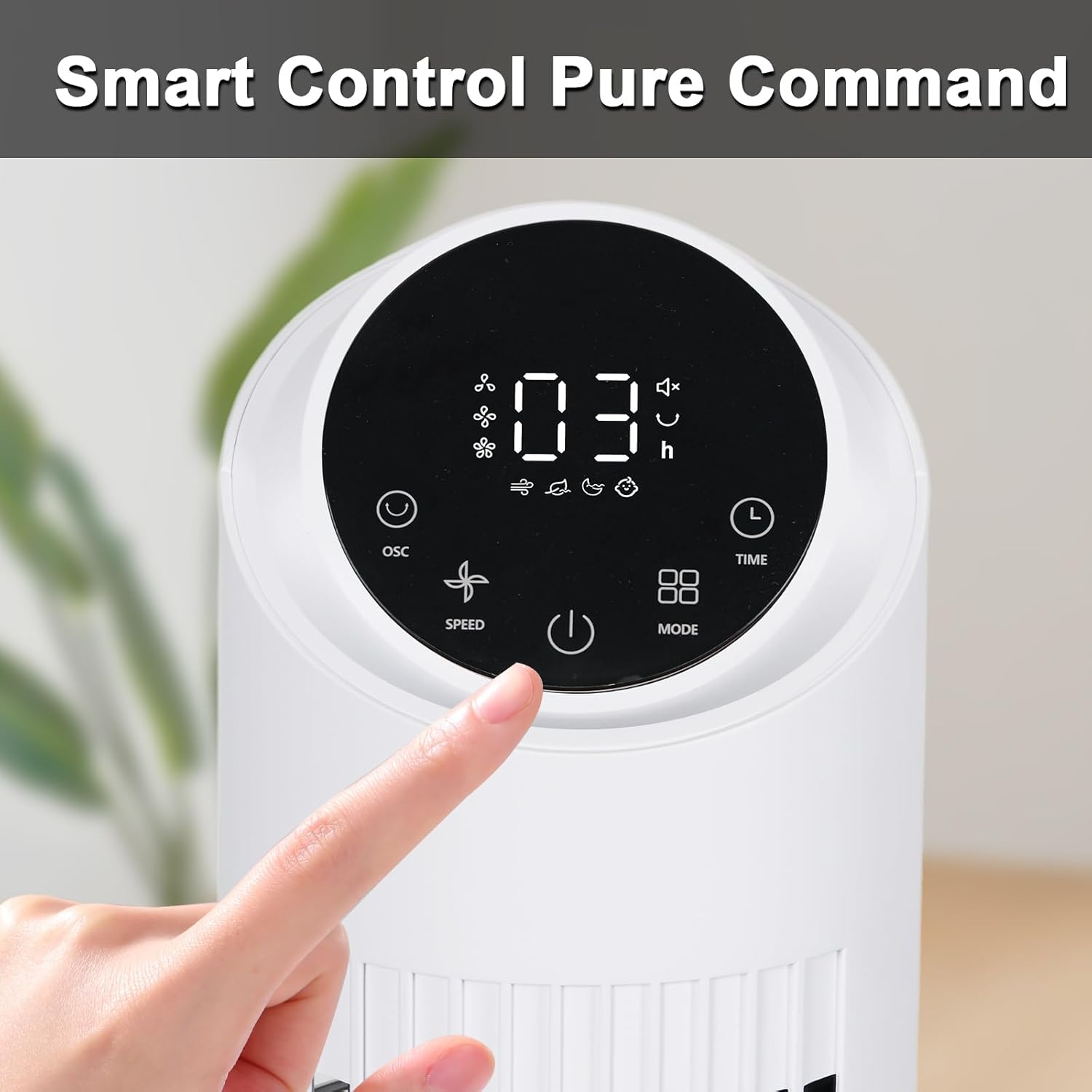
Image: A close-up view of the fan's intuitive digital control panel.
- Power Button (⏻): Turns the fan ON or OFF.
- Speed Button (⇋): Cycles through 3 fan speeds (1, 2, 3).
- Mode Button (▨): Selects operating modes: Normal, Natural, Sleep, Child.
- Oscillation Button (⟳): Activates or deactivates 90° oscillation.
- Timer Button (🕒): Sets the auto-off timer from 1 to 12 hours.
Operating Modes:

Image: Visual representation of the fan's four distinct operating modes.
- Normal Mode: Provides a constant, steady airflow at your selected speed.
- Natural Mode: Simulates a natural breeze by varying fan speed intermittently.
- Sleep Mode: Operates at a low, quiet speed with reduced display brightness for undisturbed rest.
- Child Mode: Offers a gentle, consistent airflow suitable for children's rooms.
Oscillation:
Press the oscillation button to activate the 90° wide-angle oscillation feature, distributing air across a larger area. Press again to stop oscillation.

Image: The fan demonstrating its 90-degree wide oscillation for expanded coverage.
Timer Function:
The 12-hour timer allows you to set the fan to automatically turn off after a specified period. Press the timer button repeatedly to select the desired duration (1-12 hours).
Video: An official hykolity video showcasing the display and control features of the tower fan.
Maintenance
Regular maintenance ensures optimal performance and longevity of your fan.
- Cleaning:
- Always unplug the fan before cleaning.
- Use a soft, damp cloth to wipe the exterior surfaces of the fan. Do not use abrasive cleaners or solvents.
- Use a vacuum cleaner with a brush attachment or compressed air to remove dust from the air intake and exhaust grilles.
- Ensure all parts are completely dry before plugging the fan back in.
- Storage:
- If storing the fan for an extended period, unplug it and clean it thoroughly.
- Store the fan in its original packaging or cover it to protect it from dust.
- Store in a cool, dry place.
Troubleshooting
Refer to this section for common issues and their solutions.
| Problem | Possible Cause | Solution |
|---|---|---|
| Fan does not turn on. | No power supply. | Ensure the power cord is securely plugged into a working electrical outlet. Check the circuit breaker. |
| Weak or no airflow. | Air intake/exhaust blocked; fan speed too low. | Clear any obstructions from the grilles. Increase the fan speed setting. |
| Fan makes unusual noise. | Loose parts; fan not on a level surface; internal obstruction. | Ensure the fan is on a stable, flat surface. Unplug and check for any foreign objects inside the grilles. If noise persists, contact customer support. |
| Remote control not working. | Dead batteries; remote out of range; sensor blocked. | Replace batteries in the remote. Ensure the remote is pointed at the fan's control panel within range. Clear any obstructions between the remote and the fan. |
Specifications
| Feature | Detail |
|---|---|
| Model Number | TF4002TR-L |
| Dimensions (D x W x H) | 12.4" x 12.4" x 40" |
| Noise Level | 28 Decibels |
| Power Source | Electric |
| Voltage | 120 Volts |
| Wattage | 45 watts |
| Air Flow Capacity | 26 Cubic Feet Per Second |
| Number of Speeds | 3 |
| Operating Modes | Normal, Natural, Sleep, Child |
| Oscillation | 90° Wide Oscillation |
| Timer | 1-12 Hours |
| Control Method | Remote, Control Panel |
| Indoor/Outdoor Usage | Indoor |
Customer Support
For any questions, concerns, or assistance with your hykolity Tower Fan, please contact our customer support team.
Please refer to the product packaging or the official hykolity website for the most current contact information.