
1. Overview
The Philips TAZ2200 is a versatile portable sound machine designed for enjoying various audio formats. It features a top-loading CD player, a front-loading cassette player, FM radio, Bluetooth 6.0 connectivity, USB playback, and a 3.5mm audio input. Equipped with dynamic bass boost and 6W stereo speakers, it delivers rich sound. The unit can be powered by AC mains or batteries and includes a carrying handle for portability.
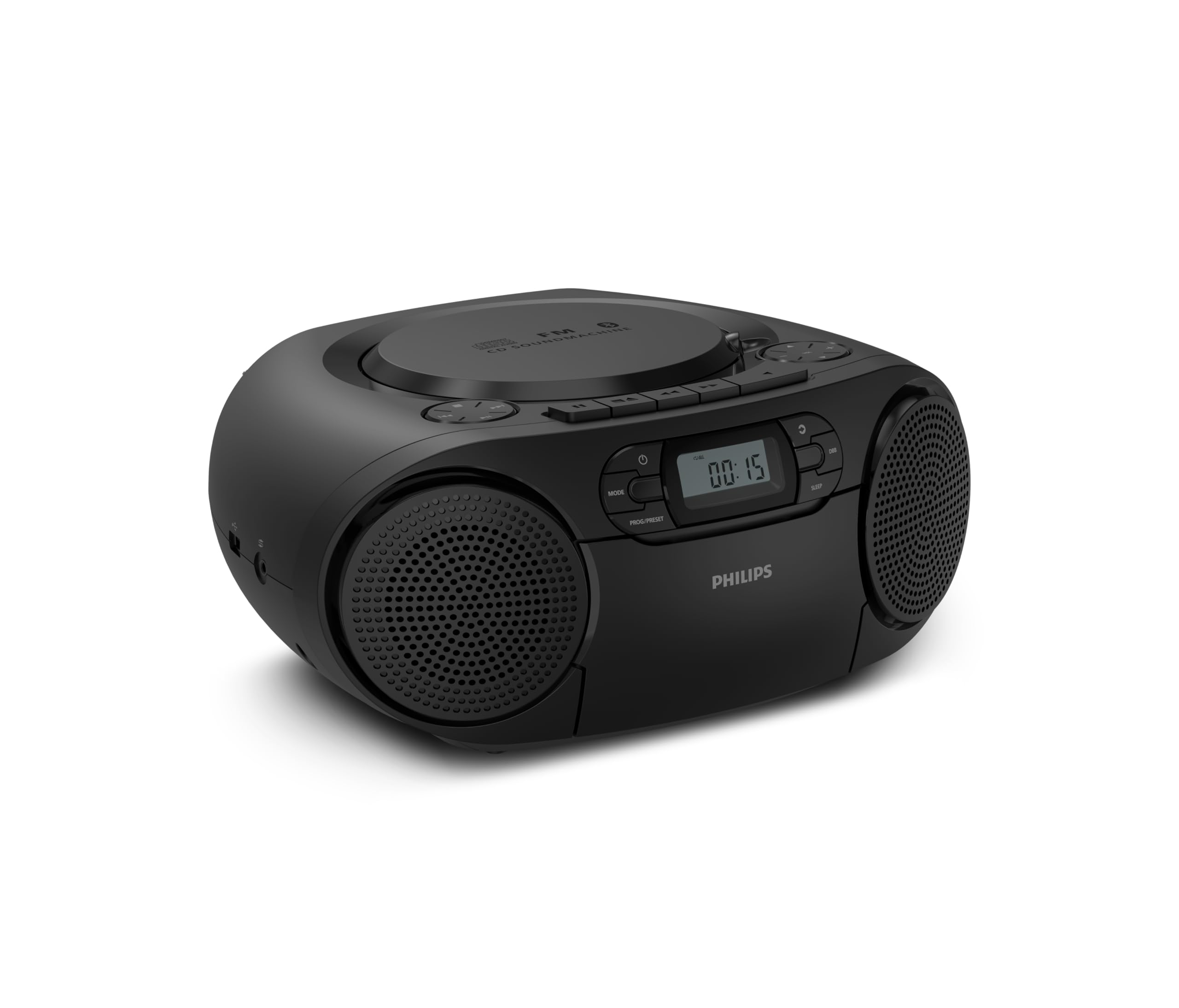
Front view of the Philips TAZ2200 CD Soundmachine, showing the main display and control buttons.
2. Safety Information
Please read these safety instructions carefully before using your device and keep them for future reference. Incorrect use may result in hazards.
- Power Source: Use only the specified power adapter or batteries. Ensure the voltage matches the requirements of the unit.
- Water and Moisture: Do not expose the unit to rain, moisture, dripping, or splashing. Do not place objects filled with liquids, such as vases, on the unit.
- Ventilation: Ensure adequate ventilation. Do not block any ventilation openings. Maintain a minimum distance around the unit for sufficient ventilation.
- Heat: Do not place the unit near heat sources such as radiators, heat registers, stoves, or other apparatus (including amplifiers) that produce heat.
- Batteries: Follow correct polarity when inserting batteries. Do not mix old and new batteries, or different types of batteries. Remove batteries if the unit is not used for a long period.
- Cleaning: Unplug the unit from the power outlet before cleaning. Use a soft, dry cloth. Do not use liquid cleaners or aerosol cleaners.
- Servicing: Do not attempt to service this product yourself. Refer all servicing to qualified service personnel.
3. What's in the Box
Upon unpacking, please ensure all items listed below are present:
- Philips TAZ2200 CD Soundmachine
- Power cable
- Quick start guide
- Warranty booklet
- Safety sheet
4. Controls and Connections
Front Panel Controls
The front panel features the main display, power button, mode selection, program/preset buttons, and dynamic bass boost (DBB) control. Playback controls for CD and USB are also located here.

Detailed front view showing the display, power, mode, program/preset, and DBB buttons.
Side and Rear Connections
The side of the unit provides a USB port for digital audio playback and a 3.5mm audio input jack for connecting external devices.

Side view illustrating the USB port and Audio Input jack.
The top of the unit houses the CD compartment and additional playback controls, while the rear features the AC power input and the FM antenna.

Top view showing the CD compartment and associated controls.

Rear view displaying the AC power input and the telescopic FM antenna.
5. Setup
5.1 Power Supply
AC Power
- Ensure the unit is switched off.
- Connect the supplied power cable to the AC IN socket on the rear of the sound machine.
- Plug the other end of the power cable into a wall power outlet.
Battery Power
For portable use, the unit can operate on 6 x C-type batteries (not included).
- Open the battery compartment cover located on the bottom of the unit.
- Insert 6 C-type batteries, ensuring correct polarity (+/-) as indicated inside the compartment.
- Close the battery compartment cover securely.
5.2 Antenna Adjustment
For optimal FM radio reception, fully extend the telescopic antenna located at the rear of the unit. Adjust its position and angle to achieve the clearest signal.
6. Operating Instructions
6.1 General Operation
- Power On/Off: Press the POWER button to turn the unit on or off.
- Volume Control: Use the VOL + or VOL - buttons to adjust the volume level.
- Dynamic Bass Boost (DBB): Press the DBB button to activate or deactivate the dynamic bass boost feature for enhanced bass sound.
- Mode Selection: Press the MODE button repeatedly to switch between CD, Cassette, FM Radio, Bluetooth, USB, and Audio Input modes.
6.2 CD Playback
- Open the CD compartment cover on top of the unit.
- Place a CD (CD, CD-R, or CD-RW) with the label side facing up onto the spindle.
- Close the CD compartment cover.
- Press the MODE button to select CD mode.
- Press the PLAY/PAUSE button to start playback.
- Use the SKIP buttons (|<< or >>|) to skip tracks.
- Press and hold |<< or >>| to search within a track.
- Press the STOP button to stop playback.
6.3 Cassette Playback
- Open the cassette compartment door on the front of the unit.
- Insert a cassette tape with the open edge facing upwards.
- Close the cassette compartment door.
- Press the MODE button to select Cassette mode.
- Press the PLAY button to start playback.
- Use the FAST FORWARD or REWIND buttons to quickly advance or rewind the tape.
- Press the STOP button to stop playback.
6.4 FM Radio
- Press the MODE button to select FM Radio mode.
- Auto Scan: Press and hold the PROG/PRESET button to automatically scan and store available FM stations.
- Manual Tuning: Press the TUNING buttons (|<< or >>|) to manually tune to a desired frequency.
- Saving Presets: After tuning to a station, press PROG/PRESET once, then use |<< or >>| to select a preset number, and press PROG/PRESET again to confirm.
- Recalling Presets: In FM mode, press PROG/PRESET repeatedly to cycle through saved preset stations.
6.5 Bluetooth Playback
- Press the MODE button to select Bluetooth mode. The display will show 'BT' and flash, indicating it's in pairing mode.
- On your Bluetooth-enabled device (smartphone, tablet), enable Bluetooth and search for available devices.
- Select "Philips TAZ2200" from the list of devices.
- Once paired, the unit will emit a confirmation sound, and 'BT' will stop flashing.
- Start playing audio on your connected device. The sound will be streamed to the sound machine.
6.6 USB Playback
- Insert a USB flash drive into the USB port on the side of the unit.
- Press the MODE button to select USB mode.
- The unit will automatically detect and begin playing compatible audio files (MP3, WAV, WMA).
- Use the playback controls (PLAY/PAUSE, SKIP, STOP) as you would for CD playback.
6.7 Audio Input (AUX)
- Connect one end of a 3.5mm audio cable (not included) to the AUDIO IN jack on the side of the sound machine.
- Connect the other end of the audio cable to the headphone jack or audio output of your external device (e.g., MP3 player, turntable).
- Press the MODE button to select Audio Input mode.
- Start playing audio on your external device. The sound will be played through the sound machine.
7. Maintenance
- Cleaning the Unit: Wipe the exterior of the unit with a soft, slightly damp cloth. Do not use abrasive cleaners or solvents.
- CD Player Care: Keep the CD compartment clean. If the lens is dirty, use a specialized CD lens cleaner. Avoid touching the lens.
- Cassette Player Care: Periodically clean the tape heads and pinch rollers with a cotton swab lightly dampened with isopropyl alcohol.
- Battery Replacement: If using batteries, replace all 6 C-type batteries when the unit's performance diminishes or if the unit will not be used for an extended period.
- Storage: When not in use, store the unit in a clean, dry place away from direct sunlight and extreme temperatures.
8. Troubleshooting
If you encounter any issues with your Philips TAZ2200, please refer to the table below for common problems and solutions.
| Problem | Possible Cause | Solution |
|---|---|---|
| No power | Power cable not connected; Batteries depleted or incorrectly inserted. | Check AC power connection; Replace batteries or ensure correct polarity. |
| No sound | Volume too low; Incorrect mode selected; Headphones connected. | Increase volume; Select the correct source mode (CD, FM, BT, etc.); Disconnect headphones. |
| CD not playing | CD inserted incorrectly; CD is dirty or scratched; CD format not supported. | Insert CD with label side up; Clean or replace CD; Ensure CD is CD-R/RW compatible. |
| Cassette not playing | Cassette inserted incorrectly; Tape is damaged. | Insert cassette correctly; Try a different cassette. |
| Poor FM reception | Antenna not extended or positioned correctly; Weak signal. | Fully extend and adjust the telescopic antenna; Try moving the unit to a different location. |
| Bluetooth not connecting | Unit not in pairing mode; Bluetooth device too far; Device already paired with another unit. | Ensure unit is in Bluetooth mode and flashing; Move device closer; Disconnect from other devices. |
| USB playback issues | USB drive not inserted correctly; Incompatible file format; USB drive corrupted. | Reinsert USB drive; Ensure files are MP3, WAV, or WMA; Try a different USB drive. |
9. Specifications
| Feature | Specification |
|---|---|
| Brand | PHILIPS |
| Model Number | TAZ2200/10 |
| Connectivity Technology | Bluetooth 6.0, USB, Audio Input (3.5mm) |
| Speaker Type | Stereo (2 speakers) |
| Output Power | 6 Watts (max) |
| Supported Media | CD, CD-R, CD-RW, Cassette, USB (MP3, WAV, WMA) |
| Radio Tuner | Digital FM with 20 presets |
| Power Source | AC (wired), 6 x C-type batteries (not included) |
| Dimensions (LxWxH) | 24.5 x 28.5 x 12.5 cm |
| Weight | 1.35 Kilograms |
| Color | Silver |
10. Warranty and Support
10.1 Product Warranty
This Philips TAZ2200 CD Soundmachine comes with a 2-year warranty from the date of purchase. Please retain your proof of purchase for warranty claims. The warranty covers manufacturing defects and malfunctions under normal use conditions.
10.2 Customer Support
For technical assistance, troubleshooting beyond this manual, or warranty service, please refer to the contact information provided in the warranty booklet included with your product. You can also visit the official Philips support website for your region for further assistance and FAQs.


