
ZAFRO 54091EWA0-6K-ZAZ1
Contents
ZAFRO U-Shaped Inverter Window Air Conditioner User Manual
Model: 54091EWA0-6K-ZAZ1
1. Important Safety Information
Please read all instructions carefully before using your ZAFRO U-Shaped Inverter Window Air Conditioner. Retain this manual for future reference.
- Ensure the unit is properly grounded to prevent electrical shock.
- Do not operate the unit with a damaged power cord or plug.
- Keep children and pets away from the unit during operation.
- Do not block the air intake or exhaust vents.
- Always unplug the unit before cleaning or performing any maintenance.
- This appliance is designed for residential use only.
- The unit contains R-32 refrigerant. Servicing should only be performed by qualified personnel.
2. Product Overview
The ZAFRO U-Shaped Inverter Window Air Conditioner is designed for efficient and quiet cooling. Its unique U-shaped design allows for an unobstructed window view and significantly reduces indoor noise levels.
Key Features:
- Ultra Quiet Operation: As low as 32dB, with the compressor positioned outside the window.
- Energy Efficiency: Inverter technology provides up to 37% energy savings and maintains a stable temperature within ±1℉.
- Multiple Operating Modes: Cool, Dehumidify, Fan, Eco, Sleep, and Mute modes.
- Smart Control: Compatible with ZAFRO App, Alexa, Google Home, remote control, and touch panel.
- Powerful Cooling: 10,000 BTU ASHRAE (6,200 BTU DOE) capacity for medium to large rooms.
- Enhanced Airflow: 4 fan speeds and 4-way 3D airflow for comprehensive coverage.
- Safety Features: Built-in Window Lock and Child Lock.
- Easy Maintenance: Removable and washable filter.
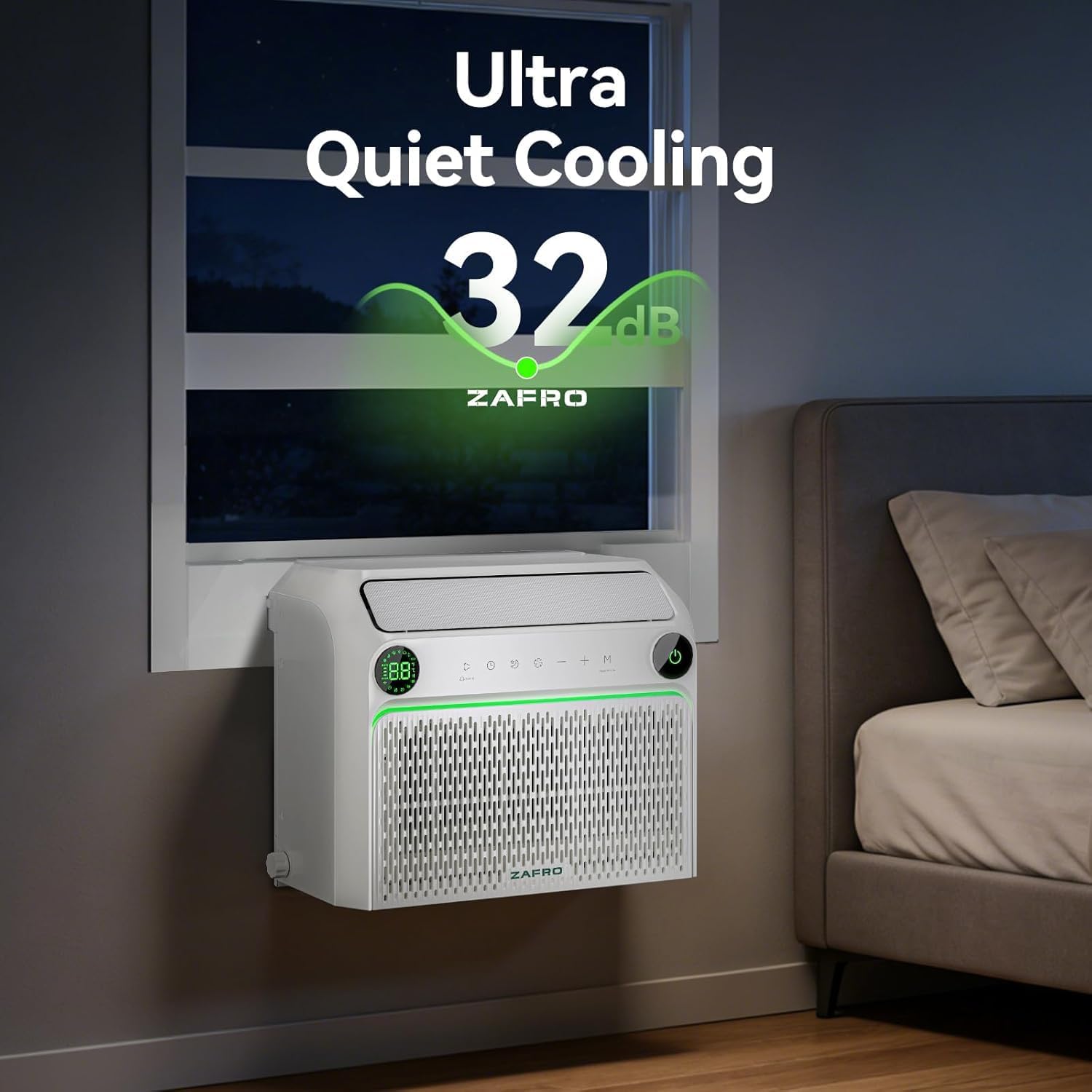
Image: The ZAFRO U-Shaped Air Conditioner installed in a window, highlighting its ultra-quiet operation at 32dB.

Image: Overview of the ZAFRO AC unit's cooling capacity, modes, and airflow capabilities.
3. Setup and Installation
The ZAFRO U-Shaped Inverter Window Air Conditioner is designed for simple setup in single and double-hung windows. All necessary installation accessories are included.
Window Requirements:
- Window Width Range: 24 inches to 48 inches wide.
- Minimum Window Opening Height: At least 16 inches.
- Sill Width: 5 to 9.4 inches wide.
- Minimum Clearance of Height: 12 inches.
- Minimum Clearance of Depth (Indoor): 8 inches.
- Minimum Clearance of Depth (Outdoor): 11.5 inches.
Refer to the detailed installation guide provided in the packaging for step-by-step instructions. Ensure the unit is securely mounted and sealed to prevent air leakage.

Image: Window dimension and clearance requirements for proper installation of the ZAFRO U-Shaped Air Conditioner.

Image: The adjustable U-shape design accommodates different wall thicknesses, with a minimum width range of 5 inches and a maximum of 9.4 inches.
4. Operating Instructions
Your ZAFRO air conditioner offers multiple ways to control its functions for maximum convenience.
Control Methods:
- Touch Control Panel: Located on the unit for direct adjustments.
- Remote Control: Use the included remote for convenient operation from a distance.
- ZAFRO App: Control your AC unit from anywhere using your smartphone.
- Voice Control: Integrate with Alexa or Google Home for hands-free operation.
Operating Modes:
- Cool Mode: Provides powerful cooling to reach your desired temperature (61℉-86℉).
- Dehumidify Mode: Removes excess moisture, up to 70 Pints per day, for a drier environment.
- Fan Mode: Circulates air without cooling, with 4 adjustable fan speeds.
- Eco Mode: Optimizes energy consumption while maintaining comfort.
- Sleep Mode: Adjusts temperature and fan speed for quiet, comfortable sleep.
- Mute Mode: Operates at the lowest possible noise level.
Using the ZAFRO App:
The ZAFRO App allows you to manage your air conditioner remotely, set schedules, and access advanced features.
- Download the ZAFRO App from your device's app store.
- Register or log in to your account.
- Long press the Mode button on the AC unit's control panel for 3 seconds to activate the Wi-Fi module.
- In the app, tap "ADD DEVICE" and follow the on-screen instructions to connect your air conditioner.

Image: Controlling the ZAFRO Air Conditioner via the smartphone app, compatible with Alexa and Google Home.
Video: This video demonstrates the process of connecting the ZAFRO U-Shaped Inverter Window Air Conditioner to its companion mobile application for smart control.
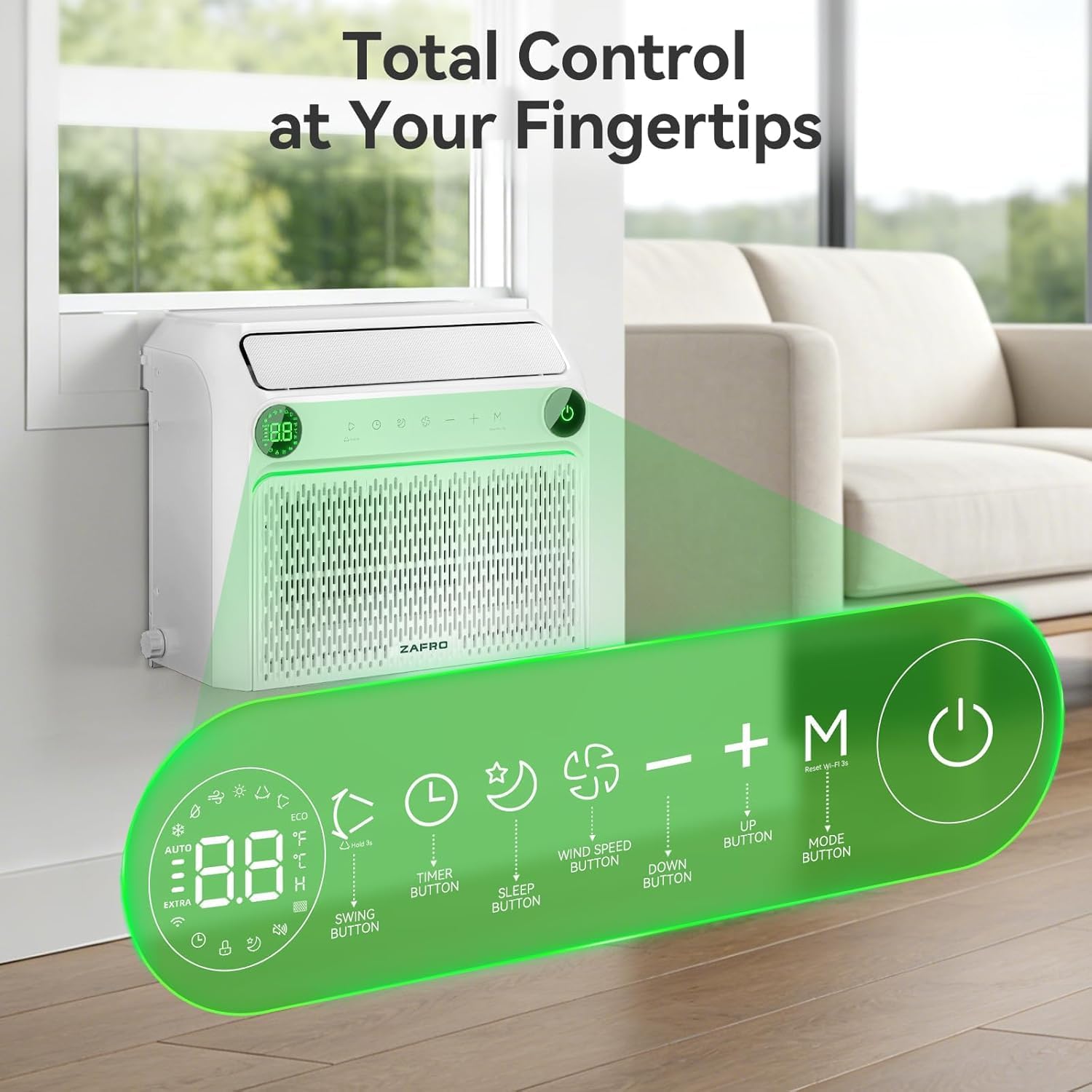
Image: Detailed view of the control panel and remote control buttons, illustrating various functions like timer, sleep, wind speed, and mode selection.
5. Maintenance
Regular maintenance ensures optimal performance and longevity of your air conditioner.
Cleaning the Washable Filter:
- Unplug the air conditioner from the power outlet.
- Carefully remove the filter from the unit.
- Wash the filter with warm, soapy water. Rinse thoroughly.
- Allow the filter to air dry completely before reinstalling.
- Reinstall the dry filter into the unit.
Drainage: The unit has a built-in drain. The container will automatically trigger an alert when it is full of water. The built-in drain can be used for draining water and cleaning the filter area.
General Cleaning: Wipe the exterior of the unit with a soft, damp cloth. Do not use harsh chemicals or abrasive cleaners.
6. Troubleshooting
If you encounter issues with your air conditioner, refer to the following common problems and solutions:
| Problem | Possible Cause | Solution |
|---|---|---|
| Unit does not turn on | No power; circuit breaker tripped; power cord not fully plugged in. | Check power supply, reset circuit breaker, ensure plug is secure. |
| Insufficient cooling | Dirty air filter; blocked air vents; room too large; temperature setting too high. | Clean air filter; clear obstructions; ensure unit matches room size; lower temperature setting. |
| Unit is noisy | Loose parts; unit not level; foreign object in fan. | Check for loose parts; ensure unit is level; inspect for obstructions (unplug first). |
| Water leakage | Drainage hose blocked or improperly installed; unit not level. | Check drainage hose for blockages and proper installation; ensure unit is level. |
| Remote control not working | Dead batteries; obstruction between remote and unit. | Replace batteries; remove obstructions. |
If the problem persists after trying these solutions, please contact ZAFRO customer support.
7. Specifications
| Feature | Detail |
|---|---|
| Brand | ZAFRO |
| Model Name | Inverter Smart Window Air Conditioners |
| Model Number | 54091EWA0-6K-ZAZ1 |
| Cooling Power (ASHRAE) | 10,000 BTU |
| Cooling Power (DOE) | 6,200 BTU |
| Noise Level | 32 dB |
| Product Dimensions (D x W x H) | 29.53" x 18.9" x 15.35" |
| Item Weight | 59.5 pounds |
| Voltage | 115 volts |
| Wattage | 460 watts |
| Seasonal Energy Efficiency Ratio (SEER) | 15.1 |
| Refrigerant | R-32 |
| Control Method | App, Remote, Touch, Voice |
| Operating Modes | Cool, Dehum, Fan, Eco, Sleep, Mute |
| Filter Type | Mesh Filter (Washable) |
| Window Width Range | 24" to 48" |
| Min Window Opening Height | 16" |
| Operating Range | 27℉ - 113℉ |
8. Warranty and Support
Warranty Information:
This ZAFRO U-Shaped Inverter Window Air Conditioner comes with a 1-Year Manufacturer's Warranty from the date of purchase. This warranty covers defects in materials and workmanship under normal use.
The warranty does not cover damage resulting from improper installation, misuse, abuse, neglect, unauthorized repairs, or acts of nature.
Customer Support:
For technical assistance, troubleshooting not covered in this manual, or warranty claims, please contact ZAFRO customer support.
Please have your model number (54091EWA0-6K-ZAZ1) and proof of purchase ready when contacting support.
You can find more information and contact details on the official ZAFRO website or through your retailer.
Ask a question about this manual
Ask about setup, troubleshooting, compatibility, parts, safety, or missing instructions. Manuals+ will review the question and use this page’s manual context to help answer it.