
1. Setup
1.1 Unpacking and Assembly
Carefully remove all components from the packaging. Ensure all parts listed in the packing list are present. The Suirviz U8 vacuum is designed for easy assembly. Connect the main body to the extension tube, and then attach the floor brush. For handheld use, connect desired attachments directly to the main body.

Figure 1.1: The Suirviz U8 vacuum in full stick mode and handheld configuration, demonstrating its versatility with various attachments.
1.2 Charging the Battery
Before first use, fully charge the battery. Connect the charger to the battery pack and plug it into a power outlet. A full charge typically takes approximately 5 hours. The battery is removable for convenient charging.

Figure 1.2: The Suirviz U8 vacuum in its self-standing position, highlighting the removable battery feature for easy charging.
2. Operation
2.1 Powering On and Mode Selection
Press the power button to turn on the vacuum. The U8 offers two cleaning modes: Eco Mode for daily maintenance and Turbo Mode for deep cleaning or stubborn messes. Switch between modes as needed for optimal cleaning performance.
2.2 Green LED Dust Detection
The floor brush is equipped with green LED lights that illuminate microscopic dust, hair, and pet dander on hard floors and under furniture. This feature helps ensure a thorough clean by making hidden dirt visible.

Figure 2.1: The green LED light feature in action, revealing dust and debris on a hard floor surface.
Video 2.1: Demonstration of the green LED lights revealing hidden dust on the floor during vacuum operation. This video shows the vacuum cleaning a floor with visible debris, highlighting how the green LED makes fine particles more apparent.
2.3 Versatile Cleaning
The U8 vacuum can be used in various configurations. Attach the extension tube and floor brush for floor cleaning. Detach the extension tube and attach accessories directly to the main unit for handheld cleaning of furniture, stairs, or car interiors. The flexible brush head allows for easy maneuverability around obstacles.

Figure 2.2: The 6-in-1 versatility of the Suirviz U8, illustrating its use as a stick vacuum, for high-reach cleaning, and as a handheld unit with various tools.
Video 2.2: This video demonstrates the multifunctional capabilities of the cordless vacuum with its versatile attachments. It shows the vacuum being used to clean various surfaces and areas, including floors, high shelves, and countertops.
2.4 Self-Standing Design
The U8 vacuum features an independent self-standing design, allowing it to stand upright on its own. This is convenient for pausing cleaning or for storage without needing to lean it against a wall or use a wall mount.
Video 2.3: A demonstration of the vacuum's lightweight and self-standing design. The video shows the vacuum being easily maneuvered and then standing upright on its own.
3. Maintenance
3.1 Emptying the Dust Cup
To maintain optimal suction, empty the dust cup regularly. The U8 features a one-touch dust emptying system for hygienic disposal without direct contact with dirt. Simply press the release button over a trash bin to empty the contents.
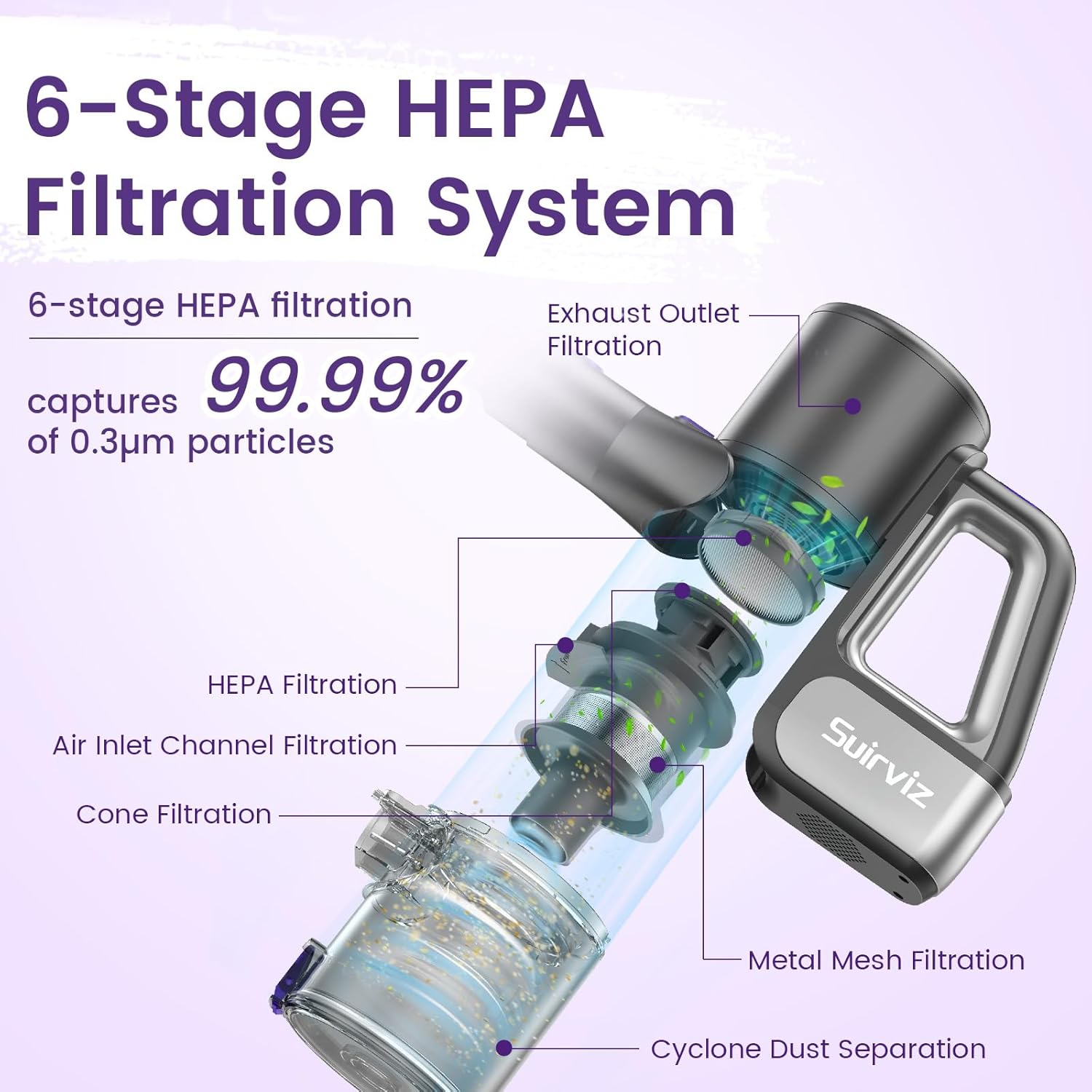
Figure 3.1: The one-touch dust emptying mechanism, showing debris falling from the dust cup into a waste receptacle.
3.2 Cleaning the Filters
The Suirviz U8 vacuum utilizes a 6-stage HEPA filtration system. For best performance, regularly clean the washable and reusable filters. Remove the filters from the dust cup assembly and rinse them under running water. Allow them to air dry completely before reinserting them into the vacuum. Do not operate the vacuum with wet filters.

Figure 3.2: Diagram illustrating the 6-stage HEPA filtration system and the washable filters.
3.3 Cleaning the Roller Brush
Hair and debris can accumulate on the roller brush. To clean, detach the roller brush from the floor head. Remove any tangled hair or fibers. The roller brush is designed to be easily removable for cleaning or replacement.

Figure 3.3: Step-by-step guide for detaching and cleaning the removable roller brush.
3.4 Filter Replacement (Important Update)
Please note that there has been an update to the HEPA filter design. When replacing filters, ensure you purchase the correct type that matches your vacuum's current filter. Compare the shape of your existing HEPA filter with the images provided below to identify the correct replacement.

Figure 3.4: Guide for identifying and replacing the HEPA filter, showing both old and new filter designs.
4. Troubleshooting
| Problem | Possible Cause | Solution |
|---|---|---|
| No power / Does not turn on | Battery not charged; Battery not properly installed; Power button not pressed correctly. | Ensure battery is fully charged (approx. 5 hours). Reinstall the battery pack securely. Press the power button firmly. |
| Low suction power | Dust cup full; Filters clogged; Roller brush tangled; Blockage in the tube or nozzle. | Empty the dust cup. Clean or replace filters. Remove tangled hair/debris from the roller brush. Check for and clear any blockages in the extension tube or floor nozzle. |
| Vacuum stops during operation | Battery low; Overheating due to blockage. | Recharge the battery. Check for and clear any blockages, then allow the vacuum to cool down before resuming use. |
| Green LED lights not working | Faulty connection; Damaged LEDs. | Ensure the floor brush is securely connected. If the issue persists, contact customer support. |
5. Specifications
- Model Name: U8
- Brand: Suirviz
- Suction Power: 40,000 Pa (40KPa)
- Motor: 500W Brushless Motor
- Battery Type: Lithium-Ion
- Battery Charge Time: Approximately 5 hours
- Runtime: Up to 35 minutes (Eco Mode), Up to 20 minutes (Turbo Mode)
- Dust Cup Capacity: 900 ml
- Filter Type: 6-Stage HEPA Filtration System
- Special Features: Green LED Dust Detection, Self-Standing Design, 6-in-1 Versatility, Removable Battery
- Surface Recommendation: All floors (optimized for hard floors & light carpets)
- Item Weight: 3.3 pounds
- Item Dimensions (L x W x H): 16.5"L x 11.8"W x 7"H
- Voltage: 120 volts
6. Warranty & Support
6.1 Product Warranty
The Suirviz U8 Cordless Vacuum comes with a 24-month worry-free warranty from the date of purchase. This warranty covers manufacturing defects and ensures reliable operation under normal use. Please retain your proof of purchase for warranty claims.
6.2 Customer Support
For any questions, technical assistance, or warranty claims, please contact Suirviz customer support. Our team is available to provide professional service and support.
- Online Support: Visit the official Suirviz website for FAQs and support resources.
- Email Support: Refer to your product packaging or the official website for the dedicated support email address.