
1. Introduction
This manual provides detailed instructions for the assembly, operation, and maintenance of your Korfile 47-inch Gaming Desk. This desk features integrated power outlets, USB charging ports, a monitor stand, storage shelves, fabric drawers, and LED lighting, designed for an optimized gaming or work experience. Please read this manual thoroughly before assembly and use to ensure proper setup and safe operation.
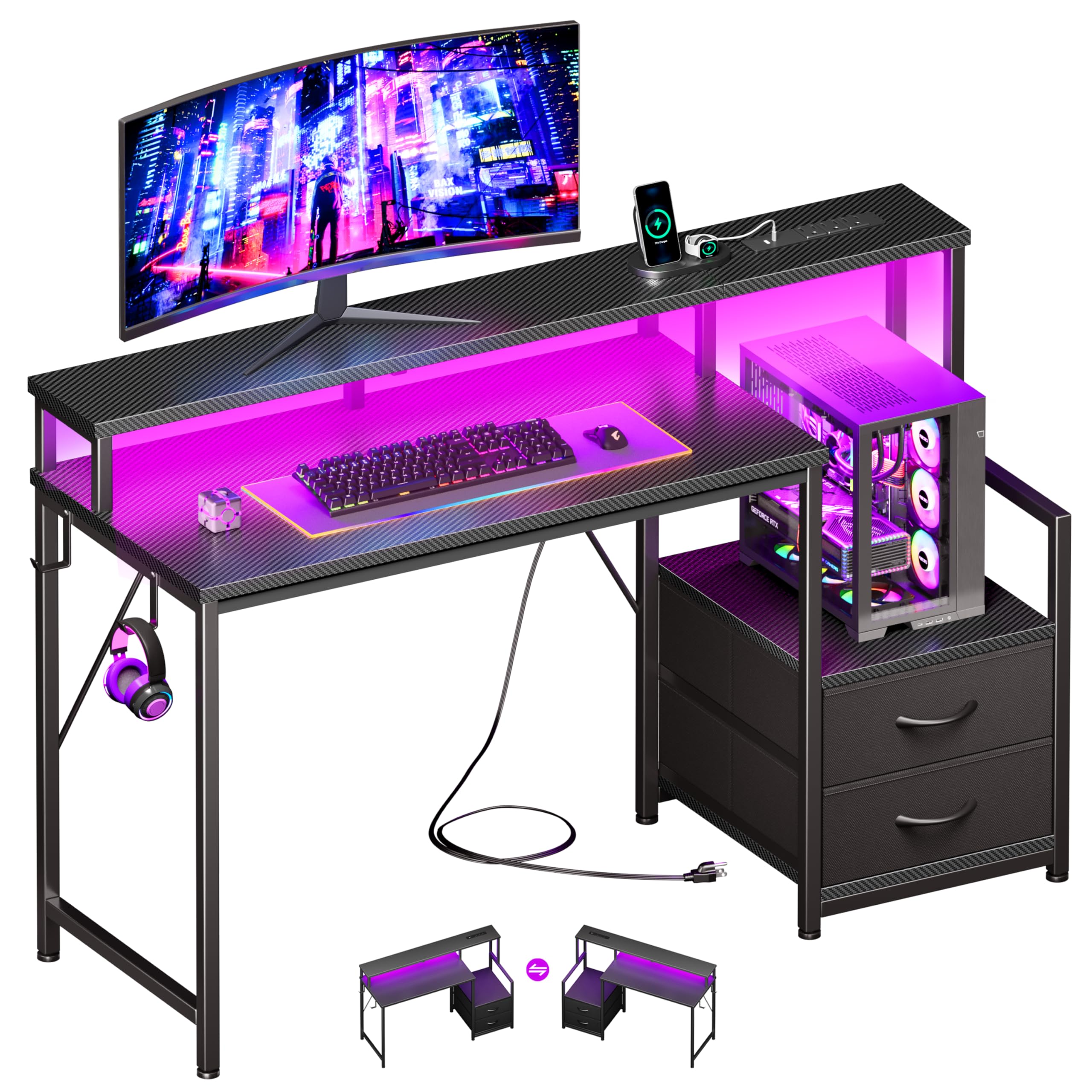
This image displays the Korfile 47-inch Gaming Desk in a complete setup, highlighting its spacious design, integrated LED lights, and functional side storage units.
2. Safety Information
To prevent injury or damage to your desk, please observe the following safety precautions:
- Read all instructions carefully before beginning assembly and use.
- Keep children and pets away from the assembly area. Small parts can be a choking hazard.
- Ensure all screws and fasteners are tightened securely before using the desk. Periodically check and re-tighten as needed.
- Do not overload the desk. The maximum weight recommendation is 220 pounds (100 kg).
- Place the desk on a flat, stable surface to prevent tipping.
- Do not stand or sit on the desk.
- Keep liquids away from electrical outlets and components.
- Use only the provided power cord and avoid using damaged cords.
3. Package Contents
Before assembly, verify that all parts are present and undamaged. If any parts are missing or damaged, please contact Korfile customer support.
Components:
- Main Desktop Panel
- Monitor Stand Panel
- Side Storage Shelf Panels
- Metal Frame Components (legs, crossbars)
- Power Strip with 3 AC Outlets and 2 USB Ports
- RGB LED Light Strip
- 2 Fabric Drawers
- 2 Headphone Hooks
- Assembly Hardware (screws, bolts, washers, Allen wrench)
- Instruction Manual

This diagram provides detailed measurements of the desk, including the main desktop, monitor stand, and storage unit, along with its maximum weight capacity of 220 lbs.
4. Setup and Assembly
Follow these steps carefully to assemble your Korfile 47-inch Gaming Desk. It is recommended to have a second person assist with assembly.
4.1. Unpack and Identify Parts
Lay out all components on a clean, soft surface to prevent scratches. Refer to the parts list in your included manual to identify each piece.
4.2. Assemble the Main Frame
Connect the metal frame components using the provided screws and Allen wrench. Do not fully tighten screws until all parts are loosely assembled.
4.3. Attach Side Shelves/Storage Unit
Assemble the side storage unit, including the shelves and supports for the fabric drawers. Note that the desk features a reversible design, allowing you to install the storage unit on either the left or right side to best fit your space.

This diagram demonstrates the reversible nature of the desk, allowing users to configure the storage unit on either the left or right side to suit their space.
4.4. Install Desktop Panels
Secure the main desktop panel and the elevated monitor stand to the assembled frame. Ensure proper alignment before tightening all screws.
4.5. Integrate Power Outlets and LED Lights
Install the power strip into its designated slot on the monitor stand. Attach the RGB LED light strip to the underside of the monitor stand, ensuring the USB connector is accessible for power. Refer to the video for visual guidance.

This image details the multi-functional charging port, which includes 1 USB-A port (5V/2A), 1 Type-C port (5V/2A), and 3 AC outlets (120V/12A) with a 6.5 ft power cord.

This image highlights the customizable RGB LED lighting feature, showcasing 20 color options and 22 dynamic modes for personalized ambiance.
4.6. Insert Fabric Drawers and Headphone Hooks
Place the fabric drawers into their compartments in the side storage unit. Attach the headphone hooks to the desired locations on the desk frame.

This image illustrates the practical storage solutions, including two fabric drawers for organizing accessories and a dedicated stand for a computer tower.
4.7. Final Tightening
Once all components are in place, carefully go back and fully tighten all screws and fasteners. Ensure the desk is stable and level.
4.8. Assembly Video Guide
This video provides a step-by-step visual guide for assembling the Korfile 47-inch Gaming Desk, covering all major components and connections.
5. Operating Instructions
5.1. Using the Power Outlets and USB Ports
The integrated power strip provides convenient access to power for your devices. Plug the desk's main power cord into a wall outlet. You can then use the 3 AC outlets for monitors, computers, or other electronics, and the 2 USB ports (1 USB-A, 1 USB-C) for charging smartphones, tablets, or other USB-powered devices.
5.2. Controlling the RGB LED Lights
The LED light strip can be controlled via a remote control (if included) or a smartphone application. Refer to the specific instructions provided with the LED light kit for pairing and operation. You can select from 20 static colors and 22 dynamic modes to customize your lighting ambiance.
5.3. Utilizing the Monitor Stand
The elevated monitor stand is designed to raise your display to an ergonomic viewing height, reducing strain on your neck and eyes. It also frees up valuable space on the main desktop for your keyboard, mouse, and other peripherals.

This image illustrates the ergonomic design of the monitor stand, promoting a healthy posture during prolonged use by elevating the screen to eye level.
5.4. Using Storage Features
The fabric drawers provide enclosed storage for accessories, cables, or documents. The open shelves and computer tower stand offer additional space for your gaming PC, books, or decorative items. The headphone hooks keep your headset easily accessible and off the desk surface.
6. Maintenance
6.1. Cleaning
Wipe the desk surfaces with a soft, damp cloth. Avoid using harsh chemicals or abrasive cleaners, as these can damage the finish. For the carbon fiber texture, a gentle wipe is sufficient.
6.2. Regular Checks
Periodically check all screws and fasteners to ensure they remain tight. Re-tighten if necessary to maintain the desk's stability. Inspect the power cord and electrical connections for any signs of wear or damage.
7. Troubleshooting
7.1. Desk is Wobbly
- Ensure all assembly screws are fully tightened.
- Check that the desk is on a level surface. Adjust the adjustable non-slip pads on the bottom of the legs if necessary.
7.2. LED Lights Not Working
- Verify that the USB connector for the LED strip is securely plugged into a powered USB port (either on the desk or another power source).
- Check the remote control or smartphone app for battery levels or connection issues.
7.3. Power Outlets/USB Ports Not Functioning
- Ensure the desk's main power cord is securely plugged into a functional wall outlet.
- Check if the wall outlet itself is receiving power (test with another device).
- Avoid overloading the power strip.
8. Specifications
| Brand | Korfile |
| Model Number | CD058 |
| Product Dimensions | 18.8"D x 55"W x 35.5"H (Note: Product title states 47 inch, but specifications list 55 inch width. Please refer to your specific model for exact dimensions.) |
| Color | Carbon Fiber Black |
| Material Type | Engineered Wood (Top), Alloy Steel (Base/Frame) |
| Maximum Weight Recommendation | 220 Pounds |
| Special Features | Built-In USB Outlet (1 USB-A, 1 USB-C), 3 AC Outlets, Headphone Hook, Monitor Stand, Reversible Design, RGB LED Lights, 2 Fabric Drawers |
| Required Assembly | Yes |
9. Warranty and Support
9.1. Warranty Information
For specific warranty details regarding your Korfile Gaming Desk, please refer to the warranty card included with your purchase or consult the retailer where the product was acquired. Warranty coverage typically includes manufacturing defects.
9.2. Customer Support
If you encounter any issues during assembly or operation, or if you have questions about your product, please contact Korfile customer support. Contact information can usually be found on the product packaging, the Korfile website, or through your retailer.