
1. Introduction
Thank you for choosing the Soulor 7000A Jump Starter with Air Compressor. This device is designed to provide reliable assistance for vehicle emergencies, combining a powerful jump starter, a portable tire inflator, an LED emergency light, and a power bank into one compact unit. Please read this manual thoroughly before use to ensure safe and optimal operation.
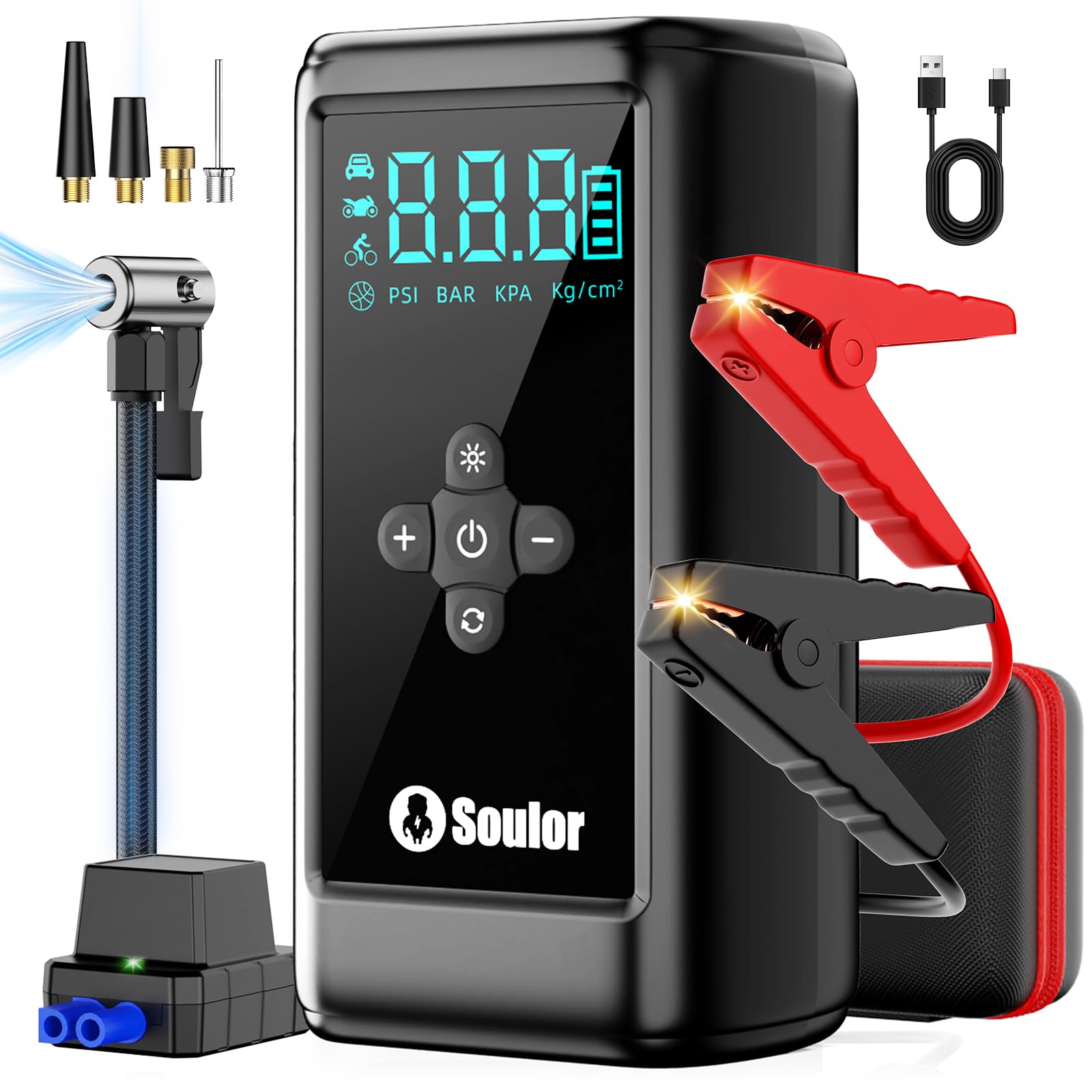
Image: The Soulor 7000A Jump Starter with Air Compressor, showcasing its compact design and multiple functions.
2. What's in the Box
Verify that all items are present in your package:
- 1x Soulor CYD27 Jump Starter with Portable Tire Inflator
- 1x Smart Jumper Cables
- 1x USB-A to USB-C Cable
- 1x User Manual
- 1x EVA Storage Bag

Image: All components included in the Soulor 7000A Jump Starter package, neatly arranged.
3. Safety Information
This device incorporates multiple safety protections. Always follow these guidelines for safe operation:
- Reverse Connection Protection: Prevents damage from incorrect cable connection.
- Over Temperature Protection: Shuts down if internal temperature exceeds safe limits.
- Over Discharge Protection: Protects the internal battery from deep discharge.
- Low Voltage Protection: Prevents operation if the device's voltage is too low.
- Impedance Match: Ensures proper electrical load.
- Over Current Protection: Guards against excessive current flow.
- Reverse Polarity Protection: Prevents damage if clamps are connected in reverse.
- Short Circuit Protection: Automatically cuts power in case of a short circuit.
- Over Charge Protection: Prevents overcharging of the internal battery.
- Shock Absorption: Designed for durability and impact resistance.
- Reverse Charge Protection: Prevents current from flowing back into the jump starter.
- Low Temperature Protection: Ensures safe operation in cold conditions.
- Spark Resistance: Reduces the risk of sparks during connection.
- Over-Power Protection: Prevents damage from excessive power output.
Important Safety Notes:
- Do not immerse the device in water.
- Do not disassemble the device.
- Keep out of reach of children.
- Use only the provided smart jumper cables.
- If continuous use of the air compressor is required, allow the equipment to cool down every 10-15 minutes.

Image: Visual representation of the 14 safety protections integrated into the jump starter, featuring the smart jumper clamps.
4. Setup and Initial Charge
Before first use, fully charge the Soulor Jump Starter. Use the provided USB-A to USB-C cable to connect the device to a USB power adapter (not included). The LCD screen will indicate the charging status and battery level.
The device is designed for long standby, up to 24 months, but regular charging is recommended to maintain optimal battery health.

Image: The Soulor Jump Starter in an outdoor setting, illustrating its long standby capability for extended adventures.
5. Operating Instructions
5.1. Jump Starting a Vehicle
This jump starter is suitable for all gas engines and diesel engines up to 14L.
- Step 1: Insert the smart jumper cable into the jump starter's port. Ensure a secure connection.
- Step 2: Connect the red clamp to the positive (+) terminal of the vehicle battery and the black clamp to the negative (-) terminal.
- Step 3: Start your car. If the car does not start immediately, wait a few seconds and try again.

Image: A three-step visual guide demonstrating how to easily jump start a car using the Soulor device.
Forced Start Mode (Boost Start)
If the vehicle battery is severely depleted and the normal jump start procedure does not work, use the Forced Start button:
- Step 1: With the jumper cables connected to the battery and the jump starter, press and hold the "Forced Start" button on the smart jumper cable for 3 seconds.
- Step 2: The indicator on the jumper cable will turn green, indicating it's ready.
- Step 3: Start your car immediately.

Image: A visual guide detailing the steps for using the Boost Start (Forced Start) function for severely depleted car batteries.
5.2. Using the Air Compressor
The integrated 160PSI air compressor can inflate tires for cars, motorcycles, bicycles, and balls. It features a digital display with auto-shutoff.
- Step 1: Connect the air hose to the tire valve and tighten it. Press the power button on the device to turn it on.
- Step 2: Press the mode button (often indicated by a gear or asterisk icon) to choose the inflation mode (Car, Motorcycle, Bicycle, Ball, or Custom). Hold the '+' or '-' buttons to set the desired pressure.
- Step 3: Hold the power button to start the pump. The device will automatically shut off when the preset pressure is reached. You can also short press the power button again to stop it manually.

Image: The Soulor device functioning as a 160PSI cordless inflator, shown inflating a car tire with various nozzles for different applications.

Image: A visual display of the four preset inflation modes (Car, Motorcycle, Bicycle, Ball) and a custom mode, indicating their typical pressure ranges.
5.3. Using the LED Light
The built-in 800-lumen LED light has three modes for various situations:
- Flashlight Mode: For general illumination, such as working under the hood or camping.
- Strobe Mode: To alert oncoming traffic or signal for attention.
- SOS Mode: For emergency signaling during roadside distress.

Image: A person using the Soulor device's 800-lumen flashlight function to illuminate a car engine bay, highlighting its utility in emergency situations.
5.4. Power Bank Functionality
The device includes USB-A and USB-C ports to charge your electronic devices:
- USB-C Input: 5V/2A (for charging the jump starter itself)
- USB-A Output: 5V/2.4A (for charging external devices)
Simply connect your device to the USB-A output port using an appropriate cable to begin charging.

Image: The Soulor device charging a smartphone and tablet, demonstrating its power bank capabilities for on-the-go charging.
6. Maintenance
- Charging: Recharge the device every 3-6 months, even if not used, to maintain battery health.
- Storage: Store the jump starter in its EVA storage bag in a cool, dry place, away from direct sunlight and extreme temperatures.
- Cleaning: Wipe the device with a dry, soft cloth. Do not use harsh chemicals or abrasive cleaners.
7. Troubleshooting
| Problem | Possible Cause | Solution |
|---|---|---|
| Device does not turn on. | Battery is depleted. | Charge the device fully. |
| Vehicle does not start after jump start attempt. | Incorrect clamp connection; severely depleted battery; vehicle issue. | Check clamp connections (red to +, black to -). Try Forced Start mode. If still no start, consult a mechanic. |
| Air compressor does not inflate. | Hose not securely connected; incorrect pressure setting; device battery low. | Ensure hose is tightly screwed onto valve. Verify pressure setting. Charge the device. |
| Device overheats during air compressor use. | Continuous operation for too long. | Allow the device to cool down for 10-15 minutes before resuming use. |
8. Specifications
- Brand: Soulor
- Model Number: CYD27
- Battery Cell Composition: Lithium Ion
- Voltage: 12 Volts
- Battery Capacity: 8000 milliamp-hours
- Amperage: 8000 milliamps
- Peak Output Current: 7000A (as per product title, though specifications list 8000 milliamps which is different from peak current)
- Air Compressor Pressure: 160 PSI
- LED Light Brightness: 800 Lumens
- USB-C Input: 5V/2A
- USB-A Output: 5V/2.4A
- Operating Temperature: -4°F to 140°F (-20°C to 60°C)
- Compatible Vehicle Types: Lawn Mower, Motorcycle, Passenger Car, Tractor, Truck (All Gas/14L Diesel)
- Manufacturer Part Number: CYD27
- UPC: 768152847903
9. Warranty and Support
The Soulor 7000A Jump Starter (Model CYD27) comes with a 2-Year Manufacturer Warranty. This warranty covers defects in materials and workmanship under normal use.
For technical support, warranty claims, or any questions regarding your product, please contact Soulor customer service. You can expect a quick reply within 24 hours. Soulor also offers 30-day no-excuses returns and lifetime technical support.

Image: An infographic detailing Soulor's customer service commitments, including 24-hour replies, 30-day returns, 24-month replacement, and lifetime technical support.