
Introduction
Thank you for choosing the VEVOR Undercounter Built-in Ice Maker, Model HBZB-36F. This manual provides essential information for the safe and efficient operation, installation, and maintenance of your ice maker. Please read it thoroughly before use and retain it for future reference.
Important Safety Instructions
To reduce the risk of fire, electric shock, or injury when using your ice maker, follow these basic precautions:
- Read all instructions before using the appliance.
- Connect to potable water supply only.
- Ensure the appliance is properly grounded.
- Do not operate the appliance with a damaged cord or plug.
- Do not allow children to climb, stand, or hang on the ice maker.
- Do not clean the appliance with flammable fluids.
- Unplug the appliance before cleaning or performing any maintenance.
- Keep ventilation openings clear of obstruction.
- This appliance is not intended for use by persons (including children) with reduced physical, sensory or mental capabilities, or lack of experience and knowledge, unless they have been given supervision or instruction concerning use of the appliance by a person responsible for their safety.
Setup and Installation
Unpacking
Carefully remove all packaging materials, including tape and protective films. Inspect the ice maker for any damage during transit. Retain packaging for future transport if needed.
Placement and Clearance
The VEVOR ice maker offers flexible installation options: it can be used as an undercounter, freestanding, or built-in unit. Ensure a stable, level surface. For proper ventilation and operation, a minimum clearance of 50 mm (2 inches) is required on the sides and top of the unit.

Image: The VEVOR ice maker shown in both built-in and freestanding configurations, illustrating the necessary clearance around the unit for optimal performance.
Reversible Door Installation
The stainless steel door is reversible, allowing for either left-hinged or right-hinged installation to suit your kitchen layout. Refer to the detailed instructions in the included installation kit for reversing the door.

Image: A visual guide demonstrating the process of reversing the ice maker's door to open from either the left or right side.
Water Supply and Drainage Connection
Connect the ice maker to a potable water supply using the provided water connector and water hose. This model features electric drainage. Note: The drain pump is NOT INCLUDED and must be purchased separately if electric drainage is desired. Without a drain pump, the unit relies on gravity drainage, which may require specific plumbing configurations. Ensure all connections are secure to prevent leaks.

Image: The accessories included with the ice maker, specifically highlighting the water hose and connector for installation.
Initial Cleaning
Before first use, clean the interior of the ice maker with a mild detergent and warm water. Rinse thoroughly and wipe dry. Run a self-cleaning cycle as described in the Operating Instructions section.
Operating Instructions
Control Panel Overview
The ice maker features a user-friendly control panel with various indicators and functions for easy operation.

Image: A detailed view of the ice maker's control panel, showing buttons and display for various functions like timer, cleaning, power, and ice thickness settings.
- ON/OFF Button: Powers the unit on or off.
- TIMER Button: Sets a timed operation for ice making or cleaning.
- CLEAN Button: Initiates the automatic self-cleaning cycle.
- +/- Buttons: Adjusts ice cube thickness (Thin, Medium, Thick) or timer settings.
- Indicators: Low water alert, ice full alert, ice-making waiting display.
- Power-off Memory: The unit retains settings after a power interruption.
Making Ice
Once connected to water and power, press the ON/OFF button to start ice production. The unit will begin a cycle, producing square ice cubes (0.87 x 0.87 x 0.87 inch) in as fast as 15 minutes. The ice maker can produce up to 80 lbs of ice per day and store up to 26 lbs.
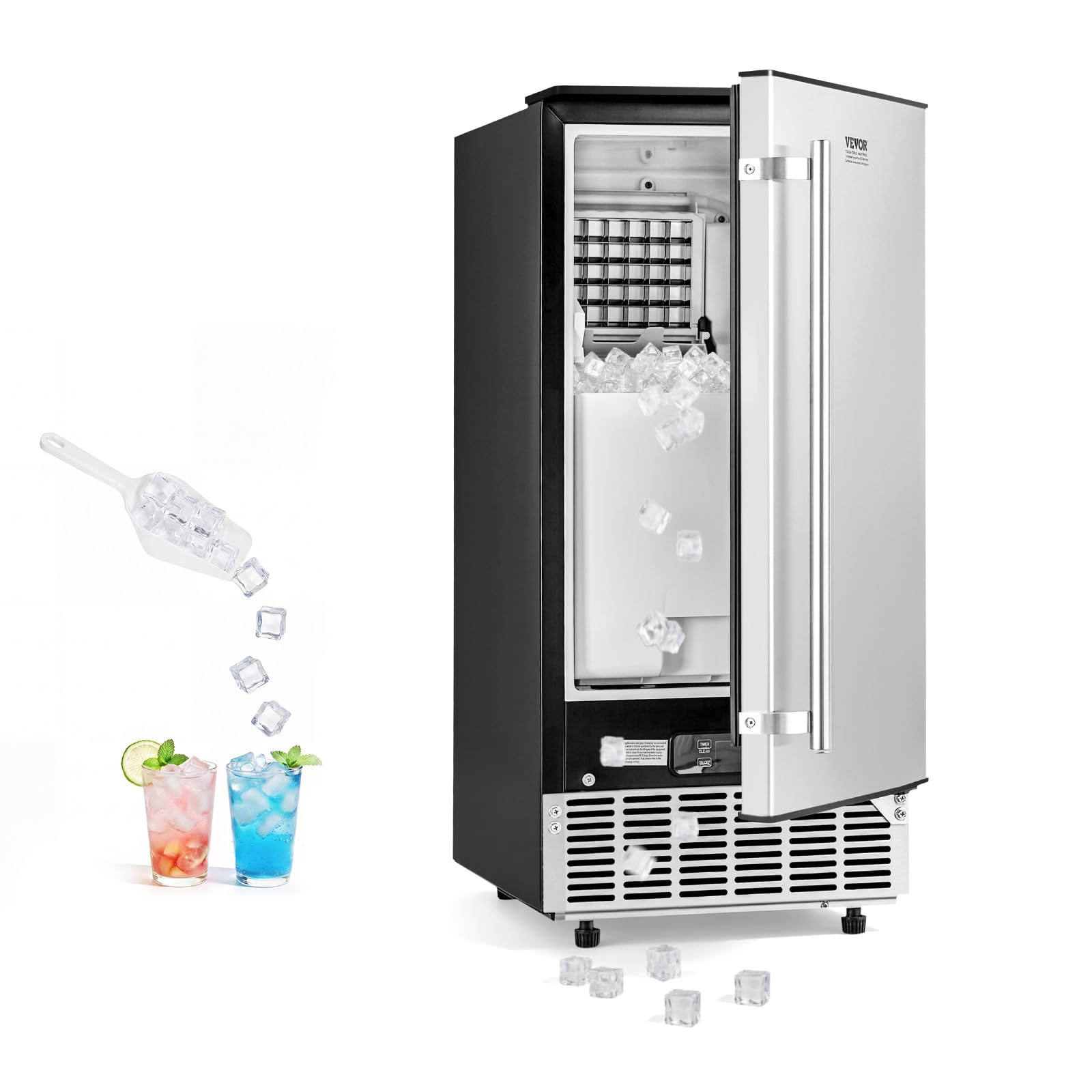
Image: The interior of the ice maker, showing the ice production tray and the storage bin filled with ice cubes.
Adjusting Ice Cube Thickness
Use the "+" and "-" buttons on the control panel to adjust the thickness of the ice cubes. Thicker ice cubes will take slightly longer to produce. The square ice cubes are ideal for various beverages.

Image: A user interacting with the control panel to select the desired ice cube thickness.

Image: Examples of ice cubes produced at different thickness settings: thin, medium, and thick.
Forced Ice Out
If ice is stuck or you need to clear the ice tray, use the "Forced Ice Out" function via the control panel. Refer to the specific button or sequence in the detailed operating guide provided with the unit.
Maintenance
Automatic Self-Cleaning
The ice maker is equipped with an automatic self-cleaning function. Press the "CLEAN" button on the control panel to initiate this cycle. Regular self-cleaning helps maintain hygiene and efficiency.
Regular Cleaning
In addition to the self-cleaning cycle, periodically clean the interior and exterior surfaces of the ice maker. Use a soft cloth with mild soap and water. Ensure the unit is unplugged before manual cleaning. Clean the ice storage bin regularly to prevent odor and bacterial growth.
Drainage System Maintenance
Regularly check the drainage system for any blockages. If using an optional electric drain pump, ensure it is functioning correctly. Proper drainage helps keep the unit clean and extends its service life.
Troubleshooting
Before contacting customer service, please refer to the following common issues and solutions:
| Problem | Possible Cause | Solution |
|---|---|---|
| Ice maker not producing ice. | No water supply, low water level, power issue, clogged water line. | Check water connection and supply. Ensure unit is powered on. Clean water lines if necessary. |
| "Low Water" indicator active. | Insufficient water supply. | Verify water connection and ensure the water supply valve is open. |
| "Ice Full" indicator active. | Ice storage bin is full. | Remove ice from the storage bin. |
| Ice cubes are too thin or too thick. | Incorrect ice thickness setting. | Adjust ice thickness using the +/- buttons on the control panel. |
| Unusual noise during operation. | Unit not level, loose components, normal compressor operation. | Ensure the unit is level. Check for any loose parts. Some compressor noise is normal. |
Specifications
| Brand | VEVOR |
| Model Name | Undercounter Built-in Ice Maker |
| Model Number | HBZB-36F |
| Product Dimensions (D x W x H) | 14.96"D x 19.09"W x 33.66"H (380 x 485 x 855 mm) |
| Net Weight | 54.2 lbs (24.6 kg) |
| Ice Production per Day | Up to 80 lbs |
| Ice Storage Capacity | Up to 26 lbs |
| Ice Shape | Square Ice Cube |
| Ice Size | 0.87" x 0.87" x 0.87" (22 x 22 x 22 mm) |
| Ice Tray Quantity | 40-Cell |
| Ice Tray Material | Nickel-Plated Copper |
| Wattage | 225 watts |
| Voltage | 110 volts |
| Noise Level | ≤65dB(A) |
| Included Components | 1 x Built-in Ice Maker, 1 x Water Connector, 1 x Water Hose, 1 x Handle, 1 x Ice Scoop, 1 x Instruction Manual |
| UPC | 197988735748 |
| ASIN | B0GWJ44GR6 |

Image: A visual representation of the ice maker's dimensions and a clear display of all components included in the package.
Warranty and Support
For warranty information, technical support, or service inquiries, please contact VEVOR customer service. Refer to the contact details provided in your purchase documentation or visit the official VEVOR website.
Website: www.vevor.com


