
TIDRADIO TD-G19 PoC Radio User Manual
Model: TD-G19
1. Introduction
The TIDRADIO TD-G19 is a 4G LTE Push-to-Talk (PoC) radio designed for long-distance communication. It offers unlimited range through cellular networks, supporting major US carriers like AT&T, Verizon, and T-Mobile. This device features built-in Bluetooth for accessory connectivity, AI noise reduction for clear audio, and a 3000mAh battery for extended use. This manual provides essential information for setting up, operating, and maintaining your TD-G19 radio.
2. What's in the Box
Verify that all items are present in your package:
- 2 x TD-G19 PoC Radios
- 2 x SIM Cards
- 2 x Desktop Chargers
- 2 x Headphones
- 2 x Charging Adapters
- 2 x Type-C Data Cables
- 2 x Hand Strips
- 2 x Belt Clips
- 1 x Instruction Manual
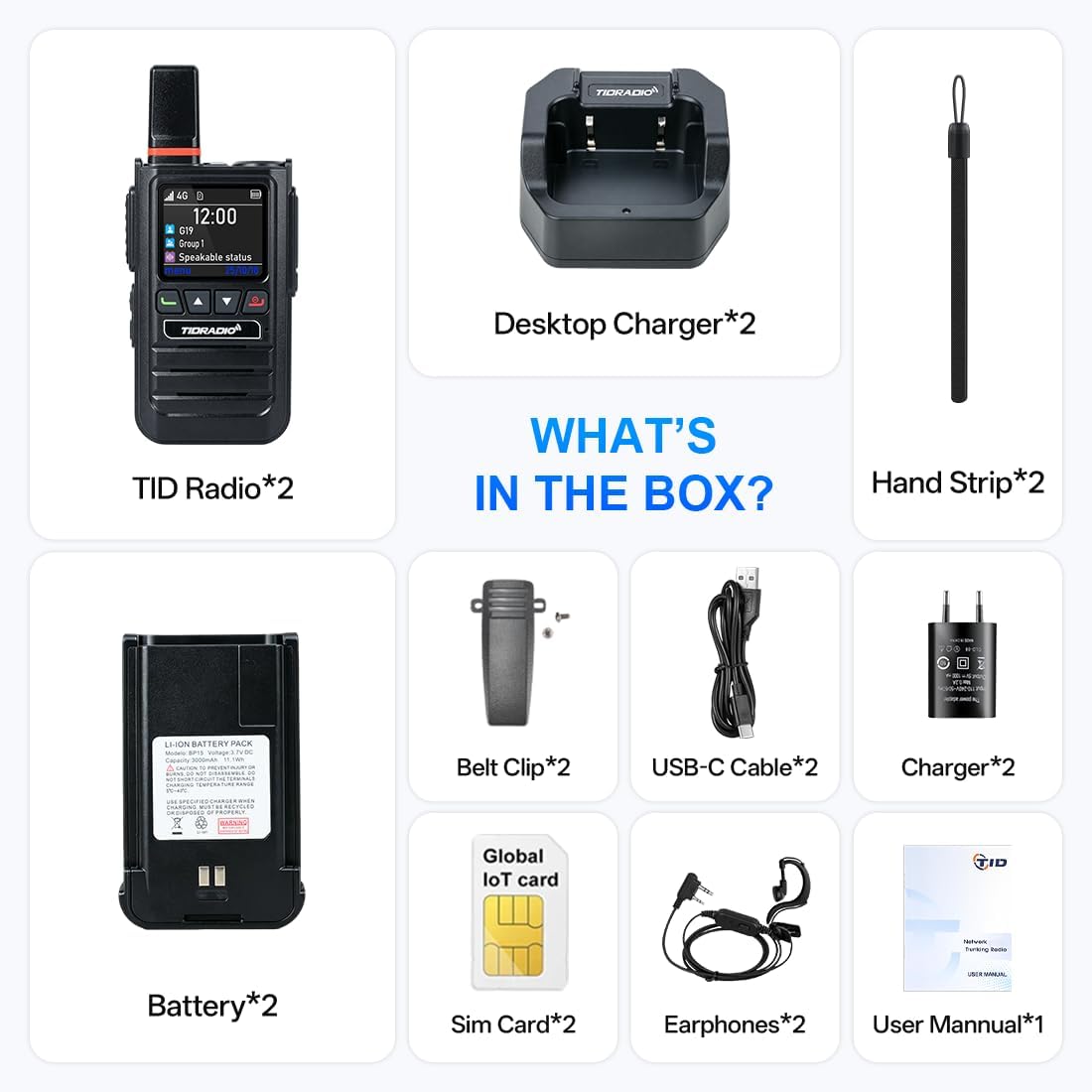
Figure 2.1: Package Contents
3. Product Overview and Features
The TD-G19 PoC Radio offers advanced communication capabilities with a focus on reliability and ease of use.
Key Features:
- Unlimited Range: Utilizes 4G LTE cellular networks for nationwide communication, eliminating traditional range limitations. Compatible with AT&T, Verizon, and T-Mobile.
- License-Free Operation: No FCC license is required for daily use.
- Lifetime Free Data Service: Includes lifetime free data service, requiring no renewal or subscription fees.
- Bluetooth Connectivity: Supports Bluetooth headphones and microphones for hands-free operation. Compatible with TIDRADIO wireless hand mics and third-party Bluetooth headsets (receive-only).
- AI Noise Reduction: An AI sound-optimizing algorithm reduces up to 98% of background noise, ensuring clear voice transmission and reception.
- Powerful Audio: Equipped with a 3W high-definition speaker for clear communication in noisy environments.
- Long Battery Life: Features a 3000mAh rechargeable battery, providing up to 24 hours of working time on a single charge. Supports Type-C fast charging and has a replaceable battery design.
- APP Management: Manage contacts, create groups (up to 20 groups, 200 members each), and monitor devices via the ODmaster APP.
- One-Click PTT Group Call: Facilitates one-to-one, multi-member, and one-key group broadcast calls for efficient team communication.
- Auto-Recording Feature: Records chats when the ODmaster APP runs in the background, allowing group members to review chat history.
- High Security: Built-in AES-256 end-to-end encryption protects voice and position data.
- OTA Auto-Update: One-click over-the-air updates for new features and performance improvements.

Figure 3.1: TD-G19 PoC Radio in use

Figure 3.2: Key Features Overview

Figure 3.3: Bluetooth Device Compatibility

Figure 3.4: AI Noise Cancellation in Action

Figure 3.5: Application for Family and Teams

Figure 3.6: High Security Level and Diverse Applications
Video 3.1: Overview of TD-G19 Rapid Walkie Talkies Unlimited Range 4G Radios.
Video 3.2: Introduction to the 2026 TIDRADIO TD-G19 4G PoC Radio with Bluetooth.
4. Setup
4.1 SIM Card Activation
The TD-G19 requires a SIM card for 4G LTE connectivity. Follow the instructions provided with your SIM card or refer to the ODmaster APP for activation steps. The included SIM card offers lifetime free data service.
4.2 ODmaster APP Download and Device Binding
To manage your TD-G19 radio, download the ODmaster APP on your smartphone. The APP allows you to bind your radio, create groups, and access various features.
- Download the ODmaster APP:
- For Android: Google Play Store
- For iOS: Apple App Store
- Open the APP and follow the on-screen guide to bind your PoC radio. This typically involves scanning a QR code on the device.
- Once bound, you can manage your PoC radio, add groups, unbind, recharge, and playback call voices within the APP.

Figure 4.1: ODmaster APP Activation Steps
Video 4.1: How to quickly activate your G19.
5. Operating Instructions
5.1 Making a Call
The TD-G19 supports single, multi-member, and group calls.
- After joining a group, press the side shortcut key to open the list for group or individual calls.
- Select the target contact or group.
- Press the PTT (Push-to-Talk) button to speak. The red light will illuminate when transmitting.
- For individual calls, you can set auto-hang-up in "Setting" → "Single Call Exit Time" or press the power button to hang up.
The last-call group serves as the standby group. You can freely switch standby groups by simply entering the desired one. After single or multi-person calls, the device will automatically return to the current group for quick access.

Figure 5.1: One-Click Call Functionality
6. APP Management
The ODmaster APP provides comprehensive management features for your TD-G19 radios.
6.1 Group Creation and Management
- You can create groups directly through the APP.
- Each group can accommodate up to 200 members.
- Each account can create up to 20 groups.
- Groups can be organized by department, project, or team for efficient communication.
6.2 Auto-Recording and Playback
When the ODmaster APP is running in the background, it automatically records conversations. This allows all group members to view and playback chat history, ensuring no crucial information is missed. Voice messages will not be recorded if the APP is closed.
6.3 OTA Updates
The TD-G19 supports one-click Over-The-Air (OTA) updates via the APP. This allows you to easily update your device with new features, extend its life, and improve performance without needing cables.

Figure 6.1: ODmaster APP Features

Figure 6.2: Audio Recording and Playback via APP
7. Maintenance
Proper maintenance ensures the longevity and optimal performance of your TD-G19 radio.
- Cleaning: Use a soft, damp cloth to clean the radio's exterior. Avoid harsh chemicals or abrasive cleaners.
- Battery Care: Charge the battery fully before first use. For long-term storage, charge the battery to approximately 50% and store in a cool, dry place. Avoid extreme temperatures.
- Storage: Store the radio in a dry, dust-free environment when not in use.
- Water Resistance: The device is water-resistant, but it is not waterproof. Avoid submerging it in water.
8. Troubleshooting
This section addresses common issues you might encounter with your TD-G19 radio.
A. About the Signal Issue
The free SIM card supports AT&T, Verizon, and T-Mobile in North America. The TIDRADIO PoC radio uses cellular networks for calls. Ensure you are in an area with good 4G signal coverage from these carriers to avoid issues.
B. About Network Fail
If you experience network failure, follow these steps:
- Modify APN: In the ODmaster APP, find "ME" → "APN". Turn on G19 Bluetooth and select "Headphone", then enter the APN code: globaldata. Reboot and test the radio again. (For G100, no need to turn on Bluetooth).
- Check the SIM card: If modifying the APN doesn't solve the problem, insert the SIM card into your phone, enable roaming, search for carriers, and test its internet access. This helps identify SIM-card problems.
- Persistent Issues: If the issue persists, please send us your SIM card number (ICCID#) and order number. We will conduct troubleshooting for you.
C. Frequent Disconnections or Choppy Sound
Usually results from weak signal. Try making calls in a well-signaled area.
D. Radio Not Registered
Usually, the radio cannot bind to the APP properly. If it shows as unbound, unbind and rebind. Restart the radio. Press PTT to enlarge the QR code for easier scanning if needed.
9. Specifications
- Brand:
- TIDRADIO
- Model Number:
- TD-G19
- Color:
- Black
- Number of Channels:
- 20
- Frequency Range:
- 4G/LTE (AT&T, Verizon, T-Mobile)
- Talking Range Maximum:
- 12430 Miles
- Voltage:
- 3.7 Volts
- Water Resistance Level:
- Water Resistant
- Number of Batteries:
- 2 Lithium Polymer batteries required (included)
- Battery Average Life:
- 72 Hours (Standby)
- Connectivity Protocol:
- Bluetooth
- Compatible Devices:
- TD-M15, TD-G18, TD-G100, TD-M2 PoC radios
- Unit Count:
- 2.0 Count (for 2-pack)
10. Warranty and Support
For warranty information, please refer to the documentation included with your purchase or contact your retailer. TIDRADIO provides lifetime OTA support for efficient resolution of usage issues.
Support Email:
- For G19 PoC Radio: sea@tidradio.com
- For G100 PoC Radio: lydia@tidradio.com
- General Support: support@tidradio.com