
1. Important Safety Instructions
Please read all instructions carefully before using this appliance. Retain this manual for future reference.
- This appliance is for household use only. Do not use outdoors or on wet surfaces.
- Do not allow children to operate the vacuum cleaner. Close supervision is necessary when used near children.
- Do not pick up flammable or combustible liquids, such as gasoline, or use in areas where they may be present.
- Do not pick up anything that is burning or smoking, such as cigarettes, matches, or hot ashes.
- Do not use without the dust cup and filters in place.
- Turn off the appliance before connecting or disconnecting the motorized brush, telescopic tube, or other accessories.
- Use only as described in this manual. Use only manufacturer's recommended attachments.
- Do not handle the charger or appliance with wet hands.
- If the appliance is not working as it should, has been dropped, damaged, left outdoors, or dropped into water, return it to a service center.
2. Package Contents
Verify that all components are present and in good condition upon unpacking.
- 650W & 55Kpa Cordless Vacuum Cleaner (Main Unit)
- HEPA Filter Replacement (2 total: 1 pre-installed, 1 spare)
- Vacuum Filter Freshener Disc
- 2-in-1 Crevice Brush
- Winged Upholstery Nozzle
- Flat Head Brush
- Adjustable Telescopic Tube
- Charging Adapter
- Rechargeable Storage Mount (with screw kit)
- User Manual

Image: All components included in the package, such as the main unit, battery, telescopic tube, floor brush, various nozzles, filters, and charging accessories.
3. Product Overview
Familiarize yourself with the main parts of your TechRise Cordless Vacuum Cleaner CP12.
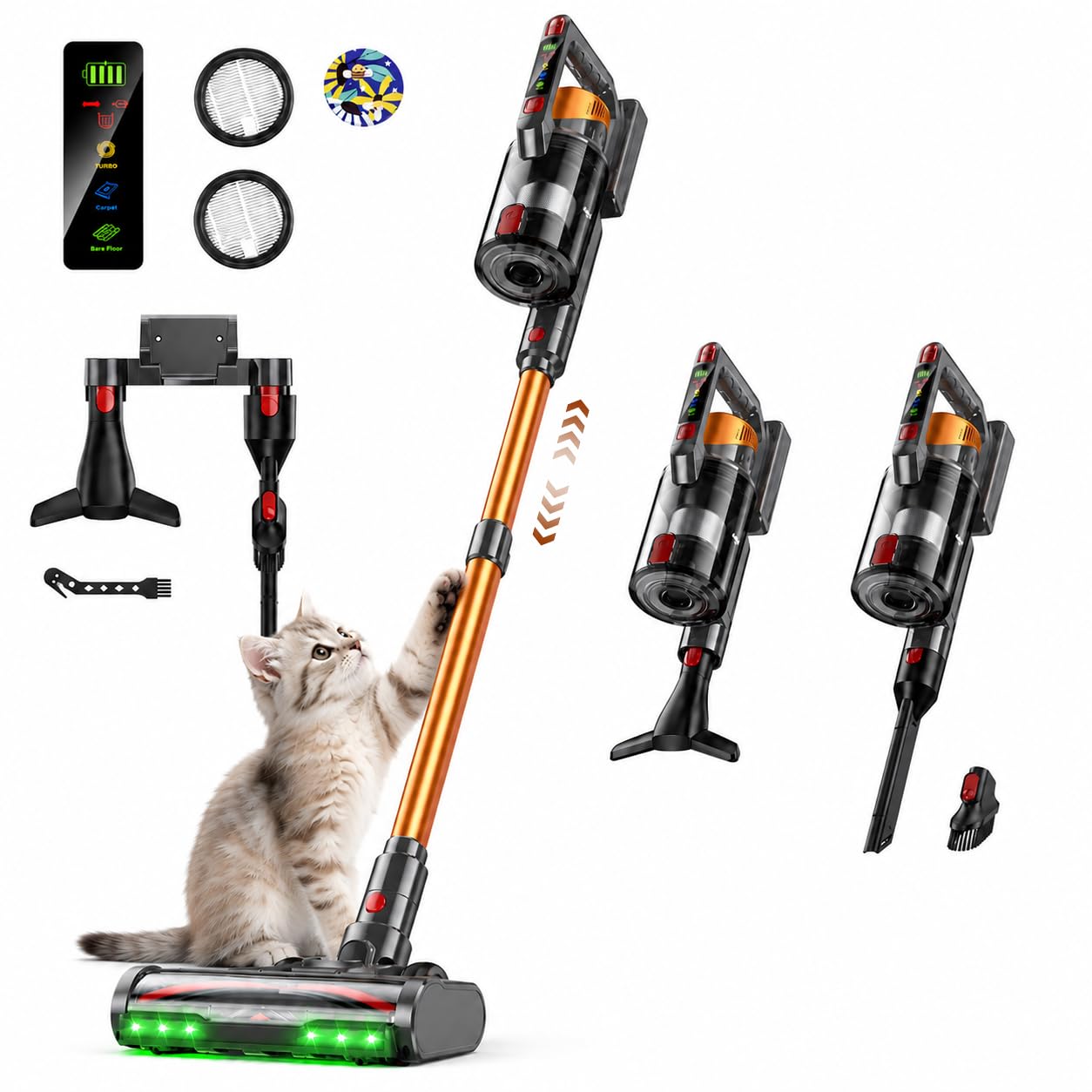
Image: The fully assembled TechRise Cordless Vacuum Cleaner CP12, highlighting its sleek design and main components.
Key Features:
- Powerful Suction: 650W motor providing 55KPa suction for effective cleaning.
- Long Runtime: Up to 70 minutes of cleaning on a single charge.
- Anti-Tangle V-Brush: Designed to prevent hair wrap, ideal for pet owners.
- Green LED Headlight: Illuminates dust and debris on hard floors for thorough cleaning.
- Smart LED Display: Shows battery level, filter status, and clog alerts.
- 8-in-1 Sealed Cyclone Filtration: Captures 99.9% of fine dust and allergens.
- Large Dust Cup: 1.8-liter capacity with one-click emptying.
- Versatile Accessories: Includes crevice tool, dust brush, and winged upholstery nozzle.
4. Assembly and Setup
Follow these steps to assemble your vacuum cleaner.
- Attach the Telescopic Tube: Insert the telescopic tube into the main unit until it clicks securely into place.
- Connect the Floor Brush: Attach the floor brush to the other end of the telescopic tube, ensuring it locks firmly.
- Install the Battery: Slide the battery pack into the designated slot on the main unit until it clicks.
- Optional Accessories: For handheld use or specific cleaning tasks, detach the telescopic tube and attach desired accessories (e.g., crevice tool, upholstery nozzle) directly to the main unit.

Image: The main unit and various accessories, illustrating how they can be combined for different cleaning configurations.
5. Charging the Battery
Ensure your vacuum is fully charged before first use for optimal performance.
- Direct Plug-in: Connect the charging adapter directly to the battery pack while it is attached to the main unit or detached.
- Wall Mount Charging: Install the rechargeable storage mount on a wall. Place the vacuum cleaner onto the mount to charge.
- The LED display will indicate charging status. A full charge typically takes approximately 4-5 hours.

Image: Different methods for charging the TechRise Cordless Vacuum Cleaner CP12, including wall-mounted storage and direct battery charging.
6. Operation
Operating your TechRise Cordless Vacuum Cleaner CP12 is straightforward.
- Power On/Off: Press the power button on the main unit to start or stop the vacuum.
- Adjust Suction Mode: Use the mode selection button on the handle to switch between different suction modes (e.g., Bare Floor, Carpet, TURBO) as indicated on the LED display.
- LED Headlight: The green LED headlight on the floor brush automatically illuminates the cleaning path, making hidden dust visible.
- Cleaning Different Surfaces: The vacuum is suitable for various floor types, including wooden floors, low-pile carpets, square tiles, and long-pile carpets. Select the appropriate mode for optimal cleaning.
- Self-Standing Design: The vacuum can stand upright on its own, allowing you to pause cleaning conveniently without leaning it against a wall.

Image: The Smart LED Interactive Display provides real-time information on battery, filter status, and selected cleaning mode.

Image: The green LED headlight on the floor brush highlights dust and debris, ensuring no spots are missed during cleaning.

Image: The vacuum cleaner's versatility across different floor surfaces, from wooden floors to various carpet types.
7. Maintenance
Regular maintenance ensures optimal performance and extends the life of your vacuum cleaner.
Emptying the Dust Cup:
- When the dust cup is full (indicated on the LED display), press the one-click release button to empty its contents into a trash bin.
- The 1.8-liter capacity minimizes the frequency of emptying.

Image: The one-click dust cup emptying mechanism, designed for hygienic disposal without direct contact with debris.
Cleaning Filters:
- The 8-layer sealed cyclone filtration system includes washable and reusable HEPA filters.
- Regularly remove and rinse the HEPA filter under cold water. Allow it to air dry completely for at least 24 hours before reinserting.
- Replace the HEPA filter every 3-6 months, or as needed, to maintain suction power and filtration efficiency.
- Insert the Vacuum Filter Freshener Disc into the designated slot to add a pleasant scent during cleaning.

Image: A detailed view of the 8-stage high-efficiency filtration system, showing how fine dust and allergens are captured.
Cleaning the Brush Roll:
- The V-shaped anti-tangle brush roll minimizes hair wrap, but occasional cleaning may still be necessary.
- To remove the brush roll, unlock the brush head cover and lift out the brush.
- Remove any tangled hair or debris using the included cleaning tool or scissors.
- Reinsert the brush roll and secure the cover.

Image: A visual comparison highlighting the anti-tangle V-brush design, which reduces hair accumulation compared to traditional brush rolls.
8. Troubleshooting
Refer to this section for common issues and their solutions.
| Problem | Possible Cause | Solution |
|---|---|---|
| Vacuum does not turn on | Battery is not charged or not properly installed. | Ensure the battery is fully charged and securely clicked into place. |
| Loss of suction power | Dust cup is full, filters are clogged, or brush roll is obstructed. | Empty the dust cup. Clean or replace filters. Remove any obstructions from the brush roll. |
| Brush roll not spinning | Hair or debris tangled in the brush roll, or brush roll is not properly installed. | Clean the brush roll. Ensure it is correctly reinserted and locked. |
| Vacuum stops during operation | Battery is low, or there is an overheating issue. | Recharge the battery. If overheating, turn off the vacuum and allow it to cool down for at least 30 minutes. Check for blockages. |
| LED display shows an error | Specific error indicated on the display (e.g., filter clog, roller brush blockage). | Refer to the LED display for the specific alert and follow the recommended action (e.g., clean filter, clear blockage). |
9. Specifications
Technical details of the TechRise Cordless Vacuum Cleaner CP12.
| Feature | Detail |
|---|---|
| Brand | TechRise |
| Model Name | CP12 |
| Power Source | Battery Powered |
| Motor Power | 650W |
| Suction Power | 55KPa |
| Runtime | Up to 70 minutes |
| Voltage | 29.6 volts |
| Dust Cup Capacity | 1.8 liters |
| Filter Type | HEPA Filter (8-layer sealed cyclone) |
| Special Features | Anti-Hair Wrap, Cordless, Detachable Battery, Headlight, High Power, LED Display |
| Surface Recommendation | All floors |
| Item Weight | 7.7 pounds |
| Item Dimensions (L x W x H) | 11"L x 9"W x 50"H |
10. Warranty and Support
TechRise stands by the quality of its products.
- Lifetime Warranty: If your vacuum fails at any time, please contact TechRise customer support.
- For support, troubleshooting assistance, or warranty claims, please refer to the contact information provided on the TechRise official website or your purchase documentation.