
1. Introduction
The Mesqool FM Radio (Model CR1031) is a versatile portable radio designed for various listening needs. It features FM radio reception with auto-scan and presets, NOAA Weather Band alerts, Bluetooth 5.0 connectivity for streaming, and microSD card playback. Additional functions include dual alarms, a sleep timer, and 6 EQ modes for a customized audio experience. The radio is equipped with a 2.4-inch color display and a built-in 3000mAh rechargeable battery for cordless operation.
2. What's in the Box
- Mesqool FM Radio (Model CR1031)
- Owner's Manual
- Power Adapter
- USB-C Charging Cable

Image: Package contents of the Mesqool FM Radio.
3. Product Features
- FM Radio with Auto Scan & 40 Presets: Easily find and save your favorite FM stations.
- NOAA Weather Band & Alert: Receive critical weather updates and alerts.
- Bluetooth 5.0 Connectivity: Wirelessly stream audio from compatible devices.
- MicroSD Playback: Play audio files directly from a microSD card (up to 64GB, not included).
- 8W Speaker with 6 EQ Modes: Enjoy clear sound with customizable audio profiles (Normal, Pop, Classic, Rock, Jazz, Bass).
- 2.4-inch Color Display: Clear display of time, mode, station, battery, and settings.
- Dual Alarms & Sleep Timer: Set two independent alarms and use the sleep timer for up to 120 minutes.
- USB-C Rechargeable Battery: Built-in 3000mAh battery for portable use.
- Headphone Jack: For private listening.
- SOS Alarm: Emergency alert function.
4. Controls and Ports

Image: Side view of the Mesqool FM Radio with labeled components.
Side Panel Components:
- Volume Knob: Rotate to adjust the audio volume. Press to power on/off.
- microSD Card Slot: Insert a microSD card for audio playback.
- Headphone Jack / Reset Hole: Connect 3.5mm headphones for private listening. The small hole is for resetting the device using a pin.
- USB-C Port: Connect the USB-C cable for charging the internal battery or for continuous power.
- Built-in 3000mAh Battery: Internal rechargeable battery (indicated by battery icon on screen).
- Speaker: Audio output.
Front Panel Buttons:
- MODE: Switch between FM, NOAA Weather, Bluetooth, and MicroSD modes.
- SOS: Activate the emergency alarm.
- WX (Weather): Directly access NOAA Weather Band.
- MENU: Access system settings and options.
- BACK: Go back to the previous menu or setting.
- PRESET: Access saved radio stations.
- EQ: Cycle through equalizer modes (Normal, Pop, Classic, Rock, Jazz, Bass).
- Scan: Automatically scan for radio stations.
- Play/Pause: Play or pause audio in Bluetooth or MicroSD mode.
- Previous/Next Track: Navigate tracks in Bluetooth or MicroSD mode, or tune stations in radio mode.
- ENTER: Confirm selections in menus.
5. Setup
5.1 Initial Charging
Before first use, fully charge the radio. Connect the provided USB-C cable to the radio's USB-C port and the power adapter to a wall outlet. The battery indicator on the display will show charging status. A full charge typically takes a few hours.

Image: Mesqool radio charging via USB-C.
5.2 Power On/Off
Press and hold the Volume Knob for approximately 2 seconds to power the radio on or off.
5.3 Antenna Extension
For optimal FM and NOAA Weather reception, fully extend the telescopic antenna.
5.4 Language Setting
Upon first power-on, you may be prompted to select a language. Navigate using the Previous/Next buttons and confirm with ENTER. Supported languages include English, Spanish, and French. To change later, go to MENU > System Settings > Language.
6. Operating Instructions
6.1 FM Radio Operation
- Press the MODE button until "FM Radio" is displayed.
- Auto Scan: Press the SCAN button to automatically search for and save available FM stations. Up to 40 stations can be saved.
- Manual Tuning: Use the Previous/Next Track buttons to fine-tune the frequency.
- Access Presets: Press the PRESET button, then use Previous/Next Track to navigate through saved stations. Press ENTER to select.
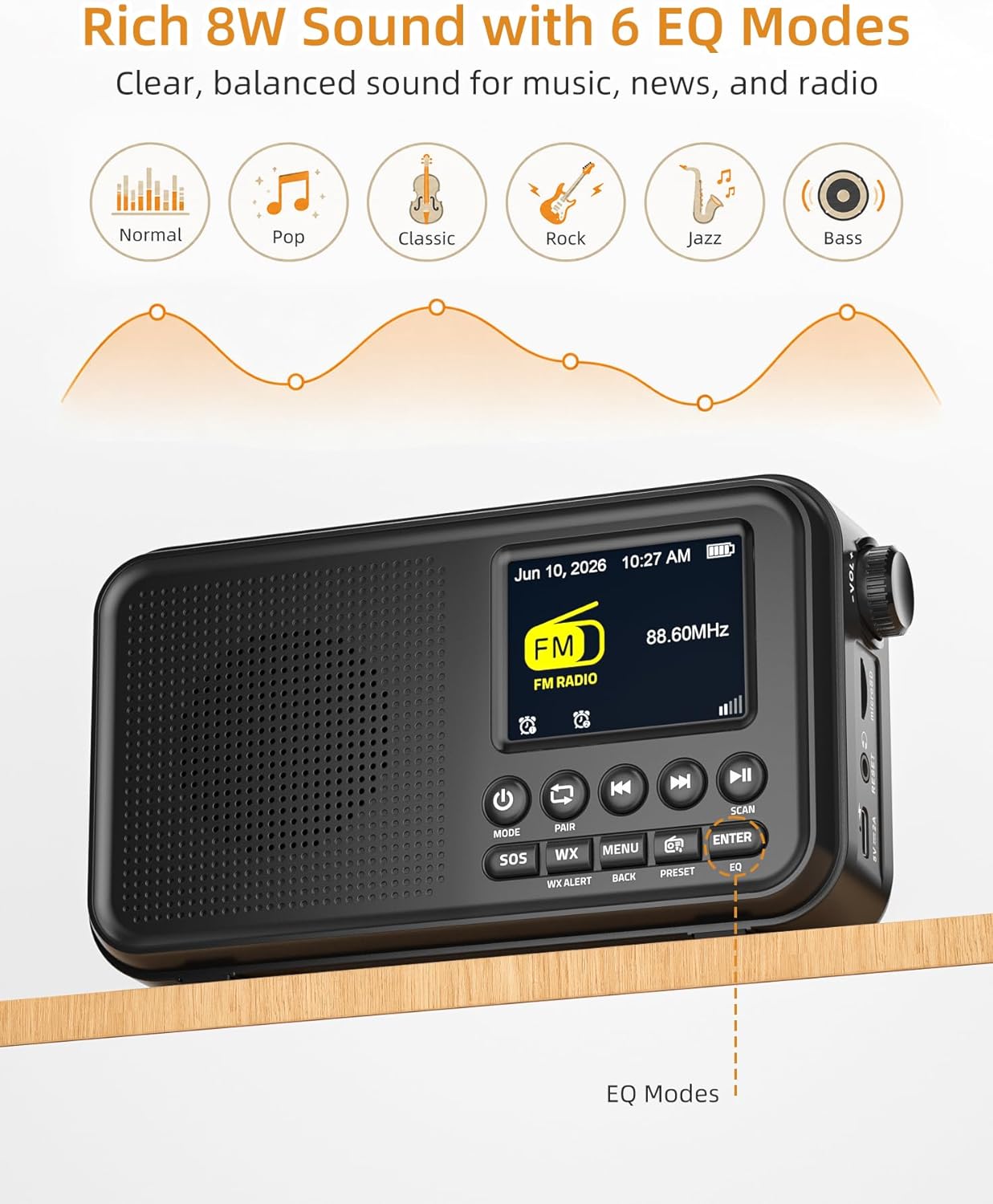
Image: Mesqool radio displaying FM radio mode and EQ options.
6.2 NOAA Weather Band (WB)
- Press the WX button to directly enter NOAA Weather Band mode.
- The radio will automatically scan for the strongest NOAA weather channel.
- The display will show the channel number and frequency (e.g., NOAA CH 5, 162.500 MHz).
- The radio will monitor for weather alerts. Ensure the antenna is fully extended for best reception.

Image: Mesqool radio displaying NOAA Weather Band information.
6.3 Bluetooth Mode
- Press the MODE button until "Bluetooth" is displayed. The radio will enter pairing mode, indicated by a blinking Bluetooth icon.
- On your smartphone, tablet, or laptop, enable Bluetooth and search for available devices.
- Select "Mesqool CR1031" (or similar name) from the list to pair.
- Once paired, the Bluetooth icon will become solid, and you can stream audio to the radio.
- Use the Play/Pause and Previous/Next Track buttons on the radio to control playback.

Image: Mesqool radio connected to a smartphone via Bluetooth.
6.4 MicroSD Playback
- Insert a microSD card (up to 64GB, not included) into the microSD card slot on the side panel.
- Press the MODE button until "MicroSD" is displayed. The radio will automatically begin playing audio files from the card.
- Use the Play/Pause and Previous/Next Track buttons to control playback.

Image: Mesqool radio in microSD playback mode.
6.5 Dual Alarms
- Press the MENU button, then navigate to "Alarm Settings" and press ENTER.
- Select "Alarm 1" or "Alarm 2" and press ENTER.
- Set the desired time, alarm frequency (daily, weekdays, weekends, once), and wake-up source (FM radio or buzzer).
- Confirm settings with ENTER. The alarm icon will appear on the display.
- When the alarm sounds, press any button (except SOS) to activate snooze, or press and hold the Volume Knob to turn off the alarm.

Image: Mesqool radio displaying dual alarm settings.
6.6 Sleep Timer
- Press the MENU button, then navigate to "Sleep Timer" and press ENTER.
- Select the desired duration (15, 30, 45, 60, 90, or 120 minutes) and press ENTER.
- The radio will automatically turn off after the set time.

Image: Mesqool radio with sleep timer function.
6.7 EQ Modes
In FM, Bluetooth, or MicroSD mode, press the EQ button repeatedly to cycle through the 6 available equalizer modes: Normal, Pop, Classic, Rock, Jazz, and Bass. Select the mode that best suits your audio preference.
6.8 Headphone Use
Insert a standard 3.5mm headphone jack into the headphone port on the side of the radio for private listening. The internal speaker will automatically mute.
7. Maintenance
7.1 Cleaning
Wipe the radio with a soft, dry cloth. Do not use liquid cleaners or abrasive materials, as they may damage the surface or internal components.
7.2 Storage
When not in use for extended periods, store the radio in a cool, dry place away from direct sunlight and extreme temperatures. Ensure the battery is partially charged (around 50%) before storage to prolong its lifespan.
8. Troubleshooting
| Problem | Possible Cause | Solution |
|---|---|---|
| Radio does not power on. | Low battery; Power button not pressed correctly. | Charge the radio using the USB-C cable. Press and hold the Volume Knob for 2 seconds. |
| Poor FM/NOAA reception. | Antenna not extended; Weak signal area. | Fully extend the telescopic antenna. Reposition the radio for better signal. |
| Bluetooth not connecting. | Radio not in pairing mode; Device too far; Already connected to another device. | Ensure radio is in Bluetooth pairing mode. Keep devices within 10 meters. Disconnect from other devices. |
| No sound from MicroSD. | MicroSD card not inserted correctly; Unsupported file format; Corrupted files. | Reinsert the microSD card. Ensure audio files are in a supported format (e.g., MP3). Try a different microSD card. |
| Display is blank or frozen. | System error. | Use a thin object (like a paperclip) to press the RESET hole on the side panel. |
9. Specifications
| Feature | Detail |
|---|---|
| Brand | Mesqool |
| Model Number | CR1031 |
| Color | Black |
| Product Dimensions (L x W x H) | 6.65" x 1.85" x 3.62" |
| Item Weight | 12.32 ounces |
| Tuner Technology | FM / Weather Band (NOAA) |
| FM Frequency Range | 87.5-108 MHz |
| NOAA WB Frequency | 162.400-162.550 MHz |
| Connectivity Technology | Bluetooth 5.0, USB-C |
| Power Source | Corded Electric, Battery Powered |
| Battery | 3000mAh Rechargeable (included) |
| Speaker Output | 8W |
| Display Type | Color Display |
| MicroSD Support | Up to 64GB (card not included) |
| Included Components | Owner's Manual, Power Adapter |
10. Warranty and Support
10.1 Warranty Information
This Mesqool product is covered by a 2-Year Replacement/Refund Warranty for any quality problems. Please retain your proof of purchase for warranty claims.
10.2 Customer Support
If you encounter any issues or have questions regarding your Mesqool FM Radio, please contact our customer support team. Refer to the contact information provided on the Mesqool official website or your purchase documentation.
For further assistance, you may visit the Mesqool Store online: Mesqool Store


