
1. Introduction
This manual provides essential information for the safe and efficient operation of your DATOUBOSS 48V 5500W Hybrid Solar Inverter. This device is designed to convert DC power from solar panels and batteries into AC power for various applications, including residential backup, off-grid systems, RVs, and trucks. Please read this manual thoroughly before installation and use to ensure proper functionality and longevity of the product.
2. Safety Information
Always observe the following safety precautions to reduce the risk of electric shock, fire, or injury:
- Qualified Personnel: Installation and maintenance must be performed by qualified personnel familiar with electrical systems and safety standards.
- Ventilation: Ensure adequate ventilation around the inverter to prevent overheating. Do not block ventilation openings.
- Environment: Install the inverter in a dry, well-ventilated area, away from flammable materials, corrosive gases, and excessive dust. Avoid direct sunlight and high humidity.
- Grounding: The inverter must be properly grounded according to local electrical codes.
- Battery Safety: Work with batteries carefully. Wear eye protection and protective clothing. Batteries can produce explosive gases.
- Disconnect Power: Before performing any maintenance or wiring, ensure all power sources (solar, utility, battery) are disconnected.
- Overload Protection: Do not overload the inverter beyond its rated capacity.
- Emergency Stop: Familiarize yourself with the emergency shutdown procedures.
3. Product Features
The DATOUBOSS 48V 5500W Hybrid Solar Inverter offers the following key features:
- Pure Sine Wave Output: Provides stable and clean power suitable for all types of loads, including sensitive electronics and motor-type appliances.
- Integrated MPPT Solar Charger: Features a built-in 100A MPPT solar charger with a maximum 8500W PV input and a 60-500Vdc MPPT tracking range for efficient solar energy harvesting.
- Multiple Charging Sources: Supports charging from solar panels, utility grid, and generators, with four adjustable charging modes.
- Universal Battery Compatibility: Compatible with AGM, Gel, Flooded lead-acid batteries, and various lithium batteries, including BMS communication and lithium battery activation.
- LCD Smart Visual Monitoring: A clear LCD display shows real-time data such as PV voltage, battery level, and load power. It allows customization of over 20 parameters.
- Comprehensive Protection: Includes over-voltage, over-load, over-temperature, short-circuit, battery undervoltage, battery overvoltage, PV reverse current, PV overvoltage, and AC input over/under voltage protection.
- Flexible Installation: Designed for vertical wall-mount installation on non-combustible surfaces.
- Cold Start and Auto-Restart: Ensures reliable operation in various conditions.
4. Package Contents
Upon unpacking, please verify that all items are present and undamaged:
- DATOUBOSS 48V 5500W Hybrid Solar Inverter
- Instruction Manual (this document)
- Installation Kit
5. Setup and Installation
Proper installation is crucial for the inverter's performance and safety. Refer to the following diagrams and instructions.
5.1 Product Overview

Figure 5.1: Front view of the DATOUBOSS 48V 5500W Hybrid Solar Inverter.
5.2 Connection Diagram
The inverter integrates solar, battery, and AC grid/generator inputs to power home appliances. Ensure all connections are secure and correctly polarized.
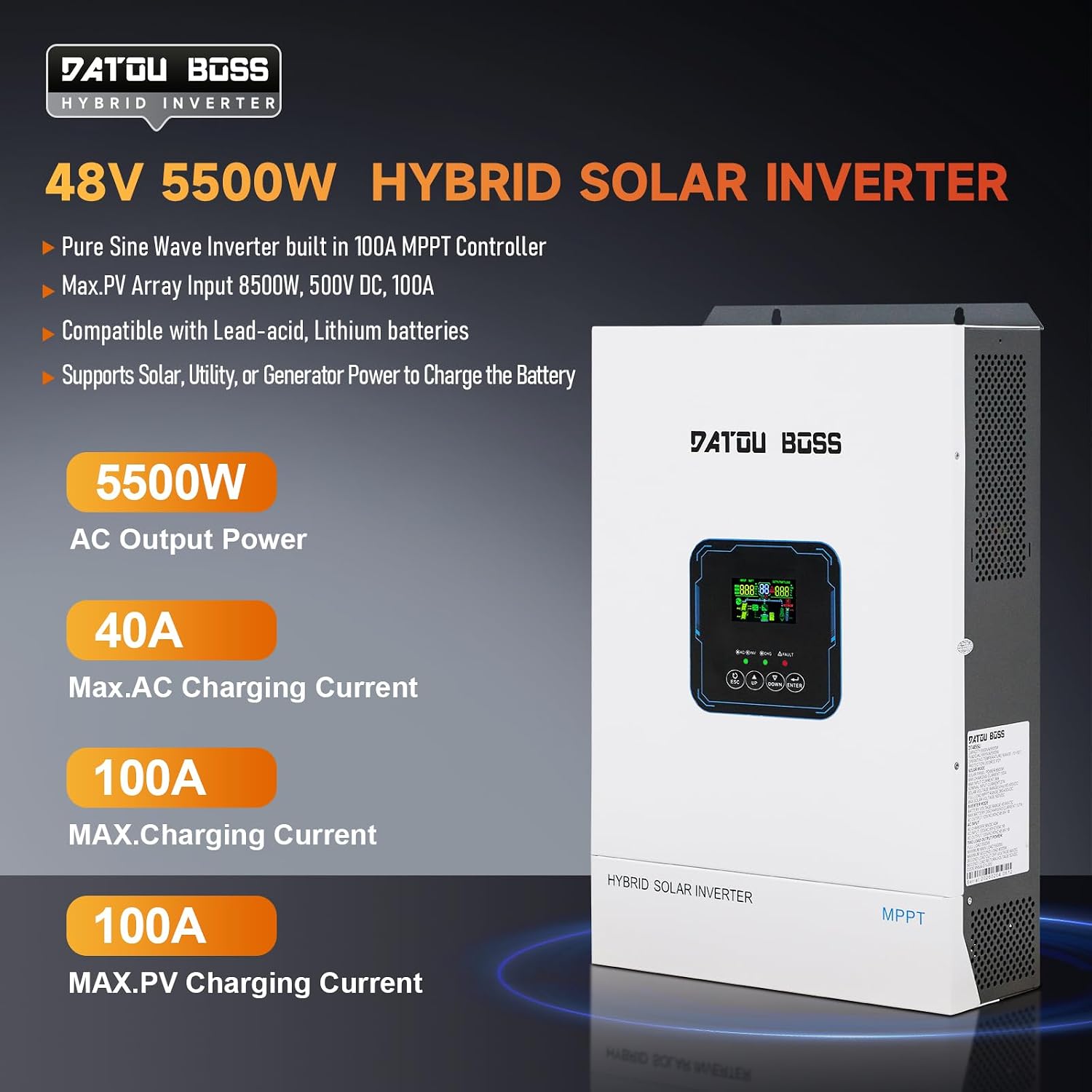
Figure 5.2: General connection diagram for the hybrid solar inverter system.
5.3 Inverter Ports and Indicators
Familiarize yourself with the inverter's display, indicators, and connection ports.

Figure 5.3: Labeled components of the inverter, including LCD display, buttons, and various input/output ports.
- LCD display
- Status indicator
- Charging indicator
- Fault indicator
- ESC button
- UP button
- DOWN button
- ENTER button
- AC Input
- AC Output
- Communication Port (RS232)
- BMS/RS485 Communication Port
- Dry Contact
- Battery Input
- Power On/Off Switch
- PV Input
6. Operating Instructions
The inverter offers various charging and load output modes to optimize energy usage.
6.1 Charging Modes
Select the appropriate charging mode via the LCD display based on your energy priorities.

Figure 6.1: Overview of the four available charging modes.
- Solar Priority: Prioritizes PV charging; utility charging activates only when solar energy is insufficient.
- Utility Priority: Prioritizes grid/generator charging; solar charging takes over when utility is unavailable.
- Hybrid Charging: Combines PV + utility/generator charging; PV leads, utility supplements when solar is low.
- Solar Only: Exclusive PV charging; no grid/generator power is used for battery charging.
6.2 Load Output Modes
Configure how the inverter supplies power to your loads.

Figure 6.2: Overview of the four available load output modes.
- Solar Priority: PV and battery power the load; switches to utility power only when PV energy is insufficient.
- Utility Priority: Utility power supplies the load first; switches to battery/PV only when utility fails.
- Inverter Priority: Battery/PV power the load; switches to utility only when battery voltage is too low.
- Hybrid Supply Mode: PV + utility jointly power the load when hybrid function is enabled; no grid feedback supported.
6.3 LCD Display and Parameter Settings
The LCD provides real-time monitoring and allows for custom parameter adjustments.

Figure 6.3: Detailed view of the LCD display for monitoring and setting parameters.
Use the UP, DOWN, ESC, and ENTER buttons to navigate menus and adjust settings. Refer to the on-screen prompts for specific parameter modifications.
7. Maintenance
Regular maintenance ensures optimal performance and extends the lifespan of your inverter.
- Cleaning: Periodically clean the inverter's exterior with a dry cloth. Ensure ventilation openings are free from dust and debris.
- Connections: Annually inspect all electrical connections for tightness and signs of corrosion. Loose connections can cause overheating and poor performance.
- Environment: Verify that the installation environment remains within the recommended temperature and humidity ranges.
- Battery Inspection: If using lead-acid batteries, check electrolyte levels and terminal conditions as per battery manufacturer guidelines.
- Performance Monitoring: Regularly check the LCD display for any fault indicators or unusual readings.
8. Troubleshooting
If you encounter issues with your inverter, refer to the following common troubleshooting steps before contacting support.
- No Power Output: Check if the inverter is switched on. Verify battery connections and voltage. Ensure AC input (utility/generator) is present if configured.
- Fault Indicator On: Check the LCD display for specific error codes. Refer to the inverter's detailed error code list (if available in a separate document or on-screen menu) for diagnosis.
- Low Output Power: Ensure the load does not exceed the inverter's rated capacity. Check battery charge level and solar input.
- Overheating: Ensure adequate ventilation. Clear any obstructions from the inverter's cooling fins. Reduce load if operating in high ambient temperatures.
- Battery Not Charging: Verify solar panel connections and voltage. Check AC input if utility/generator charging is enabled. Ensure charging mode settings are correct.
If the problem persists after attempting these steps, please contact customer support.
9. Specifications
Detailed technical specifications for the DATOUBOSS 48V 5500W Hybrid Solar Inverter.
| Category | Specification | Value |
|---|---|---|
| Input/Output | Rated Input Voltage | 110/120VAC |
| Voltage Range | 65-145VAC ±3V | |
| Rated Power (Battery Mode) | 5500W | |
| Rated Power (Photovoltaic) | 5500W | |
| Output Voltage | 110/120V AC ±5% | |
| Output Frequency | 50/60Hz ±0.1% | |
| Waveform | Pure Sine Wave | |
| Transfer Time (Adjustable) | Computers (UPS Mode) 10ms, Appliance (APL Mode) 20ms | |
| Peak Power | 11000VA | |
| Overload Capacity | 11s@105%-150% Load; 2s@150%-200% Load; 400ms@>200% Load | |
| Grid-tie Operation | Feed into the grid voltage range | 90-140VAC |
| Feed into the grid frequency range | 47-53±1Hz / 57-62±1Hz | |
| Nominal output current | 50A | |
| Power Factor Range | >0.99 | |
| Max. conversion efficiency (DC/AC) | 98% | |
| Battery Voltage | 48Vdc | |
| Charger | PV Charging Mode | MPPT |
| Max. PV Input Power | 8500W | |
| MPPT Tracking Range | 60-500Vdc | |
| Max. PV Input Voltage | 500Vdc | |
| Max. PV Charging Current | 100A | |
| Max. AC Charging Current | 40A | |
| Max. Charging Current | 100A | |
| Interfaces | RS232 | Baud Rate 2400 |
| Extended Socket / Communication Interface | Lithium Battery BMS Communication Card, Dry Contact | |
| Parallel machine interface | Without Parallel Connect | |
| Item Dimensions L x W x H | 25.5"L x 17.7"W x 11"H | |
| Item Weight | 33.9 Pounds | |
| Environmental | Operating Temperature | -10-60°C (14-140°F) |
| Humidity | 20%-95% (Non-condensing) | |
| Storage Temperature | -15-60°C (5-140°F) | |
| Altitude | Not Over 1000m, Derating over 1000m, Max 4000m (Refer to IEC62040) | |
| Noise | ≤50dB |
For more detailed specifications, refer to the product's technical data sheet.
10. Warranty and Support
10.1 Warranty Information
The DATOUBOSS 48V 5500W Hybrid Solar Inverter comes with a 2-Year Manufacturer Warranty. This warranty covers defects in materials and workmanship under normal use. Please retain your proof of purchase for warranty claims.
Optional extended protection plans may be available for purchase separately, offering additional coverage beyond the standard manufacturer warranty.
10.2 Customer Support
For technical assistance, troubleshooting not covered in this manual, or warranty inquiries, please contact DATOUBOSS customer support. Have your product model number (DATOUBOSS-48V5500w) and purchase date ready when contacting support.
You can typically find contact information on the official DATOUBOSS website or through your point of purchase.


