
1. Introduction
This manual provides essential information for the safe and efficient operation of your Garvee 8000 BTU Window Air Conditioner with Heat. This 4-in-1 unit offers cooling, heating, dehumidification, and fan modes, designed for rooms up to 350 square feet. Please read this manual thoroughly before installation and use, and retain it for future reference.
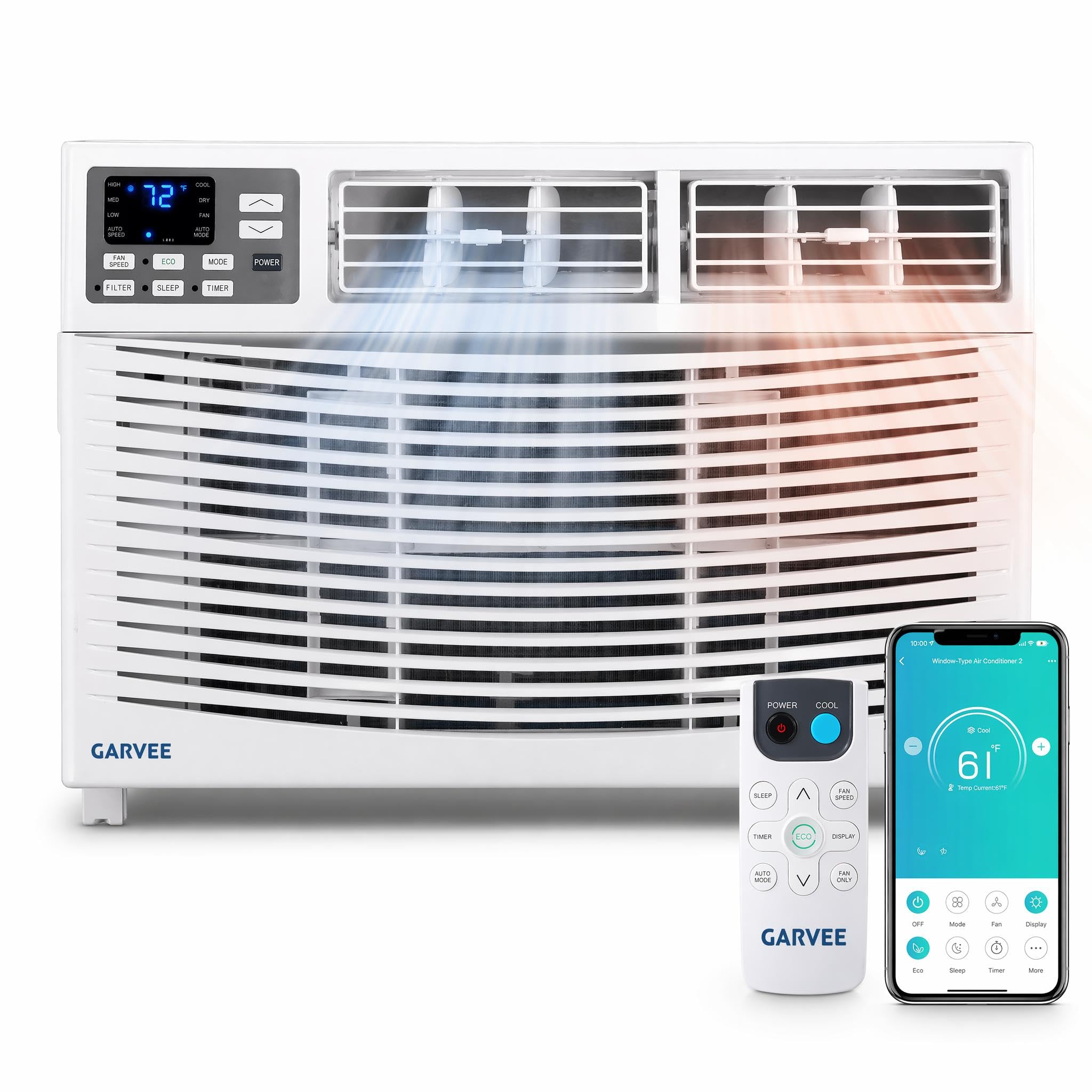
Image: The Garvee 8000 BTU Window Air Conditioner unit, showcasing its compact design.
2. Safety Information
Always follow basic safety precautions when using electrical appliances to reduce the risk of fire, electric shock, or injury.
- Ensure the unit is properly grounded.
- Do not operate the unit with a damaged power cord or plug.
- Do not insert fingers or objects into the air inlet/outlet.
- Keep flammable materials away from the unit.
- Unplug the unit before cleaning or servicing.
- This appliance is not intended for use by persons (including children) with reduced physical, sensory or mental capabilities, or lack of experience and knowledge, unless they have been given supervision or instruction concerning use of the appliance by a person responsible for their safety.
3. Package Contents
Verify that all components are present in the package before beginning installation.
- Window Air Conditioner *1
- Remote Control *1
- Installation Kit (Top Rail, Sash Lock, Filler Panels, Side Retainers, Sill Angle Bracket, Window Support Bracket, Insulation Strip, Screws, Nuts, Washers)
- Window Sash Seal (Sponge) *1
- Foam Top Window Gasket (Sponge) *1
- Remote Control Battery *2

Image: A detailed diagram illustrating all components included in the Garvee window air conditioner package, including the main unit, remote, and various installation hardware.
4. Setup and Installation
The Garvee 8000 BTU window air conditioner is designed for easy installation in compatible windows. It fits in windows 16 inches tall and 26 to 36 inches wide. This unit is suitable for double-hung and single-hung windows only. It is not compatible with timber bifold, sliding, or casement windows.
4.1 Window Requirements
- Minimum Window Height: 16 inches
- Window Width Range: 26 to 36 inches
- Compatible Window Types: Double Hung, Single Hung

Image: A visual guide detailing the required window dimensions (minimum height 16 inches, width 26-36 inches) and compatible window types (double hung, single hung) for installing the Garvee AC unit.
4.2 Installation Steps
- Attach the top rail to the unit.
- Install the accordion filler panels to the side of the unit.
- Place the unit into the window opening, ensuring it is securely seated.
- Extend the filler panels to fill the window gap and secure them with screws.
- Install the sash lock and foam top window gasket for a tight seal.
- Ensure the unit is level or slightly tilted outwards to allow for proper drainage.
5. Operating Instructions
Your Garvee 8000 BTU AC unit offers multiple modes and control options for optimal comfort.
5.1 Control Options
- Control Panel: Use the buttons on the unit's front panel for direct control.
- Remote Control: Use the included remote for convenient operation from a distance.
- Smart App & Voice Control: Download the Garvee app for Android or iOS to control the unit via your smartphone. The unit is also compatible with Alexa and Google Assistant for voice commands.

Image: The Garvee AC unit demonstrating its smart app and voice control capabilities, showing a smartphone app interface and an Amazon Alexa device.
5.2 Operating Modes
The unit features 5 working modes and 3 fan speed settings.
- Cool Mode: Provides powerful cooling.
- Heat Mode: Offers supplemental heating.
- Dehumidify Mode: Reduces room humidity.
- Fan Mode: Circulates air without cooling or heating.
- Auto Mode: Automatically selects cooling or heating based on the set temperature.

Image: A visual representation of the four primary operating modes: Cooling, Dehumidifier, Heating, and Fan, each with its corresponding icon and effect on the room environment.
5.3 Fan Speed Settings
- Automatic: Adjusts fan speed automatically based on room temperature.
- High: Maximum airflow.
- Medium: Moderate airflow.
- Low: Minimum airflow for quiet operation.
5.4 Additional Features
- 24-hr Timer: Program the unit to turn on or off at specific times.
- ECO Energy Saver: Optimizes operation to reduce power consumption.
- Sleep Mode: Adjusts temperature and fan speed for a comfortable and quiet sleeping environment.
- 4-way Swing: Adjust louvers to direct airflow as desired.

Image: A bedroom setting demonstrating the quiet operation of the Garvee AC unit, highlighting its 52dB low noise level and Sleep Mode for undisturbed rest.
6. Maintenance
Regular maintenance ensures optimal performance and longevity of your air conditioner.
6.1 Filter Cleaning
The unit features a washable filter. A clean filter alert function will notify you when cleaning is required.
- Check the filter monthly.
- Clean the filter every 1-3 months during peak use.
- To clean, remove the filter and wash it with warm, soapy water.
- Rinse thoroughly and allow it to dry completely before reinserting.

Image: A diagram illustrating the washable filter of the Garvee AC unit, along with reminders for checking and cleaning to maintain efficiency.
6.2 General Cleaning
- Wipe the exterior of the unit with a soft, damp cloth.
- Do not use harsh chemicals or abrasive cleaners.
- Ensure the drainage area is clear of obstructions.
7. Troubleshooting
If you encounter issues with your Garvee AC unit, refer to the following common problems and solutions:
| Problem | Possible Cause | Solution |
|---|---|---|
| Unit does not turn on | No power, tripped circuit breaker, power cord issue | Check power connection, reset circuit breaker, inspect power cord. |
| Insufficient cooling/heating | Dirty air filter, blocked air intake/outlet, incorrect mode/temperature setting, room size exceeds capacity | Clean air filter, clear obstructions, adjust settings, ensure unit matches room size. |
| Water leakage | Unit not level, clogged drain hose | Ensure unit is slightly tilted outwards, check and clear drain hose. |
| Unusual noise | Loose parts, unit not securely installed, foreign object inside | Check for loose parts, re-secure unit, inspect for foreign objects. |
| Remote control not working | Dead batteries, obstruction between remote and unit | Replace batteries, remove obstructions, ensure line of sight. |
If the problem persists after attempting these solutions, please contact customer support.
8. Specifications
| Feature | Detail |
|---|---|
| Brand | Garvee |
| Model Number | RlqyjyOF38423ixWeYDmIQi3w |
| Cooling Power | 8000 BTU |
| Operating Modes | Cooling, Heating, Dehumidifying, Air Circulation |
| Control Method | App, Remote, Touch, Voice |
| Noise Level | 52 dB |
| Coverage Area | Up to 350 sq. ft. |
| Voltage | 115V |
| Product Dimensions (D x W x H) | 19.76" x 24.02" x 15.16" |
| Item Weight | 81.4 pounds |
| Window Opening Minimum Height | 16 inches |
| Window Opening Width Range | 26 - 36 inches |
| Annual Energy Consumption | 1838 kilowatt hours per year |
9. Warranty and Support
9.1 Warranty Information
Your Garvee 8000 BTU Window Air Conditioner with Heat comes with a 1-Year Warranty from the date of purchase. This warranty covers defects in materials and workmanship under normal use. Please retain your proof of purchase for warranty claims.
9.2 Customer Support
For technical assistance, troubleshooting beyond this manual, or warranty inquiries, please contact Garvee customer support. Refer to the contact information provided with your product packaging or visit the official Garvee website.


