
Introduction
Thank you for choosing the Bewinner FHD WiFi Electronic Eyepiece Camera. This device is designed to enhance your observation experience with astronomy microscopes and telescopes, providing high-resolution digital imaging and recording capabilities. This manual provides essential information for the proper setup, operation, and maintenance of your new electronic eyepiece.
Product Overview
The Bewinner Electronic Eyepiece Camera features a high-resolution sensor for vibrant FHD photos and videos, an integrated 2.8-inch screen for direct viewing, and versatile compatibility with various telescope and microscope mounts.
Key Features:
- Full Optical Lens: High-definition sensor for crisp FHD photos and videos, enhancing the ocular observation effect.
- Integrated 2.8-inch Screen: For easy planet localization and image recording, with direct playback functionality.
- Easy Installation: Compatible with most telescopes, supporting 0.965", 1.25", and 23.2mm mount sizes.
- Long Battery Life: High-capacity battery for extended use; connect to a power source for longer sessions.
- WiFi Connectivity: Manage files, change modes, zoom in/out, and adjust color parameters via the dedicated application for enhanced recordings.

Image: A collage illustrating the key features of the electronic eyepiece, including WiFi connectivity, Type-C charging, compatibility with microscopes and telescopes, USB connection to a computer, and a high-performance chip.
What's in the Box:
- 1 x Electronic Eyepiece Camera
- 1 x User Manual
- 1 x Charging Cable
- 1 x 1.25-inch Adapter
- 1 x 23.2mm Adapter

Image: The Bewinner Electronic Eyepiece Camera displayed alongside its included accessories: a charging cable, a user manual, and various adapters.
Setup
Follow these steps to properly set up your electronic eyepiece camera with your observation equipment.
- Select the Correct Mount: Identify the appropriate bayonet mount (0.965", 1.25", or 23.2mm) for your telescope or microscope. Use the provided adapters if necessary.
- Install the Eyepiece: Carefully insert the electronic eyepiece camera into the observation mirror or eyepiece holder of your equipment. Ensure it is securely seated.
- Power On: Press and hold the power button to turn on the electronic eyepiece. The integrated 2.8-inch screen will illuminate.
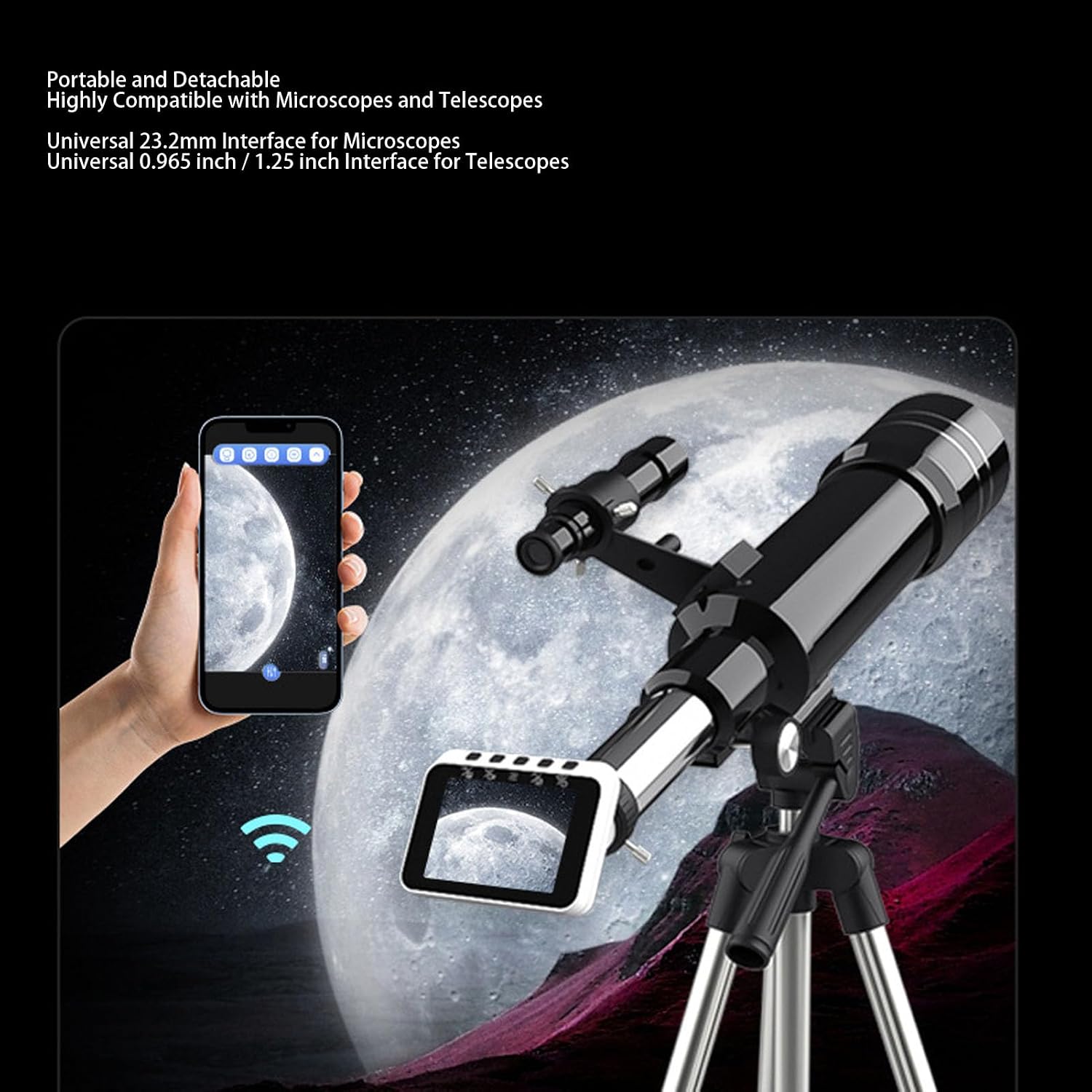
Image: The electronic eyepiece camera shown mounted on both a telescope and a microscope, demonstrating its compatibility with different observation devices. A smartphone is also depicted, indicating WiFi connectivity.

Image: A close-up view of the bottom of the electronic eyepiece camera, highlighting the universal mounting interface for attachment to various optical instruments.
Operating Instructions
Once the eyepiece is installed and powered on, you can begin observation and recording.
- Direct Observation: Use the integrated 2.8-inch screen to view the live feed from your telescope or microscope.
- Connect via WiFi: Download the 'T Camera' mobile application on your smartphone or tablet. Connect your device to the eyepiece's WiFi network.
- App Control: Through the 'T Camera' app, you can manage files, switch observation modes, zoom in or out digitally, and adjust color parameters for optimal viewing and recording.
- Recording: Use the controls on the eyepiece or within the app to capture photos and record FHD videos.
- Storage: The device supports up to a 64GB small memory card (not included) for storing your recordings.
Note: The display screen on the eyepiece is for preview purposes only and does not represent the final image quality. For FHD quality, videos must be played back on an FHD-compatible screen.
Maintenance
Proper care and maintenance will ensure the longevity and optimal performance of your Bewinner Electronic Eyepiece Camera.
- Cleaning: Use a soft, dry cloth to clean the exterior of the device. For the lens, use a specialized lens cleaning cloth and solution. Avoid abrasive materials or harsh chemicals.
- Storage: When not in use, store the eyepiece in a dry, dust-free environment, preferably in its original packaging or a protective case.
- Battery Charging: Charge the built-in 650 mAh lithium-ion battery using the provided Type-C charging cable. For extended sessions, the device can be connected to a power source or a USB power bank.

Image: A close-up view of the Type-C charging port on the electronic eyepiece camera, illustrating its convenient interface for charging and power storage, suitable for outdoor use with a power bank.
Troubleshooting
If you encounter issues with your electronic eyepiece, refer to the following common problems and solutions:
- Device does not power on: Ensure the battery is charged. Connect the device to a power source using the Type-C cable and try again.
- No image on screen: Check that the eyepiece is correctly installed in your telescope/microscope and that the lens cap is removed. Ensure the device is powered on.
- WiFi connection issues: Make sure the eyepiece's WiFi is enabled. Restart both the eyepiece and your mobile device. Ensure you are within range of the WiFi signal.
- Poor image quality: Adjust the focus of your telescope/microscope. Clean the eyepiece lens if necessary. Remember that the integrated screen is for preview; final FHD quality is best viewed on a compatible external display.
- Cannot record: Check if a memory card is inserted and if it has sufficient free space. Ensure the memory card is formatted correctly.
Specifications
| Item Type | Electronic Eyepiece |
| Material | ABS + Optical Lens |
| Observation Screen Size | 2.8 inches |
| Zoom Magnification | Multi-digital Zoom |
| Recording Resolution | FHD (Maximum) |
| WiFi Connection | Supported |
| Storage Expansion | Supports up to 64GB small memory card (not included) |
| Battery Information | 650 mAh Lithium-ion battery (built-in) |
| Mount Type | 0.965" + 1.25" + 23.2mm support |
| App Name | T Camera |
| Menu Languages | Simplified Chinese, Traditional Chinese, English, Russian, Korean, Japanese, German, Portuguese, Italian, Spanish, French |
| Product Dimensions | 10P x 10L x 6H centimeters |
Warranty and Support
Warranty Information:
This product comes with a 90-day warranty from the date of purchase. Please retain your proof of purchase for warranty claims.
Customer Support:
For technical assistance, troubleshooting, or warranty inquiries, please contact Bewinner customer support through the retailer's platform or the official Bewinner website. Please have your model number (Bewinner3c4vkwyzjp) and purchase details ready when contacting support.