
1. Introduction
Thank you for choosing the COLAMY Aether Executive Office Chair. This manual provides essential information for the proper assembly, operation, and maintenance of your new chair. Please read these instructions carefully before use to ensure safe and efficient operation and to maximize the ergonomic benefits of your chair.
The Aether series is designed for extended periods of sitting, featuring advanced ergonomic technologies such as a levitating seat cushion, synchronized recline, and intuitive adjustments to support your posture and comfort.

Image 1.1: COLAMY Aether Executive Office Chair in use.
2. Safety Information
- Ensure all components are securely fastened before use. Periodically check and tighten all screws.
- Do not stand on the chair.
- Do not use the chair as a step stool.
- Do not sit on the armrests.
- This chair is designed to support a maximum weight of 300 lbs (136 kg). Exceeding this limit may cause damage or injury.
- Keep children away from moving parts during adjustment.
- Use the chair on a level surface to prevent tipping.
3. Package Contents
Before assembly, verify that all parts are present and undamaged. If any parts are missing or damaged, contact COLAMY customer service.
- Backrest Assembly
- Seat Assembly
- Armrests (Left and Right)
- Gas Lift Cylinder
- Star Base
- Casters (5 pieces)
- Hardware Pack (Screws, Allen Wrench)
- User Manual (This document)
4. Assembly Instructions
Assembly is required for this product. Please follow the steps below carefully. It is recommended to assemble the chair on a soft, clean surface to prevent damage.
- Attach Casters to Base: Insert each of the five casters into the holes at the end of each leg of the star base until they click securely into place.
- Insert Gas Lift: Place the gas lift cylinder into the center hole of the star base.
- Attach Armrests to Seat: Secure the left and right armrests to the underside of the seat assembly using the provided screws and Allen wrench. Ensure they are oriented correctly.
- Attach Backrest to Seat: Align the backrest with the seat assembly and secure it using the designated screws.
- Connect Seat Assembly to Gas Lift: Carefully place the assembled seat and backrest onto the gas lift cylinder, ensuring the center mechanism aligns with the top of the gas lift. Press down firmly to secure.

Image 4.1: Product Dimensions and Maximum Capacity.
5. Operating Instructions (Adjustments)
The COLAMY Aether chair offers several intuitive adjustments for personalized comfort.
5.1. Seat Height Adjustment (One-Touch Control)
The chair features a convenient one-touch control for seat height adjustment, located on the right side, easily accessible while seated.
- To Raise: While seated, lift the lever located under the right side of the seat. The seat will rise. Release the lever at the desired height.
- To Lower: While seated, lift the lever located under the right side of the seat and apply slight body weight. The seat will lower. Release the lever at the desired height.
5.2. Synchronized Recline and Lock Mechanism
The synchronized recline system allows the backrest and armrests to move together, maintaining consistent support. The recline can be locked at various angles.
- To Recline: Push the recline lever (typically on the left side) outwards to unlock. Lean back to the desired angle.
- To Lock Recline: Once at the desired recline angle, push the recline lever inwards to lock the position.
- To Return Upright: While the recline is locked, lean forward slightly and push the lever outwards to unlock. The backrest will return to its upright position.

Image 5.2.1: Smart Recline & Lock Mechanism.
5.3. Adjustable Lumbar Support
The instinctive lumbar support system adjusts to your lower back curve.
- To Adjust Lumbar: Gently push or pull the lumbar support pad on the backrest to find your preferred position. The support will track your movements.

Image 5.3.1: Adjusting Lumbar Support.
5.4. 4D Armrests
The 4D armrests offer multi-directional adjustment for optimal arm and shoulder support.
- Height Adjustment: Press the button on the side of the armrest and slide it up or down. Release the button to lock.
- Forward/Backward Adjustment: Slide the armrest pad forward or backward.
- Pivot Adjustment: Rotate the armrest pad left or right.
- In/Out Adjustment: Slide the entire armrest assembly inwards or outwards.

Image 5.4.1: Adaptive Lumbar & 4D Armrests.
5.5. Seat Depth Adjustment
Adjusting the seat depth helps relieve leg pressure and ensures proper thigh support.
- Locate the seat depth adjustment lever (refer to your chair's specific mechanism, often a lever under the seat).
- Pull the lever and slide the seat forward or backward to achieve the desired depth. Ensure there is a small gap (about two fingers' width) between the edge of the seat and the back of your knees. Release the lever to lock.
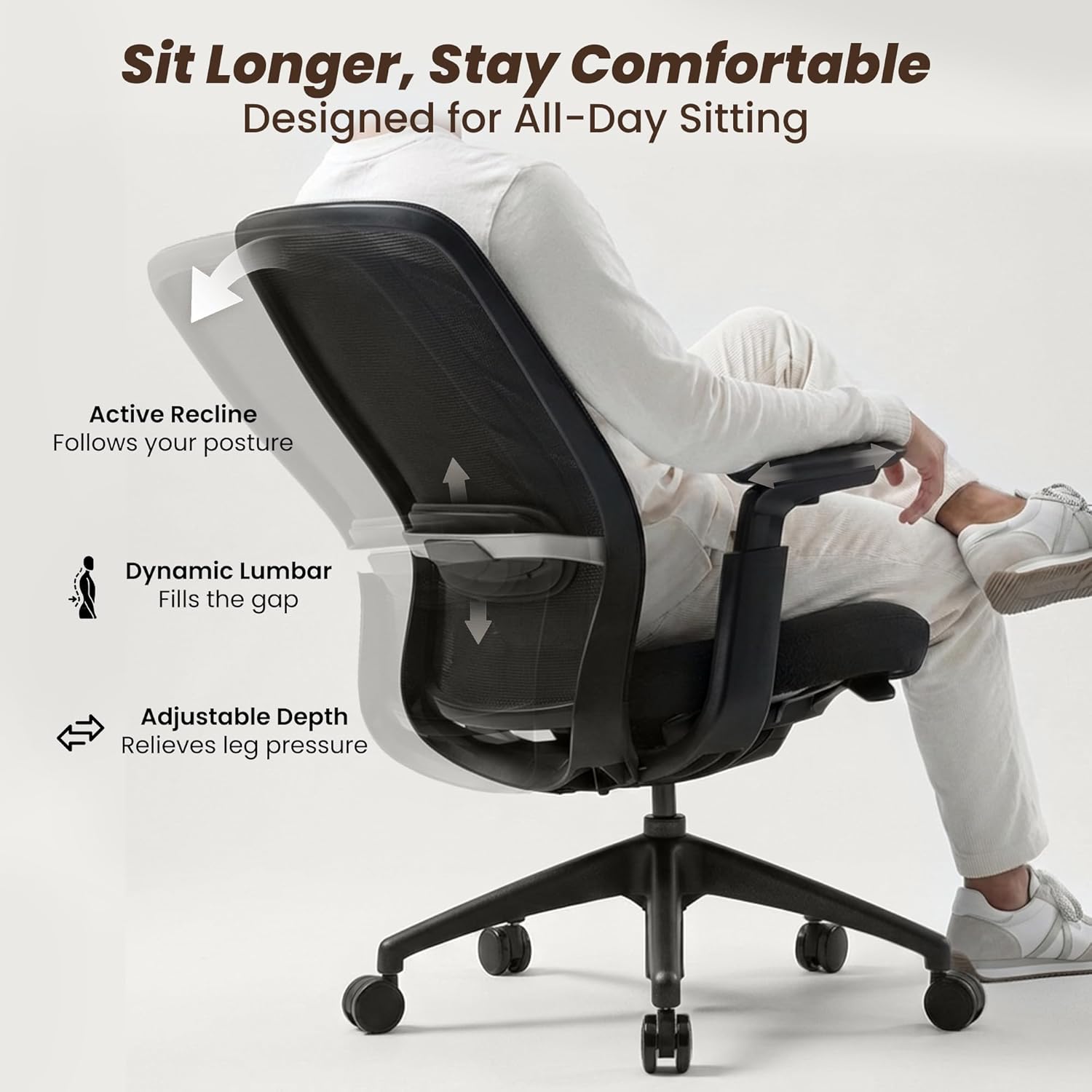
Image 5.5.1: Adjustable Depth for Leg Pressure Relief.
5.6. Levitating Seat Cushion
The unique levitating seat cushion utilizes a structural elastic suspension system to distribute body weight evenly, reducing pressure points and promoting healthy blood circulation.

Image 5.6.1: Levitating Seat Cushion Technology.
6. Maintenance
- Cleaning: For mesh and plastic surfaces, wipe with a damp cloth and mild soap. Avoid harsh chemicals or abrasive cleaners. For the seat cushion, spot clean with a fabric cleaner as needed.
- Inspection: Periodically check all screws and bolts to ensure they are tight. Re-tighten if necessary.
- Caster Care: Clean casters regularly to remove hair and debris that may hinder smooth movement.
- Gas Lift: The gas lift is a sealed unit and requires no maintenance. Do not attempt to disassemble it.
7. Troubleshooting
| Problem | Possible Cause | Solution |
|---|---|---|
| Chair does not raise/lower | Gas lift malfunction or lever not engaged. | Ensure the height adjustment lever is fully engaged. If the problem persists, the gas lift may need replacement. Contact customer support. |
| Chair wobbles | Loose screws or uneven floor. | Check and tighten all assembly screws. Ensure the chair is on a level surface. |
| Casters not rolling smoothly | Debris caught in casters. | Remove any hair, dust, or debris from the caster wheels. |
| Recline mechanism not locking | Recline lever not fully engaged. | Ensure the recline lock lever is pushed fully inwards to engage the lock. |
8. Specifications
- Model: ocm03-bk01-1.0
- Brand: COLAMY
- Color: Black
- Material: Foam, Mesh, Plastic, Polyurethane
- Product Dimensions (D x W x H): 22.24" x 28.74" x 43.9"
- Item Weight: 35.6 Pounds
- Maximum Weight Recommendation: 300 Pounds
- Features: 4D Armrests, Adjustable Height, Adjustable Lumbar, Recline Lock, Seat Depth Adjustment
- Back Style: Mid-Back
- Assembly Required: Yes
9. Warranty and Support
For warranty information, technical support, or to order replacement parts, please contact COLAMY customer service. Refer to your purchase documentation for specific warranty terms and contact details.
You can typically find support information on the official COLAMY website or through the retailer where you purchased the product.


