
Introduction
Thank you for choosing the TESSAN Surge Protector Power Strip Tower. This device is designed to provide a versatile and safe power solution for your electronic devices. It features 11 AC outlets, 4 USB ports (including 2 USB-C), 1050 Joules of surge protection, and individual switches for convenient power management. This manual will guide you through the setup, operation, and maintenance of your power strip to ensure optimal performance and safety.

Image: The TESSAN Power Strip Tower, illustrating its 15-in-1 capability to charge multiple devices simultaneously via AC outlets, USB-C, and USB-A ports.
Safety Information
Please read all safety instructions before use and retain this manual for future reference.
- Do not exceed the maximum power rating of 1625W (13A, 125V).
- This device is for indoor use only. Do not expose to moisture or wet conditions.
- Do not disassemble or modify the power strip.
- Keep away from children and pets.
- Ensure the plug is fully inserted into the wall outlet.
- Do not use with aquariums or other water-related products.
- Do not "daisy chain" power strips (plug one into another).
- If the surge protector indicator light is off, the surge protection feature may no longer be active. Replace the unit.
Product Features
- 11 AC Outlets: Provides ample power for multiple devices.
- 4 USB Ports: Includes 2 USB-C (one 20W PD Max, one 15W Max) and 2 USB-A (12W Max per port) for versatile charging.
- 1050J Surge Protection: Protects connected devices from power surges and spikes.
- Individual Switches: Three sides feature independent ON/OFF switches for energy efficiency. One side remains constantly powered.
- 6 FT Flat Plug Extension Cord: Space-saving design allows the cord to fit in tight spaces and behind furniture.
- Widened Base: Enhances stability and prevents tipping.
- Overload Protection: Automatically shuts off power to protect devices from overload.

Image: Close-up view of the TESSAN Power Strip Tower highlighting the individual ON/OFF switches on three sides for flexible power control. One side is always powered.
Setup Instructions
- Unpack: Carefully remove the TESSAN Power Strip Tower from its packaging.
- Placement: Place the power strip on a stable, flat surface. Ensure it is away from water sources, heat, and direct sunlight.
- Plug In: Insert the flat plug of the power strip into a standard 3-prong 125V AC wall outlet. The flat plug design allows it to fit easily behind furniture.
- Power Indicator: Once plugged in, the power indicator light on the top of the unit should illuminate, indicating that the unit is receiving power.

Image: The TESSAN Power Strip Tower with its 6-foot thin flat cord, demonstrating its flexibility to reach various charging destinations and fit discreetly.
Operating Instructions
Using AC Outlets:
- Connect Devices: Plug your electronic devices into the available AC outlets.
- Individual Switches: The power strip features three sides with individual ON/OFF switches. Press the switch to the "ON" position for the side you wish to power. The corresponding indicator light will illuminate.
- Constant Power Side: One side of the tower is designed as a dedicated constant power zone. Devices plugged into these outlets will receive power immediately upon the main plug being connected to the wall outlet, regardless of the individual switches.
- Power Off: To turn off power to devices connected to a switched side, press the corresponding switch to the "OFF" position.
Using USB Charging Ports:
The power strip includes 4 USB ports for charging various devices:
- USB-C2: Provides up to 20W Power Delivery (PD) for fast charging compatible devices.
- USB-C1: Provides up to 15W (5V/3A) for charging compatible devices.
- USB-A (x2): Each USB-A port provides up to 12W (5V/2.4A) for charging standard USB devices.
- Connect USB Devices: Use appropriate USB cables to connect your smartphones, tablets, or other USB-powered devices to the USB ports.
- Automatic Detection: The USB ports will automatically detect your device and deliver the optimal charging current.

Image: A detailed view of the TESSAN Power Strip Tower's USB charging section, showing the USB-C (PD 20W Max, 15W Max) and USB-A (12W Max) ports.
Video: This video demonstrates the functionality of the individual switches and the various USB charging ports on the TESSAN Surge Protector Power Strip Tower.
Maintenance
- Cleaning: Disconnect the power strip from the wall outlet before cleaning. Use a dry, soft cloth to wipe the exterior. Do not use liquid cleaners or sprays.
- Storage: When not in use, store the power strip in a cool, dry place away from direct sunlight and moisture.
- Inspection: Periodically inspect the power cord and the unit for any signs of damage, such as frayed wires or cracks. If damage is found, discontinue use and replace the unit.
Troubleshooting
No Power to Devices:
- Check Wall Outlet: Ensure the power strip is securely plugged into a functioning wall outlet. Test the wall outlet with another device.
- Check Individual Switches: For AC outlets, ensure the corresponding individual switch is in the "ON" position.
- Overload Protection: If the power strip is overloaded, the overload protection switch (often a red button on the base) may have tripped. Disconnect some devices, then press the reset button to restore power.
- Surge Protection Indicator: Check the surge protection indicator light. If it is off, the surge protection component may have expired or been damaged by a significant surge. The unit will still function as a power strip, but without surge protection. It is recommended to replace the unit for continued protection.
Slow USB Charging:
- Cable Quality: Ensure you are using a high-quality USB cable. Low-quality or damaged cables can reduce charging speed.
- Device Compatibility: While USB-C2 offers PD 20W, your device must also support PD fast charging to utilize this feature.
- Total Load: If many devices are charging simultaneously, the total power output may be distributed, potentially affecting individual charging speeds.

Image: The TESSAN Power Strip Tower in a home setting, illustrating its 1050J surge protection feature safeguarding connected household appliances.
Specifications
| Feature | Detail |
|---|---|
| Model Number | TS-TPS07US00 |
| AC Outlets | 11 |
| USB Ports | 4 (2 USB-C, 2 USB-A) |
| USB-C2 Output | PD 20W Max |
| USB-C1 Output | 5V/3A (15W Max) |
| USB-A Output | 5V/2.4A (12W Max per port) |
| Surge Protection Rating | 1050 Joules |
| Voltage | 125V |
| Maximum Current | 13A |
| Power Rating | 1625W |
| Cord Length | 6 FT |
| Plug Type | Type B - 3 pin (North American) |
| Special Features | Individual Switches, Surge Protection, USB Slots, Flat Plug |

Image: Visual representation of the TESSAN Power Strip Tower's dimensions (6.7 inches height, 4.6 inches base) and weight (0.92 lbs).
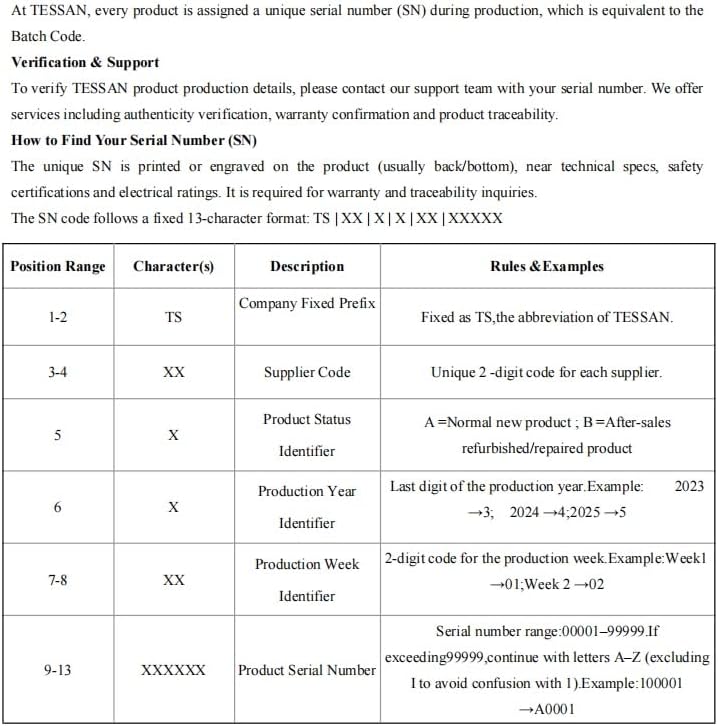
Image: Underside view of the TESSAN Power Strip Tower, showing the 4 rubber feet for stability and the red overload protection switch.
Warranty and Support
TESSAN products are designed for reliability and performance. For warranty information and technical support, please refer to the official TESSAN website or contact customer service.
Finding Your Serial Number (SN):
Each TESSAN product has a unique serial number (SN) for verification and support purposes. The SN is typically printed or engraved on the product (usually on the back or bottom), near technical specifications, safety certifications, and electrical ratings.
The SN follows a fixed 13-character format: TS | XX | X | X | XX | XXXXXX
| Position Range | Character(s) | Description | Rules & Examples |
|---|---|---|---|
| 1-2 | TS | Company Fixed Prefix | Fixed as TS, the abbreviation of TESSAN. |
| 3-4 | XX | Supplier Code | Unique 2-digit code for each supplier. |
| 5 | X | Product Status Identifier | A = Normal new product; B = After-sales refurbished/repaired product. |
| 6 | X | Production Year Identifier | Last digit of the production year. Example: 2023 → 3, 2024 → 4, 2025 → 5. |
| 7-8 | XX | Production Week Identifier | 2-digit code for the production week. Example: Week 1 → 01, Week 2 → 02. |
| 9-13 | XXXXXX | Product Serial Number | Serial number range: 00001-99999. If exceeding 99999, continue with letters A-Z (excluding I to avoid confusion with 1). Example: 100001 → A0001. |

Image: Table detailing the structure and meaning of the TESSAN product serial number for verification and support.
For further assistance, please visit the Official TESSAN Store or contact their customer support.