
MoKo P840401487662
MoKo Smartphone Time Lock Box User Manual
Model: P840401487662
Introduction
The MoKo Smartphone Time Lock Box is designed to help users manage their smartphone usage by physically restricting access for a set period. This device promotes focus on tasks such as studying, working, or spending quality time with family, thereby reducing smartphone dependency.

Image: Benefits of reduced smartphone use, showing individuals focusing on work, hobbies, family, and rest.
Product Features
- Adjustable Timer: Set a lock duration from a minimum of 1 minute to a maximum of 99 hours and 59 minutes.
- Cut-out Case Design: Allows for smartphone charging and answering emergency calls while the device is locked. The back features a window for call access.
- Digital Display: Clearly shows the set time and remaining battery level.
- Emergency Release Function: Provides two opportunities to unlock the box prematurely in case of an urgent need.
- Durable and Lightweight: Constructed from sturdy ABS material for portability.

Image: The cut-out design allows charging and emergency call access. The display shows time and battery.

Image: The lightweight design makes the lock box easy to carry in a bag.
Setup
- Initial Charge: Before first use, connect the lock box to a USB power source using the provided cable to ensure it is fully charged. The battery level will be displayed on the screen.
- Place Smartphone: Open the lid of the lock box and carefully place your smartphone inside. Ensure the phone is positioned so that the charging port aligns with the box's charging cut-out, and the screen is visible through the rear window if you intend to answer calls.
- Close Lid: Securely close the lid of the lock box.
Operating Instructions
Setting the Timer
- Activate Display: Press any button to wake up the display.
- Adjust Time: Use the + and - buttons to set the desired lock duration.
- Press + to increase the time.
- Press - to decrease the time.
- Switch Units: Press the Lock button briefly to switch between setting hours and minutes.

Image: Control panel with +, -, and lock buttons, and the digital display for time and battery status.
Initiating the Lock
- Start Lock: After setting the desired time, press and hold the Lock button for 5 seconds. The display will show a 5-second countdown.
- Cancel Lock (within 5 seconds): During the 5-second countdown, you can press the Lock button again to cancel the locking process. If no action is taken, the box will lock automatically after the countdown.
- Lock Confirmation: Once locked, the timer will begin counting down, and the box cannot be opened until the set time expires.

Image: Step-by-step guide for placing the phone, setting the timer, and initiating the lock.
Emergency Release
- In an emergency, you can unlock the box by pressing and holding the Lock button for 10 seconds.
- This emergency release function can be used only twice. After two uses, this feature will no longer be available. Please use it judiciously.
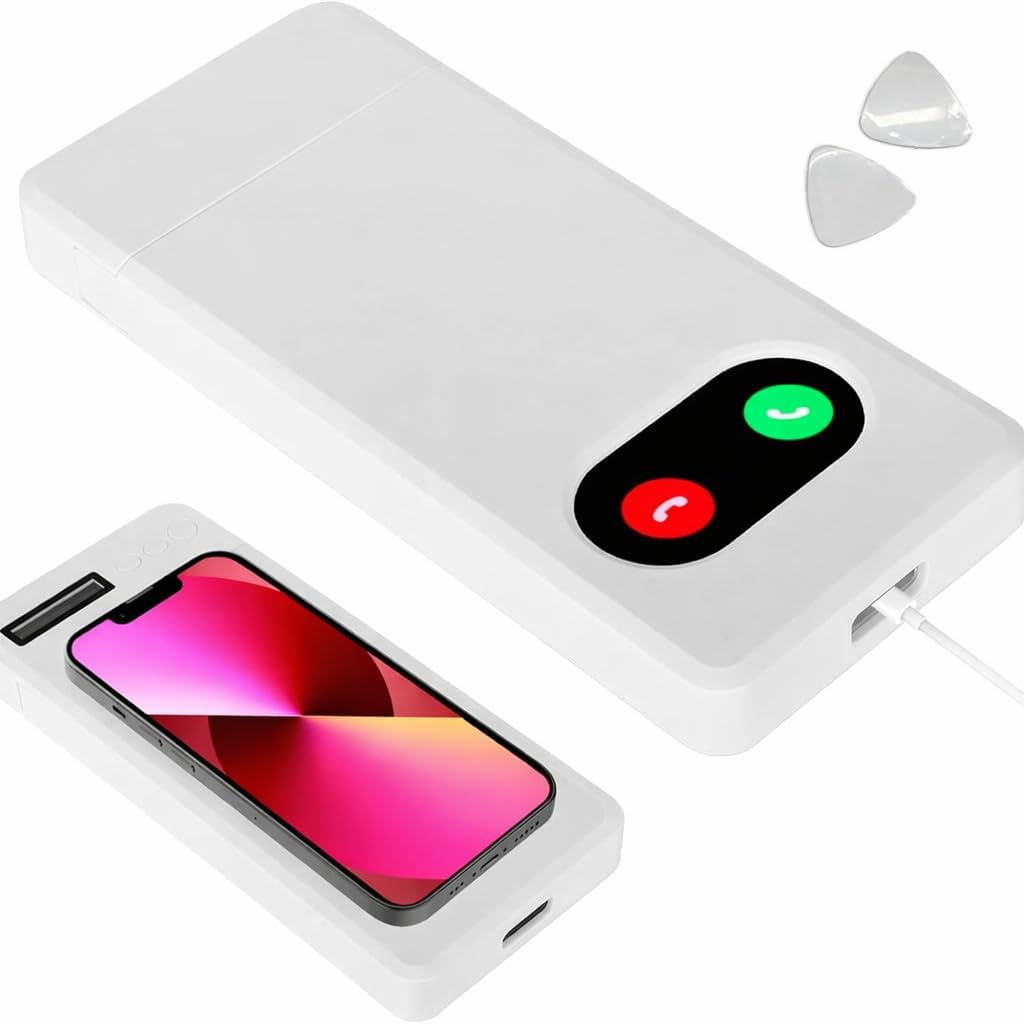
Image: Emergency call window being opened with a triangular pin, allowing access to answer calls.
Answering Calls While Locked
- The lock box features a cut-out window on the back. If your phone is positioned correctly, you can answer incoming calls by touching the screen through this window.
- To open the call window cover, use the included triangular part to gently pry it open.
Maintenance
- Cleaning: Wipe the exterior of the lock box with a soft, dry cloth. Do not use abrasive cleaners or solvents.
- Charging: Recharge the device when the battery indicator shows low power. Use a standard USB charging cable.
- Storage: Store the lock box in a cool, dry place away from direct sunlight and extreme temperatures.
Troubleshooting
- Q: The lock box does not start the countdown after setting the time.
- A: Ensure you have pressed and held the Lock button for 5 seconds until the countdown begins. If you release it too quickly, the lock may not engage.
- Q: I cannot answer calls through the back window.
- A: Verify that your smartphone is correctly positioned inside the box, aligning its screen with the transparent window. Ensure the window cover is open.
- Q: The emergency release function is not working.
- A: The emergency release can only be used twice. If you have already used it twice, it will no longer function. Please remember this limitation.
- Q: The display is blank.
- A: The display automatically turns off after 10 seconds of inactivity to save power. Press any button to reactivate it. If it remains blank, the battery may be depleted and requires charging.
Specifications
| Brand | MoKo |
|---|---|
| Model Number | P840401487662 |
| Material | Acrylonitrile Butadiene Styrene (ABS) |
| Color | White |
| GTIN/UPC | 840401487662 |
| Country of Origin | China |
| Dimensions (Approx.) | 17.5 cm (Length) x 9.5 cm (Width) x 2 cm (Height) |
| Compatibility | Smartphones under 7 inches |

Image: Product dimensions and compatibility information for smartphones under 7 inches.
Warranty and Support
For warranty information or technical support, please refer to the product packaging or contact MoKo customer service directly. Contact details can typically be found on the official MoKo website or through your purchase platform.
Ask a question about this manual
Ask about setup, troubleshooting, compatibility, parts, safety, or missing instructions. Manuals+ will review the question and use this page’s manual context to help answer it.