
1. Introduction
Thank you for choosing the Towallmark 24-inch Built-in Electric Single Wall Oven. This manual provides essential information for the safe and efficient operation, installation, and maintenance of your new appliance. Please read these instructions thoroughly before use and retain them for future reference.
2. Important Safety Information
WARNING: To reduce the risk of fire, electric shock, injury to persons, or damage when using the oven, follow basic precautions, including the following:
- Read all instructions before using the appliance.
- Ensure proper installation and grounding by a qualified technician.
- Do not touch hot surfaces. Use oven mitts or pot holders.
- Never use the oven for warming or heating the room.
- Do not store flammable materials in or near the oven.
- Always supervise children when they are near the appliance.
- Do not repair or replace any part of the oven unless specifically recommended in this manual. All other servicing should be referred to a qualified technician.
- Disconnect power before servicing.
- Use only dry pot holders. Moist or damp pot holders on hot surfaces may result in burns from steam. Do not let pot holder touch hot heating elements.
- Do not use water on grease fires. Smother fire or flame or use dry chemical or foam-type extinguisher.
- Wear proper apparel. Loose-fitting or hanging garments should never be worn while using the appliance.
- Do not use aluminum foil to line the oven bottom or any part of the oven.
- Clean the oven regularly to prevent grease buildup.
- Always ensure the oven door is fully closed during operation.
3. Product Overview
The Towallmark 24-inch Built-in Electric Single Wall Oven is designed for efficient and versatile cooking. It features 8 distinct cooking functions, a 2.5 Cu.Ft. (70 L) capacity, and a powerful 3000W heating system with convection for even heat distribution.
Key Features:
- 8 Cooking Functions: Offers versatility for various cooking needs, from baking to roasting.
- 2.5 Cu. Ft. (70 L) Capacity: Ample space for cooking multiple dishes simultaneously.
- 3000W Heating System: Ensures rapid preheating and consistent cooking performance.
- Convection Fan: Circulates hot air 360° for even heat distribution and optimal results.
- Touch Control Panel: Modern and easy-to-use interface for setting temperature, time, and functions.
- Timer Function: Allows for precise cooking duration control.
- Safety Lock: Enhances safety, especially in households with children.
- Premium Enamel Cavity: Provides corrosion protection, durability, and easy cleaning.
- Removable Oven Door: Facilitates maintenance and thorough cleaning.
- Triple Insulated Glass Doors: Improves thermal insulation, reduces heat loss, and enhances energy efficiency.
Product Components:
Familiarize yourself with the main components of your oven.

Image: Oven interior showcasing 2.5 Cu.Ft. (70L) large capacity, suitable for roasting a whole chicken.

Image: Oven displaying various automatic cooking modes like insulation, warming, toasting, pizza, chicken, bread, cake, and beef.

Image: Interior view of the oven highlighting the precision airflow convection system for fast preheating and uniform cooking.

Image: Detailed view of the oven's interior, showing triple insulated glass doors, enamelled interior, and a high-temperature cast iron grate/baking tray.
4. Setup and Installation
This appliance must be installed by a qualified technician in accordance with all local codes and ordinances. Ensure the electrical supply meets the oven's requirements (240V, 3000W).
Dimensions and Cabinet Requirements:
The oven has overall dimensions of 23.42" (W) x 22.16" (D) x 23.42" (H). Refer to the diagram below for detailed installation measurements and ensure your cabinet opening provides adequate clearance.

Image: Diagram showing the standard size and dimensions for easy installation of the oven into a kitchen cabinet, with measurements for width, depth, and height.
- Electrical Connection: Connect the oven to a dedicated 240V, 3000W electrical circuit.
- Ventilation: Ensure proper ventilation around the oven as per local building codes.
- Securing the Oven: Secure the oven into the cabinet using the provided screws to prevent tipping.
5. Operating Instructions
Your oven features an intuitive touch control panel for easy operation.
Control Panel Overview:
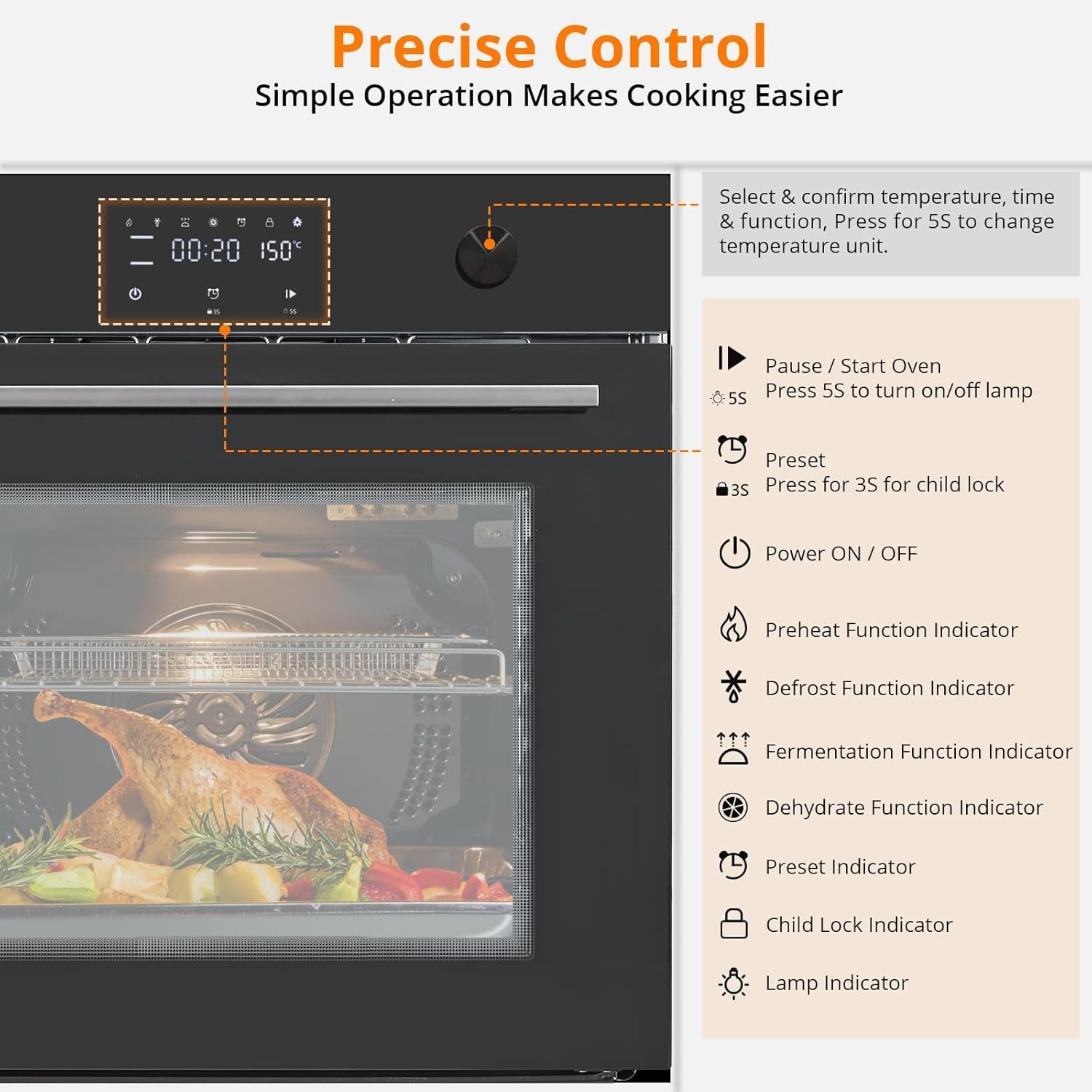
Image: Close-up of the oven's touch control panel, detailing buttons for temperature, time, function selection, power, preheat, defrost, fermentation, dehydrate, preset, child lock, and lamp indicators.
The control panel allows you to select cooking functions, set temperature, and manage the timer. Press and hold for 5 seconds to turn on/off the lamp. Press and hold for 3 seconds for child lock.
Basic Operation Steps:
- Power On: Press the Power ON/OFF button.
- Select Function: Use the function selection buttons to choose one of the 8 cooking modes (e.g., Bake, Roast, Convection Bake).
- Set Temperature: Use the temperature controls (usually + and - buttons) to adjust the desired cooking temperature.
- Set Time: Use the timer controls to set the cooking duration.
- Start Cooking: Press the Pause/Start Oven button to begin the cooking cycle.
- Child Lock: To activate the child lock, press and hold the designated button for 3 seconds. Repeat to deactivate.
Cooking Functions:
Your oven offers 8 distinct cooking functions. Refer to the image below for examples of food types suitable for various modes.

Image: Visual guide showing various dishes (pizza, cake, chicken, steak, hamburger) with recommended temperature ranges for cooking in the oven.
- Bake: Ideal for cakes, cookies, and casseroles.
- Roast: Perfect for meats and poultry.
- Convection Bake: Uses a fan to circulate heat for faster, more even cooking, suitable for multiple racks.
- Broil: For browning and crisping the top of dishes.
- Defrost: Gently thaws frozen foods.
- Fermentation: Provides a warm environment for rising dough.
- Dehydrate: For drying fruits, vegetables, and herbs.
- Warm: Keeps cooked food at serving temperature.
6. Maintenance and Cleaning
Regular cleaning and maintenance will ensure the longevity and optimal performance of your oven.
- Before Cleaning: Always ensure the oven is cool and disconnected from the power supply before cleaning.
- Interior Cleaning: The premium enamel cavity is designed for easy cleaning. Use a soft cloth with mild soap and water. For stubborn stains, use a non-abrasive oven cleaner.
- Removable Door: The oven door can be removed for thorough cleaning. Consult the installation guide for instructions on how to safely remove and reattach the door.
- Exterior Cleaning: Wipe the exterior surfaces with a soft, damp cloth and mild detergent. Avoid abrasive cleaners or scouring pads that can scratch the stainless steel finish.
- Racks and Trays: Remove oven racks and baking trays and wash them in warm, soapy water.
- Light Bulb Replacement: If the oven light needs replacement, ensure the oven is cool and unplugged. Refer to the specific instructions in the full manual for bulb type and replacement procedure.
7. Troubleshooting Guide
Before contacting customer service, please refer to the following common issues and solutions:
| Problem | Possible Cause | Solution |
|---|---|---|
| Oven does not turn on. | No power supply; circuit breaker tripped. | Check if the oven is properly plugged in. Reset the circuit breaker. |
| Oven not heating properly. | Incorrect temperature setting; faulty heating element. | Verify temperature setting. If issue persists, contact customer service. |
| Food cooking unevenly. | Improper rack position; blocked vents; excessive food in oven. | Ensure proper rack placement. Do not block vents. Avoid overcrowding the oven. Utilize convection mode for even cooking. |
| Control panel not responding. | Child lock activated; temporary electronic glitch. | Deactivate child lock. Try unplugging the oven for 5 minutes and plugging it back in to reset. |
| Oven light not working. | Bulb is loose or burned out. | Check if the bulb is securely tightened. Replace the bulb if necessary (ensure oven is cool and unplugged). |
8. Specifications
Detailed technical specifications for your Towallmark Single Wall Oven:
| Feature | Detail |
|---|---|
| Brand | Towallmark |
| Model Number | 3GE-N-ZH5DHUD9VDCGW-S5JA2CEG9 |
| Installation Type | Built-In |
| Fuel Type | Electric |
| Capacity | 2.5 Cubic Feet (70 L) |
| Wattage | 3000W |
| Voltage | 240V |
| Heating Method | Convection |
| Item Dimensions (D x W x H) | 23"D x 23"W x 23"H (Overall: 23.42" x 22.16" x 23.42") |
| Item Weight | 81.2 Pounds |
| Material Type | Stainless Steel |
| Color | Black |
| Additional Features | LED Display, Touch Control, Timer Function, Safety Lock |
| Certifications | ETL Certified |
| UPC | 824126460513 |
| ASIN | B0GVJWPL1T |
9. Warranty Information
This Towallmark Single Wall Oven comes with a 2-Year Warranty from the date of purchase. This warranty covers defects in materials and workmanship under normal use. It does not cover damage resulting from misuse, accident, alteration, neglect, improper installation, or unauthorized repair.
Please retain your proof of purchase for warranty claims. For detailed terms and conditions, refer to the warranty card included with your product or contact customer support.
10. Customer Support
If you have any questions, require technical assistance, or need to make a warranty claim, please contact Towallmark customer service. We guarantee a prompt response within 24 hours.
- Online Support: Visit the official Towallmark website for FAQs and support resources.
- Email Support: For assistance, please refer to the contact information provided on the Towallmark official website or product packaging.
- Phone Support: For immediate assistance, please refer to the contact information provided on the Towallmark official website or product packaging.
For the most up-to-date contact information, please refer to the product packaging or the Towallmark brand store on Amazon: Towallmark Store